Apply an Access List to a VLAN with VLAN ACL (VACL)
Table of Contents
- What is a VLAN access-list? ‹
- What is the difference between ACL and VACL? ‹
- How to configure a VACL? ‹
- Filtering SSH, single VLAN ‹
- Filtering in two VLANs ‹
- Bidirectional filtering with VACL ‹
- Download section ‹
What is a VLAN access-list?
A VLAN access-list (VACL) filters incoming and outgoing traffic within a single VLAN. A VACL is applied to a VLAN, instead of an interface. By configuring a VACL, specific IP addresses and port numbers can be allowed or denied network access within a particular VLAN.
What is the difference between ACL and VACL?
An ACL is applied to an interface on a networking device to filter routed traffic. In other words, an ACL applies to traffic that travels between subnets, or between VLANs. However, a VACL applies to traffic that does not leave the local VLAN it originates from. So, a VACL inspects and influences traffic between two hosts located on the same subnet (on the same VLAN). To accomplish this, a VACL actually uses a standard or extended access-list.
How to configure a VACL?
Three steps are needed to implement a VACL:
- configure ACL to specify traffic source, destination, or port number
- apply ACL to access-map and define action
- apply access-map to a particular VLAN with vlan filter command
The following example configuration makes SW1 drop traffic between Host1 and Host2. Also, any traffic dropped by the VACL is logged on SW1.
SW1>
SW1>enable
SW1#configure terminal
Enter configuration commands, one per line.  End with CNTL/Z.
SW1(config)#
SW1(config)#access-list 10 permit 192.168.0.1
SW1(config)#
SW1(config)#vlan access-map ACCESS-MAP 10
SW1(config-access-map)#match ip address 10
SW1(config-access-map)#action drop log
SW1(config-access-map)#exit
SW1(config)#
SW1(config)#vlan filter ACCESS-MAP vlan-list 10
SW1(config)#
SW1(config)#exit
SW1#
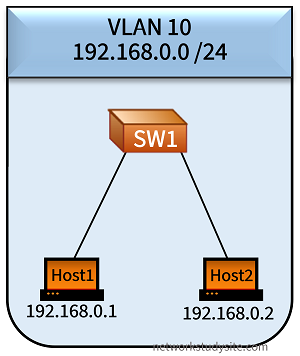
Host1:~$ ping 192.168.0.2
PING 192.168.0.2 (192.168.0.2): 56 data bytes
^C
--- 192.168.0.2 ping statistics ---
3 packets transmitted, 0 packets received, 100% packet loss


SW1#show log | beg Log Buffer
Log Buffer (8192 bytes):

%VLMAPLOG-6-ICMP: vlan 10 (port Gi0/0) denied icmp 192.168.0.1 -> 192.168.0.2 (8/0), 1 packet
%VLMAPLOG-6-ICMP: vlan 10 (port Gi0/0) denied icmp 192.168.0.1 -> 192.168.0.2 (8/0), 3 packets
As visible in the above logs, the ping packets sent by Host1 to Host2 are dropped. And at the same time, SW1 logs the dropped packets. The following show commands can be used to verify a VACL.
SW1#show vlan access-map
Vlan access-map "ACCESS-MAP"  10
  Match clauses:
    ip   address: 10
  Action:
    drop log

SW1#show vlan filter
VLAN Map ACCESS-MAP is filtering VLANs:
  10
A VACL can also be configured for IPv6, as shown in the following configuration. SW1 drops IPv6 traffic between Host1 and Host2.
SW1>
SW1>enable
SW1#configure terminal
Enter configuration commands, one per line.  End with CNTL/Z.
SW1(config)#
SW1(config)#ipv6 access-list IPv6-ACL
SW1(config-ipv6-acl)#permit ipv6 host 2001:DB8::1 any
SW1(config-ipv6-acl)#exit
SW1(config)#
SW1(config)#vlan access-map ACCESS-MAP 10
SW1(config-access-map)#match ipv6 address IPv6-ACL
SW1(config-access-map)#action drop
SW1(config-access-map)#exit
SW1(config)#
SW1(config)#vlan filter ACCESS-MAP vlan-list 10
SW1(config)#
SW1(config)#exit
SW1#

Host1:~$ ping 2001:DB8::2
PING 2001:DB8::2 (2001:db8::2): 56 data bytes
^C
--- 2001:DB8::2 ping statistics ---
3 packets transmitted, 0 packets received, 100% packet loss
As visible in the above logs, the ICMPv6 packets sent by Host1 to Host2 are dropped.
Filtering SSH, single VLAN
In this example scenario, three VLANs are configured, and L3-SW is the default gateway. L3-SW is connected with EtherChannel links to SW1 and SW2. L3-SW uses SVI interfaces to enable connectivity between the VLANs. On SW2 a VLAN Access-List (VACL) is configured. The VACL restricts any SSH traffic (TCP port 22) from Host3 to Server2 only. This means that other protocols are not blocked - such as Telnet.
Note that during configuration on SW2, the command vlan filter FILTER-SSH vlan-list 30 attaches the VLAN access-map called 'FILTER-SSH' to VLAN 30.

Configuration:
L3-SW
L3-SW#show run int Gi0/0 | sec int
interface GigabitEthernet0/0
 switchport trunk encapsulation dot1q
 switchport mode trunk
 negotiation auto
 channel-group 1 mode on

L3-SW#show run int Gi0/1 | sec int
interface GigabitEthernet0/1
 switchport trunk encapsulation dot1q
 switchport mode trunk
 negotiation auto
 channel-group 1 mode on

L3-SW#show run int Po1 | sec int
interface Port-channel1
 switchport trunk encapsulation dot1q
 switchport mode trunk

L3-SW#show run int Po2 | sec int
interface Port-channel2
 switchport trunk encapsulation dot1q
 switchport mode trunk

L3-SW#show run int Vlan10 | sec int
interface Vlan10
 description ** SVI for VLAN10 **
 ip address 192.168.10.1 255.255.255.248

L3-SW#show run int Vlan20 | sec int
interface Vlan20
 description ** SVI for VLAN20 **
 ip address 192.168.20.1 255.255.255.248

L3-SW#show run int Vlan30 | sec int
interface Vlan30
 description ** SVI for VLAN30 **
 ip address 192.168.30.1 255.255.255.248
SW1
SW1#show run int Po1 | sec int
interface Port-channel1
 switchport trunk encapsulation dot1q
 switchport mode trunk

SW1#show run int Gi0/2 | sec int
interface GigabitEthernet0/2
 switchport access vlan 10
 switchport mode access
 negotiation auto

SW1#show run int Gi1/0 | sec int
interface GigabitEthernet1/0
 switchport access vlan 20
 switchport mode access
 negotiation auto
SW2
SW2#show run | sec access-list
access-list 150 permit tcp host 192.168.30.2 host 192.168.30.4 eq 22

SW2#show run | sec vlan access|filter
vlan access-map FILTER-SSH 10
 match ip address 150
 action drop
vlan access-map FILTER-SSH 20
 action forward
vlan filter FILTER-SSH vlan-list 30
SW2#show vlan br

VLAN Name                             Status    Ports
---- -------------------------------- --------- -------------------------------
1    default                          active    Gi1/1, Gi1/2, Gi1/3
30   VLAN0030                         active    Gi0/2, Gi0/3, Gi1/0
1002 fddi-default                     act/unsup
1003 token-ring-default               act/unsup
1004 fddinet-default                  act/unsup
1005 trnet-default                    act/unsup


Host3#ping 192.168.30.4
Type escape sequence to abort.
Sending 5, 100-byte ICMP Echos to 192.168.30.4, timeout is 2 seconds:
!!!!!
Success rate is 100 percent  (5/5), round-trip min/avg/max = 2/2/3 ms              « ICMP traffic works fine


Host3#ssh -l TestUser2 192.168.30.4
% Connection timed out; remote host not responding            « SSH from Host3 to Server2 is restricted by the VACL

Host3#
Host3#
Host3#telnet 192.168.30.4                                     « However, Telnet works, it is not restricted by the VACL
Trying 192.168.30.4 ... Open
You are attempting login to Server2.

User Access Verification

Username: TestUser2
Password: You have successfully logged in to Server2.
Server2>en
Password:
Server2#


Host2#ssh -l Test-User 192.168.30.4
You are attempting loging to Server2.
Password:
You have successfully logged in to Server2.                    « SSH from any other Host works
Server2>en
Password:
Server2#
Filtering in two VLANs
In this example, a UDP-Echo IP SLA is configured on Host1, and a UDP-Echo IP SLA responder is configured on Server1. On SW1 a VLAN access-map is configured to block any UDP traffic to port 1050, in both VLANs 10 and 20.
Once the VLAN access-map is applied on SW1 with the vlan filter FILTER-UDP vlan-list 10, 20 command the IP SLA on Host1 times out. On SW1 the VLAN access-map also has logging enabled for dropped traffic.

Configuration:
SW1
SW1#show run | sec ip access
ip access-list extended EXT-ACL
 permit udp any any eq 1050

SW1#show run | sec vlan access|filter
vlan access-map FILTER-UDP 10
 match ip address EXT-ACL
 action drop log
vlan access-map FILTER-UDP 20
 action forward
vlan filter FILTER-UDP vlan-list 10,20

SW1#show run int Gi0/2 | sec int
interface GigabitEthernet0/2
 switchport access vlan 10
 switchport mode access
 negotiation auto

SW1#show run int Gi1/0 | sec int
interface GigabitEthernet1/0
 switchport access vlan 20
 switchport mode access
 negotiation auto
Host1
Host1#show run | sec ip sla
ip sla 10
 udp-echo 192.168.20.2 1050 source-port 1025 control disable
 request-data-size 1500
 threshold 1000
 timeout 1000
 frequency 1
ip sla schedule 10 life forever start-time now
Server1
Server1#show run | sec ip sla
ip sla responder udp-echo port 1050
SW1#show log | beg Log Buffer
Log Buffer (8192 bytes):

%SYS-5-CONFIG_I: Configured from console by console
%VLMAPLOG-6-L4: vlan 20 (port Gi0/0) denied udp 192.168.10.2(0) -> 192.168.20.2(0), 13 packets
%VLMAPLOG-6-L4: vlan 20 (port Gi0/0) denied udp 192.168.10.2(1025) -> 192.168.20.2(1050), 13 packets
%VLMAPLOG-6-L4: vlan 10 (port Gi0/2) denied udp 192.168.10.2(0) -> 192.168.20.2(0), 74 packets
%VLMAPLOG-6-L4: vlan 10 (port Gi0/2) denied udp 192.168.10.2(1025) -> 192.168.20.2(1050), 74 packets
%VLMAPLOG-6-L4: vlan 10 (port Gi0/2) denied udp 192.168.10.2(0) -> 192.168.20.2(0), 150 packets
%VLMAPLOG-6-L4: vlan 10 (port Gi0/2) denied udp 192.168.10.2(1025) -> 192.168.20.2(1050), 150 packets


Host1#show ip sla stat
IPSLAs Latest Operation Statistics

IPSLA operation id: 10
        Latest RTT: NoConnection/Busy/Timeout
Latest operation start time: 09:27:53 UTC Sat Aug 19 2023
Latest operation return code: Timeout
Number of successes: 1663
Number of failures: 350
Operation time to live: Forever


Host1#show ip sla sum
IPSLAs Latest Operation Summary
Codes: * active, ^ inactive, ~ pending

ID           Type        Destination       Stats       Return      Last
                                           (ms)        Code        Run
-----------------------------------------------------------------------
*10          udp-echo    192.168.20.2      -           Timeout     1 second ago
To disable communication between Host1 and Server1, it is not necessary to configure the VACL for both VLANs. Attaching the VACL on SW1 to only one of the VLANs already disrupts the communication flow.
Bidirectional filtering with VACL
In the following example, Server1 and Server2 have SSH access configured. L3-SW has a VACL configured to deny Server1 from accessing Server2 via SSH (port 22). Note, that although Server1 cannot access Server2 via SSH, the opposite direction of traffic flow is not restricted. As a result, Server2 can still access Server1 via SSH.

Configuration:
L3-SW
L3-SW#show run | sec ip access
ip access-list extended ACL-SSH
 permit tcp host 192.168.20.2 host 192.168.30.4 eq 22

L3-SW#show run | sec vlan access|filter
vlan access-map VACL-SSH 10
 match ip address ACL-SSH
 action drop log
vlan access-map VACL-SSH 20
 action forward
vlan filter VACL-SSH vlan-list 20,30

L3-SW#show run int vlan 20 | sec int
interface Vlan20
 description ** SVI for VLAN20 **
 ip address 192.168.20.1 255.255.255.248

L3-SW#show run int vlan 30 | sec int
interface Vlan30
 description ** SVI for VLAN30 **
 ip address 192.168.30.1 255.255.255.248

L3-SW#show run int Po1 | sec int
interface Port-channel1
 switchport trunk encapsulation dot1q
 switchport mode trunk

L3-SW#show run int Po2 | sec int
interface Port-channel2
 switchport trunk encapsulation dot1q
 switchport mode trunk
L3-SW#show log | beg Log Buffer
Log Buffer (8192 bytes):

*Aug 19 10:56:42.052: %VLMAPLOG-6-L4: vlan 20 (port Gi0/0) denied tcp 192.168.20.2(47623) -> 192.168.30.4(22), 3 packets    « Server1 cannot log in to Server2 via SSH
*Aug 19 11:02:25.425: %SYS-5-CONFIG_I: Configured from console by console


Server2#ssh -l TestUser 192.168.20.2
You are attempting login to Server1.
Password:
You have successfully logged in to Server1.
Server1>en
Password:
Server1#
Server1#show users
    Line       User       Host(s)              Idle       Location
   0 con 0                idle                 00:00:25
*578 vty 0     TestUser   idle                 00:00:00 192.168.30.4      « Server2 can still log in to Server1

  Interface    User               Mode         Idle     Peer Address
By adding the following line to the extended ACL on L3-SW, now SSH connections are also blocked from Server2 to Server1.
L3-SW#show run | sec ip access
ip access-list extended ACL-SSH
 permit tcp host 192.168.20.2 host 192.168.30.4 eq 22
 permit tcp host 192.168.30.4 host 192.168.20.2 eq 22      « This line is added