BGP Communities Study Guide with Example Configurations
Table of Contents
- What are BGP communities? ‹
- What type of BGP communities are there? ‹
- Internet community ‹
- No-export community ‹
- No-advertise community ‹
- Local-as community ‹
- Download section ‹
What are BGP communities?
Prefixes advertised in a BGP Update message may be tagged with one or more community numbers. A BGP standard community is an optional transitive attribute encoded in a 32-bit value. When routes from different BGP neighbors have the same community assigned, they can be easily grouped. A network administrator can enforce routing policies based on a group of prefixes with an identical BGP community value.

A prefix advertised with BGP can have multiple community values attached. This applies to all types of communities, such as standard 32-bit, extended 64-bit and also large 96-bit BGP community values. The following packet capture shows four standard BGP communities attached to a prefix update message.

Configuration with IPv4
In the following example, R1 assigns the BGP community 65001:100 to routes advertised to R2. In order to locally display BGP communities in the new-format instead of the decimal format the commandip bgp-community new-format is issued on R1 and on R2 in the global configuration mode.
Also, it is important to configure the neighbor 10.0.0.2 send-community command on R1 because it instructs BGP to attach any defined standard communities to the advertised routes.
R1#show run | sec router
router bgp 65001
 bgp router-id 1.1.1.1
 bgp log-neighbor-changes
 network 192.168.1.0
 network 192.168.2.0
 neighbor 10.0.0.2 remote-as 65002
 neighbor 10.0.0.2 send-community
 neighbor 10.0.0.2 route-map RMAP out

R1#show run | sec ^route-map
route-map RMAP permit 10
 set community 65001:100

R1#show run | sec ip bgp-
ip bgp-community new-format

R2 receives the community value assigned to the BGP routes advertised by R1, as shown below.
R2#show ip bgp 192.168.1.0
BGP routing table entry for 192.168.1.0/24, version 6
Paths: (1 available, best #1, table default)
  Not advertised to any peer
  Refresh Epoch 1
  65001
    10.0.0.1 from 10.0.0.1 (1.1.1.1)
      Origin IGP, metric 0, localpref 100, valid, external, best
      Community: 65001:100
      rx pathid: 0, tx pathid: 0x0


R2#show ip bgp community 65001:100 | beg Ne
     Network          Next Hop            Metric LocPrf Weight Path
 *>   192.168.1.0      10.0.0.1                 0             0 65001 i
 *>   192.168.2.0      10.0.0.1                 0             0 65001 i
Configuration with IOS XR
In the next example, the configuration is applied for IOS-XR, and community 65001:100 is assigned by R1 for the routes advertised to the BGP neighbor R2. IOS-XR displays communities with the new-format by default, so the command ip bgp-community new-format need not be added. Instead of a route-map, IOS XR uses a route-policy to attach the community value.
RP/0/0/CPU0:R1#show run | beg hostname
Sat Nov 11 19:00:56.827 UTC
Building configuration...
hostname R1
domain lookup disable
line console
 escape-character 0x51
!
interface Loopback10
 ipv4 address 192.168.1.1 255.255.255.0
!
interface Loopback20
 ipv4 address 192.168.2.1 255.255.255.0
!
interface MgmtEth0/0/CPU0/0
 shutdown
!
interface GigabitEthernet0/0/0/0
 description ** to R2 **
 ipv4 address 10.0.0.1 255.255.255.252
!
interface GigabitEthernet0/0/0/1
 shutdown
!
interface GigabitEthernet0/0/0/2
 shutdown
!
prefix-set PREFIX
  192.168.1.0/24,
  192.168.2.0/24
end-set
!
route-policy eBGP
  pass
end-policy
!
route-policy RPOLICY
  if destination in PREFIX then
    set community (65001:100)
  endif
end-policy
!
router bgp 65001
 bgp router-id 1.1.1.1
 address-family ipv4 unicast
  network 192.168.1.0/24
  network 192.168.2.0/24
 !
 neighbor 10.0.0.2
  remote-as 65002
  address-family ipv4 unicast
   send-community-ebgp
   route-policy eBGP in
   route-policy RPOLICY out
  !
 !
!
end
As a result, R2 receives the prefixes via BGP with the community 65001:100 assigned. This is visible in the following output.
RP/0/0/CPU0:R2#show bgp 192.168.1.0
Sat Nov 11 19:04:25.183 UTC
BGP routing table entry for 192.168.1.0/24
Versions:
  Process           bRIB/RIB  SendTblVer
  Speaker                  4           4
Last Modified: Nov 11 18:47:38.767 for 00:16:46
Paths: (1 available, best #1)
  Not advertised to any peer
  Path #1: Received by speaker 0
  Not advertised to any peer
  65001
    10.0.0.1 from 10.0.0.1 (1.1.1.1)
      Origin IGP, metric 0, localpref 100, valid, external, best, group-best
      Received Path ID 0, Local Path ID 0, version 4
      Community: 65001:100
      Origin-AS validity: not-found


RP/0/0/CPU0:R2#show bgp community 65001:100 | beg Ne
Sat Nov 11 19:04:17.863 UTC
              i - internal, r RIB-failure, S stale, N Nexthop-discard
Origin codes: i - IGP, e - EGP, ? - incomplete
   Network            Next Hop            Metric LocPrf Weight Path
*> 192.168.1.0/24     10.0.0.1                 0             0 65001 i
*> 192.168.2.0/24     10.0.0.1                 0             0 65001 i
Configuration with IPv6
BGP communities work equally with IPv4 and IPv6, there is no difference in the purpose or principles of configuration. The following example is configured on IOS, and R1 assigns the community 65001:100 to IPv6 routes advertised towards R2. In order to enable IPv6 routing on the network devices, it is important to add the command ipv6 unicast-routing in global configuration mode.
R1#show run | sec router
router bgp 65001
 bgp router-id 1.1.1.1
 bgp log-neighbor-changes
 neighbor 2001:DB8::2 remote-as 65002
 !
 address-family ipv4
  no neighbor 2001:DB8::2 activate
 exit-address-family
 !
 address-family ipv6
  network 2001:DB8:1::/64
  network 2001:DB8:2::/64
  neighbor 2001:DB8::2 activate
  neighbor 2001:DB8::2 send-community
  neighbor 2001:DB8::2 route-map RMAP out
 exit-address-family

R1#show run | sec ^route-map
route-map RMAP permit 10
 set community 65001:100

R1#show run | sec ip bgp-
ip bgp-community new-format

R1#show run | sec ipv6 uni
ipv6 unicast-routing

As a result, R2 receives the IPv6 prefixes via BGP with the community 65001:100 assigned. This is visible in the following output.
R2#show bgp ipv6 unicast 2001:DB8:1::/64
BGP routing table entry for 2001:DB8:1::/64, version 6
Paths: (1 available, best #1, table default)
  Not advertised to any peer
  Refresh Epoch 1
  65001
    2001:DB8::1 (FE80::1) from 2001:DB8::1 (1.1.1.1)
      Origin IGP, metric 0, localpref 100, valid, external, best
      Community: 65001:100
      rx pathid: 0, tx pathid: 0x0


R2#show bgp ipv6 unicast community 65001:100 | beg Ne
     Network          Next Hop            Metric LocPrf Weight Path
 *>   2001:DB8:1::/64  2001:DB8::1              0             0 65001 i
 *>   2001:DB8:2::/64  2001:DB8::1              0             0 65001 i
What type of BGP communities are there?
The following table summarizes four different types of BGP communities.
| Type | Description |
|---|---|
| Well-known community | A well-known community is a standard BGP community composed of 32 bits, and it is widely accepted by most network operators in order to trigger common routing decisions, such as forwarding or denying route advertisement to iBGP or eBGP peers. Examples are "internet" or "no-export" communities, configured in the next sections of this blog post. |
| Private community | A private BGP community is composed of 32 bits, is not registered by the IANA and therefore does not have global significance on the internet. This means, a private community is defined by a particular organization or network service provider to influence routing decisions between two organizations or within a single network domain. For example, BGP Remotely Triggered Black Hole (RTBH) routing can use private communities as a trigger mechanism, or for example a BGP Route Server can use private communities within an Internet Exchange Point (IXP). |
| Extended community | An extended community is composed of 64 bits. It is commonly defined by a particular network service provider when provisioning an MPLS L2VPN or L3VPN to influence routing decisions or VRF import/export rules. Examples are "Route Target" or "Site of Origin" extended communities. |
| Large community | A large community is composed of 96 bits (12 bytes), and is commonly used with a 4-byte BGP ASN. A 4-byte ASN takes up more space than a 2-byte ASN when identifying an organization in a BGP community. Assigning a 4-byte standard community to a route with a 4-byte ASN is not desirable, as the entire AS number would make up all the bits in a standard community (instead of only the administrator AS value). As a solution to this problem, large communities can be configured. There are no well-known BGP large communities. |


Configuration:
IOS XR
RP/0/0/CPU0:R1#show run | begin hostname
Sat Jan  4 15:59:12.625 UTC
Building configuration...
hostname R1
interface Loopback10
 ipv4 address 192.168.1.1 255.255.255.0
!
interface Loopback20
 ipv4 address 192.168.2.1 255.255.255.0
!
interface MgmtEth0/0/CPU0/0
 shutdown
!
interface GigabitEthernet0/0/0/0
 description ** to R2 **
 ipv4 address 10.0.0.1 255.255.255.252
!
interface GigabitEthernet0/0/0/1
 shutdown
!
interface GigabitEthernet0/0/0/2
 shutdown
!
prefix-set PREFIX
  192.168.1.0/24,
  192.168.2.0/24
end-set
!
large-community-set EXAMPLE-COMMUNITY-SET
  65001:65001:100
end-set
!
route-policy eBGP
  pass
end-policy
!
route-policy RPOLICY
  if destination in PREFIX then
    set large-community EXAMPLE-COMMUNITY-SET
  endif
end-policy
!
router bgp 65001
 bgp router-id 1.1.1.1
 address-family ipv4 unicast
  network 192.168.1.0/24
  network 192.168.2.0/24
 !
 neighbor 10.0.0.2
  remote-as 65002
  address-family ipv4 unicast
   send-community-ebgp
   route-policy eBGP in
   route-policy RPOLICY out
  !
 !
!
end
Internet community
In the following example scenario, R1 advertises two prefixes to R2 and attaches the internet community attribute to the BGP routes. The internet community is a well-known community value, and signals to the receiving router to continue advertising the corresponding prefix to its BGP neighbors.

Configuration:
R1
R1#show run | sec ^router
router bgp 65001
 bgp router-id 1.1.1.1
 bgp log-neighbor-changes
 network 192.168.1.0
 network 192.168.2.0
 neighbor 10.1.0.2 remote-as 65002
 neighbor 10.1.0.2 send-community
 neighbor 10.1.0.2 route-map RMAP out

R1#show run | sec ^route-map
route-map RMAP permit 10
 set community internet

R1#show run int Gi0/0 | sec int
interface GigabitEthernet0/0
 description ** to R2 **
 ip address 10.1.0.1 255.255.255.252
 duplex auto
 speed auto
 media-type rj45

R1#show run int Lo10 | sec int
interface Loopback10
 ip address 192.168.1.1 255.255.255.0

R1#show run int Lo20 | sec int
interface Loopback20
 ip address 192.168.2.1 255.255.255.0
R2
R2#show run | sec ^router
router bgp 65002
 bgp router-id 2.2.2.2
 bgp log-neighbor-changes
 neighbor 10.1.0.1 remote-as 65001
 neighbor 10.2.0.2 remote-as 65002
 neighbor 10.2.0.2 next-hop-self
 neighbor 10.2.0.2 send-community

R2#show run int Gi0/0 | sec int
interface GigabitEthernet0/0
 description ** to R1 **
 ip address 10.1.0.2 255.255.255.252
 duplex auto
 speed auto
 media-type rj45

R2#show run int Gi0/1 | sec int
interface GigabitEthernet0/1
 description ** to R3 **
 ip address 10.2.0.1 255.255.255.252
 duplex auto
 speed auto
 media-type rj45
R3
R3#show run | sec ^router
router bgp 65002
 bgp router-id 3.3.3.3
 bgp log-neighbor-changes
 neighbor 10.2.0.1 remote-as 65002
 neighbor 10.2.0.1 next-hop-self
 neighbor 10.3.0.2 remote-as 65003
 neighbor 10.3.0.2 send-community

R3#show run int Gi0/0 | sec int
interface GigabitEthernet0/0
 description ** to R4 **
 ip address 10.3.0.1 255.255.255.252
 duplex auto
 speed auto
 media-type rj45

R3#show run int Gi0/1 | sec int
interface GigabitEthernet0/1
 description ** to R2 **
 ip address 10.2.0.2 255.255.255.252
 duplex auto
 speed auto
 media-type rj45
R4
R4#show run | sec ^router
router bgp 65003
 bgp router-id 4.4.4.4
 bgp log-neighbor-changes
 neighbor 10.3.0.1 remote-as 65002

R4#show run int Gi0/0 | sec int
interface GigabitEthernet0/0
 description ** to R3 **
 ip address 10.3.0.2 255.255.255.252
 duplex auto
 speed auto
 media-type rj45
R4#show ip bgp 192.168.1.0
BGP routing table entry for 192.168.1.0/24, version 4
Paths: (1 available, best #1, table default)
  Not advertised to any peer
  Refresh Epoch 1
  65002 65001
    10.3.0.1 from 10.3.0.1 (3.3.3.3)
      Origin IGP, localpref 100, valid, external, best
      Community: internet               « The community is received on R4
      rx pathid: 0, tx pathid: 0x0


R4#show ip bgp community
BGP table version is 5, local router ID is 4.4.4.4
Status codes: s suppressed, d damped, h history, * valid, > best, i - internal,
              r RIB-failure, S Stale, m multipath, b backup-path, f RT-Filter,
              x best-external, a additional-path, c RIB-compressed,
              t secondary path,
Origin codes: i - IGP, e - EGP, ? - incomplete
RPKI validation codes: V valid, I invalid, N Not found

     Network          Next Hop            Metric LocPrf Weight Path
 *>   192.168.1.0      10.3.0.1                               0 65002 65001 i
 *>   192.168.2.0      10.3.0.1                               0 65002 65001 i
The following packet capture shows a BGP Update message including the internet community value. Notice that the name of the community isn't mentioned in the packet capture, but instead the RFC 4384 specified Reserved name value is indicated.

No-export community
In this example topology R1 advertises two prefixes with the well-known community value "no-export". This has the effect that the prefixes are not advertised beyond the neighboring AS 65002. In other words, if a router receives the "no-export" community then it only advertises those prefixes to iBGP neighbors and not to eBGP neighbors.
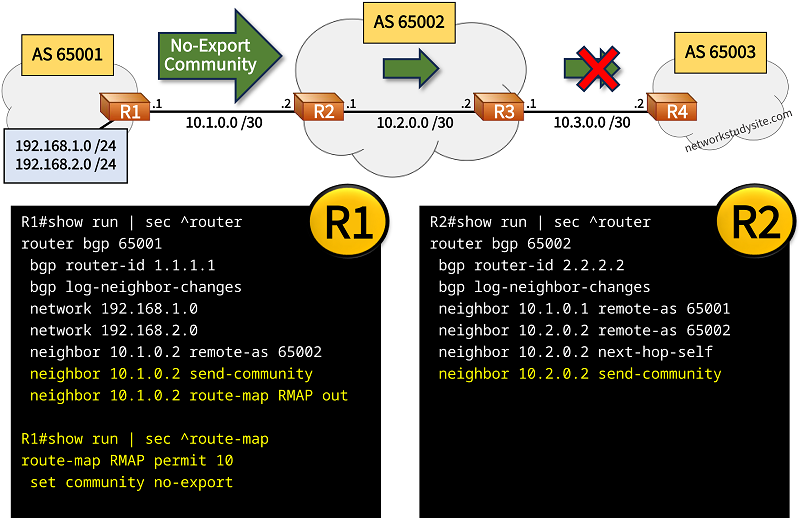
Configuration:
R1
R1#show run | sec ^router
router bgp 65001
 bgp router-id 1.1.1.1
 bgp log-neighbor-changes
 network 192.168.1.0
 network 192.168.2.0
 neighbor 10.1.0.2 remote-as 65002
 neighbor 10.1.0.2 send-community
 neighbor 10.1.0.2 route-map RMAP out

R1#show run | sec ^route-map
route-map RMAP permit 10
 set community no-export

R1#show run int Gi0/0 | sec int
interface GigabitEthernet0/0
 description ** to R2 **
 ip address 10.1.0.1 255.255.255.252
 duplex auto
 speed auto
 media-type rj45

R1#show run int Lo10 | sec int
interface Loopback10
 ip address 192.168.1.1 255.255.255.0

R1#show run int Lo20 | sec int
interface Loopback20
 ip address 192.168.2.1 255.255.255.0
R2
R2#show run | sec ^router
router bgp 65002
 bgp router-id 2.2.2.2
 bgp log-neighbor-changes
 neighbor 10.1.0.1 remote-as 65001
 neighbor 10.2.0.2 remote-as 65002
 neighbor 10.2.0.2 next-hop-self
 neighbor 10.2.0.2 send-community

R2#show run int Gi0/0 | sec int
interface GigabitEthernet0/0
 description ** to R1 **
 ip address 10.1.0.2 255.255.255.252
 duplex auto
 speed auto
 media-type rj45

R2#show run int Gi0/1 | sec int
interface GigabitEthernet0/1
 description ** to R3 **
 ip address 10.2.0.1 255.255.255.252
 duplex auto
 speed auto
 media-type rj45
R3#show ip bgp 192.168.1.0
BGP routing table entry for 192.168.1.0/24, version 4
Paths: (1 available, best #1, table default, not advertised to EBGP peer)
  Not advertised to any peer
  Refresh Epoch 1
  65001
    10.2.0.1 from 10.2.0.1 (2.2.2.2)
      Origin IGP, metric 0, localpref 100, valid, internal, best
      Community: no-export             « R3 receives community from iBGP neighbor
      rx pathid: 0, tx pathid: 0x0


R4#show ip bgp sum | beg Ne
Neighbor        V           AS MsgRcvd MsgSent   TblVer  InQ OutQ Up/Down  State/PfxRcd
10.3.0.1        4        65002      27      25       11    0    0 00:19:51        0        « R4 no longer receives any BGP routes from R3
The following packet capture shows a BGP Update message sent through iBGP and including the No-Export community attribute value. A router that receives such an Update packet will not forward any corresponding prefixes to eBGP neighbors.

No-advertise community
The following sample topology has R1 sending prefixes with the "no-advertise" BGP well-known community attribute. R2 receives this BGP community, and as a result does not advertise the prefixes to any other BGP neighbor.

Configuration:
R1
R1#show run | sec ^router
router bgp 65001
 bgp router-id 1.1.1.1
 bgp log-neighbor-changes
 network 192.168.1.0
 network 192.168.2.0
 neighbor 10.1.0.2 remote-as 65002
 neighbor 10.1.0.2 send-community
 neighbor 10.1.0.2 route-map RMAP out

R1#show run | sec ^route-map
route-map RMAP permit 10
 set community no-advertise

R1#show run int Gi0/0 | sec int
interface GigabitEthernet0/0
 description ** to R2 **
 ip address 10.1.0.1 255.255.255.252
 duplex auto
 speed auto
 media-type rj45

R1#show run int Lo10 | sec int
interface Loopback10
 ip address 192.168.1.1 255.255.255.0

R1#show run int Lo20 | sec int
interface Loopback20
 ip address 192.168.2.1 255.255.255.0
R2
R2#show run | sec ^router
router bgp 65002
 bgp router-id 2.2.2.2
 bgp log-neighbor-changes
 neighbor 10.1.0.1 remote-as 65001
 neighbor 10.2.0.2 remote-as 65002
 neighbor 10.2.0.2 next-hop-self
 neighbor 10.2.0.2 send-community

R2#show run int Gi0/0 | sec int
interface GigabitEthernet0/0
 description ** to R1 **
 ip address 10.1.0.2 255.255.255.252
 duplex auto
 speed auto
 media-type rj45

R2#show run int Gi0/1 | sec int
interface GigabitEthernet0/1
 description ** to R3 **
 ip address 10.2.0.1 255.255.255.252
 duplex auto
 speed auto
 media-type rj45
R2#show ip bgp 192.168.1.0
BGP routing table entry for 192.168.1.0/24, version 4
Paths: (1 available, best #1, table default, not advertised to any peer)
  Not advertised to any peer
  Refresh Epoch 2
  65001
    10.1.0.1 from 10.1.0.1 (1.1.1.1)
      Origin IGP, metric 0, localpref 100, valid, external, best
      Community: no-advertise
      rx pathid: 0, tx pathid: 0x0


R3#show ip bgp sum | beg Ne
Neighbor        V           AS MsgRcvd MsgSent   TblVer  InQ OutQ Up/Down  State/PfxRcd
10.2.0.1        4        65002      78      76       11    0    0 01:06:29        0
10.3.0.2        4        65003     100     102       11    0    0 01:28:10        0
Local-as community
In the following example scenario R1 advertises prefixes with the "local-as" well-known community value. As a result, the prefixes are only propagated in the local Sub-AS 65021 within the BGP confederation. The prefixes are received on R2 and R3, but R3 no longer advertises them to R4. This is because R4 is not in the local Sub-AS 65021.

Configuration:
R1
R1#show run | sec ^router
router bgp 65001
 bgp router-id 1.1.1.1
 bgp log-neighbor-changes
 network 192.168.1.0
 network 192.168.2.0
 neighbor 10.1.0.2 remote-as 65002
 neighbor 10.1.0.2 send-community
 neighbor 10.1.0.2 route-map RMAP out

R1#show run | sec ^route-map
route-map RMAP permit 10
 set community local-AS

R1#show run int Gi0/0 | sec int
interface GigabitEthernet0/0
 description ** to R2 **
 ip address 10.1.0.1 255.255.255.252
 duplex auto
 speed auto
 media-type rj45

R1#show run int Lo10 | sec int
interface Loopback10
 ip address 192.168.1.1 255.255.255.0

R1#show run int Lo20 | sec int
interface Loopback20
 ip address 192.168.2.1 255.255.255.0
R2
R2#show run | sec ^router
router bgp 65021
 bgp router-id 2.2.2.2
 bgp log-neighbor-changes
 bgp confederation identifier 65002
 neighbor 10.1.0.1 remote-as 65001
 neighbor 10.2.0.2 remote-as 65021
 neighbor 10.2.0.2 next-hop-self
 neighbor 10.2.0.2 send-community

R2#show run int Gi0/0 | sec int
interface GigabitEthernet0/0
 description ** to R1 **
 ip address 10.1.0.2 255.255.255.252
 duplex auto
 speed auto
 media-type rj45

R2#show run int Gi0/1 | sec int
interface GigabitEthernet0/1
 description ** to R3 **
 ip address 10.2.0.1 255.255.255.252
 duplex auto
 speed auto
 media-type rj45
R3
R3#show run | sec ^router
router bgp 65021
 bgp router-id 3.3.3.3
 bgp log-neighbor-changes
 bgp confederation identifier 65002
 bgp confederation peers 65022
 neighbor 10.2.0.1 remote-as 65021
 neighbor 10.2.0.1 next-hop-self
 neighbor 10.3.0.2 remote-as 65022
 neighbor 10.3.0.2 next-hop-self
 neighbor 10.3.0.2 send-community

R3#show run int Gi0/0 | sec int
interface GigabitEthernet0/0
 description ** to R2 **
 ip address 10.2.0.2 255.255.255.252
 duplex auto
 speed auto
 media-type rj45

R3#show run int Gi0/1 | sec int
interface GigabitEthernet0/1
 description ** to R4 **
 ip address 10.3.0.1 255.255.255.252
 duplex auto
 speed auto
 media-type rj45
R4
R4#show run | sec ^router
router bgp 65022
 bgp router-id 4.4.4.4
 bgp log-neighbor-changes
 bgp confederation identifier 65002
 bgp confederation peers 65021
 neighbor 10.3.0.1 remote-as 65021
 neighbor 10.3.0.1 next-hop-self
 neighbor 10.4.0.1 remote-as 65022
 neighbor 10.4.0.1 next-hop-self
 neighbor 10.4.0.1 send-community

R4#show run int Gi0/0 | sec int
interface GigabitEthernet0/0
 description ** to R5 **
 ip address 10.4.0.2 255.255.255.252
 duplex auto
 speed auto
 media-type rj45

R4#show run int Gi0/1 | sec int
interface GigabitEthernet0/1
 description ** to R3 **
 ip address 10.3.0.2 255.255.255.252
 duplex auto
 speed auto
 media-type rj45
R5
R5#show run | sec ^router
router bgp 65022
 bgp router-id 5.5.5.5
 bgp log-neighbor-changes
 bgp confederation identifier 65002
 neighbor 10.4.0.2 remote-as 65022
 neighbor 10.4.0.2 next-hop-self
 neighbor 10.5.0.2 remote-as 65003
 neighbor 10.5.0.2 send-community

R5#show run int Gi0/0 | sec int
interface GigabitEthernet0/0
 description ** to R6 **
 ip address 10.5.0.1 255.255.255.252
 duplex auto
 speed auto
 media-type rj45

R5#show run int Gi0/1 | sec int
interface GigabitEthernet0/1
 description ** to R4 **
 ip address 10.4.0.1 255.255.255.252
 duplex auto
 speed auto
 media-type rj45
R6
R4#show run | sec ^router
router bgp 65003
 bgp router-id 6.6.6.6
 bgp log-neighbor-changes
 neighbor 10.5.0.1 remote-as 65002

R4#show run int Gi0/0 | sec int
interface GigabitEthernet0/0
 description ** to R3 **
 ip address 10.5.0.2 255.255.255.252
 duplex auto
 speed auto
 media-type rj45
R2#show ip bgp 192.168.1.0
BGP routing table entry for 192.168.1.0/24, version 18
Paths: (1 available, best #1, table default, not advertised outside local AS)        « Local-AS community behavior is described
  Advertised to update-groups:
     2
  Refresh Epoch 1
  65001
    10.1.0.1 from 10.1.0.1 (1.1.1.1)
      Origin IGP, metric 0, localpref 100, valid, external, best
      Community: local-AS                                 « Local-AS community is received and displayed
      rx pathid: 0, tx pathid: 0x0


R3#show ip bgp 192.168.1.0
BGP routing table entry for 192.168.1.0/24, version 10
Paths: (1 available, best #1, table default, not advertised outside local AS)
  Not advertised to any peer
  Refresh Epoch 1
  65001
    10.2.0.1 from 10.2.0.1 (2.2.2.2)
      Origin IGP, metric 0, localpref 100, valid, confed-internal, best                 « R3 receives route within confederation
      Community: local-AS
      rx pathid: 0, tx pathid: 0x0


R4#show ip bgp sum | beg Ne
Neighbor        V           AS MsgRcvd MsgSent   TblVer  InQ OutQ Up/Down  State/PfxRcd
10.3.0.1        4        65021      26      26        5    0    0 00:19:49        0    « R4 does not receive prefixes with local-as community
10.4.0.1        4        65022      25      27        5    0    0 00:19:44        0
The following packet capture shows a BGP Update message sent by R2 and received by R3. The BGP Local-AS community value is included as a Path Attribute and attached to the advertised prefixes. When R3 receives this Update message it only advertises the prefixes to BGP neighbors in its local Sub-AS 65021.
