Segment Routing Traffic Engineering Tunnel Introduction
Table of Contents
- What is Segment Routing Traffic Engineering? ‹
- Configuring Segment Routing Traffic Engineering tunnel with EVPN IRB L3VPN ‹
- Download section ‹
What is Segment Routing Traffic Engineering?
Segment Routing Traffic Engineering (TE) enables steering MPLS traffic based on a defined path to optimize network performance. So far, MPLS TE required introducing an additional protocol (RSVP) into the core network. However, this is no longer needed with SR TE.
There are multiple options to configure SR TE. For example with tunnels, or with SR TE policy (BGP color community and automated steering), or SR TE can also be configured with a PCE/PCC architecture. The following table compares advantages and disadvantages of SR TE tunnels.
| Advantage | Disadvantage |
|---|---|
| Compared to RSVP TE, the core routers do not need to negotiate and maintain a state of primary and backup tunnels with SR TE. The SR TE tunnel is only configured on the PE routers. | There is still a need to configure SR TE tunnels on the PE routers, whereas with SR TE policy and SR TE PCE/PCC there is no need for tunnels. |
| Compared to RSVP TE, SR TE has better scalability since it is integrated with the IGP and does not need an additional protocol. Thus, SR TE consumes less system resources and network bandwidth. |
Configuring Segment Routing Traffic Engineering tunnel with EVPN IRB L3VPN
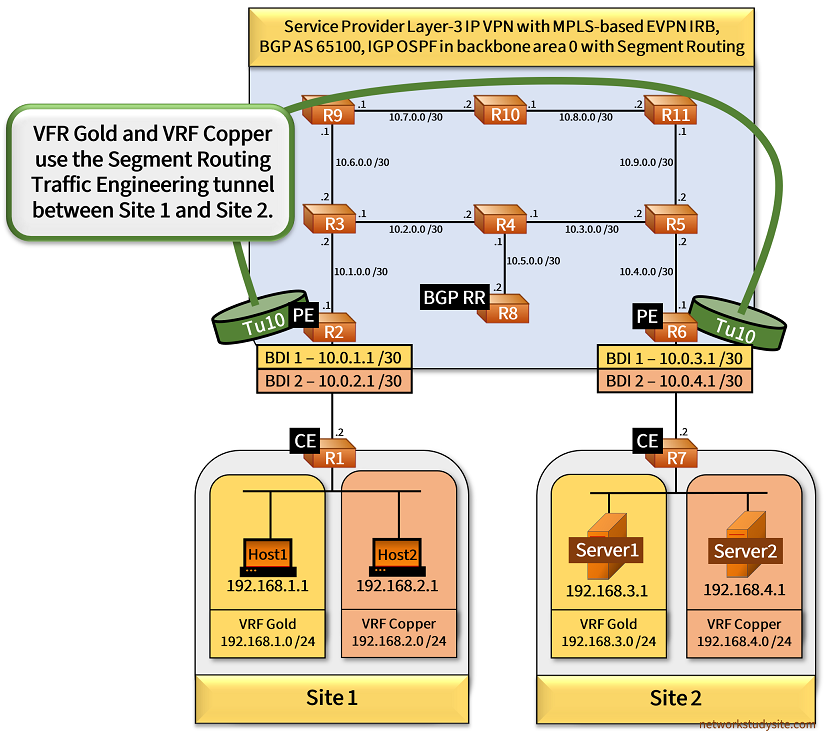
The following example topology connects two sites in VRF Gold and VRF Copper through the Service Provider (SP) MPLS Layer-3 VPN network. The SP network advertises VPN prefixes using the EVPN IRB control plane, and uses Segment Routing (SR) as the MPLS transport.
Additionally, an SR Traffic Engineering (TE) tunnel is configured in each direction between the PE routers R2 and R6. An explicit path is configured via R3-R9-R10-R11-R5, traffic in both VRFs uses this path. The SR TE tunnel configuration on PE R2 is shown below.
R2#show run int Tu10 | sec int
interface Tunnel10
 description ** Segment Routing TE tunnel to PE R6 **
 ip unnumbered Loopback10
 tunnel mode mpls traffic-eng
 tunnel destination 6.6.6.6
 tunnel mpls traffic-eng priority 1 1
 tunnel mpls traffic-eng path-option 1 explicit name TRAFFIC-ENGINEERING-PATH segment-routing

R2#show run | sec ^ip exp
ip explicit-path name TRAFFIC-ENGINEERING-PATH enable
 index 10 next-label 16003
 index 20 next-label 16009
 index 30 next-label 16010
 index 40 next-label 16011
 index 50 next-label 16005
 index 60 next-label 16006
Important aspects of this example network are highlighted in the following list.
- MPLS TE tunnels are only enabled on the PE routers and using the command mpls traffic-eng tunnels. The RSVP protocol is not needed at all in this network.
- Traffic is routed via the MPLS TE tunnel with a static route on each PE router pointing to the far-end (next-hop) Loopback IP address.
- The EVPN IRB control plane adds an MPLS VPN service label to each site's VRF, and uses the Route Type 5 to advertise prefixes. The BGP VPNv4 address-family is not used in this network. The keyword stitching is added in Route Target import/export rules.
- The PE and CE exchange prefixes with VRF-aware eBGP neighborships. The PE router uses Layer-3 Bridge Domain Interfaces (BDI) assigned to a VRF, and the CE router uses VRF-subinterfaces. The VLAN needs to match between the CE subinterface and the Service Instance configured on the CE-facing physical interface of the PE router.
Configuration:
R2 (PE)
R2#show run | sec ^mpls
mpls label range 200 299
mpls traffic-eng tunnels

R2#show run | sec ^segment
segment-routing mpls
 !
 connected-prefix-sid-map
  address-family ipv4
   2.2.2.2/32 index 2 range 1
  exit-address-family
 !

R2#show run | sec ^vrf
vrf definition Copper
 rd 65100:2
 !
 address-family ipv4
  route-target export 65100:21 stitching
  route-target import 65100:22 stitching
 exit-address-family
vrf definition Gold
 rd 65100:1
 !
 address-family ipv4
  route-target export 65100:11 stitching
  route-target import 65100:12 stitching
 exit-address-family

R2#show run int Lo10 | sec int
interface Loopback10
 ip address 2.2.2.2 255.255.255.255

R2#show run int Gi1 | sec int
interface GigabitEthernet1
 description ** to CE R1 **
 no ip address
 negotiation auto
 no mop enabled
 no mop sysid
 service instance 10 ethernet
  encapsulation dot1q 10
  rewrite ingress tag pop 1 symmetric
 !
 service instance 20 ethernet
  encapsulation dot1q 20
  rewrite ingress tag pop 1 symmetric
 !

R2#show run int Gi2 | sec int
interface GigabitEthernet2
 description ** to R3 - MPLS core **
 ip address 10.1.0.1 255.255.255.252
 ip ospf network point-to-point
 negotiation auto
 no mop enabled
 no mop sysid

R2#show run int Tu10 | sec int
interface Tunnel10
 description ** Segment Routing TE tunnel to PE R6 **
 ip unnumbered Loopback10
 tunnel mode mpls traffic-eng
 tunnel destination 6.6.6.6
 tunnel mpls traffic-eng priority 1 1
 tunnel mpls traffic-eng path-option 1 explicit name TRAFFIC-ENGINEERING-PATH segment-routing

R2#show run | sec ^ip exp
ip explicit-path name TRAFFIC-ENGINEERING-PATH enable
 index 10 next-label 16003
 index 20 next-label 16009
 index 30 next-label 16010
 index 40 next-label 16011
 index 50 next-label 16005
 index 60 next-label 16006

R2#show run int BDI 1 | sec int
interface BDI1
 description ** to CE R1 in VRF Gold **
 vrf forwarding Gold
 ip address 10.0.1.1 255.255.255.252
 no mop enabled
 no mop sysid

R2#show run int BDI 2 | sec int
interface BDI2
 description ** to CE R1 in VRF Copper **
 vrf forwarding Copper
 ip address 10.0.2.1 255.255.255.252
 no mop enabled
 no mop sysid

R2#show run | sec ^l2vpn
l2vpn evpn
 replication-type ingress
 mpls label mode per-ce
 router-id Loopback10
l2vpn evpn instance 100 vlan-based
l2vpn evpn instance 200 vlan-based

R2#show run | sec ^bridge-domain
bridge-domain 1
 member GigabitEthernet1 service-instance 10
 member evpn-instance 100
bridge-domain 2
 member GigabitEthernet1 service-instance 20
 member evpn-instance 200

R2#show run | sec ^router
router ospf 10
 router-id 2.2.2.2
 segment-routing area 0 mpls
 segment-routing mpls
 network 2.2.2.2 0.0.0.0 area 0
 network 10.1.0.0 0.0.0.3 area 0
 mpls traffic-eng router-id Loopback10
 mpls traffic-eng area 0
router bgp 65100
 bgp router-id 2.2.2.2
 bgp log-neighbor-changes
 neighbor 8.8.8.8 remote-as 65100
 neighbor 8.8.8.8 update-source Loopback10
 !
 address-family l2vpn evpn
  neighbor 8.8.8.8 activate
  neighbor 8.8.8.8 send-community both
 exit-address-family
 !
 address-family ipv4 vrf Copper
  advertise l2vpn evpn
  network 10.0.2.0 mask 255.255.255.252
  neighbor 10.0.2.2 remote-as 65001
  neighbor 10.0.2.2 activate
 exit-address-family
 !
 address-family ipv4 vrf Gold
  advertise l2vpn evpn
  network 10.0.1.0 mask 255.255.255.252
  neighbor 10.0.1.2 remote-as 65001
  neighbor 10.0.1.2 activate
 exit-address-family

R2#show run | sec ^ip route
ip route 6.6.6.6 255.255.255.255 Tunnel10
R6 (PE)
R6#show run | sec ^mpls
mpls label range 600 699
mpls traffic-eng tunnels

R6#show run | sec ^segment
segment-routing mpls
 !
 connected-prefix-sid-map
  address-family ipv4
   6.6.6.6/32 index 6 range 1
  exit-address-family
 !

R6#show run | sec ^vrf
vrf definition Copper
 rd 65100:2
 !
 address-family ipv4
  route-target export 65100:22 stitching
  route-target import 65100:21 stitching
 exit-address-family
vrf definition Gold
 rd 65100:1
 !
 address-family ipv4
  route-target export 65100:12 stitching
  route-target import 65100:11 stitching
 exit-address-family

R6#show run int Lo10 | sec int
interface Loopback10
 ip address 6.6.6.6 255.255.255.255

R6#show run int Gi1 | sec int
interface GigabitEthernet1
 description ** to CE R7 **
 no ip address
 negotiation auto
 no mop enabled
 no mop sysid
 service instance 10 ethernet
  encapsulation dot1q 10
  rewrite ingress tag pop 1 symmetric
 !
 service instance 20 ethernet
  encapsulation dot1q 20
  rewrite ingress tag pop 1 symmetric
 !

R6#show run int Gi2 | sec int
interface GigabitEthernet2
 description ** to R5 - MPLS core **
 ip address 10.4.0.1 255.255.255.252
 ip ospf network point-to-point
 negotiation auto
 no mop enabled
 no mop sysid

R6#show run int Tu10 | sec int
interface Tunnel10
 description ** Segment Routing TE tunnel to PE R2 **
 ip unnumbered Loopback10
 tunnel mode mpls traffic-eng
 tunnel destination 2.2.2.2
 tunnel mpls traffic-eng priority 1 1
 tunnel mpls traffic-eng path-option 1 explicit name TRAFFIC-ENGINEERING-PATH segment-routing

R6#show run | sec ^ip exp
ip explicit-path name TRAFFIC-ENGINEERING-PATH enable
 index 10 next-label 16005
 index 20 next-label 16011
 index 30 next-label 16010
 index 40 next-label 16009
 index 50 next-label 16003
 index 60 next-label 16002

R6#show run int BDI 1 | sec int
interface BDI1
 description ** to CE R7 in VRF Gold **
 vrf forwarding Gold
 ip address 10.0.3.1 255.255.255.252
 no mop enabled
 no mop sysid

R6#show run int BDI 2 | sec int
interface BDI2
 description ** to CE R7 in VRF Copper **
 vrf forwarding Copper
 ip address 10.0.4.1 255.255.255.252
 no mop enabled
 no mop sysid

R6#show run | sec ^l2vpn
l2vpn evpn
 replication-type ingress
 mpls label mode per-ce
 router-id Loopback10
l2vpn evpn instance 100 vlan-based
l2vpn evpn instance 200 vlan-based

R6#show run | sec ^bridge-domain
bridge-domain 1
 member GigabitEthernet1 service-instance 10
 member evpn-instance 100
bridge-domain 2
 member GigabitEthernet1 service-instance 20
 member evpn-instance 200

R6#show run | sec ^router
router ospf 10
 router-id 6.6.6.6
 segment-routing area 0 mpls
 segment-routing mpls
 network 6.6.6.6 0.0.0.0 area 0
 network 10.4.0.0 0.0.0.3 area 0
 mpls traffic-eng router-id Loopback10
 mpls traffic-eng area 0
router bgp 65100
 bgp router-id 6.6.6.6
 bgp log-neighbor-changes
 neighbor 8.8.8.8 remote-as 65100
 neighbor 8.8.8.8 update-source Loopback10
 !
 address-family l2vpn evpn
  neighbor 8.8.8.8 activate
  neighbor 8.8.8.8 send-community both
 exit-address-family
 !
 address-family ipv4 vrf Copper
  advertise l2vpn evpn
  network 10.0.4.0 mask 255.255.255.252
  neighbor 10.0.4.2 remote-as 65002
  neighbor 10.0.4.2 activate
 exit-address-family
 !
 address-family ipv4 vrf Gold
  advertise l2vpn evpn
  network 10.0.3.0 mask 255.255.255.252
  neighbor 10.0.3.2 remote-as 65002
  neighbor 10.0.3.2 activate
 exit-address-family

R6#show run | sec ^ip route
ip route 2.2.2.2 255.255.255.255 Tunnel10
R8 (BGP RR)
R8#show run int Lo10 | sec int
interface Loopback10
 ip address 8.8.8.8 255.255.255.255

R8#show run int Gi0/0 | sec int
interface GigabitEthernet0/0
 description ** to R4 **
 ip address 10.5.0.2 255.255.255.252
 ip ospf network point-to-point
 duplex auto
 speed auto
 media-type rj45

R8#show run | sec ^router
router ospf 10
 router-id 8.8.8.8
 network 8.8.8.8 0.0.0.0 area 0
 network 10.5.0.0 0.0.0.3 area 0
router bgp 65100
 bgp router-id 8.8.8.8
 bgp log-neighbor-changes
 neighbor 2.2.2.2 remote-as 65100
 neighbor 2.2.2.2 update-source Loopback10
 neighbor 6.6.6.6 remote-as 65100
 neighbor 6.6.6.6 update-source Loopback10
 !
 address-family l2vpn evpn
  neighbor 2.2.2.2 activate
  neighbor 2.2.2.2 send-community both
  neighbor 2.2.2.2 route-reflector-client
  neighbor 6.6.6.6 activate
  neighbor 6.6.6.6 send-community both
  neighbor 6.6.6.6 route-reflector-client
 exit-address-family
R3
R3#show run | sec ^segment
segment-routing mpls
 !
 connected-prefix-sid-map
  address-family ipv4
   3.3.3.3/32 index 3 range 1
  exit-address-family
 !

R3#show run int Lo10 | sec int
interface Loopback10
 ip address 3.3.3.3 255.255.255.255

R3#show run int Gi1 | sec int
interface GigabitEthernet1
 description ** to PE R2 **
 ip address 10.1.0.2 255.255.255.252
 ip ospf network point-to-point
 negotiation auto
 no mop enabled
 no mop sysid

R3#show run int Gi2 | sec int
interface GigabitEthernet2
 description ** to R4 **
 ip address 10.2.0.1 255.255.255.252
 ip ospf network point-to-point
 negotiation auto
 no mop enabled
 no mop sysid

R3#show run | sec ^router
router ospf 10
 router-id 3.3.3.3
 segment-routing area 0 mpls
 segment-routing mpls
 network 3.3.3.3 0.0.0.0 area 0
 network 10.1.0.0 0.0.0.3 area 0
 network 10.2.0.0 0.0.0.3 area 0
 network 10.6.0.0 0.0.0.3 area 0
R4
R4#show run | sec ^segment
segment-routing mpls
 !
 connected-prefix-sid-map
  address-family ipv4
   4.4.4.4/32 index 4 range 1
  exit-address-family
 !

R4#show run int Lo10 | sec int
interface Loopback10
 ip address 4.4.4.4 255.255.255.255

R4#show run int Gi1 | sec int
interface GigabitEthernet1
 description ** to R3 **
 ip address 10.2.0.2 255.255.255.252
 ip ospf network point-to-point
 negotiation auto
 no mop enabled
 no mop sysid

R4#show run int Gi2 | sec int
interface GigabitEthernet2
 description ** to R5 **
 ip address 10.3.0.1 255.255.255.252
 ip ospf network point-to-point
 negotiation auto
 no mop enabled
 no mop sysid

R4#show run int Gi3 | sec int
interface GigabitEthernet3
 description ** to BGP RR R8 **
 ip address 10.5.0.1 255.255.255.252
 ip ospf network point-to-point
 negotiation auto
 no mop enabled
 no mop sysid

R4#show run | sec ^router
router ospf 10
 router-id 4.4.4.4
 segment-routing area 0 mpls
 segment-routing mpls
 network 4.4.4.4 0.0.0.0 area 0
 network 10.2.0.0 0.0.0.3 area 0
 network 10.3.0.0 0.0.0.3 area 0
 network 10.5.0.0 0.0.0.3 area 0
R1 (CE)
R1#show run | sec ^vrf
vrf definition Copper
 rd 2:2
 !
 address-family ipv4
 exit-address-family
vrf definition Gold
 rd 1:1
 !
 address-family ipv4
 exit-address-family

R1#show run int Gi0/0 | sec int
interface GigabitEthernet0/0
 description ** to Host1 and Host2 **
 no ip address
 duplex auto
 speed auto
 media-type rj45

R1#show run int Gi0/0.10 | sec int
interface GigabitEthernet0/0.10
 description ** to Host1 in VRF Gold (VLAN 10) **
 encapsulation dot1Q 10
 vrf forwarding Gold
 ip address 192.168.1.2 255.255.255.0

R1#show run int Gi0/0.20 | sec int
interface GigabitEthernet0/0.20
 description ** to Host2 in VRF Copper (VLAN 20) **
 encapsulation dot1Q 20
 vrf forwarding Copper
 ip address 192.168.2.2 255.255.255.0

R1#show run int Gi0/1 | sec int
interface GigabitEthernet0/1
 description ** to PE R2 **
 no ip address
 duplex auto
 speed auto
 media-type rj45

R1#show run int Gi0/1.10 | sec int
interface GigabitEthernet0/1.10
 description ** to PE R2 in VRF Gold **
 encapsulation dot1Q 10
 vrf forwarding Gold
 ip address 10.0.1.2 255.255.255.252

R1#show run int Gi0/1.20 | sec int
interface GigabitEthernet0/1.20
 description ** to PE R2 in VRF Copper **
 encapsulation dot1Q 20
 vrf forwarding Copper
 ip address 10.0.2.2 255.255.255.252

R1#show run | sec ^router
router bgp 65001
 bgp router-id 1.1.1.1
 bgp log-neighbor-changes
 !
 address-family ipv4 vrf Copper
  network 192.168.2.0
  neighbor 10.0.2.1 remote-as 65100
  neighbor 10.0.2.1 activate
 exit-address-family
 !
 address-family ipv4 vrf Gold
  network 192.168.1.0
  neighbor 10.0.1.1 remote-as 65100
  neighbor 10.0.1.1 activate
 exit-address-family
R7 (CE)
R7#show run | sec ^vrf
vrf definition Copper
 rd 2:2
 !
 address-family ipv4
 exit-address-family
vrf definition Gold
 rd 1:1
 !
 address-family ipv4
 exit-address-family

R7#show run int Gi0/0 | sec int
interface GigabitEthernet0/0
 description ** to Server1 and Server2 **
 no ip address
 duplex auto
 speed auto
 media-type rj45

R7#show run int Gi0/0.10 | sec int
interface GigabitEthernet0/0.10
 description ** to Server1 in VRF Gold (VLAN 10) **
 encapsulation dot1Q 10
 vrf forwarding Gold
 ip address 192.168.3.2 255.255.255.0

R7#show run int Gi0/0.20 | sec int
interface GigabitEthernet0/0.20
 description ** to Server2 in VRF Copper (VLAN 20) **
 encapsulation dot1Q 20
 vrf forwarding Copper
 ip address 192.168.4.2 255.255.255.0

R7#show run int Gi0/1 | sec int
interface GigabitEthernet0/1
 description ** to PE R6 **
 no ip address
 duplex auto
 speed auto
 media-type rj45

R7#show run int Gi0/1.10 | sec int
interface GigabitEthernet0/1.10
 description ** to PE R6 in VRF Gold **
 encapsulation dot1Q 10
 vrf forwarding Gold
 ip address 10.0.3.2 255.255.255.252

R7#show run int Gi0/1.20 | sec int
interface GigabitEthernet0/1.20
 description ** to PE R6 in VRF Copper **
 encapsulation dot1Q 20
 vrf forwarding Copper
 ip address 10.0.4.2 255.255.255.252

R7#show run | sec ^router
router bgp 65002
 bgp router-id 7.7.7.7
 bgp log-neighbor-changes
 !
 address-family ipv4 vrf Copper
  network 192.168.4.0
  neighbor 10.0.4.1 remote-as 65100
  neighbor 10.0.4.1 activate
 exit-address-family
 !
 address-family ipv4 vrf Gold
  network 192.168.3.0
  neighbor 10.0.3.1 remote-as 65100
  neighbor 10.0.3.1 activate
 exit-address-family
Host1
Host1#show run int Gi0/0 | sec int
interface GigabitEthernet0/0
 description ** to CE R1 **
 ip address 192.168.1.1 255.255.255.0
 duplex auto
 speed auto
 media-type rj45

Host1#show run | sec ^ip route
ip route 0.0.0.0 0.0.0.0 192.168.1.2
Host1#ping 192.168.3.1
Type escape sequence to abort.
Sending 5, 100-byte ICMP Echos to 192.168.3.1, timeout is 2 seconds:
!!!!!
Success rate is 100 percent (5/5), round-trip min/avg/max = 95/96/100 ms         « Host1 (Site 1) can reach Server1 (Site 2)


Host1#trace 192.168.3.1 probe 1
Type escape sequence to abort.
Tracing the route to 192.168.3.1
VRF info: (vrf in name/id, vrf out name/id)
  1 192.168.1.2 3 msec
  2 10.0.1.1 25 msec
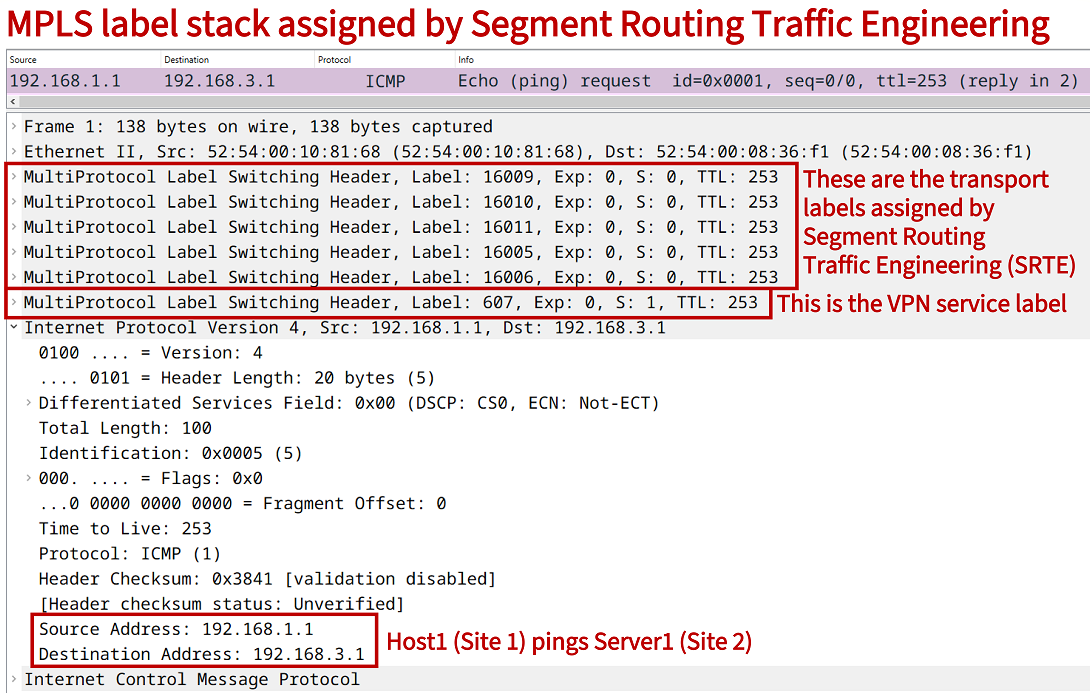
  3 10.1.0.2 [MPLS: Labels 16009/16010/16011/16005/16006/607 Exp 0] 93 msec      « Segment Routing TE label stack is used
  4 10.6.0.1 [MPLS: Labels 16010/16011/16005/16006/607 Exp 0] 94 msec
  5 10.7.0.2 [MPLS: Labels 16011/16005/16006/607 Exp 0] 93 msec
  6 10.8.0.2 [MPLS: Labels 16005/16006/607 Exp 0] 94 msec
  7 10.9.0.2 [MPLS: Labels 16006/607 Exp 0] 94 msec
  8 10.0.3.1 [MPLS: Label 607 Exp 0] 73 msec                                     « PE R6 assigns the VPN service label
  9 10.0.3.2 94 msec
 10 192.168.3.1 96 msec


Host2#ping 192.168.4.1
Type escape sequence to abort.
Sending 5, 100-byte ICMP Echos to 192.168.4.1, timeout is 2 seconds:
!!!!!
Success rate is 100 percent (5/5), round-trip min/avg/max = 93/96/98 ms


Host2#trace 192.168.4.1 probe 1
Type escape sequence to abort.
Tracing the route to 192.168.4.1
VRF info: (vrf in name/id, vrf out name/id)
  1 192.168.2.2 3 msec
  2 10.0.2.1 26 msec
  3 10.1.0.2 [MPLS: Labels 16009/16010/16011/16005/16006/609 Exp 0] 94 msec
  4 10.6.0.1 [MPLS: Labels 16010/16011/16005/16006/609 Exp 0] 92 msec
  5 10.7.0.2 [MPLS: Labels 16011/16005/16006/609 Exp 0] 92 msec
  6 10.8.0.2 [MPLS: Labels 16005/16006/609 Exp 0] 93 msec
  7 10.9.0.2 [MPLS: Labels 16006/609 Exp 0] 93 msec
  8 10.0.4.1 [MPLS: Label 609 Exp 0] 72 msec
  9 10.0.4.2 93 msec
 10 192.168.4.1 95 msec
It is visible in the above outputs how Segment Routing Traffic Engineering assigns a label stack to traffic, and at each next-hop the top label is popped (removed). This exposes the next label which moves traffic forward along the predefined explicit path. Thus, at the first hop after traffic leaves PE R2 (towards PE R6) there are six MPLS labels attached to each packet. These MPLS labels are also called a SID list, and are inserted by a head-end router configured with SR TE (in this case PE R2).
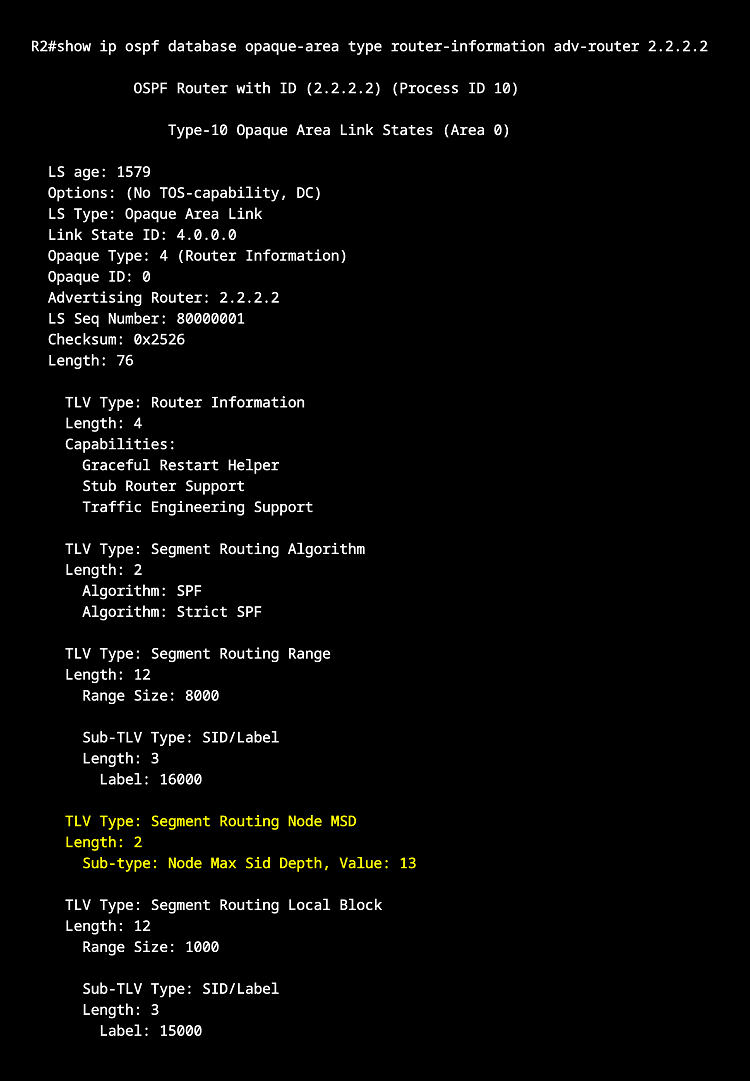
A SID list is an ordered list of segments instructing the path of a packet. The SID list could exceed the Maximum SID Depth (MSD) of an intermediary node in the MPLS core. The following outputs are taken from the BGP Route Reflector R8 and show the EVPN Type 5 routes received from each PE router.
R8#show ip bgp l2vpn evpn rd 65100:1 | beg Ne
     Network          Next Hop            Metric LocPrf Weight Path
Route Distinguisher: 65100:1
 *>i  [5][65100:1][0][24][192.168.1.0]/17                                  « VRF Gold Site 1 prefix
                       2.2.2.2                  0    100      0 65001 i
 *>i  [5][65100:1][0][24][192.168.3.0]/17                                  « VRF Gold Site 2 prefix
                       6.6.6.6                  0    100      0 65002 i
 *>i  [5][65100:1][0][30][10.0.1.0]/17
                       2.2.2.2                  0    100      0 i
 *>i  [5][65100:1][0][30][10.0.3.0]/17
                       6.6.6.6                  0    100      0 i


R8#show ip bgp l2vpn evpn rd 65100:2 | beg Ne
     Network          Next Hop            Metric LocPrf Weight Path
Route Distinguisher: 65100:2
 *>i  [5][65100:2][0][24][192.168.2.0]/17
                       2.2.2.2                  0    100      0 65001 i
 *>i  [5][65100:2][0][24][192.168.4.0]/17
                       6.6.6.6                  0    100      0 65002 i
 *>i  [5][65100:2][0][30][10.0.2.0]/17
                       2.2.2.2                  0    100      0 i
 *>i  [5][65100:2][0][30][10.0.4.0]/17
                       6.6.6.6                  0    100      0 i