EIGRP Variance and Maximum Paths Explained and Configured
Table of Contents
- What is EIGRP unequal cost load balancing? ‹
- Where does EIGRP find possible routes for load balancing? ‹
- EIGRP Maximum Paths explained ‹
- Download section ‹
What is EIGRP unequal cost load balancing?
If two loop-free paths with different metrics are learned through EIGRP to the same destination prefix, then EIGRP installs the path with the best metric into the routing table. This path is called the Successor route. In other words, EIGRP chooses a single best path, and by default EIGRP does not perform load balancing for unequal cost paths. However, unequal cost load balancing can be enabled with the variance command.

Configuration:
R1
R1#show run | sec ^router
router eigrp EXAMPLE-EIGRP
 !
 address-family ipv4 unicast autonomous-system 10
  !
  af-interface GigabitEthernet0/0
   passive-interface
  exit-af-interface
  !
  topology base
   variance 2
  exit-af-topology
  network 10.1.0.0 0.0.0.3
  network 10.2.0.0 0.0.0.3
  network 192.168.1.0
  eigrp router-id 1.1.1.1
 exit-address-family

R1#show run int Gi0/0 | sec int
interface GigabitEthernet0/0
 description ** to Host **
 ip address 192.168.1.2 255.255.255.0
 duplex auto
 speed auto
 media-type rj45

R1#show run int Gi0/1 | sec int
interface GigabitEthernet0/1
 description ** to R2 **
 ip address 10.1.0.1 255.255.255.252
 duplex auto
 speed auto
 media-type rj45

R1#show run int Gi0/2 | sec int
interface GigabitEthernet0/2
 description ** to R3 **
 ip address 10.2.0.1 255.255.255.252
 duplex auto
 speed auto
 media-type rj45
R2
R2#show run | sec ^router
router eigrp EXAMPLE-EIGRP
 !
 address-family ipv4 unicast autonomous-system 10
  !
  topology base
  exit-af-topology
  network 10.1.0.0 0.0.0.3
  network 10.3.0.0 0.0.0.3
  eigrp router-id 2.2.2.2
 exit-address-family

R2#show run int Gi0/0 | sec int
interface GigabitEthernet0/0
 description ** to R1 **
 ip address 10.1.0.2 255.255.255.252
 duplex auto
 speed auto
 media-type rj45

R2#show run int Gi0/1 | sec int
interface GigabitEthernet0/1
 description ** to R4 **
 ip address 10.3.0.1 255.255.255.252
 duplex auto
 speed auto
 media-type rj45
R3
R3#show run | sec ^router
router eigrp EXAMPLE-EIGRP
 !
 address-family ipv4 unicast autonomous-system 10
  !
  topology base
   offset-list ACL-OFFSET out 1000 GigabitEthernet0/0
  exit-af-topology
  network 10.2.0.0 0.0.0.3
  network 10.4.0.0 0.0.0.3
  eigrp router-id 3.3.3.3
 exit-address-family

R3#show run | sec ^ip access
ip access-list standard ACL-OFFSET
 permit 192.168.2.0 0.0.0.255

R3#show run int Gi0/0 | sec int
interface GigabitEthernet0/0
 description ** to R1 **
 ip address 10.2.0.2 255.255.255.252
 duplex auto
 speed auto
 media-type rj45

R3#show run int Gi0/1 | sec int
interface GigabitEthernet0/1
 description ** to R5 **
 ip address 10.4.0.1 255.255.255.252
 duplex auto
 speed auto
 media-type rj45
R4
R4#show run | sec ^router
router eigrp EXAMPLE-EIGRP
 !
 address-family ipv4 unicast autonomous-system 10
  !
  topology base
  exit-af-topology
  network 10.3.0.0 0.0.0.3
  network 10.5.0.0 0.0.0.3
  eigrp router-id 4.4.4.4
 exit-address-family

R4#show run int Gi0/0 | sec int
interface GigabitEthernet0/0
 description ** to R2 **
 ip address 10.3.0.2 255.255.255.252
 duplex auto
 speed auto
 media-type rj45

R4#show run int Gi0/1 | sec int
interface GigabitEthernet0/1
 description ** to R5 **
 ip address 10.5.0.1 255.255.255.252
 duplex auto
 speed auto
 media-type rj45
R5
R5#show run | sec ^router
router eigrp EXAMPLE-EIGRP
 !
 address-family ipv4 unicast autonomous-system 10
  !
  af-interface GigabitEthernet0/2
   passive-interface
  exit-af-interface
  !
  topology base
  exit-af-topology
  network 10.4.0.0 0.0.0.3
  network 10.5.0.0 0.0.0.3
  network 192.168.2.0
  eigrp router-id 5.5.5.5
 exit-address-family

R5#show run int Gi0/0 | sec int
interface GigabitEthernet0/0
 description ** to R3 **
 ip address 10.4.0.2 255.255.255.252
 duplex auto
 speed auto
 media-type rj45

R5#show run int Gi0/1 | sec int
interface GigabitEthernet0/1
 description ** to R4 **
 ip address 10.5.0.2 255.255.255.252
 duplex auto
 speed auto
 media-type rj45

R5#show run int Gi0/2 | sec int
interface GigabitEthernet0/2
 description ** to Server **
 ip address 192.168.2.2 255.255.255.0
 duplex auto
 speed auto
 media-type rj45
Host
Host#show run int Gi0/0 | sec int
interface GigabitEthernet0/0
 description ** to R1 **
 ip address 192.168.1.1 255.255.255.0
 duplex auto
 speed auto
 media-type rj45

Host#show run | sec ^ip route
ip route 0.0.0.0 0.0.0.0 GigabitEthernet0/0 192.168.1.2
R1#show ip eigrp topology
EIGRP-IPv4 VR(EXAMPLE-EIGRP) Topology Table for AS(10)/ID(1.1.1.1)
Codes: P - Passive, A - Active, U - Update, Q - Query, R - Reply,
       r - reply Status, s - sia Status

P 10.4.0.0/30, 1 successors, FD is 1966080
        via 10.2.0.2 (1966080/1310720), GigabitEthernet0/2
P 192.168.2.0/24, 2 successors, FD is 2622440                         « R1 has two loop-free routes to the Server
        via 10.2.0.2 (2622440/1967080), GigabitEthernet0/2            « The Feasible Distance is 2622440, through R3
        via 10.1.0.2 (3276800/2621440), GigabitEthernet0/1            « The Reported Distance from R2 is 2621440, meets Feasibility Condition
P 10.5.0.0/30, 2 successors, FD is 2621440
        via 10.1.0.2 (2621440/1966080), GigabitEthernet0/1
        via 10.2.0.2 (2621440/1966080), GigabitEthernet0/2
P 10.1.0.0/30, 1 successors, FD is 1310720
        via Connected, GigabitEthernet0/1
P 10.2.0.0/30, 1 successors, FD is 1310720
        via Connected, GigabitEthernet0/2
P 192.168.1.0/24, 1 successors, FD is 1310720
        via Connected, GigabitEthernet0/0
P 10.3.0.0/30, 1 successors, FD is 1966080
        via 10.1.0.2 (1966080/1310720), GigabitEthernet0/1


R1#show ip route eigrp | beg Ga
Gateway of last resort is not set

      10.0.0.0/8 is variably subnetted, 7 subnets, 2 masks
D        10.3.0.0/30 [90/15360] via 10.1.0.2, 00:08:08, GigabitEthernet0/1
D        10.4.0.0/30 [90/15360] via 10.2.0.2, 00:08:08, GigabitEthernet0/2
D        10.5.0.0/30 [90/20480] via 10.2.0.2, 00:08:08, GigabitEthernet0/2
                     [90/20480] via 10.1.0.2, 00:08:08, GigabitEthernet0/1
D     192.168.2.0/24 [90/20487] via 10.2.0.2, 00:01:15, GigabitEthernet0/2        « Due to variance command unequal cost routes are installed
                     [90/25600] via 10.1.0.2, 00:01:15, GigabitEthernet0/1


R1#show ip route 192.168.2.0
Routing entry for 192.168.2.0/24
  Known via "eigrp 10", distance 90, metric 20487, type internal
  Redistributing via eigrp 10
  Last update from 10.1.0.2 on GigabitEthernet0/1, 00:02:48 ago
  Routing Descriptor Blocks:
  * 10.2.0.2, from 10.2.0.2, 00:02:48 ago, via GigabitEthernet0/2
      Route metric is 20487, traffic share count is 5                       « Unequal cost load balancing, higher share traffic count because lower metric
      Total delay is 31 microseconds, minimum bandwidth is 1000000 Kbit
      Reliability 255/255, minimum MTU 1500 bytes
      Loading 1/255, Hops 2
    10.1.0.2, from 10.1.0.2, 00:02:48 ago, via GigabitEthernet0/1
      Route metric is 25600, traffic share count is 4
      Total delay is 40 microseconds, minimum bandwidth is 1000000 Kbit
      Reliability 255/255, minimum MTU 1500 bytes
      Loading 1/255, Hops 3
The following image describes the criteria needed for R1 to consider the route through R2 as a valid backup path, this is called the Feasibility Condition. If all links had equal costs then the route through R2 would not meet the Feasibility Condition because the Reported Distance (RD) of R2 is equal to the Feasible Distance (FD) of R1.

Therefore, in this example scenario an EIGRP Offset List is configured on R3, increasing R1's FD by 1000. Now, R2's RD is lower than R1's FD and unequal cost load balancing can be deployed.
The command variance 2 is issued on R1. The number 2 is a multiplier. It ensures that EIGRP routes that have a maximum of twice the metric of the FD (of the best route) are installed in R1's routing table.
In other words, any Feasible Successor route (any loop-free backup route) that has a metric higher (worse) than twice the amount of the best metric (of the loop-free primary route) becomes part of unequal cost load balancing on R1.
R1#show ip eigrp topology 192.168.2.0 255.255.255.0
EIGRP-IPv4 VR(EXAMPLE-EIGRP) Topology Entry for AS(10)/ID(1.1.1.1) for 192.168.2.0/24
  State is Passive, Query origin flag is 1, 2 Successor(s), FD is 2622440, RIB is 20487      « The variance multiplier 2 results in 5244880
  Descriptor Blocks:
  10.2.0.2 (GigabitEthernet0/2), from 10.2.0.2, Send flag is 0x0
      Composite metric is (2622440/1967080), route is Internal
      Vector metric:
        Minimum bandwidth is 1000000 Kbit
        Total delay is 30015259 picoseconds
        Reliability is 255/255
        Load is 1/255
        Minimum MTU is 1500
        Hop count is 2
        Originating router is 5.5.5.5
  10.1.0.2 (GigabitEthernet0/1), from 10.1.0.2, Send flag is 0x0
      Composite metric is (3276800/2621440), route is Internal                               « 3276800 is less than 5244880 so installed in RIB
      Vector metric:
        Minimum bandwidth is 1000000 Kbit
        Total delay is 40000000 picoseconds
        Reliability is 255/255
        Load is 1/255
        Minimum MTU is 1500
        Hop count is 3
        Originating router is 5.5.5.5
Where does EIGRP find possible routes for load balancing?
EIGRP builds an independent topology table where it stores all routes it has learned from its neighbors. The EIGRP topology table is independent from the routing table, and it also contains routes that do not meet the Feasibility Condition. Routes installed in the topology table can be used to find a suitable best path (and backup path) that can be installed in the routing table.
The following output shows the EIGRP topology table on R1.
R1#show ip eigrp topology all
EIGRP-IPv4 VR(EXAMPLE-EIGRP) Topology Table for AS(10)/ID(1.1.1.1)
Codes: P - Passive, A - Active, U - Update, Q - Query, R - Reply,
       r - reply Status, s - sia Status

P 10.4.0.0/30, 1 successors, FD is 1966080, serno 13
        via 10.2.0.2 (1966080/1310720), GigabitEthernet0/2
P 192.168.2.0/24, 1 successors, FD is 2621440, serno 35
        via 10.2.0.2 (2621440/1966080), GigabitEthernet0/2
        via 10.1.0.2 (3276800/2621440), GigabitEthernet0/1          « Route does not meet Feasibility Condition, because RD equal to FD 2621440
P 10.5.0.0/30, 2 successors, FD is 2621440, serno 33
        via 10.1.0.2 (2621440/1966080), GigabitEthernet0/1
        via 10.2.0.2 (2621440/1966080), GigabitEthernet0/2
P 10.1.0.0/30, 1 successors, FD is 1310720, serno 31
        via Connected, GigabitEthernet0/1
P 10.2.0.0/30, 1 successors, FD is 1310720, serno 2
        via Connected, GigabitEthernet0/2
P 192.168.1.0/24, 1 successors, FD is 1310720, serno 3
        via Connected, GigabitEthernet0/0
P 10.3.0.0/30, 1 successors, FD is 1966080, serno 34
        via 10.1.0.2 (1966080/1310720), GigabitEthernet0/1
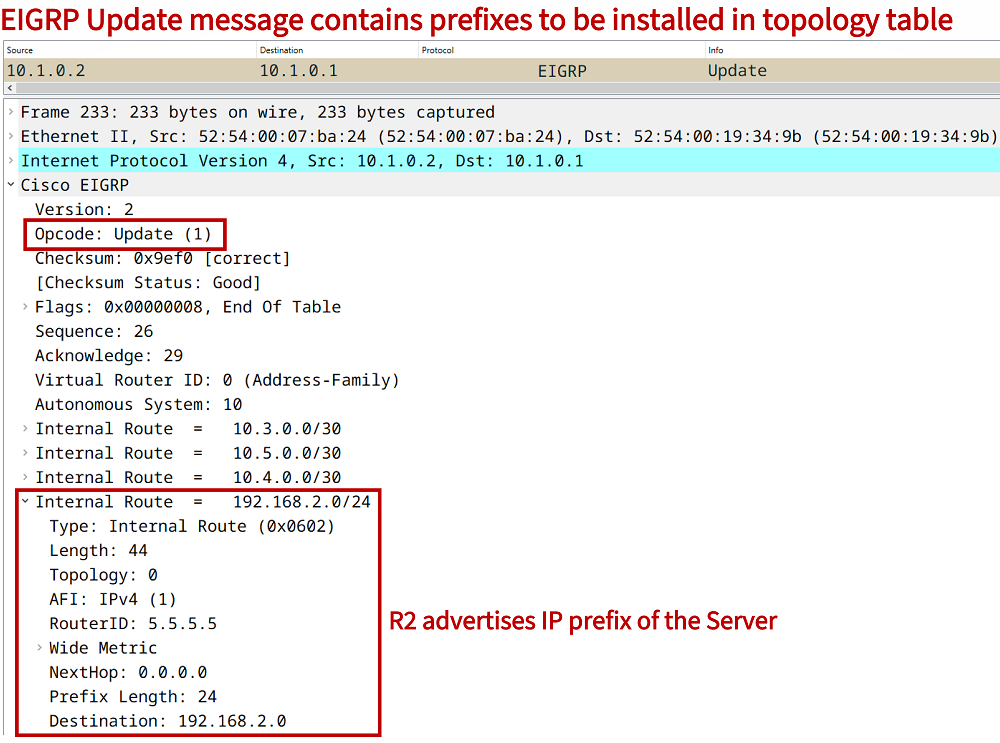
For example, the following EIGRP Update message contains the highlighted prefix 192.168.2.0/24 where the Server is located. As long as this Update message is received on R1 it will be installed in the EIGRP topology table (even if it does not meet the Feasibility Condition).
EIGRP Maximum Paths explained
When multiple EIGRP routes to the same destination are in the topology table, EIGRP can limit the specific number of routes to be installed in the routing table (RIB). By default, EIGRP installs 4 routes into the RIB for load balancing. The maximum-paths command is used to configure the maximum number of routes permitted into the RIB.
R1#show run | sec ^router eigrp
router eigrp EXAMPLE-EIGRP
 !
 address-family ipv4 unicast autonomous-system 10
  !
  af-interface GigabitEthernet0/0
   passive-interface
  exit-af-interface
  !
  topology base
   maximum-paths 1
   variance 2
  exit-af-topology
  network 10.1.0.0 0.0.0.3
  network 10.2.0.0 0.0.0.3
  network 192.168.1.0
  eigrp router-id 1.1.1.1
 exit-address-family