DHCP Default Route Object Tracking Tutorial with Examples
- Can you receive two DHCP default routes? ‹
- What happens if one of my default routes fails? ‹
- Failover without object tracking ‹
- DHCP default route with object tracking configuration ‹
- NAT with two outside interfaces ‹
- Download section ‹
Can you receive two DHCP default routes?
Yes, a router can receive two DHCP default routes and prioritize which one to use. In a multihomed scenario, a router may have two separate interfaces enabled with DHCP and each interface may be connected to a different internet provider.

In such a scenario a DHCP client router can assign different administrative distances (AD) to select the primary and secondary default route. Without changing the AD, the value 254 will be automatically assigned to a default route received via DHCP.
R1#show ip route | beg Ga
Gateway of last resort is 10.0.0.2 to network 0.0.0.0

S*    0.0.0.0/0 [254/0] via 10.0.0.2
      10.0.0.0/8 is variably subnetted, 2 subnets, 2 masks
C        10.0.0.0/30 is directly connected, GigabitEthernet0/0
L        10.0.0.1/32 is directly connected, GigabitEthernet0/0


R1#show ip route 0.0.0.0
Routing entry for 0.0.0.0/0, supernet
  Known via "static", distance 254, metric 0, candidate default path
  Routing Descriptor Blocks:
  * 10.0.0.2
      Route metric is 0, traffic share count is 1
The example command ip route 0.0.0.0 0.0.0.0 GigabitEthernet0/1 dhcp 25 assigns an AD of 25 to the default route received on interface Gi0/1. The default route with a lower AD is installed in the routing table.

What happens if one of my default routes fails?
If the primary default gateway fails, then a failover needs to happen to the secondary default route. This failover process may not be immediate. In fact, the local router may first need to wait for the DHCP lease of the primary default route to expire before it finds out about the gateway failure and installs the secondary default route.
To speed up the failover mechanism, object tracking can be configured together with a DHCP default route. The following is a sample configuration to accomplish this objective.
R2#show run int Gi0/1 | sec int
interface GigabitEthernet0/1
 ip dhcp client route track 10
 ip address dhcp
 ip virtual-reassembly in
 duplex auto
 speed auto
 media-type rj45

R2#show run | sec ^track 10
track 10 list boolean or
 object 1
 object 2

R2#show run | sec track 1_
track 1 ip sla 10

R2#show run | sec track 2_
track 2 ip sla 20
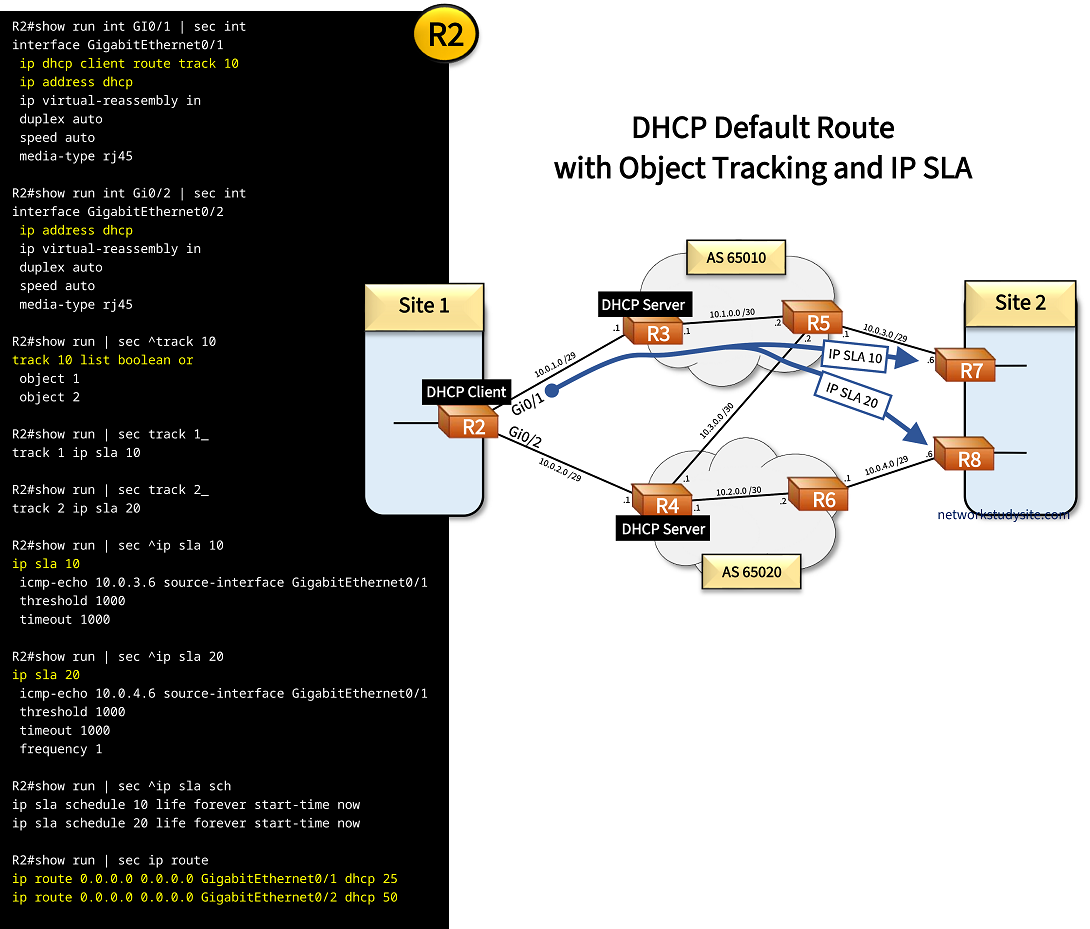
Based on the above configuration, a default route received on router R2 interface GigabitEthernet0/1 tracks object 10. In turn, track object 10 uses a boolean expression, and monitors two different IP SLAs, IP SLA 10 and 20. The command track 10 list boolean or means that both IP SLAs need to be down in order for object 10 to be down. Once object 10 is down, the default route received through DHCP is removed from the routing table.
Failover without object tracking
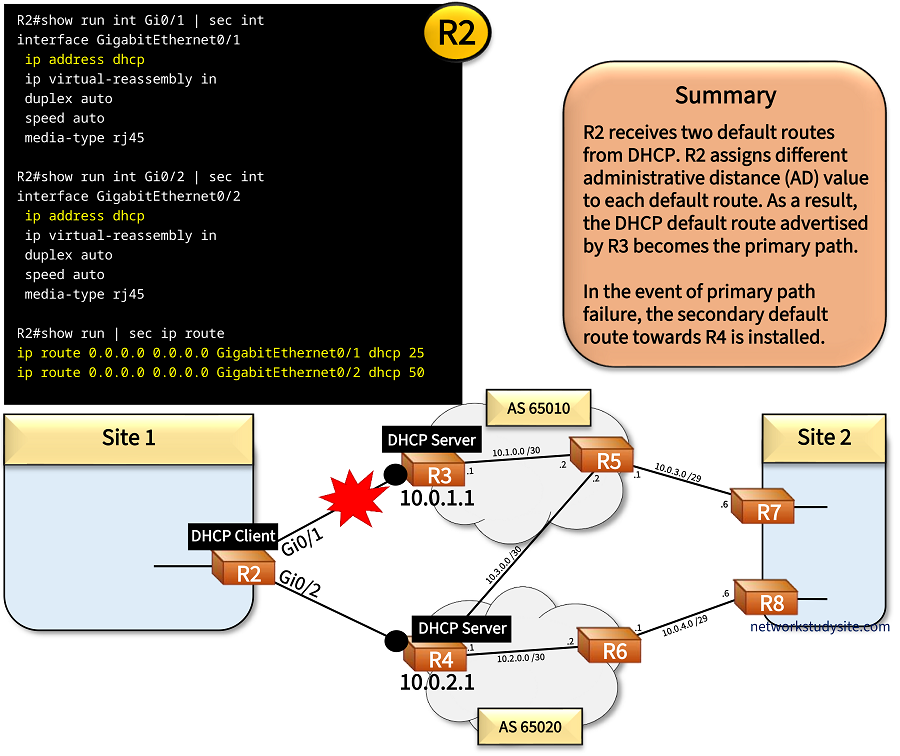
In the following example scenario, R2 receives interface IP addressing and default routes via DHCP from R3 and R4. The default routes are assigned different administrative distances on R2, AD 25 and 50. The default route received from R3 takes priority (AD 25), and it is installed in R2's RIB.
Configuration:
R2
R2#show run int GI0/1 | sec int
interface GigabitEthernet0/1
 ip address dhcp
 ip virtual-reassembly in
 duplex auto
 speed auto
 media-type rj45

R2#show run int Gi0/2 | sec int
interface GigabitEthernet0/2
 ip address dhcp
 ip virtual-reassembly in
 duplex auto
 speed auto
 media-type rj45

R2#show run | sec ip route
ip route 0.0.0.0 0.0.0.0 GigabitEthernet0/1 dhcp 25
ip route 0.0.0.0 0.0.0.0 GigabitEthernet0/2 dhcp 50
R3
R3#show run | sec dhcp
ip dhcp excluded-address 10.0.1.1 10.0.1.2
ip dhcp pool DHCP-Pool
 network 10.0.1.0 255.255.255.248
 default-router 10.0.1.1
 lease 0 0 1
R4
R4#show run | sec dhcp
ip dhcp excluded-address 10.0.2.1 10.0.2.3
ip dhcp pool DHCP-Pool
 network 10.0.2.0 255.255.255.248
 default-router 10.0.2.1
 lease 0 0 1
If link between R2 - R3 fails, the failover time is proportional to the DHCP lease time of the default route. Before the lease expires (in this scenario every minute), R2 sends a unicast DHCP Request message to R3 to extend the lease. If R2's DHCP Request to renew the lease is not answered, R2 sends DHCP Discover messages.
If there is no reply to the DHCP Discover messages, then the active default route on R2 is timed out. After timeout, the default route received from R4 takes precedence (AD 50), and the failover is complete. The process of such a DHCP lease expiry is shown in the following capture.

DHCP default route with object tracking configuration
The DHCP default route on R2 can track an object to trigger failover. In this example scenario two IP SLAs are configured on R2, and are tracked. Only if both IP SLAs are down, will the track object 10 also go down. When the track object 10 goes down on R2, it triggers the failover to the backup default route towards R4. This mechanism is achieved with the interface level command ip dhcp client route track 10.
Configuration:
R2
R2#show run int GI0/1 | sec int
interface GigabitEthernet0/1
 ip dhcp client route track 10
 ip address dhcp
 ip virtual-reassembly in
 duplex auto
 speed auto
 media-type rj45

R2#show run int Gi0/2 | sec int
interface GigabitEthernet0/2
 ip address dhcp
 ip virtual-reassembly in
 duplex auto
 speed auto
 media-type rj45

R2#show run | sec ^track 10
track 10 list boolean or
 object 1
 object 2

R2#show run | sec track 1_
track 1 ip sla 10

R2#show run | sec track 2_
track 2 ip sla 20

R2#show run | sec ^ip sla 10
ip sla 10
 icmp-echo 10.0.3.6 source-interface GigabitEthernet0/1
 threshold 1000
 timeout 1000

R2#show run | sec ^ip sla 20
ip sla 20
 icmp-echo 10.0.4.6 source-interface GigabitEthernet0/1
 threshold 1000
 timeout 1000
 frequency 1

R2#show run | sec ^ip sla sch
ip sla schedule 10 life forever start-time now
ip sla schedule 20 life forever start-time now

R2#show run | sec ip route
ip route 0.0.0.0 0.0.0.0 GigabitEthernet0/1 dhcp 25
ip route 0.0.0.0 0.0.0.0 GigabitEthernet0/2 dhcp 50
R3
R3#show run | sec dhcp
ip dhcp excluded-address 10.0.1.1 10.0.1.2
ip dhcp pool DHCP-Pool
 network 10.0.1.0 255.255.255.248
 default-router 10.0.1.1
 lease 0 0 1
R4
R4#show run | sec dhcp
ip dhcp excluded-address 10.0.2.1 10.0.2.3
ip dhcp pool DHCP-Pool
 network 10.0.2.0 255.255.255.248
 default-router 10.0.2.1
 lease 0 0 1
R2#show track 10
Track 10
  List boolean or
  Boolean OR is Up                            « Tracked object is Up
    26 changes, last change 00:00:17
    object 1 Up
    object 2 Up
  Tracked by:
    Static IP Routing 0                       « Default static route is tracking this object


R2#show ip route track-table
 ip route 0.0.0.0 0.0.0.0 10.0.1.1 254 track 10 state is [up]         « Tracked object state is up, route is installed in RIB
 ip route 0.0.0.0 0.0.0.0 GigabitEthernet0/1 10.0.1.1 25 track 10 state is [up]


R2#show ip route static | beg Ga
Gateway of last resort is 10.0.1.1 to network 0.0.0.0

S*    0.0.0.0/0 [25/0] via 10.0.1.1, GigabitEthernet0/1  « Route installed


R2#show track br
Track Type        Instance                   Parameter        State Last Change
1     ip sla      10                         state            Up    00:00:35
2     ip sla      20                         state            Up    00:00:35
10    list                                   boolean          Up    00:00:35


R2#show ip sla sum
IPSLAs Latest Operation Summary
Codes: * active, ^ inactive, ~ pending

ID           Type        Destination       Stats       Return      Last
                                           (ms)        Code        Run
-----------------------------------------------------------------------
*10          icmp-echo   10.0.3.6          RTT=85      OK          0 seconds ago


*20          icmp-echo   10.0.4.6          RTT=87      OK          0 seconds ago
In the above scenarios, network address translation (NAT) is not configured, instead routes are redistributed between OSPF and BGP to ensure end-to-end connectivity.
NAT with two outside interfaces
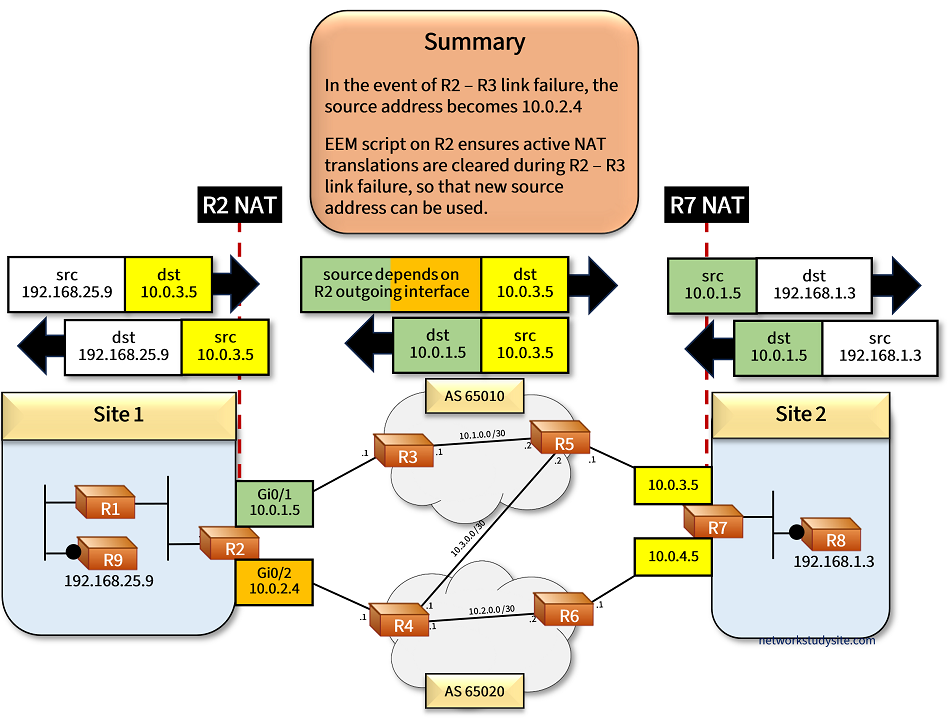
Building on the previous scenario, now NAT is also configured on R2 and translates inside source addresses depending on which outside interface — Gi0/1 or Gi0/2 — is actively used. If traffic is routed on the primary path through R2 egress interface Gi0/1, then the inside source addresses are translated to the (outside) address of R2 Gi0/1. This outside address is always received by DHCP.
However, if a failover happens on R2 and interface Gi0/2 becomes the egress interface for all traffic, then the inside source addresses are translated to the (outside) address of R2 Gi0/2. The IP address of Gi0/2 is always received by DHCP (same mechanism as interface Gi0/1).
For ongoing traffic flows with active NAT translations to failover, an EEM script is configured on R2, clearing NAT translations every time track object 10 changes state (Up/Down). In other words, whenever a failover happens, NAT translations are automatically cleared.
Meanwhile on R7, NAT is configured to statically translate two outside addresses — Gi0/0 and Gi0/2 — to the same inside address 192.168.1.3 (R8) using the extendable command. This means, traffic received to R7 Gi0/0 or to R7 Gi0/2 gets routed to R8. Both interfaces on R7 will NAT translate and send traffic directly to R8.

Configuration:
R2
R2#show run | sec ^ip nat
ip nat inside source route-map RM-INSIDE-SOURCE-NAT-R3 interface GigabitEthernet0/1 overload
ip nat inside source route-map RM-INSIDE-SOURCE-NAT-R4 interface GigabitEthernet0/2 overload

R2#show run | sec ^route-map
route-map RM-INSIDE-SOURCE-NAT-R4 permit 10
 match ip address ACL-NAT-INSIDE
 match interface GigabitEthernet0/2
route-map RM-INSIDE-SOURCE-NAT-R3 permit 10
 match ip address ACL-NAT-INSIDE
 match interface GigabitEthernet0/1

R2#show run | sec ip access-list standard ACL-NAT-INSIDE
ip access-list standard ACL-NAT-INSIDE
 permit 192.168.0.0 0.0.0.15
 permit 192.168.25.0 0.0.0.31
 permit 192.168.25.64 0.0.0.31

R2#show run int Gi0/0 | sec int
interface GigabitEthernet0/0
 description ** LAN **
 ip address 192.168.0.1 255.255.255.248
 ip nat inside
 ip virtual-reassembly in
 duplex auto
 speed auto
 media-type rj45

R2#show run int Gi0/1 | sec int
interface GigabitEthernet0/1
 ip dhcp client route track 10
 ip address dhcp
 ip nat outside
 ip virtual-reassembly in
 duplex auto
 speed auto
 media-type rj45

R2#show run int Gi0/2 | sec int
interface GigabitEthernet0/2
 ip address dhcp
 ip nat outside
 ip virtual-reassembly in
 duplex auto
 speed auto
 media-type rj45

R2#show run | sec event
event manager applet EEM-CLEAR-NAT-TRANSLATIONS-DOWN-UP
 event track 10 state any
 action 1  cli command "enable"
 action 2  cli command "clear ip nat translation *"
 action 99 syslog msg "R2 - R3 link down or up, cleared NAT translations to enable failover for active sessions."
R7
R7#show run | sec ^ip nat
ip nat inside source static 192.168.1.3 10.0.3.5 extendable
ip nat inside source static 192.168.1.3 10.0.4.5 extendable

R7#show run int Gi0/0 | sec int
interface GigabitEthernet0/0
 description ** R5 **
 ip address 10.0.3.5 255.255.255.248 secondary
 ip address 10.0.3.6 255.255.255.248
 ip nat outside
 ip virtual-reassembly in
 duplex auto
 speed auto
 media-type rj45

R7#show run int Gi0/2 | sec int
interface GigabitEthernet0/2
 description ** R6 **
 ip address 10.0.4.5 255.255.255.248 secondary
 ip address 10.0.4.6 255.255.255.248
 ip nat outside
 ip virtual-reassembly in
 duplex auto
 speed auto
 media-type rj45

R7#show run int Gi0/1 | sec int
interface GigabitEthernet0/1
 description ** LAN **
 ip address 192.168.1.1 255.255.255.248
 ip nat inside
 ip virtual-reassembly in
 duplex auto
 speed auto
 media-type rj45
R2#show event manager policy registered
No.  Class     Type    Event Type          Trap  Time Registered           Name
1    applet    user    track               Off   Mon Nov 14 18:22:49 2022  EEM-CLEAR-NAT-TRANSLATIONS-DOWN-UP
 track 10 state any
 maxrun 20.000
 action 1  cli command "enable"
 action 2  cli command "clear ip nat translation *"
 action 99 syslog msg "R2 - R3 link down or up, cleared NAT translations to enable failover for active sessions."
The above output displays the instructions assigned to the EEM script. Accordingly, the state changes (Up or Down) of track object 10 will trigger the EEM script. When the script is triggered, it will issue the command clear ip nat translation * in privileged exec mode.
The following image provides more details. On Site 2, R8 has two global addresses (color yellow), and both can be used interchangeably due to NAT with the extendable keyword. This means, if traffic is destined to 10.0.3.5 or to 10.0.4.5 it will always be translated to the single IP address 192.168.1.3 of R8.