ICMP Redirect with HSRP Described using Configuration
Table of Contents
- What is ICMP Redirect? ‹
- Example scenario with two HSRP Groups ‹
- ICMP Redirect instead of failover ‹
- Conclusion ‹
- Download section ‹
What is ICMP Redirect?
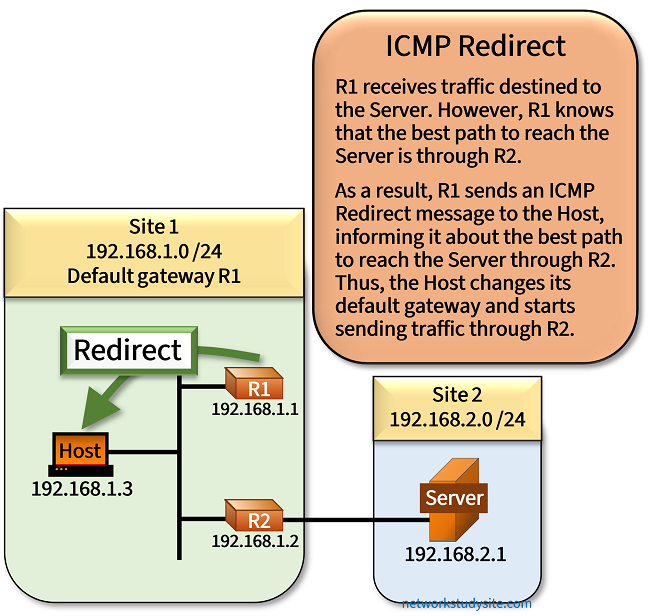
The ICMP Redirect feature enables a router to inform hosts about an alternative next-hop addres to reach their destination. An ICMP Redirect message may be triggered if a router receives a packet, and finds that the destination IP address can be reached by forwarding the packet out the same interface it was received on.

In the following scenario, the Host has the default gateway IP address 192.168.1.1 of R1 installed. When the Host tries to reach the Server through R1, it is informed by R1 to instead use R2 in order to reach the Server. In other words, R1 recognizes that the Server is reachable through R2, and so it sends an ICMP Redirect message to the Host, advising about a better path.
Configuration:
R1
R1#show run int Gi0/0 | sec int
interface GigabitEthernet0/0
 description ** to Host in Site 1 LAN **
 ip address 192.168.1.1 255.255.255.0
 duplex auto
 speed auto
 media-type rj45

R1#show run | sec ^router
router ospf 10
 router-id 1.1.1.1
 network 192.168.1.0 0.0.0.255 area 0
R2
R2#show run int Gi0/0 | sec int
interface GigabitEthernet0/0
 description ** to Host in Site 1 LAN **
 ip address 192.168.1.2 255.255.255.0
 duplex auto
 speed auto
 media-type rj45

R2#show run int Gi0/1 | sec int
interface GigabitEthernet0/1
 description ** to Server **
 ip address 192.168.2.2 255.255.255.0
 duplex auto
 speed auto
 media-type rj45

R2#show run | sec ^router
router ospf 10
 router-id 2.2.2.2
 network 192.168.1.0 0.0.0.255 area 0
 network 192.168.2.0 0.0.0.255 area 0
Host
Host#show run int Gi0/0 | sec int
interface GigabitEthernet0/0
 description ** to R1 and R2 **
 ip address 192.168.1.3 255.255.255.0
 duplex auto
 speed auto
 media-type rj45

Host#show run | sec ^ip route
ip route 0.0.0.0 0.0.0.0 GigabitEthernet0/0 192.168.1.1
Server
Server#show run int Gi0/0 | sec int
interface GigabitEthernet0/0
 description ** to R2 **
 ip address 192.168.2.1 255.255.255.0
 duplex auto
 speed auto
 media-type rj45

Server#show run | sec ^ip route
ip route 0.0.0.0 0.0.0.0 GigabitEthernet0/0 192.168.2.2
Host#ping 192.168.2.1
Type escape sequence to abort.
Sending 5, 100-byte ICMP Echos to 192.168.2.1, timeout is 2 seconds:
U.!!!
Success rate is 60 percent (3/5), round-trip min/avg/max = 2/3/5 ms


R1#show ip route ospf | beg Ga
Gateway of last resort is not set

O     192.168.2.0/24 [110/2] via 192.168.1.2, 00:23:05, GigabitEthernet0/0


R1#show ip cef exact-route 192.168.1.1 192.168.2.1
192.168.1.1 -> 192.168.2.1 =>IP adj out of GigabitEthernet0/0, addr 192.168.1.2         « R1 can reach the Server through R2


R1#show ip traffic | sec ICMP statistics
ICMP statistics:
  Rcvd: 0 format errors, 0 checksum errors, 0 redirects, 0 unreachable
        0 echo, 0 echo reply, 0 mask requests, 0 mask replies, 0 quench
        0 parameter, 0 timestamp, 0 timestamp replies, 0 info request, 0 other
        0 irdp solicitations, 0 irdp advertisements
        0 time exceeded, 0 info replies
  Sent: 4 redirects, 0 unreachable, 0 echo, 0 echo reply
        0 mask requests, 0 mask replies, 0 quench, 0 timestamp, 0 timestamp replies
        0 info reply, 0 time exceeded, 0 parameter problem
        0 irdp solicitations, 0 irdp advertisements


Host#show ip traffic | sec ICMP statistics
ICMP statistics:
  Rcvd: 0 format errors, 0 checksum errors, 4 redirects, 0 unreachable
        0 echo, 114 echo reply, 0 mask requests, 0 mask replies, 0 quench
        0 parameter, 0 timestamp, 0 timestamp replies, 0 info request, 0 other
        0 irdp solicitations, 0 irdp advertisements
        0 time exceeded, 0 info replies
  Sent: 0 redirects, 0 unreachable, 115 echo, 0 echo reply
        0 mask requests, 0 mask replies, 0 quench, 0 timestamp, 0 timestamp replies
        0 info reply, 0 time exceeded, 0 parameter problem
        0 irdp solicitations, 0 irdp advertisements
ICMP Redirect and HSRP can work together in a way that the Redirect message advises about an HSRP virtual IP address (vIP). Upon receiving the Redirect message, a host can install an HSRP vIP address as its new default gateway. The following sections describe such a mechanism.
Example scenario with two HSRP Groups
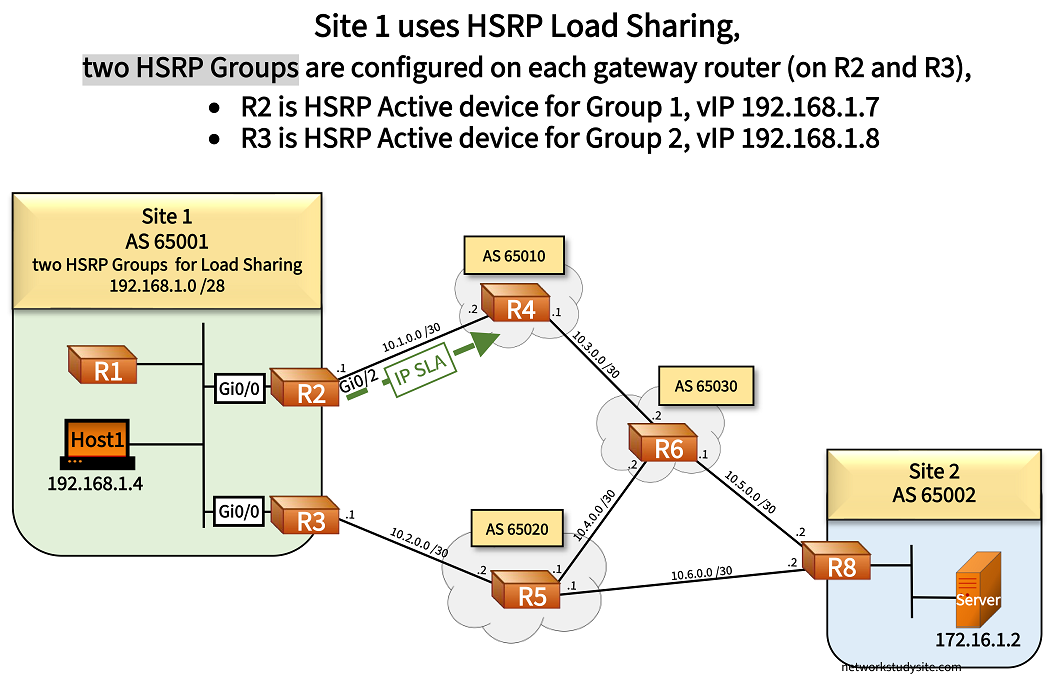
In this example scenario, AS 65001 uses the Customer Edge (CE) routers R2 and R3 for multihoming. The CE routers connect with eBGP to AS 65010 and 65020 respectively. Through this redundant connection, AS 65001 can reach the Server in AS 65002.
R2 and R3 have HSRP configured. Two HSRP groups are created, and both CE routers are active in one of the group. This means, both CE routers forward traffic sumaltaneously (HSRP Load Sharing). The interface Gi0/0 on R2 and R3 are configured with the following:
- R2 is the active router for HSRP Group 1 - virtual IP 192.168.1.7
- R3 is the active router for HSRP Group 2 - virtual IP 192.168.1.8
Configuration:
R2
R2#show run int Gi0/0 | sec interface
interface GigabitEthernet0/0
 description ** SW1 **
 ip address 192.168.1.1 255.255.255.240
 standby version 2
 standby 1 ip 192.168.1.7
 standby 1 priority 110
 standby 1 preempt
 standby 1 name HSRP-GROUP-1
 standby 1 track 1 decrement 30
 standby 2 ip 192.168.1.8
 standby 2 priority 90
 standby 2 preempt
 standby 2 name HSRP-GROUP-2
 duplex auto
 speed auto
 media-type rj45
R3
R3#show run int Gi0/0 | sec interface
interface GigabitEthernet0/0
 description ** SW1 **
 ip address 192.168.1.2 255.255.255.240
 standby version 2
 standby 1 ip 192.168.1.7
 standby 1 priority 90
 standby 1 preempt
 standby 1 name HSRP-GROUP-1
 standby 2 ip 192.168.1.8
 standby 2 priority 110
 standby 2 preempt
 standby 2 name HSRP-GROUP-2
 duplex auto
 speed auto
 media-type rj45
HSRP Group 1 on R2 is tracking an ICMP IP SLA configured towards R4. If the IP SLA is unreachable, track object goes down, and HSRP Group 1 activates CE router R3. The is the HSRP failover mechanism for Group 1 in case the link R2 - R4 fails.
R2#show standby br
                     P indicates configured to preempt.
                     |
Interface   Grp  Pri P State   Active          Standby         Virtual IP
Gi0/0       1    110 P Active  local           192.168.1.2     192.168.1.7
Gi0/0       2    90  P Standby 192.168.1.2     local           192.168.1.8


R2#show track 1
Track 1
  IP SLA 10 reachability
  Reachability is Up
    3 changes, last change 01:21:44
  Latest operation return code: OK
  Latest RTT (millisecs) 1
  Tracked by:
    HSRP GigabitEthernet0/0 1         « Tracked by HSRP
Host1 uses the default gateway IP address of HSRP Group 1, where the active router is R2. From R2, currently the best path to reach Server1 is to take the path through the eBGP neighbor R4. This is shown in the following output.
R2#show ip cef exact-route 192.168.1.4 172.16.1.2
192.168.1.4 -> 172.16.1.2 =>IP adj out of GigabitEthernet0/2, addr 10.1.0.2    « Next-hop is R4


R2#show ip route 172.16.1.2
Routing entry for 172.16.1.0/29
  Known via "bgp 65001", distance 20, metric 0
  Tag 65010, type external
  Redistributing via ospf 1
  Advertised by ospf 1 metric 25 metric-type 1 subnets tag 65010
  Last update from 10.1.0.2 00:18:56 ago
  Routing Descriptor Blocks:
  * 10.1.0.2, from 10.1.0.2, 00:18:56 ago
      Route metric is 0, traffic share count is 1
      AS Hops 3
      Route tag 65010
      MPLS label: none
ICMP Redirect instead of failover
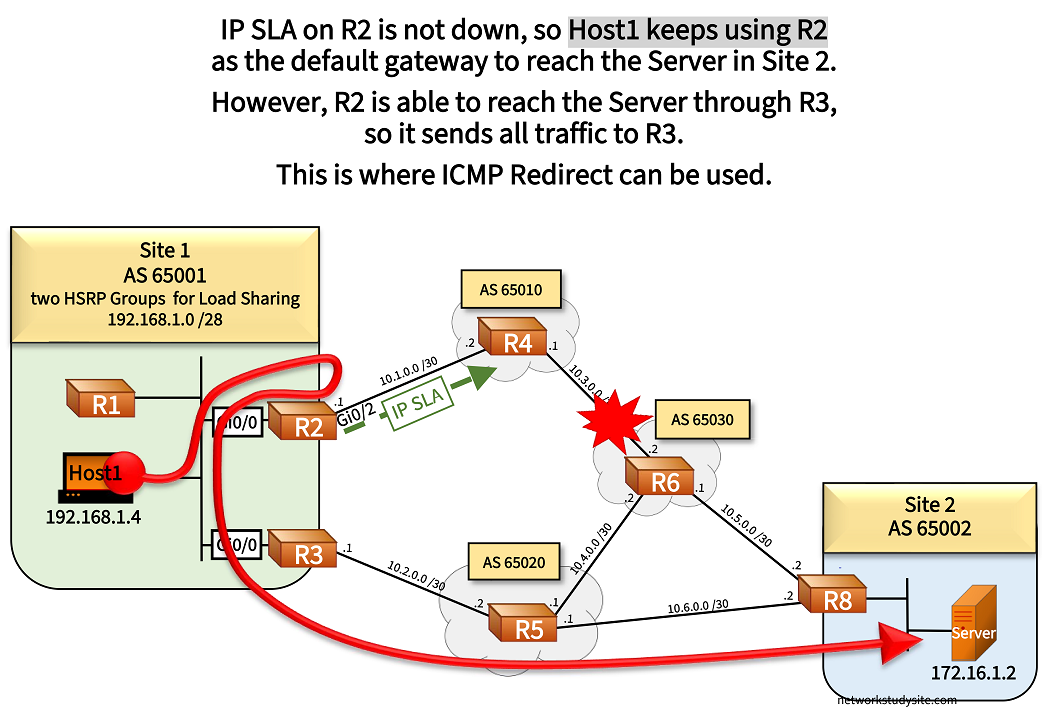
Importantly, when the link between R4 - R6 fails, it does not affect the IP SLA on R2, and no HSRP failover happens. As a result, R3 is not activated for HSRP Group 1, and Host1 continues to use R2 as its default gateway.
However, now two actions take place:
- R2 receives a packet (ingress) on Gi0/0 destined to the Server in Site 2.
- R2 consults its routing table, and finds that the best path is through R3. As a result, R2 would need to send the (egress) packet out on the same interface Gi0/0 where it was received on.
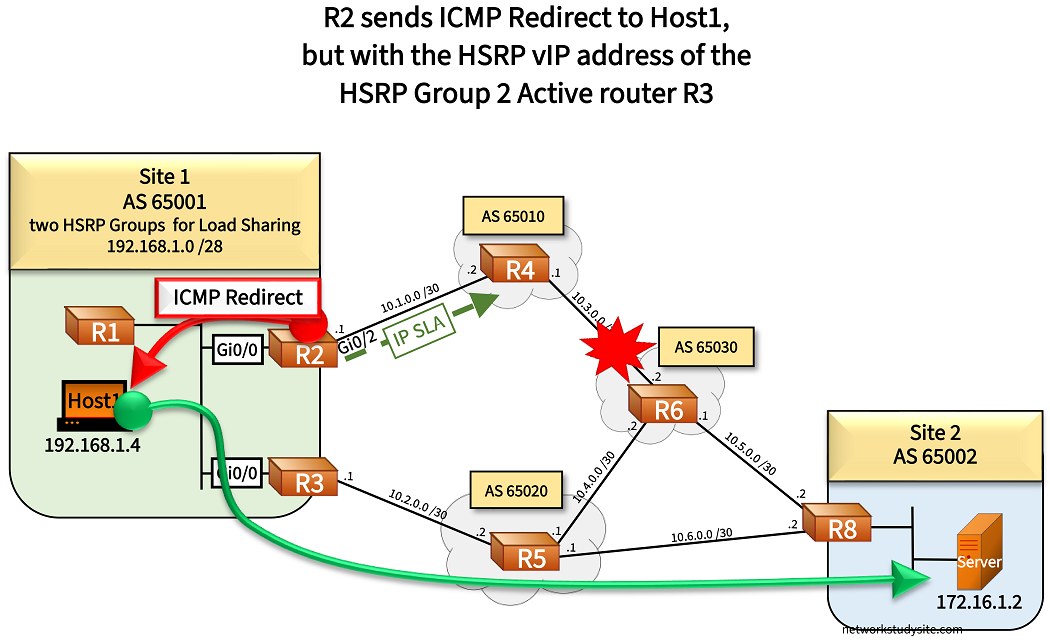
At this point the ICMP Redirect feature on R2 instructs Host1 of a better path through R3. However, the ICMP Redirect packet sends the HSRP vIP address of Group 2, where R3 is currently the active device. In other words, the ICMP Redirect feature is aware of both HSRP Groups, and can instruct the Host to use another HSRP vIP address (instead of sending the physical interface address of R3).
Note that R3 is currently the standby router for HSRP Group 1, but R3 is the active router for HSRP Group 2. The current path taken from Host1 to the Server is shown below, before the ICMP Redirect feature is triggered.
R2#show ip cef exact-route 192.168.1.4 172.16.1.2
192.168.1.4 -> 172.16.1.2 =>IP adj out of GigabitEthernet0/0, addr 192.168.1.2       « Next-hop is R3


R2#show ip route 172.16.1.0
Routing entry for 172.16.1.0/29
  Known via "ospf 1", distance 110, metric 51                              « Learned via OSPF
  Tag 65020, type extern 1
  Redistributing via bgp 65001
  Last update from 192.168.1.2 on GigabitEthernet0/0, 00:00:38 ago         « Physical address of next-hop 192.168.1.2 (on R3)
  Routing Descriptor Blocks:
  * 192.168.1.2, from 3.3.3.3, 00:00:38 ago, via GigabitEthernet0/0
      Route metric is 51, traffic share count is 1
      Route tag 65020
In the following image, R2 informs Host1 with an ICMP Redirect message to choose R3 HSRP vIP as the default gateway to reach the Server in Site 2. Specifically, the ICMP message type 5 code 1 is used to instruct Host1 of a different next-hop IP address.
R2#show ip traffic | sec ICMP
ICMP statistics:
  Rcvd: 0 format errors, 0 checksum errors, 0 redirects, 0 unreachable
        0 echo, 734 echo reply, 0 mask requests, 0 mask replies, 0 quench
        0 parameter, 0 timestamp, 0 timestamp replies, 0 info request, 0 other
        0 irdp solicitations, 0 irdp advertisements
        0 time exceeded, 0 info replies
  Sent: 1 redirects, 0 unreachable, 751 echo, 0 echo reply                           « ICMP Redirect message sent by R2
        0 mask requests, 0 mask replies, 0 quench, 0 timestamp, 0 timestamp replies
        0 info reply, 5 time exceeded, 0 parameter problem
        0 irdp solicitations, 0 irdp advertisements


Host1#trace 172.16.1.2 pr 1
Type escape sequence to abort.
Tracing the route to 172.16.1.2
VRF info: (vrf in name/id, vrf out name/id)
  1 192.168.1.1 4 msec                               « Here R2 sends the ICMP Redirect message to Host1 before forwarding the trace
  2 192.168.1.2 6 msec
  3 10.6.0.2 7 msec
  4 172.16.1.2 9 msec


Host1#trace 172.16.1.2 pr 1
Type escape sequence to abort.
Tracing the route to 172.16.1.2
VRF info: (vrf in name/id, vrf out name/id)
  1 192.168.1.2 4 msec                               « Host1 installs new gateway address and starts using it
  2 10.2.0.2 5 msec
  3 10.6.0.2 6 msec
  4 172.16.1.2 9 msec


Host1#show ip route
Default gateway is 192.168.1.7

Host               Gateway           Last Use    Total Uses  Interface
172.16.1.2         192.168.1.8           0:34            18  GigabitEthernet0/0      « New gateway installed due to ICMP Redirect
Conclusion
In conclusion, when R2 sends the ICMP Redirect message to Host1, it sends the virtual IP address of HSRP Group 2 (192.168.1.8). The ICMP Redirect message containing the HSRP vIP is sent because there is an active device in HSRP Group 2.
This scenario is an example of how HSRP and the ICMP Redirect feature can work together. After the redirect message is received by Host1, the new gateway is installed, and now Host1 uses the vIP address of HSRP Group 2.
ICMP Redirect messages are generated by the CPU of R2, and high volumes of redirect messages can impact router performance.
R2#show ip cef switching statistics

       Reason                          Drop       Punt  Punt2Host
RP LES Packet destined for us             0       1324          0
RP LES TTL expired                        0          0       1393
RP LES IP redirects                       0          0          1       « ICMP Redirect punt packet, handled by the CPU
RP LES Total                              0       1324       1394

All    Total                              0       1324       1394
Note that even after the link between R4 - R6 is restored, Host1 keeps using R3 as its gateway, although originally configured for gateway R2. Commonly, the ICMP Redirect feature is disabled in production networks.