Bidirectional PIM Configuration and Phantom RP Explained
Table of Contents
- What is Bidirectional PIM? ‹
- How to configure Bidirectional PIM? ‹
- RP redundancy with Phantom RP configuration ‹
- Download section ‹
What is Bidirectional PIM?
Bidirectional PIM is a scalable variant of PIM Sparse Mode and uses only Shared Trees rooted at the Rendezvous Point. With a large number of simultanous multicast sources and receivers, the Source-Based Tree (S,G) entries installed by PIM Sparse Mode require increased system resources on each router. However, Bidirectional PIM overcomes this limitation by only using Shared Tree (*,G) entries.
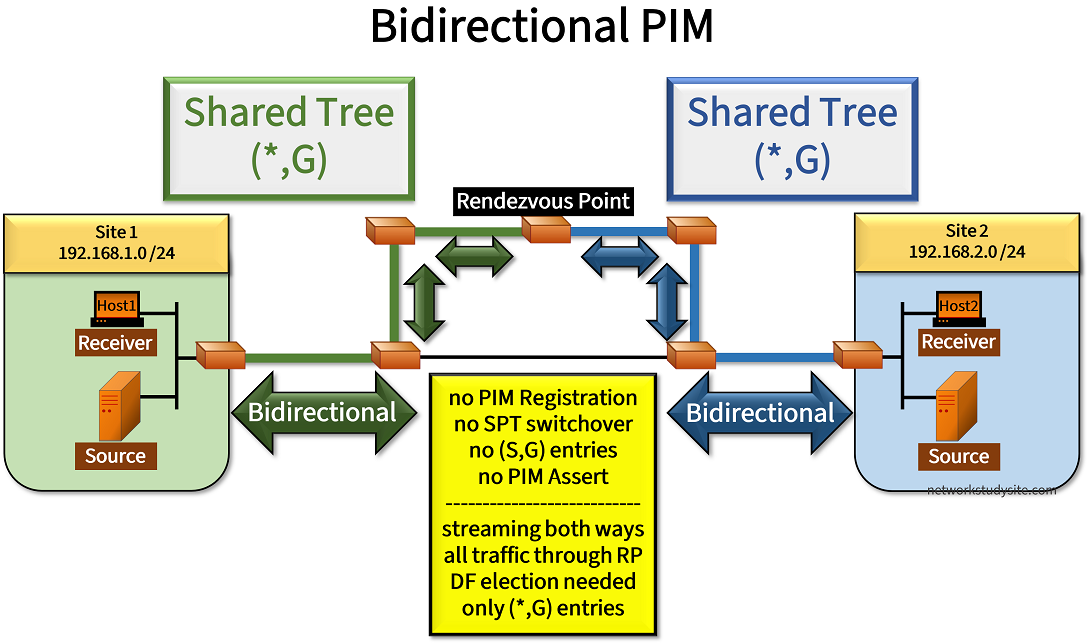
The above image highlights several important aspects of Bidirectional PIM that are detailed in the following list.
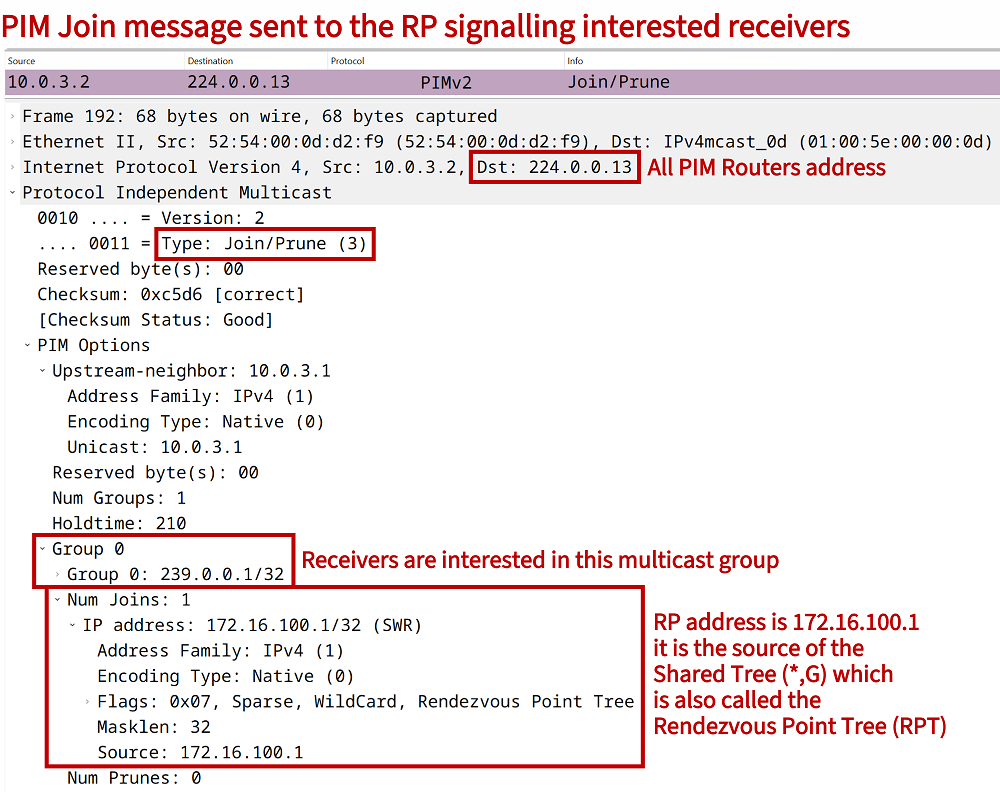
- Similarities to PIM Sparse Mode include that Bidirectional PIM uses a Rendezvous Point (RP) which can be statically configured, or dynamically advertised with a Bootstrap Router (BSR) or Auto-RP. Also, receivers that request a particular multicast stream are signalled with PIM Join messages sent to the RP, which is also the same as in PIM Sparse Mode.
- However, in Bidirectional PIM multicast sources start sending data to the RP natively without a registration process and without encapsulation (tunneling) in a unicast packet. This is because there is no Source-Based Tree (S,G) in bidirectional PIM, and the Shared Trees (*,G) rooted at the RP are bidirectional. Note that in PIM Sparse Mode the Shared Tree is unidirectional, and only forwards traffic from the RP towards the receivers.
- Since all traffic chooses the path through the RP there is no SPT switchover. This means, RP placement and RP redundancy is very important with Bidirectional PIM.
- For loop-avoidance, Bidirectional PIM uses the concept of a Designated Forwarder (DF) which is elected on each PIM-enabled link, except for the link directly connected to the RP. The DF election between two routers is based on the unicast routing protocol Administrative Distance (AD) or the metric to reach the RP. Thus, the router with the better AD or a better unicast metric to the RP becomes the DF for each link. If the AD and metric are the same, the router with the highest IP address wins the election.
- A DF is elected for each RP and not for each multicast group. This means, there can be different DF routers on a shared segment if there are multiple RPs configured.
- The DF election ensures a loop-free path centered at the RP, and the DF forwards PIM Join messages to the RP. As a result, Bidirectional PIM does not use the PIM Assert mechanism which relies on the same election process. Note that the DF election packets as well as PIM Assert packets contain the AD of the unicast routing protocol configured on the originating router. If the AD is changed, this also means the Metric Preference value changes in the DF/PIM Assert election process.


How to configure Bidirectional PIM?
In the following example scenario Bidirectional PIM is configured with the Rendezvous Point (RP) R4. To dynamically advertise the group-to-RP mapping in the PIM-domain, R4 is also configured as the Bootstrap Router (BSR). The configuration is similar to PIM Sparse Mode except for the command ip pim rp-candidate Loopback10 group-list ACL-EXAMPLE-GROUP bidir which includes the keyword bidir.
The similarity to PIM Sparse Mode is further visible when configuring Bidirectional PIM. Each PIM-enabled router has the interface-level command ip pim sparse-mode added. However, additionally the global configuration command ip pim bidir-enable is also needed to enabled Bidirectional PIM.
Thus, in the following topology Source1 and Source2 both stream multicast traffic to the single group address 239.0.0.1. This means, traffic is transmitted in both directions along the Shared Distribution Tree which is centered at the RP. Note that there is no SPT switchover, so multicast traffic will never be transmitted across the directly connected link R2 - R6 (subnet 10.0.6.0/30).

Configuration:
R1
R1#show run | sec ^ip multi
ip multicast-routing

R1#show run | sec ^ip pim
ip pim bidir-enable

R1#show run int Gi0/0 | sec int
interface GigabitEthernet0/0
 description ** to Site 1 LAN **
 ip address 192.168.1.3 255.255.255.0
 ip pim sparse-mode
 duplex auto
 speed auto
 media-type rj45

R1#show run int Gi0/1 | sec int
interface GigabitEthernet0/1
 description ** to R2 **
 ip address 10.0.1.1 255.255.255.252
 ip pim sparse-mode
 duplex auto
 speed auto
 media-type rj45

R1#show run | sec ^router
router eigrp EXAMPLE-EIGRP
 !
 address-family ipv4 unicast autonomous-system 10
  !
  af-interface GigabitEthernet0/0
   passive-interface
  exit-af-interface
  !
  topology base
  exit-af-topology
  network 10.0.1.0 0.0.0.3
  network 192.168.1.0
  eigrp router-id 1.1.1.1
 exit-address-family
R2
R2#show run | sec ^ip multi
ip multicast-routing

R2#show run | sec ^ip pim
ip pim bidir-enable

R2#show run int Gi0/0 | sec int
interface GigabitEthernet0/0
 description ** to R1 **
 ip address 10.0.1.2 255.255.255.252
 ip pim sparse-mode
 duplex auto
 speed auto
 media-type rj45

R2#show run int Gi0/1 | sec int
interface GigabitEthernet0/1
 description ** to R3 **
 ip address 10.0.2.1 255.255.255.252
 ip pim sparse-mode
 duplex auto
 speed auto
 media-type rj45

R2#show run int Gi0/2 | sec int
interface GigabitEthernet0/2
 description ** to R6 **
 ip address 10.0.6.1 255.255.255.252
 ip pim sparse-mode
 duplex auto
 speed auto
 media-type rj45

R2#show run | sec ^router
router eigrp EXAMPLE-EIGRP
 !
 address-family ipv4 unicast autonomous-system 10
  !
  topology base
  exit-af-topology
  network 10.0.1.0 0.0.0.3
  network 10.0.2.0 0.0.0.3
  network 10.0.6.0 0.0.0.3
  eigrp router-id 2.2.2.2
 exit-address-family
R3
R3#show run | sec ^ip multi
ip multicast-routing

R3#show run | sec ^ip pim
ip pim bidir-enable

R3#show run int Gi0/0 | sec int
interface GigabitEthernet0/0
 description ** to R2 **
 ip address 10.0.2.2 255.255.255.252
 ip pim sparse-mode
 duplex auto
 speed auto
 media-type rj45

R3#show run int Gi0/1 | sec int
interface GigabitEthernet0/1
 description ** to R4 **
 ip address 10.0.3.1 255.255.255.252
 ip pim sparse-mode
 duplex auto
 speed auto
 media-type rj45

R3#show run | sec ^router
router eigrp EXAMPLE-EIGRP
 !
 address-family ipv4 unicast autonomous-system 10
  !
  topology base
  exit-af-topology
  network 10.0.2.0 0.0.0.3
  network 10.0.3.0 0.0.0.3
  eigrp router-id 3.3.3.3
 exit-address-family
R4 (RP/BSR)
R4#show run | sec ^ip multi
ip multicast-routing

R4#show run | sec ^ip pim
ip pim bidir-enable
ip pim bsr-candidate Loopback10 0
ip pim rp-candidate Loopback10 group-list ACL-EXAMPLE-GROUP bidir

R4#show run | sec ^ip access
ip access-list standard ACL-EXAMPLE-GROUP
 permit 239.0.0.1

R4#show run int Lo10 | sec int
interface Loopback10
 ip address 4.4.4.4 255.255.255.255
 ip pim sparse-mode

R4#show run int Gi0/0 | sec int
interface GigabitEthernet0/0
 description ** to R3 **
 ip address 10.0.3.2 255.255.255.252
 ip pim sparse-mode
 duplex auto
 speed auto
 media-type rj45

R4#show run int Gi0/1 | sec int
interface GigabitEthernet0/1
 description ** to R5 **
 ip address 10.0.4.1 255.255.255.252
 ip pim sparse-mode
 duplex auto
 speed auto
 media-type rj45

R4#show run | sec ^router
router eigrp EXAMPLE-EIGRP
 !
 address-family ipv4 unicast autonomous-system 10
  !
  topology base
  exit-af-topology
  network 4.4.4.4 0.0.0.0
  network 10.0.3.0 0.0.0.3
  network 10.0.4.0 0.0.0.3
  eigrp router-id 4.4.4.4
 exit-address-family
R5
R5#show run | sec ^ip multi
ip multicast-routing

R5#show run | sec ^ip pim
ip pim bidir-enable

R5#show run int Gi0/0 | sec int
interface GigabitEthernet0/0
 description ** to R6 **
 ip address 10.0.5.2 255.255.255.252
 ip pim sparse-mode
 duplex auto
 speed auto
 media-type rj45

R5#show run int Gi0/1 | sec int
interface GigabitEthernet0/1
 description ** to R4 **
 ip address 10.0.4.2 255.255.255.252
 ip pim sparse-mode
 duplex auto
 speed auto
 media-type rj45

R5#show run | sec ^router
router eigrp EXAMPLE-EIGRP
 !
 address-family ipv4 unicast autonomous-system 10
  !
  topology base
  exit-af-topology
  network 10.0.4.0 0.0.0.3
  network 10.0.5.0 0.0.0.3
  eigrp router-id 5.5.5.5
 exit-address-family
R6
R6#show run | sec ^ip multi
ip multicast-routing

R6#show run | sec ^ip pim
ip pim bidir-enable

R6#show run int Gi0/0 | sec int
interface GigabitEthernet0/0
 description ** to R7  **
 ip address 10.0.7.2 255.255.255.252
 ip pim sparse-mode
 duplex auto
 speed auto
 media-type rj45

R6#show run int Gi0/1 | sec int
interface GigabitEthernet0/1
 description ** to R5 **
 ip address 10.0.5.1 255.255.255.252
 ip pim sparse-mode
 duplex auto
 speed auto
 media-type rj45

R6#show run int Gi0/2 | sec int
interface GigabitEthernet0/2
 description ** to R2 **
 ip address 10.0.6.2 255.255.255.252
 ip pim sparse-mode
 duplex auto
 speed auto
 media-type rj45

R6#show run | sec ^router
router eigrp EXAMPLE-EIGRP
 !
 address-family ipv4 unicast autonomous-system 10
  !
  topology base
  exit-af-topology
  network 10.0.5.0 0.0.0.3
  network 10.0.6.0 0.0.0.3
  network 10.0.7.0 0.0.0.3
  eigrp router-id 6.6.6.6
 exit-address-family
R7
R7#show run | sec ^ip multi
ip multicast-routing

R7#show run | sec ^ip pim
ip pim bidir-enable

R7#show run int Gi0/0 | sec int
interface GigabitEthernet0/0
 description ** to Site 2 LAN  **
 ip address 192.168.2.3 255.255.255.0
 ip pim sparse-mode
 duplex auto
 speed auto
 media-type rj45

R7#show run int Gi0/1 | sec int
interface GigabitEthernet0/1
 description ** to R6 **
 ip address 10.0.7.1 255.255.255.252
 ip pim sparse-mode
 duplex auto
 speed auto
 media-type rj45

R7#show run | sec ^router
router eigrp EXAMPLE-EIGRP
 !
 address-family ipv4 unicast autonomous-system 10
  !
  af-interface GigabitEthernet0/0
   passive-interface
  exit-af-interface
  !
  topology base
  exit-af-topology
  network 10.0.7.0 0.0.0.3
  network 192.168.2.0
  eigrp router-id 7.7.7.7
 exit-address-family
Host1
Host1#show run int Gi0/0 | sec int
interface GigabitEthernet0/0
 description ** to R1 **
 ip address 192.168.1.2 255.255.255.0
 ip igmp join-group 239.0.0.1
 duplex auto
 speed auto
 media-type rj45

Host1#show run | sec ^ip route
ip route 0.0.0.0 0.0.0.0 GigabitEthernet0/0 192.168.1.3
Host2
Host2#show run int Gi0/0 | sec int
interface GigabitEthernet0/0
 description ** to R7 **
 ip address 192.168.2.2 255.255.255.0
 ip igmp join-group 239.0.0.1
 duplex auto
 speed auto
 media-type rj45

Host2#show run | sec ^ip route
ip route 0.0.0.0 0.0.0.0 GigabitEthernet0/0 192.168.2.3
Source1
Source1#show run int Gi0/0 | sec int
interface GigabitEthernet0/0
 description ** to R1 **
 ip address 192.168.1.1 255.255.255.0
 duplex auto
 speed auto
 media-type rj45

Source1#show run | sec ^ip route
ip route 0.0.0.0 0.0.0.0 GigabitEthernet0/0 192.168.1.3
Source2
Source2#show run int Gi0/0 | sec int
interface GigabitEthernet0/0
 description ** to R7 **
 ip address 192.168.2.1 255.255.255.0
 duplex auto
 speed auto
 media-type rj45

Source2#show run | sec ^ip route
ip route 0.0.0.0 0.0.0.0 GigabitEthernet0/0 192.168.2.3
R1#show ip pim rp mapping
PIM Group-to-RP Mappings

Group(s) 239.0.0.1/32
  RP 4.4.4.4 (?), v2, bidir                                               « Bidirectional PIM is used
    Info source: 4.4.4.4 (?), via bootstrap, priority 0, holdtime 150     « RP address of R4 learned with BSR
         Uptime: 03:06:53, expires: 00:01:40


R1#show ip mroute
IP Multicast Routing Table
Flags: D - Dense, S - Sparse, B - Bidir Group, s - SSM Group, C - Connected,
       L - Local, P - Pruned, R - RP-bit set, F - Register flag,
       T - SPT-bit set, J - Join SPT, M - MSDP created entry, E - Extranet,
       X - Proxy Join Timer Running, A - Candidate for MSDP Advertisement,
       U - URD, I - Received Source Specific Host Report,
       Z - Multicast Tunnel, z - MDT-data group sender,
       Y - Joined MDT-data group, y - Sending to MDT-data group,
       G - Received BGP C-Mroute, g - Sent BGP C-Mroute,
       N - Received BGP Shared-Tree Prune, n - BGP C-Mroute suppressed,
       Q - Received BGP S-A Route, q - Sent BGP S-A Route,
       V - RD & Vector, v - Vector, p - PIM Joins on route,
       x - VxLAN group
Outgoing interface flags: H - Hardware switched, A - Assert winner, p - PIM Join
 Timers: Uptime/Expires
 Interface state: Interface, Next-Hop or VCD, State/Mode

(*,239.0.0.1), 03:05:26/-, RP 4.4.4.4, flags: BC                          « RP address is R4, the flag indicates Bidir PIM
  Bidir-Upstream: GigabitEthernet0/1, RPF nbr: 10.0.1.2                   « To reach R4 the interface Gi0/1 is used
  Incoming interface list:                                                « Multiple IIF
    GigabitEthernet0/1, Accepting/Sparse
    GigabitEthernet0/0, Accepting/Sparse
  Outgoing interface list:                                                « Multiple OIL
    GigabitEthernet0/0, Forward/Sparse, 00:43:00/00:02:05
    GigabitEthernet0/1, Bidir-Upstream/Sparse, 00:43:01/stopped

(*, 224.0.1.40), 03:05:59/00:02:59, RP 0.0.0.0, flags: DCL
  Incoming interface: Null, RPF nbr 0.0.0.0
  Outgoing interface list:
    GigabitEthernet0/0, Forward/Sparse, 03:05:59/00:02:59


R4#show ip mroute
IP Multicast Routing Table
Flags: D - Dense, S - Sparse, B - Bidir Group, s - SSM Group, C - Connected,
       L - Local, P - Pruned, R - RP-bit set, F - Register flag,
       T - SPT-bit set, J - Join SPT, M - MSDP created entry, E - Extranet,
       X - Proxy Join Timer Running, A - Candidate for MSDP Advertisement,
       U - URD, I - Received Source Specific Host Report,
       Z - Multicast Tunnel, z - MDT-data group sender,
       Y - Joined MDT-data group, y - Sending to MDT-data group,
       G - Received BGP C-Mroute, g - Sent BGP C-Mroute,
       N - Received BGP Shared-Tree Prune, n - BGP C-Mroute suppressed,
       Q - Received BGP S-A Route, q - Sent BGP S-A Route,
       V - RD & Vector, v - Vector, p - PIM Joins on route,
       x - VxLAN group
Outgoing interface flags: H - Hardware switched, A - Assert winner, p - PIM Join
 Timers: Uptime/Expires
 Interface state: Interface, Next-Hop or VCD, State/Mode

(*,239.0.0.1), 03:07:31/-, RP 4.4.4.4, flags: B
  Bidir-Upstream: Loopback10, RPF nbr: 0.0.0.0                            « R4 uses its Loopback interface as the RP address
  Incoming interface list:
    GigabitEthernet0/0, Accepting/Sparse
    GigabitEthernet0/1, Accepting/Sparse
    Loopback10, Accepting/Sparse
  Outgoing interface list:
    GigabitEthernet0/0, Forward/Sparse, 00:43:11/00:02:51, p              « PIM Join message received on this interface
    GigabitEthernet0/1, Forward/Sparse, 03:05:34/00:03:05, p

(*, 224.0.1.40), 03:10:00/00:02:23, RP 0.0.0.0, flags: DCL
  Incoming interface: Null, RPF nbr 0.0.0.0
  Outgoing interface list:
    GigabitEthernet0/0, Forward/Sparse, 03:10:00/00:02:23


Source1#ping 239.0.0.1 re 3
Type escape sequence to abort.
Sending 3, 100-byte ICMP Echos to 239.0.0.1, timeout is 2 seconds:

Reply to request 0 from 192.168.1.2, 2 ms                                 « Multicast receivers in Site 1 and in Site 2
Reply to request 0 from 192.168.2.2, 6 ms
Reply to request 1 from 192.168.1.2, 2 ms
Reply to request 1 from 192.168.2.2, 6 ms
Reply to request 2 from 192.168.1.2, 2 ms
Reply to request 2 from 192.168.2.2, 6 ms
The following output from the RP verifies that in Bidirectional PIM there is no Registration process. The outputs also indicates that the Bootstrap Router is configured on R4.
R4#show ip traffic | section PIM
PIMv2 statistics: Sent/Received
  Total: 3264/2720, 0 checksum errors, 0 format errors
  Registers: 0/0 (0 non-rp, 0 non-sm-group), Register Stops: 0/0,  Hellos: 1636/1636
  Join/Prunes: 0/546, Asserts: 0/0, grafts: 0/0
  Bootstraps: 797/265, Candidate_RP_Advertisements: 268/268
  Queue drops: 0
  State-Refresh: 0/0
  DVMRP: 0/0, PIM: 0/0
RP redundancy with Phantom RP configuration
In the following example scenario Bidirectional PIM is configured with redundant Rendezvous Points. R2 is the primary RP with the IP address 172.16.100.1/30, and R3 is the secondary (backup) RP with the address 172.16.100.1/29. Notice that both routers use the same RP address but with a different subnet mask. As a result, the address 172.16.100.1 is advertised by BSR originating from the RP routers.

However, at the same time EIGRP advertises two separate RP addresses (due to different subnet). Thus, two RP routers can be configured to provide redundancy. The router with the /30 prefix becomes the primary RP because a longer prefix match is preferrerd by the unicast IGP routing protocol.

Configuration:
R1
R1#show run | sec ^ip multi
ip multicast-routing

R1#show run | sec ^ip pim
ip pim bidir-enable

R1#show run int Gi0/0 | sec int
interface GigabitEthernet0/0
 description ** to Source **
 ip address 192.168.1.2 255.255.255.0
 ip pim sparse-mode
 duplex auto
 speed auto
 media-type rj45

R1#show run int Gi0/1 | sec int
interface GigabitEthernet0/1
 description ** to R2 **
 ip address 10.0.1.1 255.255.255.252
 ip pim sparse-mode
 duplex auto
 speed auto
 media-type rj45

R1#show run int Gi0/2 | sec int
interface GigabitEthernet0/2
 description ** to R3 **
 ip address 10.0.2.1 255.255.255.252
 ip pim sparse-mode
 duplex auto
 speed auto
 media-type rj45

R1#show run | sec ^router
router eigrp EXAMPLE-EIGRP
 !
 address-family ipv4 unicast autonomous-system 10
  !
  af-interface GigabitEthernet0/0
   passive-interface
  exit-af-interface
  !
  topology base
  exit-af-topology
  network 10.0.1.0 0.0.0.3
  network 10.0.2.0 0.0.0.3
  network 192.168.1.0
  eigrp router-id 1.1.1.1
 exit-address-family
R2 (RP/BSR)
R2#show run | sec ^ip multi
ip multicast-routing

R2#show run | sec ^ip pim
ip pim bidir-enable
ip pim bsr-candidate Loopback100 0
ip pim rp-candidate Loopback100 group-list ACL-EXAMPLE-GROUP bidir

R2#show run | sec ^ip access
ip access-list standard ACL-EXAMPLE-GROUP
 permit 239.0.0.1

R2#show run int Lo100 | sec int
interface Loopback100
 description ** Phantom RP redundancy IP address /30 (primary) **
 ip address 172.16.100.1 255.255.255.252
 ip pim sparse-mode

R2#show run int Gi0/0 | sec int
interface GigabitEthernet0/0
 description ** to R1 **
 ip address 10.0.1.2 255.255.255.252
 ip pim sparse-mode
 duplex auto
 speed auto
 media-type rj45

R2#show run int Gi0/1 | sec int
interface GigabitEthernet0/1
 description ** to R4 **
 ip address 10.0.3.1 255.255.255.252
 ip pim sparse-mode
 duplex auto
 speed auto
 media-type rj45

R2#show run | sec ^router
router eigrp EXAMPLE-EIGRP
 !
 address-family ipv4 unicast autonomous-system 10
  !
  topology base
  exit-af-topology
  network 10.0.1.0 0.0.0.3
  network 10.0.3.0 0.0.0.3
  network 172.16.100.0 0.0.0.3
  eigrp router-id 2.2.2.2
 exit-address-family
R3 (RP/BSR)
R3#show run | sec ^ip multi
ip multicast-routing

R3#show run | sec ^ip pim
ip pim bidir-enable
ip pim bsr-candidate Loopback100 0
ip pim rp-candidate Loopback100 group-list ACL-EXAMPLE-GROUP bidir

R3#show run | sec ^ip access
ip access-list standard ACL-EXAMPLE-GROUP
 permit 239.0.0.1

R3#show run int Lo100 | sec int
interface Loopback100
 description ** Phantom RP redundancy IP address /29 (secondary) **
 ip address 172.16.100.1 255.255.255.248
 ip pim sparse-mode

R3#show run int Gi0/0 | sec int
interface GigabitEthernet0/0
 description ** to R1 **
 ip address 10.0.2.2 255.255.255.252
 ip pim sparse-mode
 duplex auto
 speed auto
 media-type rj45

R3#show run int Gi0/1 | sec int
interface GigabitEthernet0/1
 description ** to R4 **
 ip address 10.0.4.1 255.255.255.252
 ip pim sparse-mode
 duplex auto
 speed auto
 media-type rj45

R3#show run | sec ^router
router eigrp EXAMPLE-EIGRP
 !
 address-family ipv4 unicast autonomous-system 10
  !
  topology base
  exit-af-topology
  network 10.0.2.0 0.0.0.3
  network 10.0.4.0 0.0.0.3
  network 172.16.100.0 0.0.0.7
  eigrp router-id 3.3.3.3
 exit-address-family
R4
R4#show run | sec ^ip multi
ip multicast-routing

R4#show run | sec ^ip pim
ip pim bidir-enable

R4#show run int Gi0/0 | sec int
interface GigabitEthernet0/0
 description ** to Receiver (Host) **
 ip address 192.168.2.2 255.255.255.0
 ip pim sparse-mode
 duplex auto
 speed auto
 media-type rj45

R4#show run int Gi0/1 | sec int
interface GigabitEthernet0/1
 description ** to R2 **
 ip address 10.0.3.2 255.255.255.252
 ip pim sparse-mode
 duplex auto
 speed auto
 media-type rj45

R4#show run int Gi0/2 | sec int
interface GigabitEthernet0/2
 description ** to R3 **
 ip address 10.0.4.2 255.255.255.252
 ip pim sparse-mode
 duplex auto
 speed auto
 media-type rj45

R4#show run | sec ^router
router eigrp EXAMPLE-EIGRP
 !
 address-family ipv4 unicast autonomous-system 10
  !
  af-interface GigabitEthernet0/0
   passive-interface
  exit-af-interface
  !
  topology base
  exit-af-topology
  network 10.0.3.0 0.0.0.3
  network 10.0.4.0 0.0.0.3
  network 192.168.2.0
  eigrp router-id 4.4.4.4
 exit-address-family
Source
Source#show run int Gi0/0 | sec int
interface GigabitEthernet0/0
 description ** to R1 **
 ip address 192.168.1.1 255.255.255.0
 duplex auto
 speed auto
 media-type rj45

Source#show run | sec ^ip route
ip route 0.0.0.0 0.0.0.0 GigabitEthernet0/0 192.168.1.2
Receiver
Host#show run int Gi0/0 | sec int
interface GigabitEthernet0/0
 description ** to R4 **
 ip address 192.168.2.1 255.255.255.0
 ip igmp join-group 239.0.0.1
 duplex auto
 speed auto
 media-type rj45

Host#show run | sec ^ip route
ip route 0.0.0.0 0.0.0.0 GigabitEthernet0/0 192.168.2.2
R1#show ip pim rp mapping
PIM Group-to-RP Mappings

Group(s) 239.0.0.1/32
  RP 172.16.100.1 (?), v2, bidir
    Info source: 172.16.100.1 (?), via bootstrap, priority 0, holdtime 150        « RP address learned through BSR
         Uptime: 02:21:34, expires: 00:01:46


R1#show ip route eigrp | beg Ga
Gateway of last resort is not set

      10.0.0.0/8 is variably subnetted, 6 subnets, 2 masks
D        10.0.3.0/30 [90/15360] via 10.0.1.2, 02:25:54, GigabitEthernet0/1
D        10.0.4.0/30 [90/15360] via 10.0.2.2, 02:25:55, GigabitEthernet0/2
      172.16.0.0/16 is variably subnetted, 2 subnets, 2 masks
D        172.16.100.0/29 [90/10880] via 10.0.2.2, 02:17:52, GigabitEthernet0/2    « EIGRP advertises two RP address subnetworks
D        172.16.100.0/30 [90/10880] via 10.0.1.2, 02:05:21, GigabitEthernet0/1
D     192.168.2.0/24 [90/20480] via 10.0.2.2, 02:25:54, GigabitEthernet0/2
                     [90/20480] via 10.0.1.2, 02:25:54, GigabitEthernet0/1


R1#show ip cef exact-route 192.168.1.2 172.16.100.1
192.168.1.2 -> 172.16.100.1 =>IP adj out of GigabitEthernet0/1, addr 10.0.1.2     « Next-hop to primary RP address


R1#show ip mroute | beg Int
 Interface state: Interface, Next-Hop or VCD, State/Mode

(*,239.0.0.1), 02:07:13/-, RP 172.16.100.1, flags: B
  Bidir-Upstream: GigabitEthernet0/1, RPF nbr: 10.0.1.2                           « The primary RP is used to forward multicast streams
  Incoming interface list:
    GigabitEthernet0/1, Accepting/Sparse
    GigabitEthernet0/0, Accepting/Sparse

(*, 224.0.1.40), 02:30:57/00:02:07, RP 0.0.0.0, flags: DCL
  Incoming interface: Null, RPF nbr 0.0.0.0
  Outgoing interface list:
    GigabitEthernet0/0, Forward/Sparse, 02:30:57/00:02:07


R1#show ip mroute | beg Int
 Interface state: Interface, Next-Hop or VCD, State/Mode

(*,239.0.0.1), 00:00:09/-, RP 172.16.100.1, flags: B
  Bidir-Upstream: GigabitEthernet0/2, RPF nbr: 10.0.2.2                          « After primary RP failure, secondary RP is used
  Incoming interface list:
    GigabitEthernet0/2, Accepting/Sparse
    GigabitEthernet0/0, Accepting/Sparse

(*, 224.0.1.40), 02:31:35/00:02:30, RP 0.0.0.0, flags: DCL
  Incoming interface: Null, RPF nbr 0.0.0.0
  Outgoing interface list:
    GigabitEthernet0/0, Forward/Sparse, 02:31:35/00:02:30


R1#show ip cef exact-route 192.168.1.2 172.16.100.1
192.168.1.2 -> 172.16.100.1 =>IP adj out of GigabitEthernet0/2, addr 10.0.2.2   « Next-hop to secondary RP address


Source#ping 239.0.0.1 re 3
Type escape sequence to abort.
Sending 3, 100-byte ICMP Echos to 239.0.0.1, timeout is 2 seconds:

Reply to request 0 from 192.168.2.1, 4 ms
Reply to request 1 from 192.168.2.1, 4 ms
Reply to request 2 from 192.168.2.1, 17 ms
The above outputs show how the primary or the secondary RP can be used to forward a multicast stream. Note that the failover and switchback times are connected to the IGP convergence. Thus, when EIGRP reconverges, that is when the redundant RP convergence also happens.