PIM Dense Mode Multicast Flooding and Pruning Introduction
Table of Contents
- What is PIM Dense Mode? ‹
- How to configure PIM Dense Mode? ‹
- What is the PIM Graft message? ‹
- What is the PIM Assert mechanism and PIM Forwarder? ‹
- What is the Prune Override mechanism? ‹
- Download section ‹
What is PIM Dense Mode?
PIM Dense Mode floods a multicast stream to all PIM-enabled routers unconditionally. The RPF-check verifies incoming multicast packets on each PIM-enabled interface to avoid a routing loop. However, until a PIM Prune message is received, a router will continue to forward multicast traffic downstream on a Source-Based Distribution Tree (S,G).

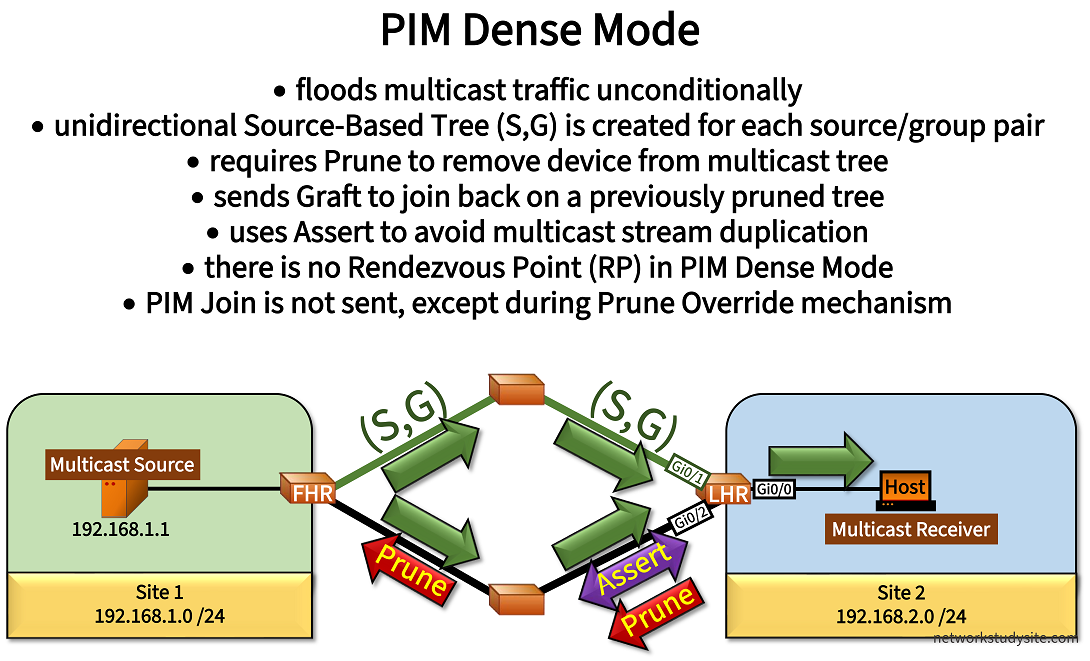
The image shows the multicast stream originating from the Source in Site 1 and flooded through the network until it reaches the Host in Site 2. The Last Hop Router (LHR) chooses a single incoming interface (IIF) to accept the multicast stream. On its other interface the LHR sends a Prune message and thus removes itself from the Source Tree.
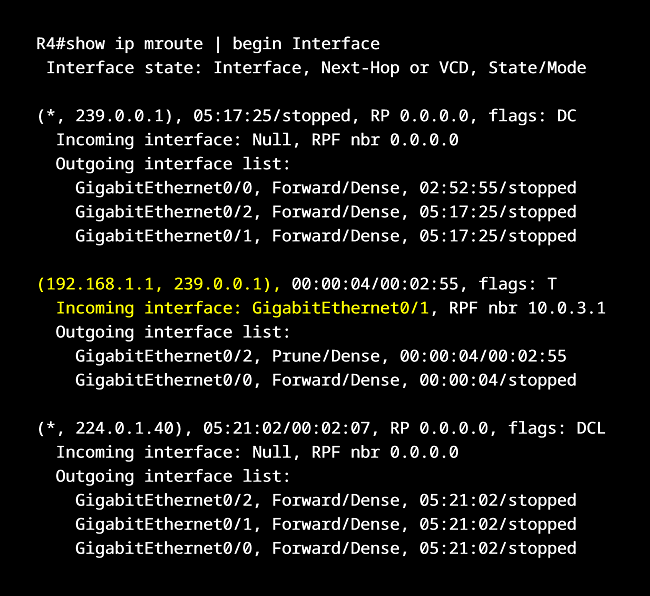
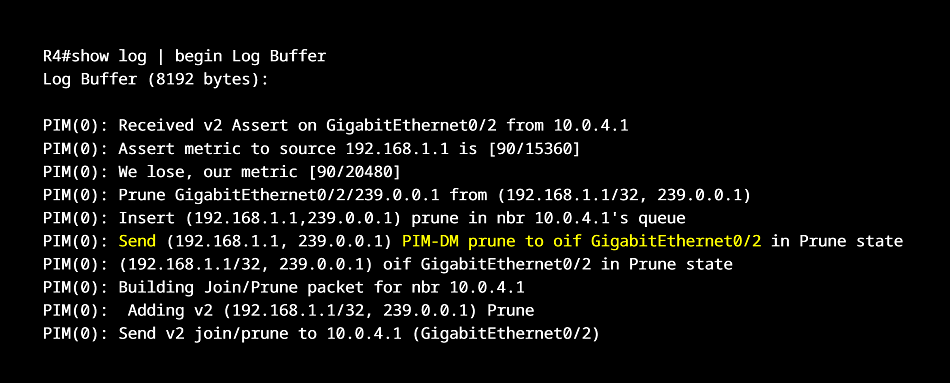
Notice in the above image there are also Assert messages exchanged between two routers. An Assert message is automatically generated when a multicast stream arrives on an Outgoing Interface (OIL) assigned for that same (S,G) stream. Above, the LHR receives a duplicate copy of the multicast stream on its OIL Gi0/2. Since it received the multicast packet on its outgoing interface (OIL), the LHR replies with a PIM Assert.

The PIM Assert mechanism is useful for shared network segments with multiple PIM-enabled routers duplicating a single multicast stream towards a common destination. However in the above image, the PIM Assert mechanism occurs on a point-to-point link and does not have an impact on multicast forwarding since the link is pruned. This illustrates the inefficiency of PIM Dense Mode and multicast flooding.
How to configure PIM Dense Mode?
The configuration of PIM Dense Mode requires enabling multicast routing with the global configuration command ip multicast-routing, issued on each router. Thereafter, each interface on each router receives the command ip pim dense-mode to enable PIM Dense Mode.
In this particular scenario, an EIGRP Offset List is configured on R3 to make the path R4 - R3 - R1 less preferred, and by extension the path R4 - R2 - R1 is more preferred. This affects multicast routing and as a result the multicast stream takes the path R1 - R2 - R4. On R4 the interface Gi0/1 (towards R2) becomes the IIF, in other words R4 Gi0/1 is the RPF interface.


Configuration:
R1
R1#show run | sec ^ip multi
ip multicast-routing

R1#show run int Gi0/0 | sec int
interface GigabitEthernet0/0
 description ** to Source **
 ip address 192.168.1.2 255.255.255.0
 ip pim dense-mode
 duplex auto
 speed auto
 media-type rj45

R1#show run int Gi0/1 | sec int
interface GigabitEthernet0/1
 description ** to R2 **
 ip address 10.0.1.1 255.255.255.252
 ip pim dense-mode
 duplex auto
 speed auto
 media-type rj45

R1#show run int Gi0/2 | sec int
interface GigabitEthernet0/2
 description ** to R3 **
 ip address 10.0.2.1 255.255.255.252
 ip pim dense-mode
 duplex auto
 speed auto
 media-type rj45

R1#show run | sec ^router
router eigrp EXAMPLE-EIGRP
 !
 address-family ipv4 unicast autonomous-system 10
  !
  af-interface GigabitEthernet0/0
   passive-interface
  exit-af-interface
  !
  topology base
  exit-af-topology
  network 10.0.1.0 0.0.0.3
  network 10.0.2.0 0.0.0.3
  network 192.168.1.0
  eigrp router-id 1.1.1.1
 exit-address-family
R2
R2#show run | sec ^ip multi
ip multicast-routing

R2#show run int Gi0/0 | sec int
interface GigabitEthernet0/0
 description ** to R1 **
 ip address 10.0.1.2 255.255.255.252
 ip pim dense-mode
 duplex auto
 speed auto
 media-type rj45

R2#show run int Gi0/1 | sec int
interface GigabitEthernet0/1
 description ** to R4 **
 ip address 10.0.3.1 255.255.255.252
 ip pim dense-mode
 duplex auto
 speed auto
 media-type rj45

R2#show run | sec ^router
router eigrp EXAMPLE-EIGRP
 !
 address-family ipv4 unicast autonomous-system 10
  !
  topology base
  exit-af-topology
  network 10.0.1.0 0.0.0.3
  network 10.0.3.0 0.0.0.3
  eigrp router-id 2.2.2.2
 exit-address-family
R3
R3#show run | sec ^ip multi
ip multicast-routing

R3#show run int Gi0/0 | sec int
interface GigabitEthernet0/0
 description ** to R1 **
 ip address 10.0.2.2 255.255.255.252
 ip pim dense-mode
 duplex auto
 speed auto
 media-type rj45

R3#show run int Gi0/1 | sec int
interface GigabitEthernet0/1
 description ** to R4 **
 ip address 10.0.4.1 255.255.255.252
 ip pim dense-mode
 duplex auto
 speed auto
 media-type rj45

R3#show run | sec ^router
router eigrp EXAMPLE-EIGRP
 !
 address-family ipv4 unicast autonomous-system 10
  !
  topology base
   offset-list ACL-OFFSET-LIST out 1000 GigabitEthernet0/1
  exit-af-topology
  network 10.0.2.0 0.0.0.3
  network 10.0.4.0 0.0.0.3
  eigrp router-id 3.3.3.3
 exit-address-family

R3#show run | sec ^ip access
ip access-list standard ACL-OFFSET-LIST
 permit 192.168.1.0 0.0.0.255
R4
R4#show run | sec ^ip multi
ip multicast-routing

R4#show run int Gi0/0 | sec int
interface GigabitEthernet0/0
 description ** to Receiver (Host) **
 ip address 192.168.2.2 255.255.255.0
 ip pim dense-mode
 duplex auto
 speed auto
 media-type rj45

R4#show run int Gi0/1 | sec int
interface GigabitEthernet0/1
 description ** to R2 **
 ip address 10.0.3.2 255.255.255.252
 ip pim dense-mode
 duplex auto
 speed auto
 media-type rj45

R4#show run int Gi0/2 | sec int
interface GigabitEthernet0/2
 description ** to R3 **
 ip address 10.0.4.2 255.255.255.252
 ip pim dense-mode
 duplex auto
 speed auto
 media-type rj45

R4#show run | sec ^router
router eigrp EXAMPLE-EIGRP
 !
 address-family ipv4 unicast autonomous-system 10
  !
  af-interface GigabitEthernet0/0
   passive-interface
  exit-af-interface
  !
  topology base
  exit-af-topology
  network 10.0.3.0 0.0.0.3
  network 10.0.4.0 0.0.0.3
  network 192.168.2.0
  eigrp router-id 4.4.4.4
 exit-address-family
Source
Source#show run int Gi0/0 | sec int
interface GigabitEthernet0/0
 description ** to R1 **
 ip address 192.168.1.1 255.255.255.0
 duplex auto
 speed auto
 media-type rj45

Source#show run | sec ^ip route
ip route 0.0.0.0 0.0.0.0 GigabitEthernet0/0 192.168.1.2
Host
Host#show run int Gi0/0 | sec int
interface GigabitEthernet0/0
 description ** to R4 **
 ip address 192.168.2.1 255.255.255.0
 ip igmp join-group 239.0.0.1
 duplex auto
 speed auto
 media-type rj45

Host#show run | sec ^ip route
ip route 0.0.0.0 0.0.0.0 GigabitEthernet0/0 192.168.2.2
R4#show ip mroute
IP Multicast Routing Table
Flags: D - Dense, S - Sparse, B - Bidir Group, s - SSM Group, C - Connected,
       L - Local, P - Pruned, R - RP-bit set, F - Register flag,
       T - SPT-bit set, J - Join SPT, M - MSDP created entry, E - Extranet,
       X - Proxy Join Timer Running, A - Candidate for MSDP Advertisement,
       U - URD, I - Received Source Specific Host Report,
       Z - Multicast Tunnel, z - MDT-data group sender,
       Y - Joined MDT-data group, y - Sending to MDT-data group,
       G - Received BGP C-Mroute, g - Sent BGP C-Mroute,
       N - Received BGP Shared-Tree Prune, n - BGP C-Mroute suppressed,
       Q - Received BGP S-A Route, q - Sent BGP S-A Route,
       V - RD & Vector, v - Vector, p - PIM Joins on route,
       x - VxLAN group
Outgoing interface flags: H - Hardware switched, A - Assert winner, p - PIM Join
 Timers: Uptime/Expires
 Interface state: Interface, Next-Hop or VCD, State/Mode

(*, 239.0.0.1), 00:41:11/stopped, RP 0.0.0.0, flags: DC
  Incoming interface: Null, RPF nbr 0.0.0.0
  Outgoing interface list:
    GigabitEthernet0/2, Forward/Dense, 00:41:11/stopped
    GigabitEthernet0/1, Forward/Dense, 00:41:11/stopped
    GigabitEthernet0/0, Forward/Dense, 00:41:11/stopped

(192.168.1.1, 239.0.0.1), 00:00:07/00:02:52, flags: T              « PIM Dense Mode creates Source Tree
  Incoming interface: GigabitEthernet0/1, RPF nbr 10.0.3.1         « Interface Gi0/1 is the IIF on R4
  Outgoing interface list:
    GigabitEthernet0/0, Forward/Dense, 00:00:07/stopped
    GigabitEthernet0/2, Prune/Dense, 00:00:07/00:02:52             « Interface towards R3 is pruned

(*, 224.0.1.40), 00:42:12/00:02:56, RP 0.0.0.0, flags: DCL
  Incoming interface: Null, RPF nbr 0.0.0.0
  Outgoing interface list:
    GigabitEthernet0/2, Forward/Dense, 00:41:59/stopped
    GigabitEthernet0/1, Forward/Dense, 00:42:07/stopped
    GigabitEthernet0/0, Forward/Dense, 00:42:12/stopped


Source#ping 239.0.0.1 re 5
Type escape sequence to abort.
Sending 5, 100-byte ICMP Echos to 239.0.0.1, timeout is 2 seconds:

Reply to request 0 from 192.168.2.1, 58 ms             « Multicast stream received on Host in Site 2
Reply to request 1 from 192.168.2.1, 4 ms
Reply to request 2 from 192.168.2.1, 4 ms
Reply to request 3 from 192.168.2.1, 4 ms
Reply to request 4 from 192.168.2.1, 3 ms


R4#show ip pim interface Gi0/1 count

For switching state use "show ip mfib interface"
Address          Interface                Mpackets In/Out
10.0.3.2         GigabitEthernet0/1       5/0          « Multicast traffic visible on R4 IIF


R4#show ip pim interface Gi0/1 detail
GigabitEthernet0/1 is up, line protocol is up
  Internet address is 10.0.3.2/30
  Multicast switching: fast
  Multicast packets in/out: 0/0
  Multicast TTL threshold: 0
  PIM: enabled                                         « PIM enabled
    PIM version: 2, mode: dense                        « PIM Dense Mode used
    PIM DR: 10.0.3.2 (this system)
    PIM neighbor count: 1
    PIM Hello/Query interval: 30 seconds
    PIM Hello packets in/out: 112/112
    PIM J/P interval: 60 seconds
    PIM State-Refresh processing: enabled
    PIM State-Refresh origination: disabled
    PIM NBMA mode: disabled
    PIM ATM multipoint signalling: disabled
    PIM domain border: disabled
    PIM neighbors rpf proxy capable: TRUE
    PIM BFD: disabled
    PIM Non-DR-Join: FALSE
  Multicast Tagswitching: disabled
What is the PIM Graft message?
The PIM Graft message signals to an RPF neighbor to start forwarding a multicast stream on a previously pruned link. In other words, a PIM Dense Mode router sends a Graft message to join again on a multicast tree that it previously removed itself from. Multiple scenarios can trigger a PIM Graft message which is shown in the following image.

In order for a Graft message to be sent, there has to already be a (S,G) entry in the mroute table of a sending router. This is shown in the following output. In PIM Dense Mode, if there is no (S,G) entry it means a multicast stream has not yet been received. Initially, each PIM Dense Mode router receives the flooded multicast stream, and then decides to prune itself from the multicast tree, or to join back (Graft) at a later time.
R4#show ip mroute | beg Int
 Interface state: Interface, Next-Hop or VCD, State/Mode

(*, 239.0.0.1), 00:13:12/stopped, RP 0.0.0.0, flags: DC
  Incoming interface: Null, RPF nbr 0.0.0.0
  Outgoing interface list:
    GigabitEthernet0/0, Forward/Dense, 00:00:24/stopped
    GigabitEthernet0/2, Forward/Dense, 00:13:12/stopped
    GigabitEthernet0/1, Forward/Dense, 00:13:12/stopped

(192.168.1.1, 239.0.0.1), 00:00:50/00:02:09, flags: T              « (S;G) entry
  Incoming interface: GigabitEthernet0/1, RPF nbr 10.0.3.1
  Outgoing interface list:
    GigabitEthernet0/0, Forward/Dense, 00:00:24/stopped            « Router receives IGMP Join message (sent from Host) on interface Gi0/0
    GigabitEthernet0/2, Prune/Dense, 00:00:50/00:02:09             « Unicast protocol chooses Gi0/1 (instead of Gi0/2) as preferred egress RPF interface

(*, 224.0.1.40), 00:13:26/00:02:58, RP 0.0.0.0, flags: DCL
  Incoming interface: Null, RPF nbr 0.0.0.0
  Outgoing interface list:
    GigabitEthernet0/2, Forward/Dense, 00:13:26/stopped
    GigabitEthernet0/1, Forward/Dense, 00:13:26/stopped
    GigabitEthernet0/0, Forward/Dense, 00:13:26/stopped
Once the multicast stream is received and a (S,G) entry is created, a router can choose to remove (prune) itself on that link. One of the reasons to prune a link from a multicast group address is there are no interested receivers connected. Or there were receivers, but they decided to leave the group and no longer request the multicast stream.
Another reason for pruning a link is if a router has two unicast routes to the multicast source. The unicast routing protocol will choose the best path and egress interface to reach the multicast source. This will become the RPF interface. However, the other interface will be pruned. In both scenarios (no interested receivers, different RPF interface) a router uses the Graft message to re-join a pruned multicast tree.
R4#show log | beg Log Buffer
Log Buffer (8192 bytes):

PIM(0): Building Graft message for 239.0.0.1, GigabitEthernet0/0: no entries
PIM(0): Building Graft message for 239.0.0.1, GigabitEthernet0/2: no entries
PIM(0): Building Graft message for 239.0.0.1, GigabitEthernet0/1:
     192.168.1.1/32 count 1
PIM(0): Send v2 Graft to 10.0.3.1 (GigabitEthernet0/1)
PIM(0): Received v2 Graft-Ack on GigabitEthernet0/1 from 10.0.3.1
     Group 239.0.0.1:
     192.168.1.1/32
What is the PIM Assert mechanism and PIM Forwarder?
The PIM Assert mechanism ensures that multicast streams are not duplicated. This is achieved with an election process between two routers to decide which one should become the PIM Forwarder. The Assert mechanism is used in PIM Dense Mode and also in PIM Sparse Mode.
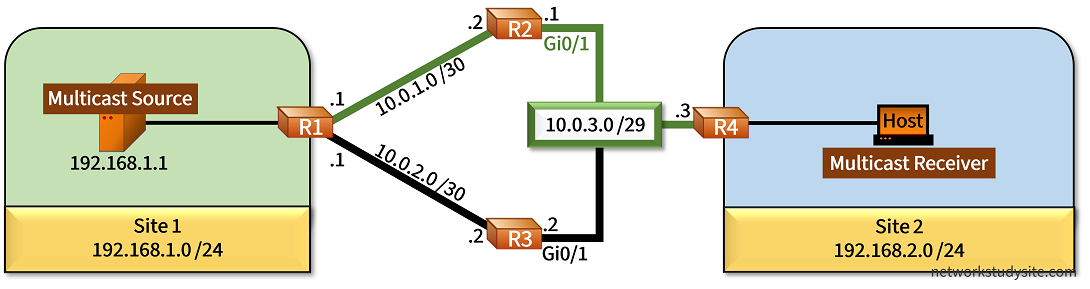
In the following example scenario, R2 and R3 receive the multicast stream from the source in Site 1. Both R2 and R3 forward the multicast stream towards R4 on the shared network segment 10.0.3.0/29. As a result, the PIM Assert election process takes place between R2 and R3.
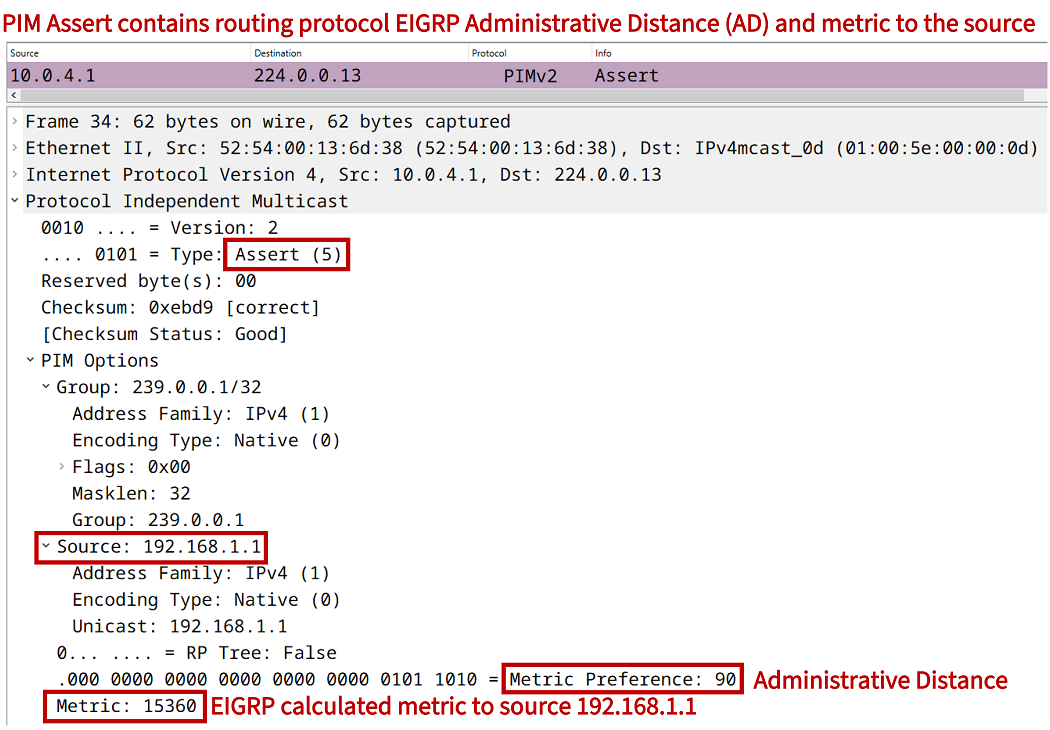
An EIGRP Offset list configured on R1 ensures that R3 has a worse metric to reach the source than R2. Thus, R2 wins the PIM Assert election, and becomes the PIM Forwarder for the 10.0.3.0/29 segment. As part of the PIM Assert mechanism, R3 proceeds to send a prune message out its interface Gi0/1. This is illustrated in following debug outputs from R2 (Assert winner) and R3 (Assert loser).
R2#show log |  beg Log Buffer
Log Buffer (8192 bytes):

PIM(0): Send v2 Assert on GigabitEthernet0/1 for 239.0.0.1, source 192.168.1.1, metric [90/15360]
PIM(0): Assert metric to source 192.168.1.1 is [90/15360]
PIM(0): We win, our metric [90/15360]

---------------------------------------------------------------------------

R3#show log | beg Log Buffer
Log Buffer (8192 bytes):

%SYS-5-CONFIG_I: Configured from console by console
PIM(0): Received v2 Assert on GigabitEthernet0/1 from 10.0.3.1
PIM(0): Assert metric to source 192.168.1.1 is [90/15360]
PIM(0): We lose, our metric [90/15367]
PIM(0): Insert (192.168.1.1,239.0.0.1) prune in nbr 10.0.3.1's queue
PIM(0): Send (192.168.1.1, 239.0.0.1) PIM-DM prune to oif GigabitEthernet0/1 in Prune state
PIM(0): (192.168.1.1/32, 239.0.0.1) oif GigabitEthernet0/1 in Prune state
PIM(0): Building Join/Prune packet for nbr 10.0.3.1
PIM(0):  Adding v2 (192.168.1.1/32, 239.0.0.1) Prune
PIM(0): Send v2 join/prune to 10.0.3.1 (GigabitEthernet0/1)
Configuration:
R1
R1#show run | sec ^ip multicast
ip multicast-routing

R1#show run int Gi0/0 | sec int
interface GigabitEthernet0/0
 description ** to Source **
 ip address 192.168.1.2 255.255.255.0
 ip pim dense-mode
 duplex auto
 speed auto
 media-type rj45

R1#show run int Gi0/1 | sec int
interface GigabitEthernet0/1
 description ** to R2 **
 ip address 10.0.1.1 255.255.255.252
 ip pim dense-mode
 duplex auto
 speed auto
 media-type rj45

R1#show run | sec ^router
router eigrp EXAMPLE-EIGRP
 !
 address-family ipv4 unicast autonomous-system 10
  !
  af-interface GigabitEthernet0/0
   passive-interface
  exit-af-interface
  !
  topology base
   offset-list ACL-OFFSET-LIST out 1000 GigabitEthernet0/2
  exit-af-topology
  network 10.0.1.0 0.0.0.3
  network 10.0.2.0 0.0.0.3
  network 192.168.1.0
  eigrp router-id 1.1.1.1
 exit-address-family

R1#show run | sec ^ip access
ip access-list standard ACL-OFFSET-LIST
 permit 192.168.1.0 0.0.0.255
R2
R2#show run | sec ^ip multi
ip multicast-routing

R2#show run int Gi0/0 | sec int
interface GigabitEthernet0/0
 description ** to R1 **
 ip address 10.0.1.2 255.255.255.252
 ip pim dense-mode
 duplex auto
 speed auto
 media-type rj45

R2#show run int Gi0/1 | sec int
interface GigabitEthernet0/1
 description ** to R4 **
 ip address 10.0.3.1 255.255.255.248
 ip pim dense-mode
 duplex auto
 speed auto
 media-type rj45

R2#show run | sec ^router
router eigrp EXAMPLE-EIGRP
 !
 address-family ipv4 unicast autonomous-system 10
  !
  topology base
  exit-af-topology
  network 10.0.1.0 0.0.0.3
  network 10.0.3.0 0.0.0.7
  eigrp router-id 2.2.2.2
 exit-address-family
R3
R3#show run | sec ^ip multi
ip multicast-routing

R3#show run int Gi0/0 | sec int
interface GigabitEthernet0/0
 description ** to R1 **
 ip address 10.0.2.2 255.255.255.252
 ip pim dense-mode
 duplex auto
 speed auto
 media-type rj45

R3#show run int Gi0/1 | sec int
interface GigabitEthernet0/1
 description ** to R4 **
 ip address 10.0.3.2 255.255.255.248
 ip pim dense-mode
 duplex auto
 speed auto
 media-type rj45

R3#show run | sec ^router
router eigrp EXAMPLE-EIGRP
 !
 address-family ipv4 unicast autonomous-system 10
  !
  topology base
  exit-af-topology
  network 10.0.2.0 0.0.0.3
  network 10.0.3.0 0.0.0.7
  eigrp router-id 3.3.3.3
 exit-address-family
R4
R4#show run | sec ^ip multi
ip multicast-routing

R4#show run int Gi0/0 | sec int
interface GigabitEthernet0/0
 description ** to Receiver (Host) **
 ip address 192.168.2.2 255.255.255.0
 ip pim dense-mode
 duplex auto
 speed auto
 media-type rj45

R4#show run int Gi0/1 | sec int
interface GigabitEthernet0/1
 description ** to R2 and R3 **
 ip address 10.0.3.3 255.255.255.248
 ip pim dense-mode
 duplex auto
 speed auto
 media-type rj45

R4#show run | sec ^router
router eigrp EXAMPLE-EIGRP
 !
 address-family ipv4 unicast autonomous-system 10
  !
  af-interface GigabitEthernet0/0
   passive-interface
  exit-af-interface
  !
  topology base
  exit-af-topology
  network 10.0.3.0 0.0.0.7
  network 192.168.2.0
  eigrp router-id 4.4.4.4
 exit-address-family
R2#show ip mroute
IP Multicast Routing Table
Flags: D - Dense, S - Sparse, B - Bidir Group, s - SSM Group, C - Connected,
       L - Local, P - Pruned, R - RP-bit set, F - Register flag,
       T - SPT-bit set, J - Join SPT, M - MSDP created entry, E - Extranet,
       X - Proxy Join Timer Running, A - Candidate for MSDP Advertisement,
       U - URD, I - Received Source Specific Host Report,
       Z - Multicast Tunnel, z - MDT-data group sender,
       Y - Joined MDT-data group, y - Sending to MDT-data group,
       G - Received BGP C-Mroute, g - Sent BGP C-Mroute,
       N - Received BGP Shared-Tree Prune, n - BGP C-Mroute suppressed,
       Q - Received BGP S-A Route, q - Sent BGP S-A Route,
       V - RD & Vector, v - Vector, p - PIM Joins on route,
       x - VxLAN group
Outgoing interface flags: H - Hardware switched, A - Assert winner, p - PIM Join
 Timers: Uptime/Expires
 Interface state: Interface, Next-Hop or VCD, State/Mode

(*, 239.0.0.1), 00:00:19/stopped, RP 0.0.0.0, flags: D
  Incoming interface: Null, RPF nbr 0.0.0.0
  Outgoing interface list:
    GigabitEthernet0/1, Forward/Dense, 00:00:19/stopped
    GigabitEthernet0/0, Forward/Dense, 00:00:19/stopped

(192.168.1.1, 239.0.0.1), 00:00:19/00:02:40, flags: T
  Incoming interface: GigabitEthernet0/0, RPF nbr 10.0.1.1
  Outgoing interface list:
    GigabitEthernet0/1, Forward/Dense, 00:00:19/stopped, A    « Interface forwarding because it is PIM Assert winner

(*, 224.0.1.40), 03:25:08/00:02:38, RP 0.0.0.0, flags: DCL
  Incoming interface: Null, RPF nbr 0.0.0.0
  Outgoing interface list:
    GigabitEthernet0/1, Forward/Dense, 03:25:08/stopped
    GigabitEthernet0/0, Forward/Dense, 03:25:08/stopped


R2#show ip route 192.168.1.0
Routing entry for 192.168.1.0/24
  Known via "eigrp 10", distance 90, metric 15360, type internal
  Redistributing via eigrp 10
  Last update from 10.0.1.1 on GigabitEthernet0/0, 01:50:53 ago
  Routing Descriptor Blocks:
  * 10.0.1.1, from 10.0.1.1, 01:50:53 ago, via GigabitEthernet0/0
      Route metric is 15360, traffic share count is 1                    « R2 has better EIGRP metric to the Source so it wins Assert election
      Total delay is 20 microseconds, minimum bandwidth is 1000000 Kbit
      Reliability 255/255, minimum MTU 1500 bytes
      Loading 1/255, Hops 1
What is the Prune Override mechanism?
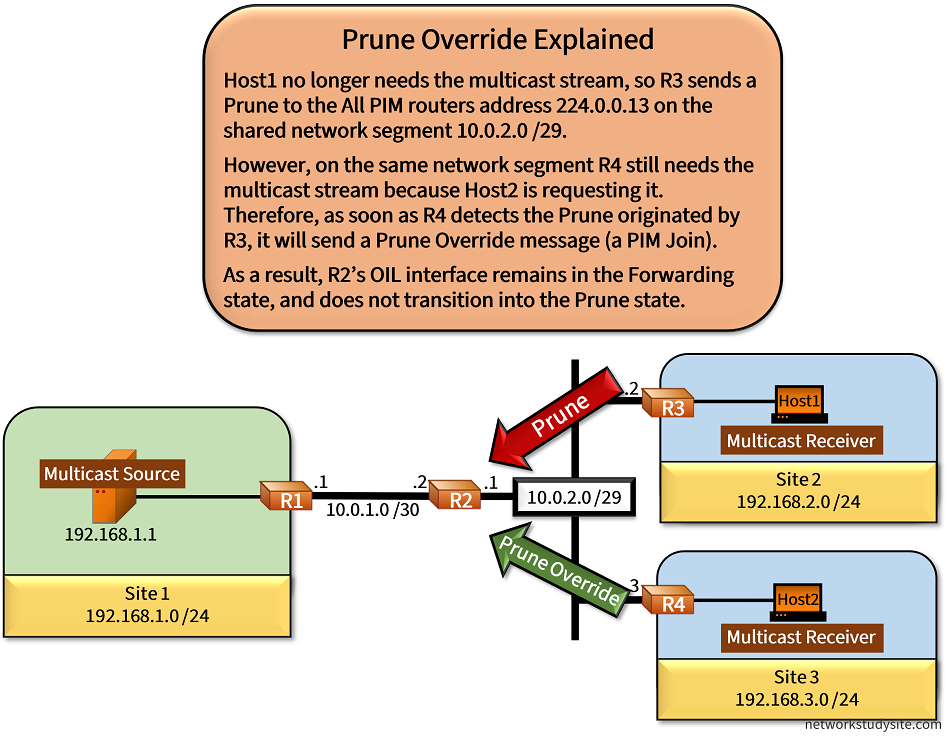
A Prune message is sent to the All PIM Routers multicast address 224.0.0.13. On a shared network segment, if there are multiple donwstream routers forwarding the multicast stream, a single Prune message may inadvertently prune an upstream router's OIL interface. To avoid such a scenario, a Prune Override message can be sent.
The following scenario shows R2 forwarding the multicast stream to R3 and R4 on a shared network segment. When Host1 no longer requests the multicast stream, R3 sends a Prune message. However, R4 still needs the stream because Host2 is requesting it. Thus, as soon as R4 receives the Prune message (sent to the All PIM routers address), R4 replies with a Prune Override message which is essentially a PIM Join.

The following debug output from R2 shows this scenario.
R2#show log | beg Log Buffer
Log Buffer (8192 bytes):

%SYS-5-CONFIG_I: Configured from console by console
PIM(0): Join-list: (192.168.1.1/32, 239.0.0.1)
PIM(0): Add GigabitEthernet0/1/0.0.0.0 to (192.168.1.1, 239.0.0.1), Forward state, by PIM Graft
PIM(0): Send v2 Graft-Ack on GigabitEthernet0/1 to 10.0.2.2
PIM(0): Received v2 Join/Prune on GigabitEthernet0/1 from 10.0.2.2, to us
PIM(0): Prune-list: (192.168.1.1/32, 239.0.0.1)
PIM(0): Schedule to prune GigabitEthernet0/1 for (192.168.1.1/32, 239.0.0.1)
PIM(0): Received v2 Join/Prune on GigabitEthernet0/1 from 10.0.2.3, to us
PIM(0): Join-list: (192.168.1.1/32, 239.0.0.1)
PIM(0): Update GigabitEthernet0/1/10.0.2.3 to (192.168.1.1, 239.0.0.1), Forward state, by PIM SG Join
Configuration:
R1
R1#show run | sec ^ip multi
ip multicast-routing

R1#show run int Gi0/0 | sec int
interface GigabitEthernet0/0
 description ** to Source **
 ip address 192.168.1.2 255.255.255.0
 ip pim dense-mode
 duplex auto
 speed auto
 media-type rj45

R1#show run int Gi0/1 | sec int
interface GigabitEthernet0/1
 description ** to R2 **
 ip address 10.0.1.1 255.255.255.252
 ip pim dense-mode
 duplex auto
 speed auto
 media-type rj45

R1#show run | sec ^router
router eigrp EXAMPLE-EIGRP
 !
 address-family ipv4 unicast autonomous-system 10
  !
  af-interface GigabitEthernet0/0
   passive-interface
  exit-af-interface
  !
  topology base
  exit-af-topology
  network 10.0.1.0 0.0.0.3
  network 192.168.1.0
  eigrp router-id 1.1.1.1
 exit-address-family
R2
R2#show run | sec ^ip multi
ip multicast-routing

R2#show run int Gi0/0 | sec int
interface GigabitEthernet0/0
 description ** to R1 **
 ip address 10.0.1.2 255.255.255.252
 ip pim dense-mode
 duplex auto
 speed auto
 media-type rj45

R2#show run int Gi0/1 | sec int
interface GigabitEthernet0/1
 description ** to R3 and R4 **
 ip address 10.0.2.1 255.255.255.248
 ip pim dense-mode
 duplex auto
 speed auto
 media-type rj45

R2#show run | sec ^router
router eigrp EXAMPLE-EIGRP
 !
 address-family ipv4 unicast autonomous-system 10
  !
  topology base
  exit-af-topology
  network 10.0.1.0 0.0.0.3
  network 10.0.2.0 0.0.0.7
  eigrp router-id 2.2.2.2
 exit-address-family
R3
R3#show run | sec ^ip multi
ip multicast-routing

R3#show run int Gi0/0 | sec int
interface GigabitEthernet0/0
 description ** to Host1 **
 ip address 192.168.2.2 255.255.255.0
 ip pim dense-mode
 duplex auto
 speed auto
 media-type rj45

R3#show run int Gi0/1 | sec int
interface GigabitEthernet0/1
 description ** to R2 **
 ip address 10.0.2.2 255.255.255.248
 ip pim dense-mode
 duplex auto
 speed auto
 media-type rj45

R3#show run | sec ^router
router eigrp EXAMPLE-EIGRP
 !
 address-family ipv4 unicast autonomous-system 10
  !
  af-interface GigabitEthernet0/0
   passive-interface
  exit-af-interface
  !
  topology base
  exit-af-topology
  network 10.0.2.0 0.0.0.7
  network 192.168.2.0
  eigrp router-id 3.3.3.3
 exit-address-family
R4
R4#show run | sec ^ip multi
ip multicast-routing

R4#show run int Gi0/0 | sec int
interface GigabitEthernet0/0
 description ** to Host2 **
 ip address 192.168.3.2 255.255.255.0
 ip pim dense-mode
 duplex auto
 speed auto
 media-type rj45

R4#show run int Gi0/1 | sec int
interface GigabitEthernet0/1
 description ** to R2 **
 ip address 10.0.2.3 255.255.255.248
 ip pim dense-mode
 duplex auto
 speed auto
 media-type rj45

R4#show run | sec ^router
router eigrp EXAMPLE-EIGRP
 !
 address-family ipv4 unicast autonomous-system 10
  !
  af-interface GigabitEthernet0/0
   passive-interface
  exit-af-interface
  !
  topology base
  exit-af-topology
  network 10.0.2.0 0.0.0.7
  network 192.168.3.0
  eigrp router-id 4.4.4.4
 exit-address-family
Host1
Host1#show run int Gi0/0 | sec int
interface GigabitEthernet0/0
 description ** to R3 **
 ip address 192.168.2.1 255.255.255.0
 ip igmp join-group 239.0.0.1
 duplex auto
 speed auto
 media-type rj45

Host1#show run | sec ^ip route
ip route 0.0.0.0 0.0.0.0 GigabitEthernet0/0 192.168.2.2
Host2
Host2#show run int Gi0/0 | sec int
interface GigabitEthernet0/0
 description ** to R4 **
 ip address 192.168.3.1 255.255.255.0
 ip igmp join-group 239.0.0.1
 duplex auto
 speed auto
 media-type rj45

Host2#show run | sec ^ip route
ip route 0.0.0.0 0.0.0.0 GigabitEthernet0/0 192.168.3.2
Source#ping 239.0.0.1 re 5
Type escape sequence to abort.
Sending 5, 100-byte ICMP Echos to 239.0.0.1, timeout is 2 seconds:

Reply to request 0 from 192.168.2.1, 4 ms
Reply to request 0 from 192.168.3.1, 5 ms
Reply to request 1 from 192.168.2.1, 3 ms
Reply to request 1 from 192.168.3.1, 3 ms
Reply to request 2 from 192.168.2.1, 5 ms
Reply to request 2 from 192.168.3.1, 5 ms          « At this point R3 has pruned itself and only Host2 receives the multicast stream
Reply to request 3 from 192.168.3.1, 3 ms
Reply to request 4 from 192.168.3.1, 4 ms


R2#show ip mroute | beg Int
 Interface state: Interface, Next-Hop or VCD, State/Mode

(*, 239.0.0.1), 00:00:26/stopped, RP 0.0.0.0, flags: D
  Incoming interface: Null, RPF nbr 0.0.0.0
  Outgoing interface list:
    GigabitEthernet0/1, Forward/Dense, 00:00:26/stopped
    GigabitEthernet0/0, Forward/Dense, 00:00:26/stopped

(192.168.1.1, 239.0.0.1), 00:00:26/00:02:33, flags: T
  Incoming interface: GigabitEthernet0/0, RPF nbr 10.0.1.1
  Outgoing interface list:
    GigabitEthernet0/1, Forward/Dense, 00:00:26/stopped         « R2 OIL Gi0/1 needs to remain in the Forward state even though a Prune was received

(*, 224.0.1.40), 00:42:52/00:02:25, RP 0.0.0.0, flags: DCL
  Incoming interface: Null, RPF nbr 0.0.0.0
  Outgoing interface list:
    GigabitEthernet0/1, Forward/Dense, 00:42:52/stopped
    GigabitEthernet0/0, Forward/Dense, 00:42:52/stopped
An essential part of the Prune Override mechanism is a delay timer or override timer that is started upon receipt of a Prune message. The following quote from the RFC 7899 provides further details about the importance of this timer to enable the override mechanism on a shared network segment.
Indeed, when active, the prune override mechanism consists in having a PIM upstream router introduce a delay ("prune override interval") before taking into account a PIM Prune message sent by a downstream neighbor.
This mechanism has not been designed specifically for the purpose of damping multicast state, but as a means to allow PIM to operate on multi-access networks.
RFC 7899, Multicast VPN State Damping