Unicast Reverse Path Forwarding - Network Security
Table of Contents
- What is Unicast Reverse Path Forwarding (uRPF)? ‹
- What is the uRPF check and uRPF verification? ‹
- uRPF Strict Mode configuration ‹
- uRPF Strict Mode configuration with ACL ‹
- uRPF allow default configuration ‹
- uRPF Loose Mode configuration ‹
- Download section ‹
What is Unicast Reverse Path Forwarding (uRPF)?
uRPF protects a network against an IP spoofing attack. An external malicious actor can modify the source IP address of packets to make them seemingly originate from within a network. Upon receiving these malicious packets that have modified (spoofed) IP addresses, internal hosts can be tricked into sending the response traffic to each other. The malicious actor can thus trigger a denial-of-service attack as shown below.

R1#ping 192.168.0.1 source 192.168.0.2
Type escape sequence to abort.
Sending 5, 100-byte ICMP Echos to 192.168.0.1, timeout is 2 seconds:
Packet sent with a source address of 192.168.0.2
.....
Success rate is 0 percent (0/5)


Host2:~$ sudo tcpdump -i eth0 icmp
tcpdump: verbose output suppressed, use -v[v]... for full protocol decode
listening on eth0, link-type EN10MB (Ethernet), snapshot length 262144 bytes
16:05:36.175061 IP 192.168.0.1 > 192.168.0.2: ICMP echo reply, id 59, seq 0, length 80
16:05:38.175191 IP 192.168.0.1 > 192.168.0.2: ICMP echo reply, id 59, seq 1, length 80
16:05:40.174283 IP 192.168.0.1 > 192.168.0.2: ICMP echo reply, id 59, seq 2, length 80
16:05:42.174092 IP 192.168.0.1 > 192.168.0.2: ICMP echo reply, id 59, seq 3, length 80
16:05:44.181994 IP 192.168.0.1 > 192.168.0.2: ICMP echo reply, id 59, seq 4, length 80
^C
5 packets captured
5 packets received by filter
0 packets dropped by kernel
uRPF can mitigate such an attack by inspecting the source IP address of received packets. When receiving a packet on an interface configured with uRPF, a router verifies if it would normally reach that source IP address through the same interface (uRPF strict mode), or if it has any information in its Forwarding Information Base about that source IP address (uRPF loose mode).
What is the uRPF check and uRPF verification?
The terms uRPF check and uRPF verification refer to the router comparing the source IP address of received packets to its locally stored Forwarding Information Base (FIB). The FIB is a list of next-hop IP addresses known to a router and used for packet forwarding. It is part of the Cisco Express Forwarding (CEF) technology. CEF is needed for uRPF to work.
There are two varieties of uRPF, Strict Mode and Loose Mode. They use different methods to verify source IP addresses.
| Strict Mode | Loose Mode |
|---|---|
| If a packet is received on interface A, the packet's source IP address should also be learnt on interface A. Should this not be true, the uRPF check fails, and the packet is dropped. uRPF Strict Mode is concerned with the specific interface of the incoming packet compared to the interface the local router would normally use to reach the incoming packet's source IP address. | With uRPF Loose Mode the router is concerned only with the FIB, and not with the specific interface. In this case, if a packet is received on any interface, the router only checks if the source IP address is learnt and installed in the FIB. If the router has no knowledge of the received packet's source IP address, then the uRPF check fails, and the packet is dropped. |
uRPF Strict Mode configuration
In this example topology, uRPF strict mode is configured on R2 interface Gi0/0. As a result, R2 looks at the source IP address of all traffic incoming on Gi0/0. If R2 finds that the incoming traffic on Gi0/0 actually has a source IP address reachable via Gi0/1, than it drops that traffic.
In other words, if R2 can reach 192.168.0.2 on Gi0/1, then R2 does not allow ingress traffic on Gi0/0 with a source IP of 192.168.0.2. Now, R1 can no longer send packet to Host1 with a spoofed source IP address.

Configuration:
R1
R1#show run int Gi0/0 | sec int
interface GigabitEthernet0/0
 description ** to R2 **
 ip address 10.0.0.1 255.255.255.252
 duplex auto
 speed auto
 media-type rj45

R1#show run int Lo10 | sec int
interface Loopback10
 ip address 192.168.0.2 255.255.255.255

R1#show run | sec ip route
ip route 0.0.0.0 0.0.0.0 GigabitEthernet0/0 10.0.0.2
R2
R2#show run int Gi0/0 | sec int
interface GigabitEthernet0/0
 description ** to R1 **
 ip address 10.0.0.2 255.255.255.252
 ip verify unicast source reachable-via rx
 duplex auto
 speed auto
 media-type rj45

R2#show run int Gi0/1 | sec int
interface GigabitEthernet0/1
 description ** to Site 1 **
 ip address 192.168.0.3 255.255.255.0
 duplex auto
 speed auto
 media-type rj45

R2#show run | sec ip route
ip route 0.0.0.0 0.0.0.0 GigabitEthernet0/0 10.0.0.1
R1#ping 192.168.0.1 source 192.168.0.2
Type escape sequence to abort.
Sending 5, 100-byte ICMP Echos to 192.168.0.1, timeout is 2 seconds:
Packet sent with a source address of 192.168.0.2
.....
Success rate is 0 percent (0/5)


R2#show ip traffic | section IP statistics
IP statistics:
  Rcvd:  11 total, 11 local destination
         0 format errors, 0 checksum errors, 0 bad hop count
         0 unknown protocol, 0 not a gateway
         0 security failures, 0 bad options, 0 with options
  Opts:  0 end, 0 nop, 0 basic security, 0 loose source route
         0 timestamp, 0 extended security, 0 record route
         0 stream ID, 0 strict source route, 0 alert, 0 cipso, 0 ump
         0 other
  Frags: 0 reassembled, 0 timeouts, 0 couldn't reassemble
         0 fragmented, 0 fragments, 0 couldn't fragment
         0 invalid hole
  Bcast: 11 received, 0 sent
  Mcast: 0 received, 0 sent
  Sent:  0 generated, 0 forwarded
  Drop:  0 encapsulation failed, 0 unresolved, 0 no adjacency
         0 no route, 5 unicast RPF, 0 forced drop                   « uRPF dropped 5 packets
         0 options denied
  Drop:  0 packets with source IP address zero
  Drop:  0 packets with internal loop back IP address
         0 physical broadcast
  Reinj: 0 in input feature path, 0 in output feature path


R2#show cef interface Gi0/0
GigabitEthernet0/0 is up (if_number 2)
  Corresponding hwidb fast_if_number 2
  Corresponding hwidb firstsw->if_number 2
  Internet address is 10.0.0.2/30
  ICMP redirects are never sent
  Per packet load-sharing is disabled
  IP unicast RPF check is enabled
  Input features: uRPF                         « uRPF is enabled on this interface
  IP policy routing is disabled
  BGP based policy accounting on input is disabled
  BGP based policy accounting on output is disabled
  Hardware idb is GigabitEthernet0/0
  Fast switching type 1, interface type 27
  IP CEF switching enabled
  IP CEF switching turbo vector
  IP prefix lookup IPv4 mtrie 8-8-8-8 optimized
  Input fast flags 0x4000, Output fast flags 0x0
  ifindex 2(2)
  Slot  Slot unit 0 VC -1
  IP MTU 1500
When an incoming packet fails the uRPF check, it is dropped silently, as shown in the following capture. This means, there is no ICMP unreachable message and no error code sent in return. This is in contrast to how an ACL drops traffic. Namely, an ACL generates ICMP unreachable packets informing the sender about the reason of the error.

uRPF Strict Mode configuration with ACL
In this example, asymmetric routing is configured between the prefix 172.16.0.0/24 and Site 1. To reach Site 1, the path R1 - R3 - R2 is taken. However, to reach prefix 172.16.0.0/24, the path R2 - R1 is taken.
With uRPF strict mode configured on R2 Gi0/2, the traffic between 172.16.0.0/24 and Site 1 would be dropped by default. This is because R2 receives traffic on interface Gi0/2 with source IP 172.16.0.1, however R2 would actually reach 172.16.0.1 via its interface Gi0/0.
In other words, the source of the traffic is reachable through a different interface (Gi0/0) than that traffic is received on (Gi0/2). This fails the uRPF check, the incoming traffic is therefore dropped. To override this default behavior, an ACL can be configured and attached to uRPF strict mode. This ACL permits particular source IP address(es) that would otherwise be dropped.

Configuration:
R1
R1#show run int Gi0/0 | sec int
interface GigabitEthernet0/0
 description ** to R2 **
 ip address 10.0.0.1 255.255.255.252
 duplex auto
 speed auto
 media-type rj45

R1#show run int Gi0/1 | sec int
interface GigabitEthernet0/1
 description ** to R3 **
 ip address 10.1.0.1 255.255.255.252
 duplex auto
 speed auto
 media-type rj45

R1#show run int Lo10 | sec int
interface Loopback10
 ip address 172.16.0.1 255.255.255.0

R1#show run | sec ip route
ip route 0.0.0.0 0.0.0.0 GigabitEthernet0/1 10.1.0.2
R2
R2#show run int Gi0/0 | sec int
interface GigabitEthernet0/0
 description ** to R1 **
 ip address 10.0.0.2 255.255.255.252
 duplex auto
 speed auto
 media-type rj45

R2#show run int Gi0/1 | sec int
interface GigabitEthernet0/1
 description ** to Site 1 **
 ip address 192.168.0.3 255.255.255.0
 duplex auto
 speed auto
 media-type rj45

R2#show run int Gi0/2 | sec int
interface GigabitEthernet0/2
 description ** to R3 **
 ip address 10.2.0.2 255.255.255.252
 ip verify unicast source reachable-via rx 10
 duplex auto
 speed auto
 media-type rj45

R2#show run | sec access-list
access-list 10 permit 172.16.0.1

R2#show run | sec ip route
ip route 172.16.0.0 255.255.255.0 GigabitEthernet0/0 10.0.0.1
R3
R3#show run int Gi0/0 | sec int
interface GigabitEthernet0/0
 description ** to R2 **
 ip address 10.2.0.1 255.255.255.252
 duplex auto
 speed auto
 media-type rj45

R3#show run int Gi0/1 | sec int
interface GigabitEthernet0/1
 description ** to R1 **
 ip address 10.1.0.2 255.255.255.252
 duplex auto
 speed auto
 media-type rj45

R3#show run | sec ip route
ip route 0.0.0.0 0.0.0.0 GigabitEthernet0/0 10.2.0.2
R1#ping 192.168.0.1 source 172.16.0.1
Type escape sequence to abort.
Sending 5, 100-byte ICMP Echos to 192.168.0.1, timeout is 2 seconds:
Packet sent with a source address of 172.16.0.1
!!!!!
Success rate is 100 percent (5/5), round-trip min/avg/max = 1/1/2 ms


R1#trace 192.168.0.1 source 172.16.0.1 pr 1
Type escape sequence to abort.
Tracing the route to 192.168.0.1
VRF info: (vrf in name/id, vrf out name/id)
  1  *
  2 10.2.0.2 1 msec
  3 192.168.0.1 2 msec


R2#show ip int Gi0/2 | sec IP verify
  IP verify source reachable-via RX, ACL 10         « uRPF strict mode with ACL
   9 verification drops
   25 suppressed verification drops                 « These packets failed the uRPF check but were not dropped due to the ACL
   0 verification drop-rate
Note, the command show ip cef exact-route is a good method to find the next-hop IP address and egress interface for traffic. Examples from R1 and R2 are shown in the following outputs.
R1#show ip cef exact-route 172.16.0.1 192.168.0.1
172.16.0.1 -> 192.168.0.1 =>IP adj out of GigabitEthernet0/1, addr 10.1.0.2


R2#show ip cef exact-route 192.168.0.1 172.16.0.1
192.168.0.1 -> 172.16.0.1 =>IP adj out of GigabitEthernet0/0, addr 10.0.0.1
uRPF allow default configuration
In this example scenario, R1 and R2 have an eBGP neighborship established. R2 advertises the Site 1 prefix 192.168.0.0/24, however R1 only advertises a single default route through eBGP. If uRPF strict mode is configured on the R2 interface Gi0/0, then the eBGP default route would make the traffic fail the uRPF check and be dropped by R2. The default behavior of uRPF strict mode is to drop traffic if it only matches a default route.
However, this requirement can be overruled by configuring the allow-default keyword together with the uRPF configuration. The details are shown in the following image.

Configuration:
R1
R1#show run int Gi0/0 | sec int
interface GigabitEthernet0/0
 description ** to R2 **
 ip address 10.0.0.1 255.255.255.252
 duplex auto
 speed auto
 media-type rj45

R1#show run int Lo10 | sec int
interface Loopback10
 ip address 172.16.0.1 255.255.255.0

R1#show run | sec router
router bgp 65001
 bgp router-id 1.1.1.1
 bgp log-neighbor-changes
 neighbor 10.0.0.2 remote-as 65002
 neighbor 10.0.0.2 default-originate
R2
R2#show run int Gi0/0 | sec int
interface GigabitEthernet0/0
 description ** to R1 **
 ip address 10.0.0.2 255.255.255.252
 ip verify unicast source reachable-via rx allow-default
 duplex auto
 speed auto
 media-type rj45

R2#show run int Gi0/1 | sec int
interface GigabitEthernet0/1
 description ** to Site 1 **
 ip address 192.168.0.3 255.255.255.0
 duplex auto
 speed auto
 media-type rj45

R2#show run | sec router
router bgp 65002
 bgp router-id 2.2.2.2
 bgp log-neighbor-changes
 network 192.168.0.0
 neighbor 10.0.0.1 remote-as 65001
R2#show ip int Gi0/0 | sec IP verify
  IP verify source reachable-via RX, allow default               « uRPF allows default route
   0 verification drops
   0 suppressed verification drops
   0 verification drop-rate


R2#show ip bgp | beg Network
     Network          Next Hop            Metric LocPrf Weight Path
 *>   0.0.0.0          10.0.0.1                               0 65001 i         « Default route received through eBGP
 *>   192.168.0.0      0.0.0.0                  0         32768 i


R1#ping 192.168.0.1 source 172.16.0.1
Type escape sequence to abort.
Sending 5, 100-byte ICMP Echos to 192.168.0.1, timeout is 2 seconds:
Packet sent with a source address of 172.16.0.1
!!!!!
Success rate is 100 percent (5/5), round-trip min/avg/max = 1/1/2 ms


R1#trace 192.168.0.1 source 172.16.0.1 pr 1
Type escape sequence to abort.
Tracing the route to 192.168.0.1
VRF info: (vrf in name/id, vrf out name/id)
  1 10.0.0.2 2 msec
  2 192.168.0.1 [AS 65002] 1 msec
uRPF Loose Mode configuration
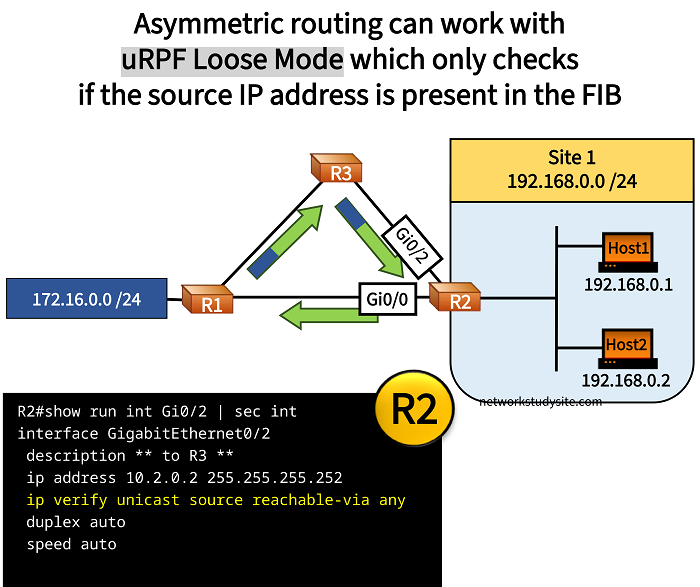
In this example, asymmetric routing is configured between the prefix 172.16.0.0/24 and Site 1. To reach Site 1, the path R1 - R3 - R2 is taken. However, to reach prefix 172.16.0.0/24, the path R2 - R1 is taken.
uRPF Loose Mode is configured on R2, which only compares the source IP address of incoming packets to R2's Forwarding Information Base (FIB). The FIB is a list of next-hop IP addresses known to a router, and it is part of the Cisco Express Forwarding (CEF) technology.
In other words, uRPF Loose Mode does not verify the ingress interface of received packets, but only whether the source IP address is in the FIB. If the source IP address is not the FIB, or if the source IP address points to a discard route, uRPF Loose Mode drops the packet.
Configuration:
R1
R1#show run int Gi0/0 | sec int
interface GigabitEthernet0/0
 description ** to R2 **
 ip address 10.0.0.1 255.255.255.252
 duplex auto
 speed auto
 media-type rj45

R1#show run int Gi0/1 | sec int
interface GigabitEthernet0/1
 description ** to R3 **
 ip address 10.1.0.1 255.255.255.252
 duplex auto
 speed auto

R1#show run int Lo10 | sec int
interface Loopback10
 ip address 172.16.0.1 255.255.255.0
R2
R2#show run int Gi0/0 | sec int
interface GigabitEthernet0/0
 description ** to R1 **
 ip address 10.0.0.2 255.255.255.252
 duplex auto
 speed auto
 media-type rj45

R2#show run int Gi0/1 | sec int
interface GigabitEthernet0/1
 description ** to Site 1 **
 ip address 192.168.0.3 255.255.255.0
 duplex auto
 speed auto
 media-type rj45

R2#show run int Gi0/2 | sec int
interface GigabitEthernet0/2
 description ** to R3 **
 ip address 10.2.0.2 255.255.255.252
 ip verify unicast source reachable-via any
 duplex auto
 speed auto

R2#show run | sec ip route
ip route 172.16.0.0 255.255.255.0 GigabitEthernet0/0 10.0.0.1
R3
R3#show run int Gi0/0 | sec int
interface GigabitEthernet0/0
 description ** to R1 **
 ip address 10.1.0.2 255.255.255.252
 duplex auto
 speed auto
 media-type rj45

R3#show run int Gi0/1 | sec int
interface GigabitEthernet0/1
 description ** to R2 **
 ip address 10.2.0.1 255.255.255.252
 duplex auto
 speed auto
 media-type rj45

R3#show run | sec ip route
ip route 0.0.0.0 0.0.0.0 GigabitEthernet0/1 10.2.0.2
R1#ping 192.168.0.1 source 172.16.0.1
Type escape sequence to abort.
Sending 5, 100-byte ICMP Echos to 192.168.0.1, timeout is 2 seconds:
Packet sent with a source address of 172.16.0.1
!!!!!
Success rate is 100 percent (5/5), round-trip min/avg/max = 1/1/2 ms


R2#show ip int Gi0/2 | sec IP verify
  IP verify source reachable-via ANY         « uRPF Loose Mode is configured
   0 verification drops
   5 suppressed verification drops           « Packets are not dropped
   0 verification drop-rate