PIM Sparse Mode Configured with BSR and Auto-RP Explained
Table of Contents
Jump to section:
- • What is PIM Sparse Mode?
- • How to configure PIM Sparse Mode with Bootstrap Router (BSR)?
- • PIM Sparse Mode with Auto-RP configuration
- • Configuring RP redundancy with Anycast RP and MSDP
- • Interdomain PIM Sparse Mode with MSDP
- • IPv6 multicast with PIM Sparse Mode, BSR and MLD
- • PIM Sparse Mode alternatives, Bidirectional PIM and PIM SSM
- • Download section
- What is PIM Sparse Mode? ‹
- How to configure PIM Sparse Mode with Bootstrap Router (BSR)? ‹
- PIM Sparse Mode with Auto-RP configuration ‹
- Configuring RP redundancy with Anycast RP and MSDP ‹
- Interdomain PIM Sparse Mode with MSDP ‹
- IPv6 multicast with PIM Sparse Mode, BSR and MLD ‹
- PIM Sparse Mode alternatives, Bidirectional PIM and PIM SSM ‹
- Download section ‹
What is PIM Sparse Mode?
PIM Sparse Mode introduces a Rendezvous Point (RP) which connects the multicast source with the receivers. A pull model is employed which requires an explicit join request originating from receivers interested in a particular multicast stream. In other words, a multicast stream is only forwarded if it is requested. This makes PIM Sparse Mode more efficient than PIM Dense Mode.
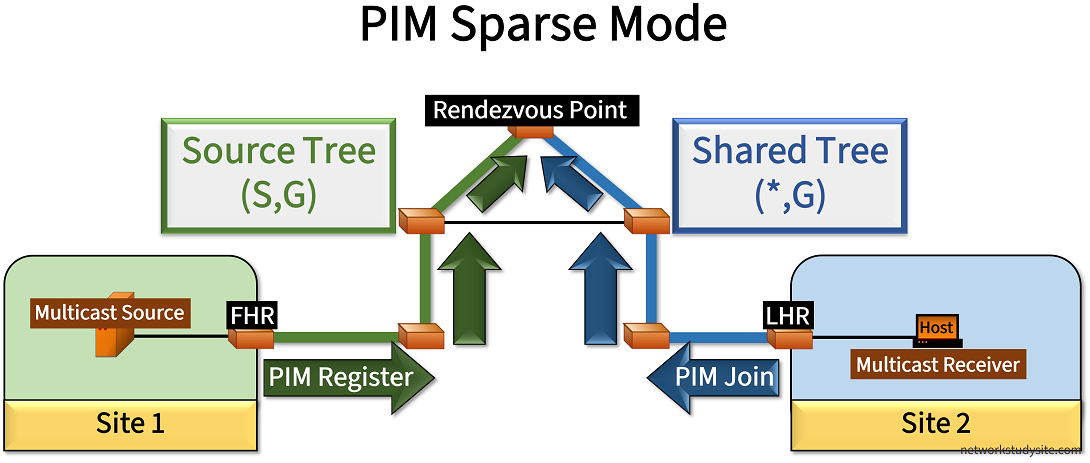
The image above highlights important elements of PIM Sparse Mode which has the RP as an integral and necessary component. The following list describes PIM Sparse Mode in more detail.
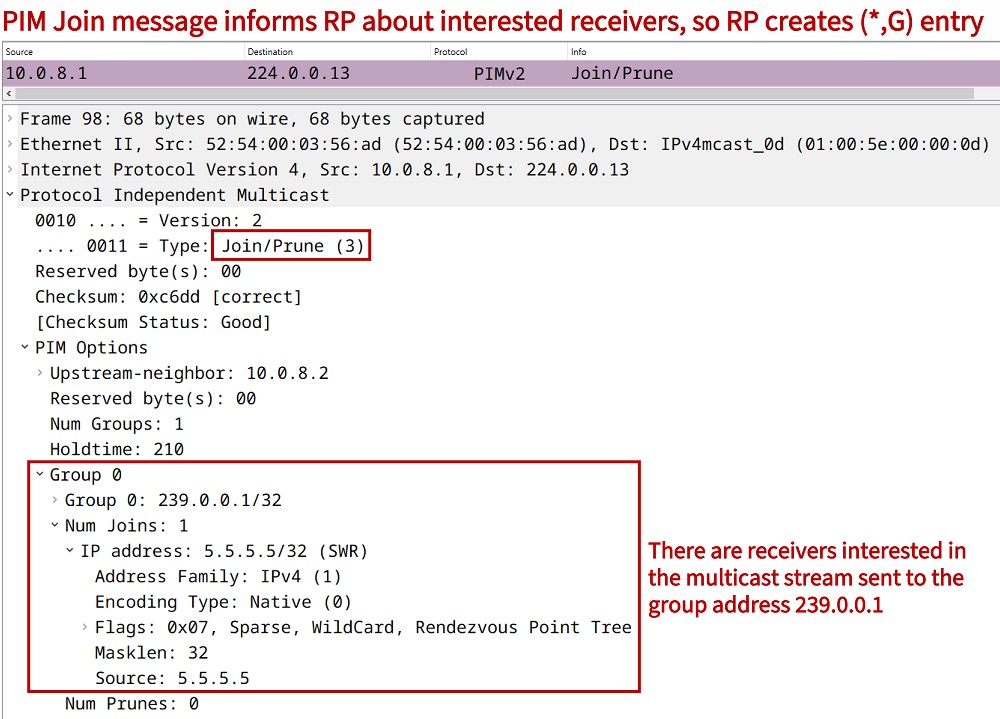
- The RP keeps track of interested receivers that request a specific multicast stream. The PIM Join messages are an important part of this process because they inform about interested receivers and create a Shared Distribution Tree (*,G) between the Last Hop Router (LHR) and the RP. The RP is at the root of the Shared Tree.
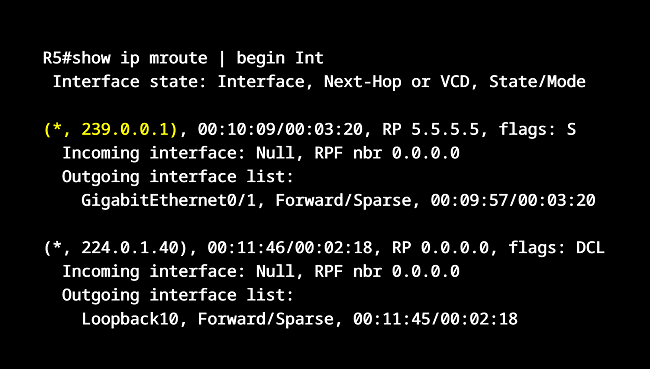
- The RP creates a (*,G) forwarding state entry for each multicast group address with interested receivers. The Outgoing Interface List (OIL) on the RP and on each multicast router is populated with egress interfaces to reach these receivers. Specifically, the OIL is populated with each interface where a PIM Join was received (per each individual group address). The (*,G) entries are added on the RP even if a source is not streaming any data yet.
- When the multicast source starts streaming data to a multicast group address it first registers with the RP. This is accomplished by the First Hop Router (FHR) sending a PIM Register message with multicast data which is encapsulated (tunneled) in a unicast packet. The unicast packet is destined to the RP. The PIM Registration process creates a Source Based Tree (S,G) between the FHR and the RP. The RP adds an Incoming Interface (IIF) to the (S,G) entry pointing towards the FHR.
- Along each PIM-enabled router (including on the RP) the Reverse Path Forwarding (RPF) check is carried out. A router accepts multicast data traffic only on an interface that is used by the unicast routing table to reach the source of the distribution tree (the source can be the FHR or the RP). This also means, if there is no route to the source of an incoming multicast packet, it will be discarded. This ensures a loop-free path within the PIM domain. The incoming interface (IIF) is also called the RPF interface. Note, the IGP RPF check can be influenced (overriden) with a static mroute or with multicast BGP.
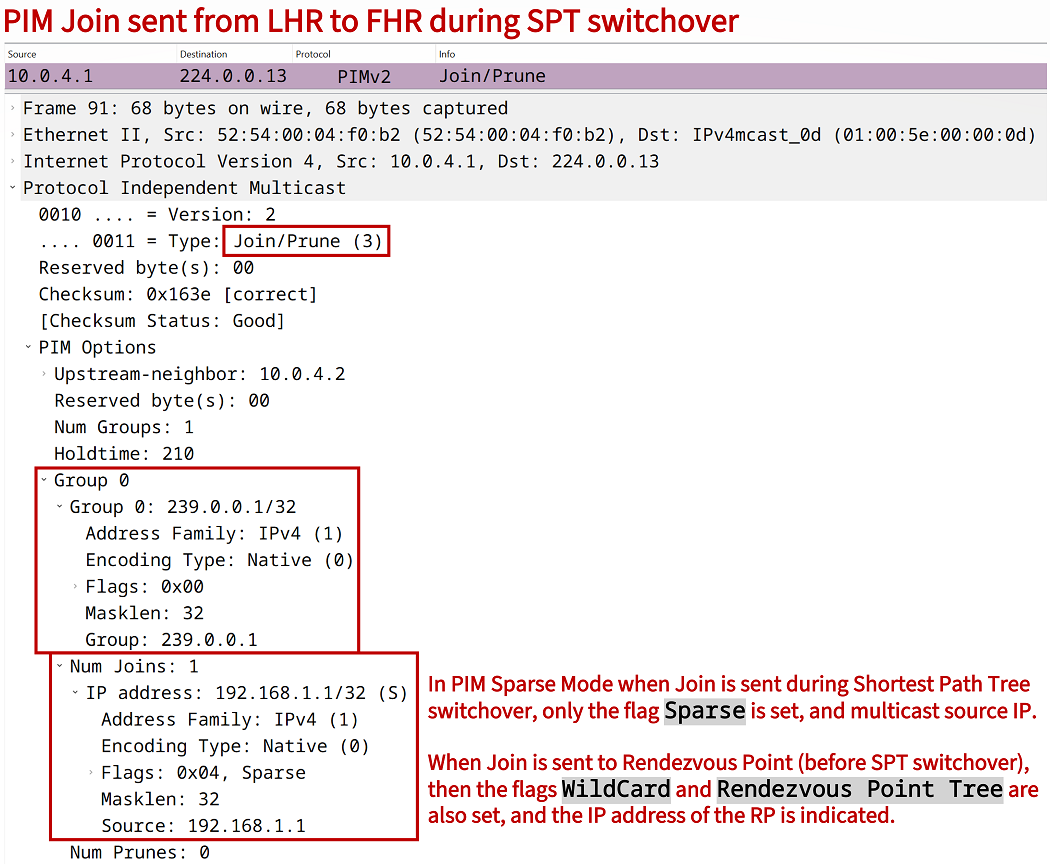
- At first, the RP receives data from the source incoming on the (S,G) tree, and forwards it on the (*,G) tree to the receivers. However, after exceeding a configured threshold limit of received packets, the LHR can initiate a Shortest Path Tree (SPT) switchover. This consists of the LHR sending a PIM Join message directly to the FHR. Consequently, the LHR can install an (S,G) entry in its mroute table. Note that without an SPT switchover, the LHR only has a (*,G) entry with the RP at the root of the Shared Tree (this is how Bidirectional PIM works).
- With the SPT switchover, the LHR and the FHR can establish a Source Based Tree (S,G) without having to rely on the RP for data forwarding. SPT switchover is an optimization mechanism that chooses the shortest path between the FHR and the LHR.
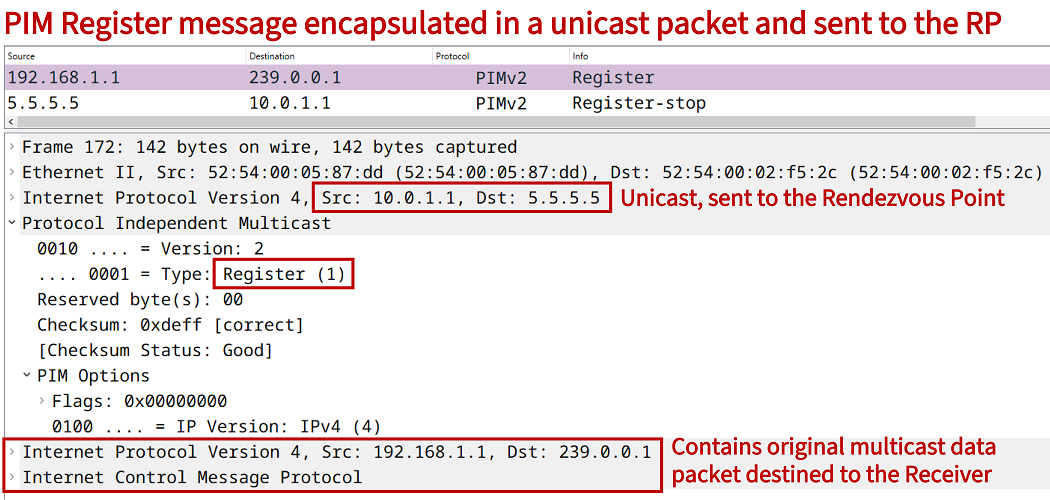
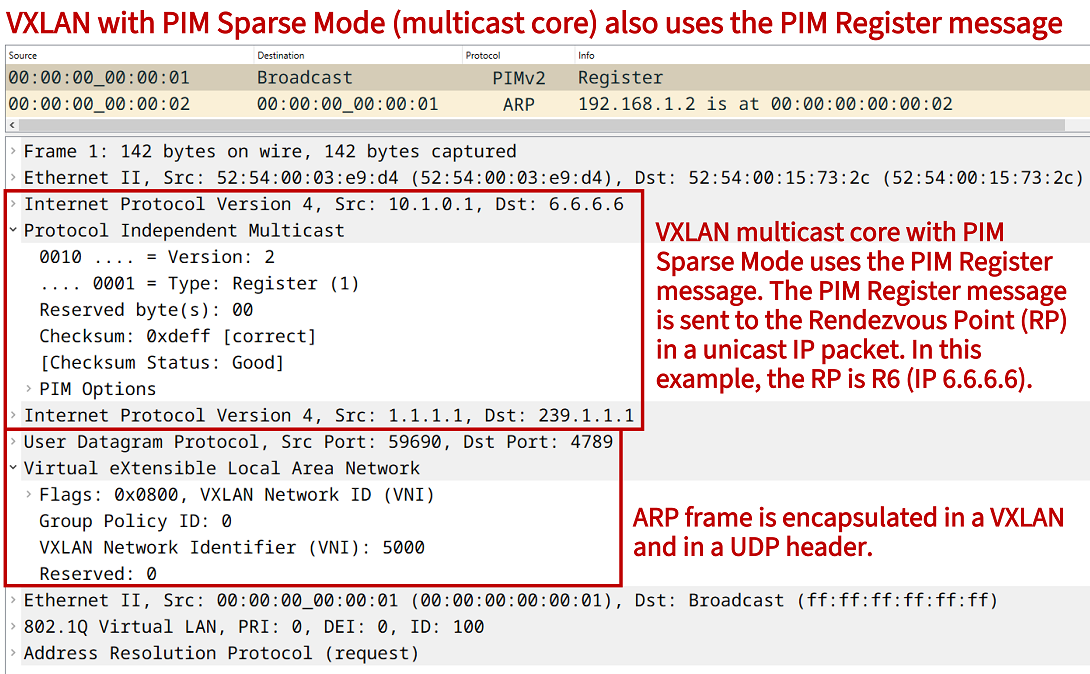
As shown in the above capture, VXLAN with a multicast core (PIM Sparse Mode) will also unicast the PIM Register message to the Rendezvous Point address, while including a VXLAN and UDP header for Layer-2 encapsulation.
How to configure PIM Sparse Mode with Bootstrap Router (BSR)?
In the following example scenario, the Multicast Source sends data to the group address 239.0.0.1 which has the Multicast Receiver (in Site 2) subscribed. This is achieved by first configuring the IGP EIGRP to establish unicast connectivity between the two sites.
Next, multicast routing is enabled on each router using the global configuration command ip multicast-routing. PIM Sparse Mode is enabled under each interface participating in the PIM-domain, by adding the command ip pim sparse-mode. R5 is chosen as the Rendezvous Point (RP). In order to dynamically advertise the RP address, R4 is configured as a Bootstrap Router (BSR).
The RP and the BSR work together. First, the BSR announces itself by periodically sending Bootstrap messages. In this example, the BSR only accepts a candidate-RP with the IP address 5.5.5.5/32. This is an optional feature and is configured on the BSR using an ACL with the example command ip pim bsr-candidate Loopback10 0 100 accept-rp-candidate ACL-EXAMPLE-RP.
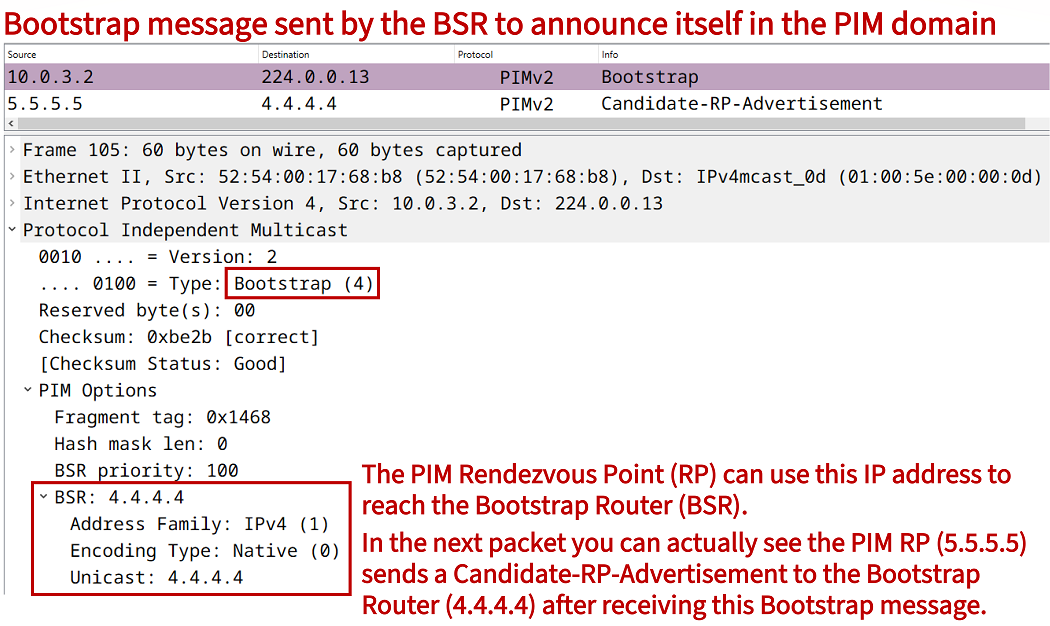
In response to the Bootstrap messages advertised by R4, the RP R5 announces itself (with unicast packet to R4) as a Candidate-RP for the group address 239.0.0.1 and using its Loopback IP address 5.5.5.5/32. The unicast message sent from RP R5 is received on the BSR R4, and the BSR advertises it to other devices in the PIM domain. The BSR uses Bootstrap messages to distribute group-to-RP mapping.
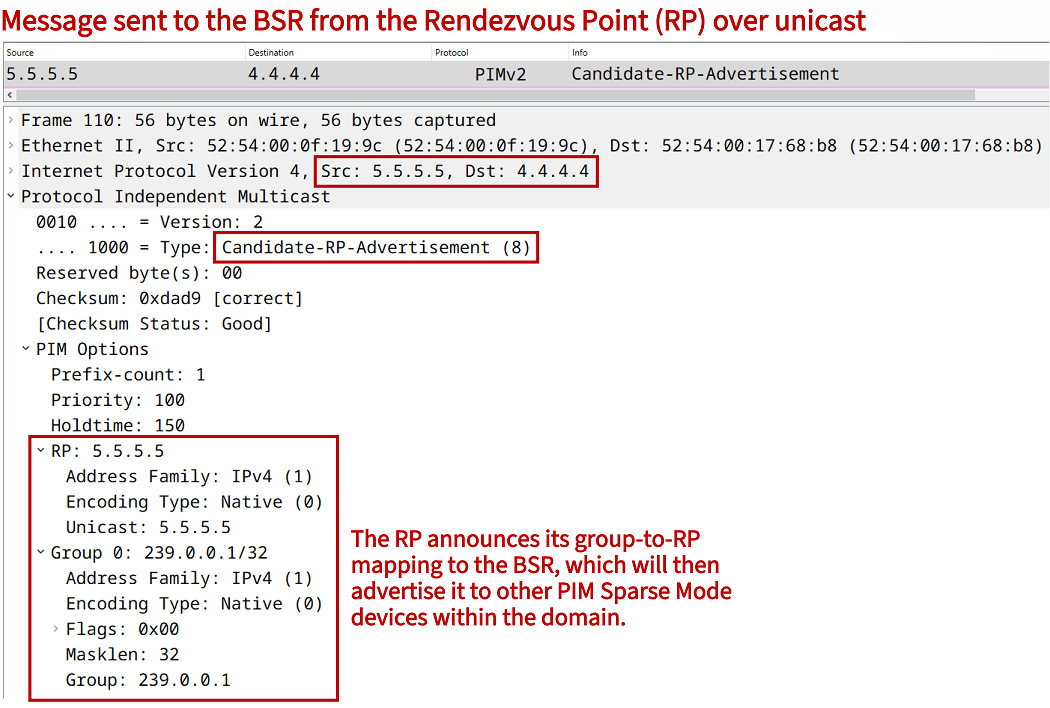
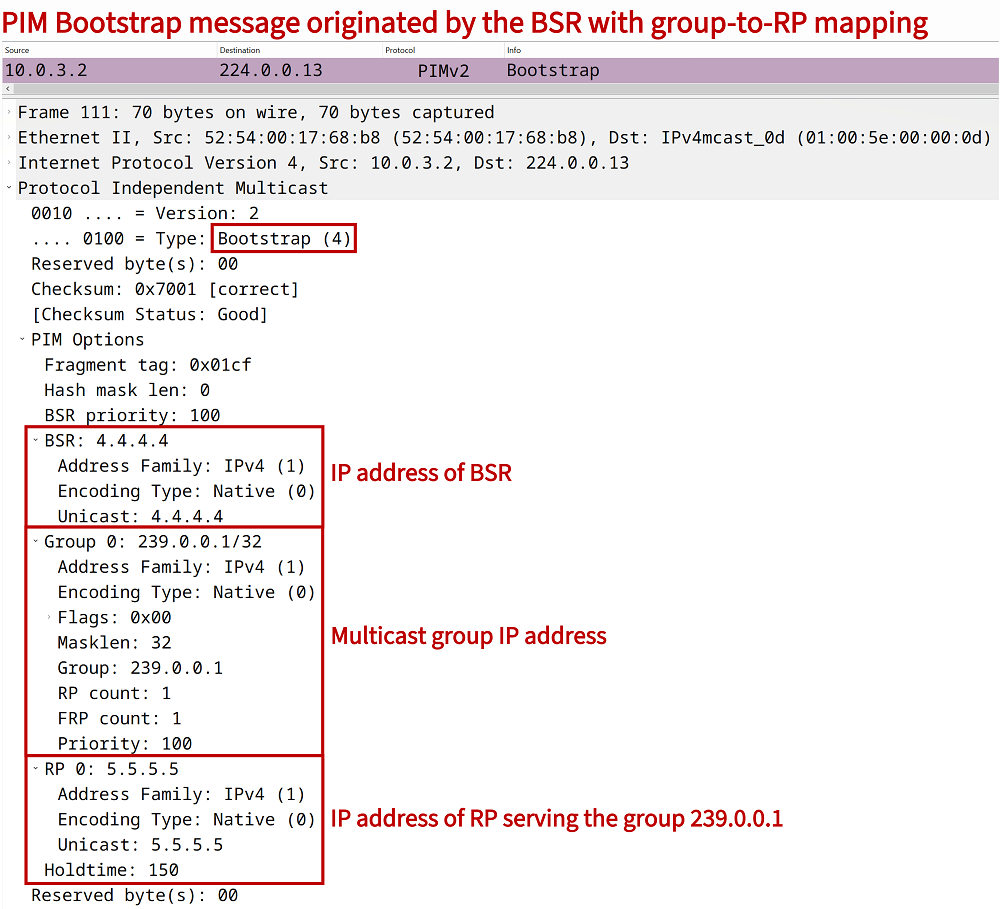
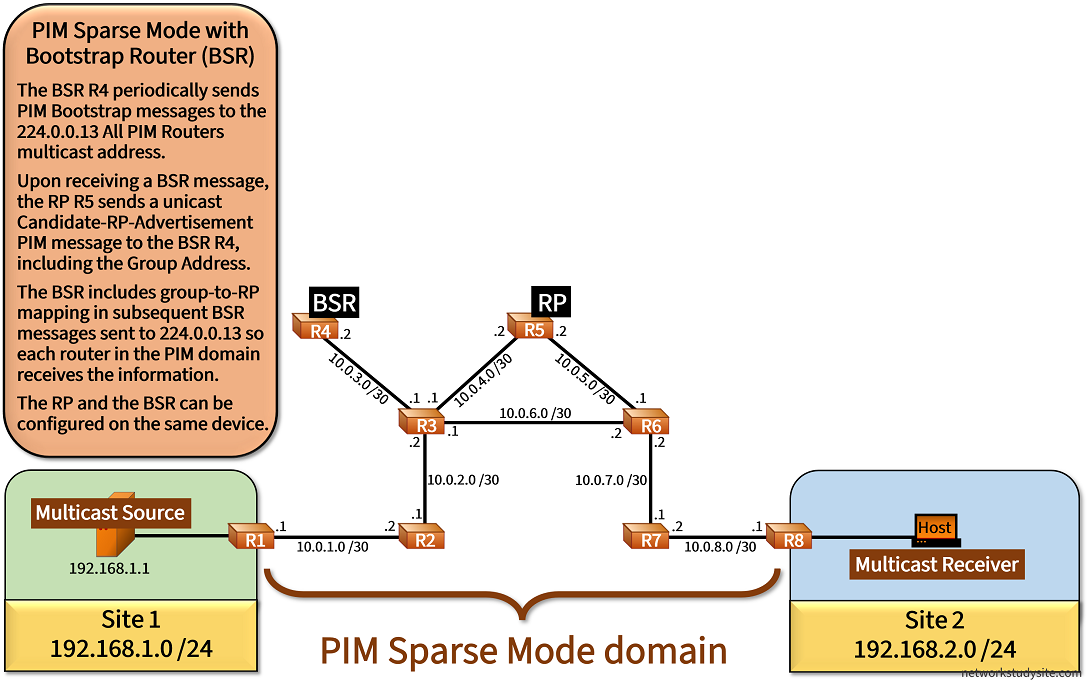
Configuration:
R1
R1#show run | sec ^ip multi
ip multicast-routing

R1#show run int Gi0/0 | sec int
interface GigabitEthernet0/0
 description ** to Multicast Source **
 ip address 192.168.1.2 255.255.255.0
 ip pim bsr-border
 ip pim sparse-mode
 duplex auto
 speed auto
 media-type rj45

R1#show run int Gi0/1 | sec int
interface GigabitEthernet0/1
 description ** to R2 **
 ip address 10.0.1.1 255.255.255.252
 ip pim sparse-mode
 duplex auto
 speed auto
 media-type rj45

R1#show run | sec ^router
router eigrp EXAMPLE-EIGRP
 !
 address-family ipv4 unicast autonomous-system 10
  !
  af-interface GigabitEthernet0/0
   passive-interface
  exit-af-interface
  !
  topology base
  exit-af-topology
  network 10.0.1.0 0.0.0.3
  network 192.168.1.0
  eigrp router-id 1.1.1.1
 exit-address-family
R2
R2#show run | sec ^ip multi
ip multicast-routing

R2#show run int Gi0/0 | sec int
interface GigabitEthernet0/0
 description ** to R1 **
 ip address 10.0.1.2 255.255.255.252
 ip pim sparse-mode
 duplex auto
 speed auto
 media-type rj45

R2#show run int Gi0/1 | sec int
interface GigabitEthernet0/1
 description ** to R3 **
 ip address 10.0.2.1 255.255.255.252
 ip pim sparse-mode
 duplex auto
 speed auto
 media-type rj45

R2#show run | sec ^router
router eigrp EXAMPLE-EIGRP
 !
 address-family ipv4 unicast autonomous-system 10
  !
  topology base
  exit-af-topology
  network 10.0.1.0 0.0.0.3
  network 10.0.2.0 0.0.0.3
  eigrp router-id 2.2.2.2
 exit-address-family
R3
R3#show run | sec ^ip multi
ip multicast-routing

R3#show run int Gi0/0 | sec int
interface GigabitEthernet0/0
 description ** to R2 **
 ip address 10.0.2.2 255.255.255.252
 ip pim sparse-mode
 duplex auto
 speed auto
 media-type rj45

R3#show run int Gi0/1 | sec int
interface GigabitEthernet0/1
 description ** to R5 **
 ip address 10.0.4.1 255.255.255.252
 ip pim sparse-mode
 duplex auto
 speed auto
 media-type rj45

R3#show run int Gi0/2 | sec int
interface GigabitEthernet0/2
 description ** to R6 **
 ip address 10.0.6.1 255.255.255.252
 ip pim sparse-mode
 duplex auto
 speed auto
 media-type rj45

R3#show run int Gi0/3 | sec int
interface GigabitEthernet0/3
 description ** to R4**
 ip address 10.0.3.1 255.255.255.252
 ip pim sparse-mode
 duplex auto
 speed auto
 media-type rj45

R3#show run | sec ^router
router eigrp EXAMPLE-EIGRP
 !
 address-family ipv4 unicast autonomous-system 10
  !
  topology base
  exit-af-topology
  network 10.0.2.0 0.0.0.3
  network 10.0.3.0 0.0.0.3
  network 10.0.4.0 0.0.0.3
  network 10.0.6.0 0.0.0.3
  eigrp router-id 3.3.3.3
 exit-address-family
R4 (BSR)
R4#show run | sec ^ip multi
ip multicast-routing

R4#show run | sec ^ip pim
ip pim bsr-candidate Loopback10 0 100 accept-rp-candidate ACL-EXAMPLE-RP

R4#show run | sec ^ip access
ip access-list standard ACL-EXAMPLE-RP
 permit 5.5.5.5

R4#show run int Lo10 | sec int
interface Loopback10
 ip address 4.4.4.4 255.255.255.255
 ip pim sparse-mode

R4#show run int Gi0/0 | sec int
interface GigabitEthernet0/0
 description ** to R3 **
 ip address 10.0.3.2 255.255.255.252
 ip pim sparse-mode
 duplex auto
 speed auto
 media-type rj45

R4#show run | sec ^router
router eigrp EXAMPLE-EIGRP
 !
 address-family ipv4 unicast autonomous-system 10
  !
  topology base
  exit-af-topology
  network 4.4.4.4 0.0.0.0
  network 10.0.3.0 0.0.0.3
  eigrp router-id 4.4.4.4
 exit-address-family
R5 (RP)
R5#show run | sec ^ip multi
ip multicast-routing

R5#show run | sec ^ip pim
ip pim rp-candidate Loopback10 group-list ACL-EXAMPLE-GROUP priority 100

R5#show run | sec ^ip access
ip access-list standard ACL-EXAMPLE-GROUP
 permit 239.0.0.1

R5#show run int Lo10 | sec int
interface Loopback10
 ip address 5.5.5.5 255.255.255.255
 ip pim sparse-mode

R5#show run int Gi0/0 | sec int
interface GigabitEthernet0/0
 description ** to R3 **
 ip address 10.0.4.2 255.255.255.252
 ip pim sparse-mode
 duplex auto
 speed auto
 media-type rj45

R5#show run int Gi0/1 | sec int
interface GigabitEthernet0/1
 description ** to R6 **
 ip address 10.0.5.2 255.255.255.252
 ip pim sparse-mode
 duplex auto
 speed auto
 media-type rj45

R5#show run | sec ^router
router eigrp EXAMPLE-EIGRP
 !
 address-family ipv4 unicast autonomous-system 10
  !
  topology base
  exit-af-topology
  network 5.5.5.5 0.0.0.0
  network 10.0.4.0 0.0.0.3
  network 10.0.5.0 0.0.0.3
  eigrp router-id 5.5.5.5
 exit-address-family
R6
R6#show run | sec ^ip multi
ip multicast-routing

R6#show run int Gi0/0 | sec int
interface GigabitEthernet0/0
 description ** to R7 **
 ip address 10.0.7.2 255.255.255.252
 ip pim sparse-mode
 duplex auto
 speed auto
 media-type rj45

R6#show run int Gi0/1 | sec int
interface GigabitEthernet0/1
 description ** to R5 **
 ip address 10.0.5.1 255.255.255.252
 ip pim sparse-mode
 duplex auto
 speed auto
 media-type rj45

R6#show run int Gi0/2 | sec int
interface GigabitEthernet0/2
 description ** to R3 **
 ip address 10.0.6.2 255.255.255.252
 ip pim sparse-mode
 duplex auto
 speed auto
 media-type rj45

R6#show run | sec ^router
router eigrp EXAMPLE-EIGRP
 !
 address-family ipv4 unicast autonomous-system 10
  !
  topology base
  exit-af-topology
  network 10.0.5.0 0.0.0.3
  network 10.0.6.0 0.0.0.3
  network 10.0.7.0 0.0.0.3
  eigrp router-id 6.6.6.6
 exit-address-family
R7
R7#show run | sec ^ip multi
ip multicast-routing

R7#show run int Gi0/0 | sec int
interface GigabitEthernet0/0
 description ** to R8 **
 ip address 10.0.8.2 255.255.255.252
 ip pim sparse-mode
 duplex auto
 speed auto
 media-type rj45

R7#show run int Gi0/1 | sec int
interface GigabitEthernet0/1
 description ** to R6 **
 ip address 10.0.7.1 255.255.255.252
 ip pim sparse-mode
 duplex auto
 speed auto
 media-type rj45

R7#show run | sec ^router
router eigrp EXAMPLE-EIGRP
 !
 address-family ipv4 unicast autonomous-system 10
  !
  topology base
  exit-af-topology
  network 10.0.7.0 0.0.0.3
  network 10.0.8.0 0.0.0.3
  eigrp router-id 7.7.7.7
 exit-address-family
R8
R8#show run | sec ^ip multi
ip multicast-routing

R8#show run int Gi0/0 | sec int
interface GigabitEthernet0/0
 description ** to Multicast Receiver **
 ip address 192.168.2.2 255.255.255.0
 ip pim bsr-border
 ip pim sparse-mode
 duplex auto
 speed auto
 media-type rj45

R8#show run int Gi0/1 | sec int
interface GigabitEthernet0/1
 description ** to R7 **
 ip address 10.0.8.1 255.255.255.252
 ip pim sparse-mode
 duplex auto
 speed auto
 media-type rj45

R8#show run | sec ^router
router eigrp EXAMPLE-EIGRP
 !
 address-family ipv4 unicast autonomous-system 10
  !
  af-interface GigabitEthernet0/0
   passive-interface
  exit-af-interface
  !
  topology base
  exit-af-topology
  network 10.0.8.0 0.0.0.3
  network 192.168.2.0
  eigrp router-id 8.8.8.8
 exit-address-family
Multicast Source
Source#show run int Gi0/0 | sec int
interface GigabitEthernet0/0
 description ** to R1 **
 ip address 192.168.1.1 255.255.255.0
 duplex auto
 speed auto
 media-type rj45

Source#show run | sec ^ip route
ip route 0.0.0.0 0.0.0.0 GigabitEthernet0/0 192.168.1.2
Multicast Receiver
Receiver#show run int Gi0/0 | sec int
interface GigabitEthernet0/0
 description ** to R8 **
 ip address 192.168.2.1 255.255.255.0
 ip igmp join-group 239.0.0.1
 duplex auto
 speed auto
 media-type rj45

Receiver#show run | sec ^ip route
ip route 0.0.0.0 0.0.0.0 GigabitEthernet0/0 192.168.2.2
R1#show ip pim rp mapping
PIM Group-to-RP Mappings

Group(s) 239.0.0.1/32
  RP 5.5.5.5 (?), v2                                                          « FHR R1 learns about the RP for the group address 239.0.0.1
    Info source: 4.4.4.4 (?), via bootstrap, priority 100, holdtime 150       « RP information is advertised by the BSR R4
         Uptime: 00:00:05, expires: 00:02:20


R8#show ip pim rp mapping
PIM Group-to-RP Mappings

Group(s) 239.0.0.1/32
  RP 5.5.5.5 (?), v2
    Info source: 4.4.4.4 (?), via bootstrap, priority 100, holdtime 150
         Uptime: 00:12:11, expires: 00:02:19


R1#show ip pim bsr-router
PIMv2 Bootstrap information
  BSR address: 4.4.4.4 (?)                                                    « BSR IP address is visible
  Uptime:      00:00:16, BSR Priority: 100, Hash mask length: 0               « Priority value configured on R4, higher value becomes active BSR
  Expires:     00:01:55


Source#ping 239.0.0.1 re 5
Type escape sequence to abort.
Sending 5, 100-byte ICMP Echos to 239.0.0.1, timeout is 2 seconds:

Reply to request 0 from 192.168.2.1, 6 ms                                     « Receiver Host (Site 2) responds to multicast ping
Reply to request 1 from 192.168.2.1, 5 ms
Reply to request 2 from 192.168.2.1, 6 ms
Reply to request 3 from 192.168.2.1, 5 ms
Reply to request 4 from 192.168.2.1, 6 ms
It is possible to configure the RP and BSR functions on the same network device. For example, to configure R5 as the RP and the BSR, the following configuration can be applied. Additionally, it is important to advertise the RP's Loopback IP address in the unicast routing protocol to other PIM-enabled devices so they have a route ro reach the RP. Notice, the following is a simpler configuration compared to the one displayed above because the access-lists are not added.
R5>
R5>enable
R5#configure terminal
Enter configuration commands, one per line.  End with CNTL/Z.
R5(config)#
R5(config)#interface Loopback10
R5(config-if)#ip address 5.5.5.5 255.255.255.255
R5(config-if)#ip pim sparse-mode
R5(config-if)#exit
R5(config)#
R5(config)#ip pim rp-candidate Loopback10
R5(config)#ip pim bsr-candidate Loopback10
R5(config)#exit
R5#


--------------------------------------------------------------


R1#show ip pim bsr
PIMv2 Bootstrap information
  BSR address: 5.5.5.5 (?)
  Uptime:      00:02:55, BSR Priority: 0, Hash mask length: 0
  Expires:     00:01:14


R1#show ip pim rp mapping
PIM Group-to-RP Mappings

Group(s) 224.0.0.0/4
  RP 5.5.5.5 (?), v2
    Info source: 5.5.5.5 (?), via bootstrap, priority 0, holdtime 150
         Uptime: 00:02:56, expires: 00:01:29
An important security-related aspect of this topology is the command ip pim bsr-border which is added on the LAN-facing interface of the FHR and the LHR. As a result, PIM Bootstrap messages are not sent to devices that do not participate in the PIM domain. This feature is especially important when configuring interdomain multicast, as it prevents the BSR messages to leak between different domains.
PIM Sparse Mode with Auto-RP configuration
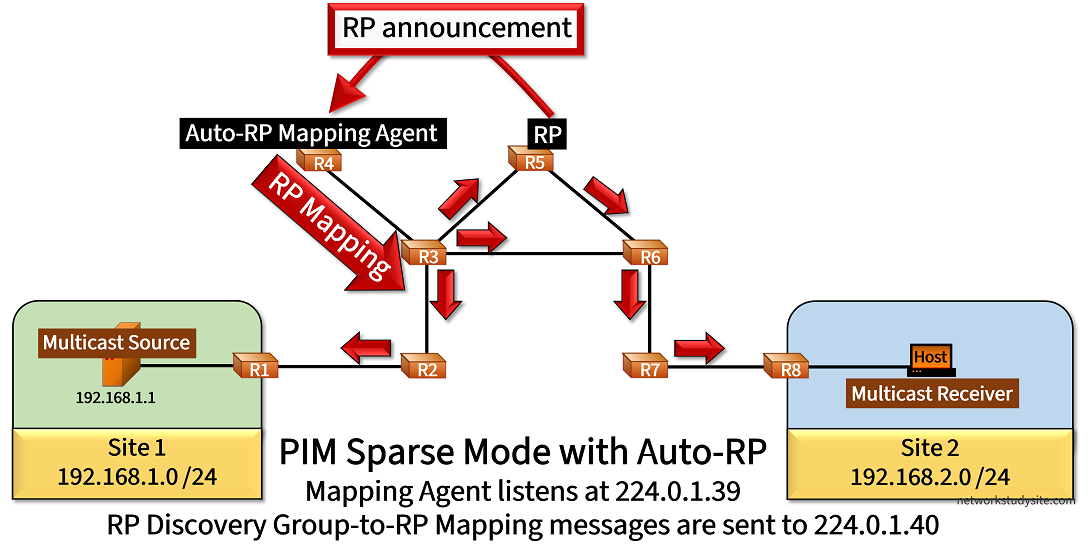
Auto-RP provides a similar function to BSR but with a different mechanism. In this example scenario, R5 is the RP and announces itself for the multicast group 239.0.0.1 by sending an RP announcement message to the address 224.0.1.39. By default, an RP sends every 60 seconds an RP announcement packet which contains the group-to-RP mapping.
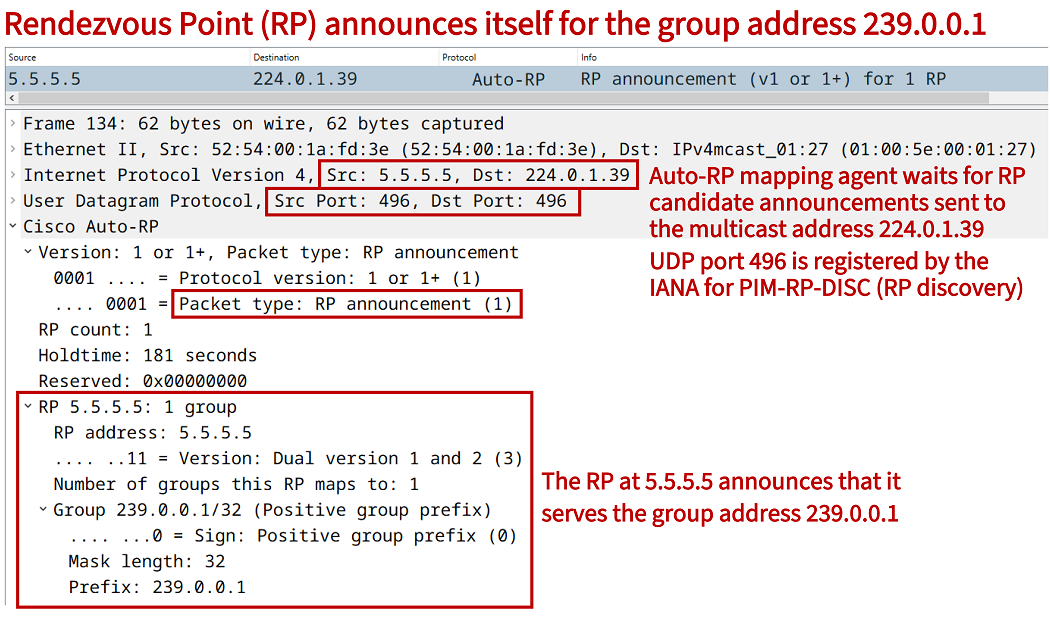
In turn, the Auto-RP Mapping Agent R4 receives RP announcement messages sent to 224.0.1.39, and advertises RP mapping messages to the address 224.0.1.40. The address 224.0.1.40 is used by each PIM-enabled router to receive group-to-RP messages from the Auto-RP Mapping Agent. But, since there is no RP associated with the address 224.0.1.40, therefore RP mapping messages are flooded using PIM Dense Mode.
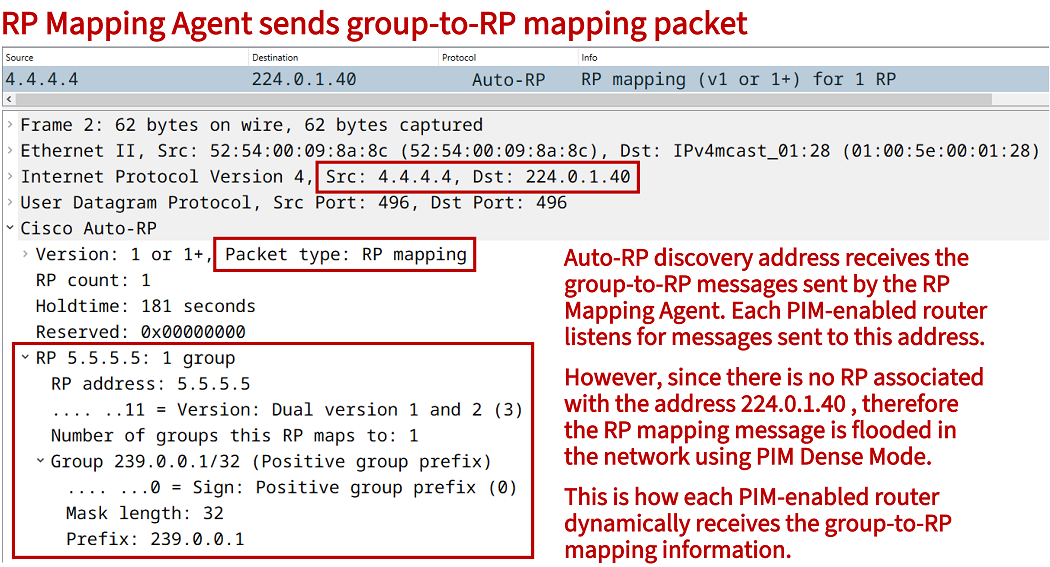
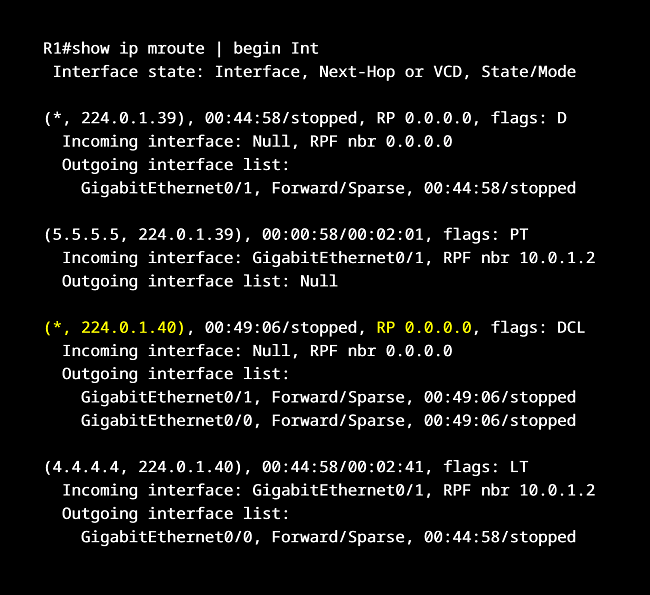
As this is a PIM Sparse Mode network, extra configuration needs to be added to make the Dense Mode flooding of Auto-RP messages work. In this scenario, each PIM-enabled router receives the global configuration command ip pim autorp listener. This enables reception and propagation of packets using PIM Dense Mode for only the two Auto-RP addresses (224.0.1.39 and 224.0.1.40).
As an alternative to the Auto-RP listener (not configured in this scenario), PIM-enabled interfaces could have been configured with the command ip pim sparse-dense-mode. This would cause any multicast traffic with an unknown RP address (not just the two Auto-RP addresses) to be flooded in PIM Dense Mode.
Configuration:
R1
R1#show run | sec ^ip multi
ip multicast-routing

R1#show run | sec ^ip pim
ip pim autorp listener

R1#show run int Gi0/0 | sec int
interface GigabitEthernet0/0
 description ** to Multicast Source **
 ip address 192.168.1.2 255.255.255.0
 ip pim bsr-border
 ip pim sparse-mode
 duplex auto
 speed auto
 media-type rj45

R1#show run int Gi0/1 | sec int
interface GigabitEthernet0/1
 description ** to R2 **
 ip address 10.0.1.1 255.255.255.252
 ip pim sparse-mode
 duplex auto
 speed auto
 media-type rj45

R1#show run | sec ^router
router eigrp EXAMPLE-EIGRP
 !
 address-family ipv4 unicast autonomous-system 10
  !
  af-interface GigabitEthernet0/0
   passive-interface
  exit-af-interface
  !
  topology base
  exit-af-topology
  network 10.0.1.0 0.0.0.3
  network 192.168.1.0
  eigrp router-id 1.1.1.1
 exit-address-family
R4 (Auto-RP Mapping Agent)
R4#show run | sec ^ip multi
ip multicast-routing

R4#show run | sec ^ip pim
ip pim autorp listener
ip pim send-rp-discovery Loopback10 scope 15

R4#show run int Lo10 | sec int
interface Loopback10
 ip address 4.4.4.4 255.255.255.255
 ip pim sparse-mode

R4#show run int Gi0/0 | sec int
interface GigabitEthernet0/0
 description ** to R3 **
 ip address 10.0.3.2 255.255.255.252
 ip pim sparse-mode
 duplex auto
 speed auto
 media-type rj45

R4#show run | sec ^router
router eigrp EXAMPLE-EIGRP
 !
 address-family ipv4 unicast autonomous-system 10
  !
  topology base
  exit-af-topology
  network 4.4.4.4 0.0.0.0
  network 10.0.3.0 0.0.0.3
  eigrp router-id 4.4.4.4
 exit-address-family
R5 (RP)
R5#show run | sec ^ip multi
ip multicast-routing

R5#show run | sec ^ip pim
ip pim autorp listener
ip pim send-rp-announce 5.5.5.5 scope 15 group-list ACL-EXAMPLE-GROUP

R5#show run | sec ^ip access
ip access-list standard ACL-EXAMPLE-GROUP
 permit 239.0.0.1

R5#show run int Lo10 | sec int
interface Loopback10
 ip address 5.5.5.5 255.255.255.255
 ip pim sparse-mode

R5#show run int Gi0/0 | sec int
interface GigabitEthernet0/0
 description ** to R3 **
 ip address 10.0.4.2 255.255.255.252
 ip pim sparse-mode
 duplex auto
 speed auto
 media-type rj45

R5#show run int Gi0/1 | sec int
interface GigabitEthernet0/1
 description ** to R6 **
 ip address 10.0.5.2 255.255.255.252
 ip pim sparse-mode
 duplex auto
 speed auto
 media-type rj45

R5#show run | sec ^router
router eigrp EXAMPLE-EIGRP
 !
 address-family ipv4 unicast autonomous-system 10
  !
  topology base
  exit-af-topology
  network 5.5.5.5 0.0.0.0
  network 10.0.4.0 0.0.0.3
  network 10.0.5.0 0.0.0.3
  eigrp router-id 5.5.5.5
 exit-address-family
R8
R8#show run | sec ^ip multi
ip multicast-routing

R8#show run | sec ^ip pim
ip pim autorp listener

R8#show run int Gi0/0 | sec int
interface GigabitEthernet0/0
 description ** to Multicast Receiver **
 ip address 192.168.2.2 255.255.255.0
 ip pim bsr-border
 ip pim sparse-mode
 duplex auto
 speed auto
 media-type rj45

R8#show run int Gi0/1 | sec int
interface GigabitEthernet0/1
 description ** to R7 **
 ip address 10.0.8.1 255.255.255.252
 ip pim sparse-mode
 duplex auto
 speed auto
 media-type rj45

R8#show run | sec ^router
router eigrp EXAMPLE-EIGRP
 !
 address-family ipv4 unicast autonomous-system 10
  !
  af-interface GigabitEthernet0/0
   passive-interface
  exit-af-interface
  !
  topology base
  exit-af-topology
  network 10.0.8.0 0.0.0.3
  network 192.168.2.0
  eigrp router-id 8.8.8.8
 exit-address-family
R1#show ip pim autorp
AutoRP Information:
  AutoRP is enabled.                                   « Auto-RP enabled on R1
  RP Discovery packet MTU is 0.
  224.0.1.40 is joined on GigabitEthernet0/0.
  AutoRP groups over sparse mode interface is enabled

PIM AutoRP Statistics: Sent/Received
  RP Announce: 0/0, RP Discovery: 0/208                « FHR R1 receives Auto-RP Discovery with group-to-RP mapping


R1#show ip pim rp mapping
PIM Group-to-RP Mappings

Group(s) 239.0.0.1/32                                  « FHR R1 receives group-to-RP mapping from Auto-RP
  RP 5.5.5.5 (?), v2v1
    Info source: 4.4.4.4 (?), elected via Auto-RP
         Uptime: 03:26:32, expires: 00:02:56


R5#show ip pim autorp
AutoRP Information:
  AutoRP is enabled.
  RP Discovery packet MTU is 0.
  224.0.1.40 is joined on GigabitEthernet0/0.
  AutoRP groups over sparse mode interface is enabled

PIM AutoRP Statistics: Sent/Received
  RP Announce: 684/0, RP Discovery: 0/209              « The RP sends RP Announce messages


R4#show ip pim autorp
AutoRP Information:
  AutoRP is enabled.
  RP Discovery packet MTU is 1500.
  224.0.1.40 is joined on Loopback10.
  AutoRP groups over sparse mode interface is enabled

PIM AutoRP Statistics: Sent/Received
  RP Announce: 0/207, RP Discovery: 418/0             « The Mapping Agent sends RP Discovery messages


R8#show ip mroute
IP Multicast Routing Table
Flags: D - Dense, S - Sparse, B - Bidir Group, s - SSM Group, C - Connected,
       L - Local, P - Pruned, R - RP-bit set, F - Register flag,
       T - SPT-bit set, J - Join SPT, M - MSDP created entry, E - Extranet,
       X - Proxy Join Timer Running, A - Candidate for MSDP Advertisement,
       U - URD, I - Received Source Specific Host Report,
       Z - Multicast Tunnel, z - MDT-data group sender,
       Y - Joined MDT-data group, y - Sending to MDT-data group,
       G - Received BGP C-Mroute, g - Sent BGP C-Mroute,
       N - Received BGP Shared-Tree Prune, n - BGP C-Mroute suppressed,
       Q - Received BGP S-A Route, q - Sent BGP S-A Route,
       V - RD & Vector, v - Vector, p - PIM Joins on route,
       x - VxLAN group
Outgoing interface flags: H - Hardware switched, A - Assert winner, p - PIM Join
 Timers: Uptime/Expires
 Interface state: Interface, Next-Hop or VCD, State/Mode

(*, 239.0.0.1), 06:00:01/stopped, RP 5.5.5.5, flags: SJC
  Incoming interface: GigabitEthernet0/1, RPF nbr 10.0.8.2
  Outgoing interface list:
    GigabitEthernet0/0, Forward/Sparse, 05:54:07/00:02:58

(192.168.1.1, 239.0.0.1), 00:00:18/00:02:41, flags: JT        « SPT switchover occurred on LHR
  Incoming interface: GigabitEthernet0/1, RPF nbr 10.0.8.2
  Outgoing interface list:
    GigabitEthernet0/0, Forward/Sparse, 00:00:18/00:02:58

(*, 224.0.1.39), 03:27:47/stopped, RP 0.0.0.0, flags: D       « Auto-RP Mapping Agent address learnt with PIM Dense Mode
  Incoming interface: Null, RPF nbr 0.0.0.0
  Outgoing interface list:
    GigabitEthernet0/1, Forward/Sparse, 03:27:47/stopped

(5.5.5.5, 224.0.1.39), 03:21:47/00:02:01, flags: PT           « SPT towards RP, entry relevant on the path between Auto-RP MA and RP
  Incoming interface: GigabitEthernet0/1, RPF nbr 10.0.8.2
  Outgoing interface list: Null

(*, 224.0.1.40), 03:28:25/stopped, RP 0.0.0.0, flags: DCL     « RP Discovery is sent here, does not have an RP assigned, needs PIM Dense Mode
  Incoming interface: Null, RPF nbr 0.0.0.0
  Outgoing interface list:
    GigabitEthernet0/1, Forward/Sparse, 03:28:25/stopped
    GigabitEthernet0/0, Forward/Sparse, 03:28:25/stopped

(4.4.4.4, 224.0.1.40), 03:27:47/00:02:44, flags: LT           « SPT towards the Auto-RP Mapping Agent
  Incoming interface: GigabitEthernet0/1, RPF nbr 10.0.8.2
  Outgoing interface list:
    GigabitEthernet0/0, Forward/Sparse, 03:27:47/stopped
Configuring RP redundancy with Anycast RP and MSDP
In the following example scenario three redundant Rendezvous Point routers are configured (R3, R5, and R8) using Anycast RP. The three RPs advertise the single IP address 10.99.99.99/32 with BSR to other routers in the PIM-domain. Thus, each PIM-enabled router starts to use the single RP IP address, but this address is in fact shared by three separate RP devices.
R1#show ip pim rp mapping
PIM Group-to-RP Mappings

Group(s) 224.0.0.0/4
  RP 10.99.99.99 (?), v2
    Info source: 10.99.99.99 (?), via bootstrap, priority 0, holdtime 150
         Uptime: 00:20:45, expires: 00:01:55
Each PIM-enabled router connects to the nearest RP IP address based on the IGP metric (EIGRP). This means, R1 connects to RP R3, and R7 connects to the RP R5. As a result, the RP R3 and the RP R5 have a different set of PIM multicast group state entries, or in other words their IP mroute table is different and needs to be synchronized. Therefore, Multicast Source Discovery Protocol (MSDP) is configured on each RP.
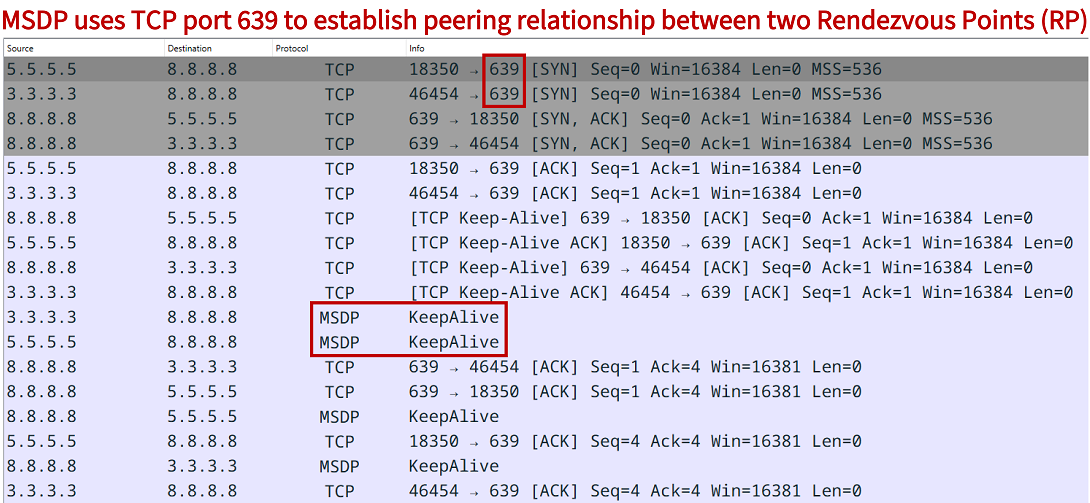
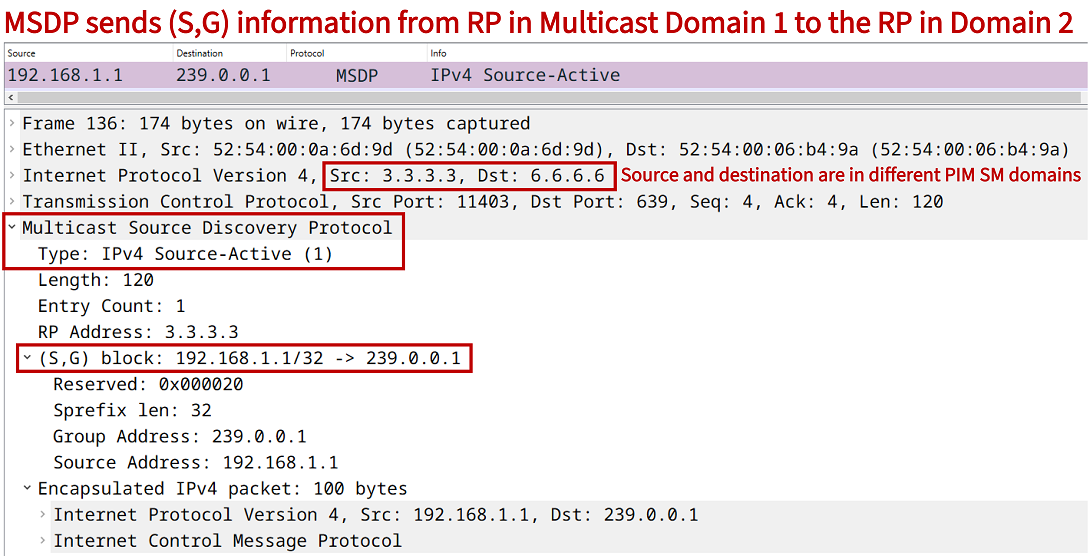
MSDP establishes neighbor relationships (peerings) between the RPs over TCP port 639. When the peering relationship is established between RPs, MSDP proceeds to share Source-Active (SA) messages containing each source address/group address/RP address mapping. Now, MSDP can synchronize each mroute table so each router has a shared set of multicast state entries.
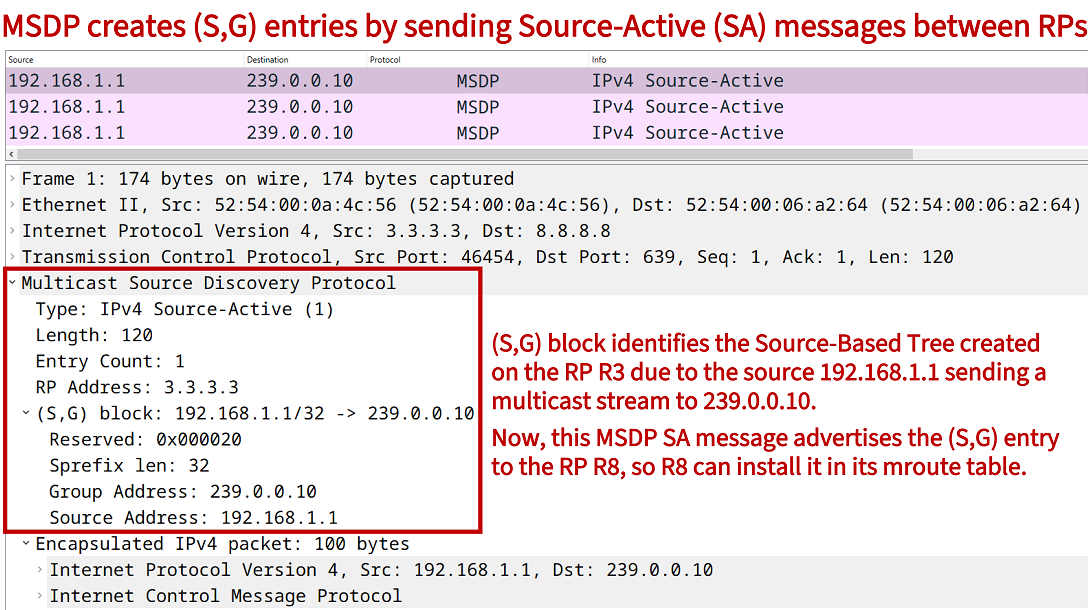
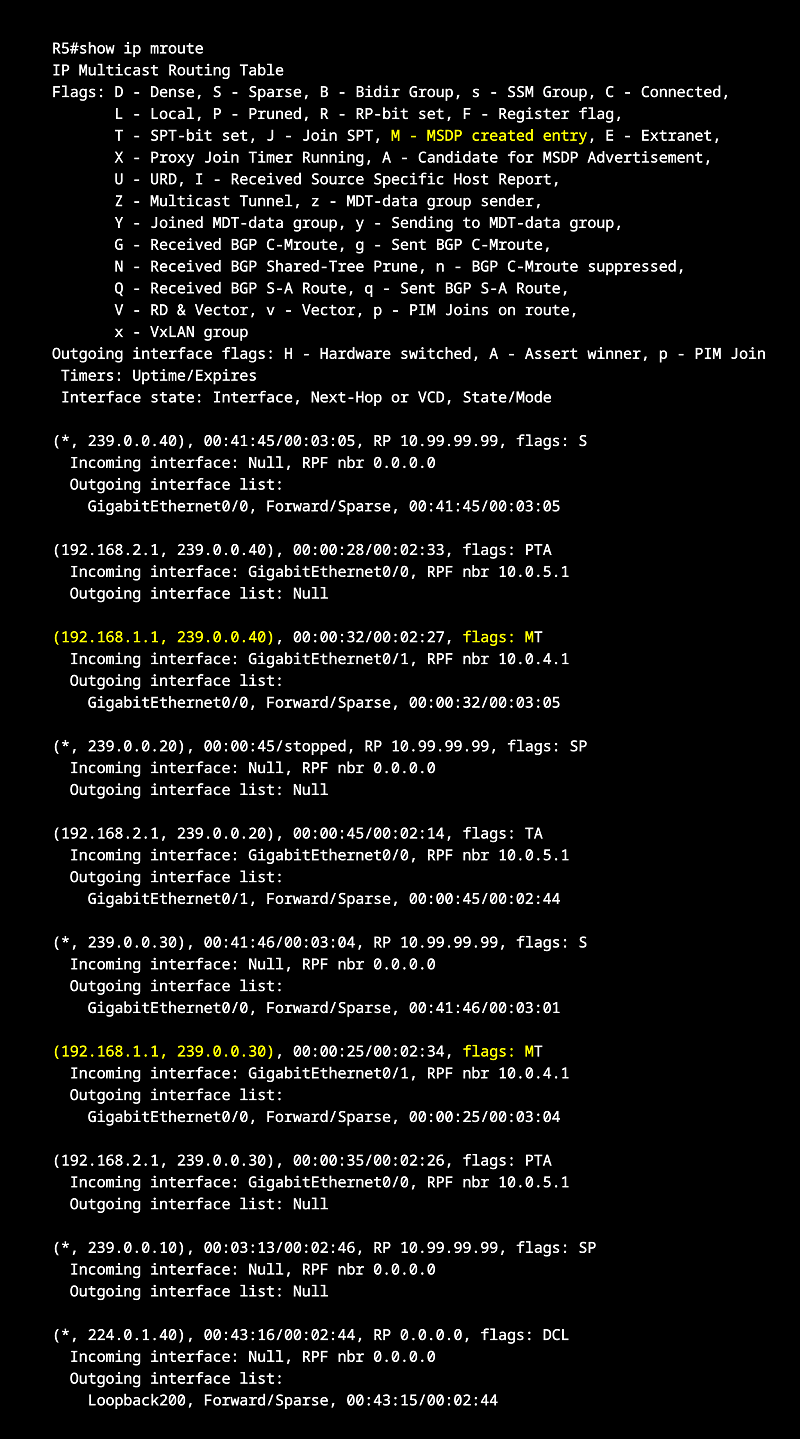
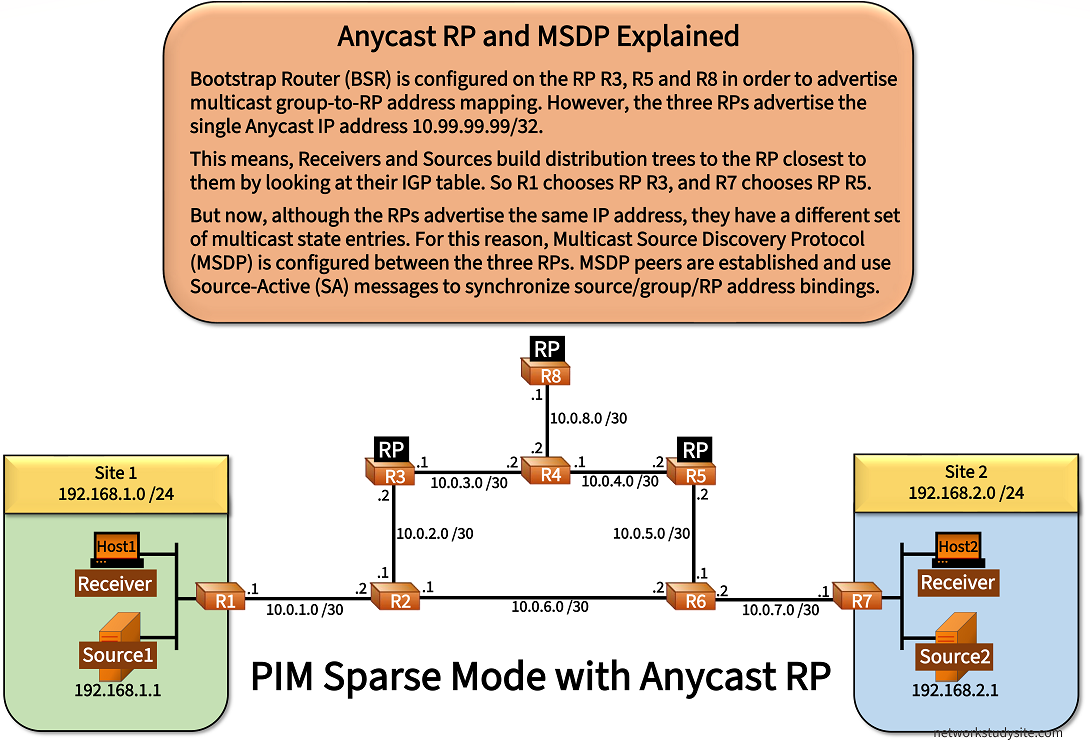
Configuration:
R3 (RP/BSR)
R3#show run | sec ^ip multi
ip multicast-routing

R3#show run | sec ^ip pim
ip pim bsr-candidate Loopback200 0
ip pim rp-candidate Loopback200

R3#show run | sec ^ip msdp
ip msdp peer 5.5.5.5 connect-source Loopback100
ip msdp peer 8.8.8.8 connect-source Loopback100
ip msdp cache-sa-state
ip msdp originator-id Loopback100

R3#show run int Lo100 | sec int
interface Loopback100
 description ** MSDP uses this IP address for peering **
 ip address 3.3.3.3 255.255.255.255

R3#show run int Lo200 | sec int
interface Loopback200
 description ** Anycast IP address used by RPs in PIM-domain **
 ip address 10.99.99.99 255.255.255.255
 ip pim sparse-mode

R3#show run int Gi0/0 | sec int
interface GigabitEthernet0/0
 description ** to R2 **
 ip address 10.0.2.2 255.255.255.252
 ip pim sparse-mode
 duplex auto
 speed auto
 media-type rj45

R3#show run int Gi0/1 | sec int
interface GigabitEthernet0/1
 description ** to R4 **
 ip address 10.0.3.1 255.255.255.252
 ip pim sparse-mode
 duplex auto
 speed auto
 media-type rj45

R3#show run | sec ^router
router eigrp EXAMPLE-EIGRP
 !
 address-family ipv4 unicast autonomous-system 10
  !
  topology base
  exit-af-topology
  network 3.3.3.3 0.0.0.0
  network 10.0.2.0 0.0.0.3
  network 10.0.3.0 0.0.0.3
  network 10.99.99.99 0.0.0.0
  eigrp router-id 3.3.3.3
 exit-address-family
R5 (RP/BSR)
R5#show run | sec ^ip multi
ip multicast-routing

R5#show run | sec ^ip pim
ip pim bsr-candidate Loopback200 0
ip pim rp-candidate Loopback200

R5#show run | sec ^ip msdp
ip msdp peer 3.3.3.3 connect-source Loopback100
ip msdp peer 8.8.8.8 connect-source Loopback100
ip msdp cache-sa-state
ip msdp originator-id Loopback100

R5#show run int Lo100 | sec int
interface Loopback100
 description ** MSDP uses this IP address for peering **
 ip address 5.5.5.5 255.255.255.255

R5#show run int Lo200 | sec int
interface Loopback200
 description ** Anycast IP address used by RPs in PIM-domain **
 ip address 10.99.99.99 255.255.255.255
 ip pim sparse-mode

R5#show run int Gi0/0 | sec int
interface GigabitEthernet0/0
 description ** to R6 **
 ip address 10.0.5.2 255.255.255.252
 ip pim sparse-mode
 duplex auto
 speed auto
 media-type rj45

R5#show run int Gi0/1 | sec int
interface GigabitEthernet0/1
 description ** to R4 **
 ip address 10.0.4.2 255.255.255.252
 ip pim sparse-mode
 duplex auto
 speed auto
 media-type rj45

R5#show run | sec ^router
router eigrp EXAMPLE-EIGRP
 !
 address-family ipv4 unicast autonomous-system 10
  !
  topology base
  exit-af-topology
  network 5.5.5.5 0.0.0.0
  network 10.0.4.0 0.0.0.3
  network 10.0.5.0 0.0.0.3
  network 10.99.99.99 0.0.0.0
  eigrp router-id 5.5.5.5
 exit-address-family
R8 (RP/BSR)
R8#show run | sec ^ip multi
ip multicast-routing

R8#show run | sec ^ip pim
ip pim bsr-candidate Loopback200 0
ip pim rp-candidate Loopback200

R8#show run | sec ^ip msdp
ip msdp peer 5.5.5.5 connect-source Loopback100
ip msdp peer 3.3.3.3 connect-source Loopback100
ip msdp cache-sa-state
ip msdp originator-id Loopback100

R8#show run int Lo100 | sec int
interface Loopback100
 description ** MSDP uses this IP address for peering **
 ip address 8.8.8.8 255.255.255.255

R8#show run int Lo200 | sec int
interface Loopback200
 description ** Anycast IP address used by RPs in PIM-domain **
 ip address 10.99.99.99 255.255.255.255
 ip pim sparse-mode

R8#show run int Gi0/0 | sec int
interface GigabitEthernet0/0
 description ** to R4 **
 ip address 10.0.8.1 255.255.255.252
 ip pim sparse-mode
 duplex auto
 speed auto
 media-type rj45

R8#show run | sec ^router
router eigrp EXAMPLE-EIGRP
 !
 address-family ipv4 unicast autonomous-system 10
  !
  topology base
  exit-af-topology
  network 8.8.8.8 0.0.0.0
  network 10.0.8.0 0.0.0.3
  network 10.99.99.99 0.0.0.0
  eigrp router-id 8.8.8.8
 exit-address-family
R1
R1#show run | sec ^ip multi
ip multicast-routing

R1#show run int Gi0/0 | sec int
interface GigabitEthernet0/0
 description ** to Site 1 LAN **
 ip address 192.168.1.3 255.255.255.0
 ip pim sparse-mode
 duplex auto
 speed auto
 media-type rj45

R1#show run int Gi0/1 | sec int
interface GigabitEthernet0/1
 description ** to R2 **
 ip address 10.0.1.1 255.255.255.252
 ip pim sparse-mode
 duplex auto
 speed auto
 media-type rj45

R1#show run | sec ^router
router eigrp EXAMPLE-EIGRP
 !
 address-family ipv4 unicast autonomous-system 10
  !
  af-interface GigabitEthernet0/0
   passive-interface
  exit-af-interface
  !
  topology base
  exit-af-topology
  network 10.0.1.0 0.0.0.3
  network 192.168.1.0
  eigrp router-id 1.1.1.1
 exit-address-family
R2
R2#show run | sec ^ip multi
ip multicast-routing

R2#show run int Gi0/0 | sec int
interface GigabitEthernet0/0
 description ** to R1 **
 ip address 10.0.1.2 255.255.255.252
 ip pim sparse-mode
 duplex auto
 speed auto
 media-type rj45

R2#show run int Gi0/1 | sec int
interface GigabitEthernet0/1
 description ** to R3 **
 ip address 10.0.2.1 255.255.255.252
 ip pim sparse-mode
 duplex auto
 speed auto
 media-type rj45

R2#show run int Gi0/2 | sec int
interface GigabitEthernet0/2
 description ** to R6 **
 ip address 10.0.6.1 255.255.255.252
 ip pim sparse-mode
 duplex auto
 speed auto
 media-type rj45

R2#show run | sec ^router
router eigrp EXAMPLE-EIGRP
 !
 address-family ipv4 unicast autonomous-system 10
  !
  topology base
  exit-af-topology
  network 10.0.1.0 0.0.0.3
  network 10.0.2.0 0.0.0.3
  network 10.0.6.0 0.0.0.3
  eigrp router-id 2.2.2.2
 exit-address-family
R4
R4#show run | sec ^ip multi
ip multicast-routing

R4#show run int Gi0/0 | sec int
interface GigabitEthernet0/0
 description ** to R3 **
 ip address 10.0.3.2 255.255.255.252
 ip pim sparse-mode
 duplex auto
 speed auto
 media-type rj45

R4#show run int Gi0/1 | sec int
interface GigabitEthernet0/1
 description ** to R5 **
 ip address 10.0.4.1 255.255.255.252
 ip pim sparse-mode
 duplex auto
 speed auto
 media-type rj45

R4#show run int Gi0/2 | sec int
interface GigabitEthernet0/2
 description ** to R8 **
 ip address 10.0.8.2 255.255.255.252
 ip pim sparse-mode
 duplex auto
 speed auto
 media-type rj45

R4#show run | sec ^router
router eigrp EXAMPLE-EIGRP
 !
 address-family ipv4 unicast autonomous-system 10
  !
  topology base
  exit-af-topology
  network 10.0.3.0 0.0.0.3
  network 10.0.4.0 0.0.0.3
  network 10.0.8.0 0.0.0.3
  eigrp router-id 4.4.4.4
 exit-address-family
R6
R6#show run | sec ^ip multi
ip multicast-routing

R6#show run int Gi0/0 | sec int
interface GigabitEthernet0/0
 description ** to R7  **
 ip address 10.0.7.2 255.255.255.252
 ip pim sparse-mode
 duplex auto
 speed auto
 media-type rj45

R6#show run int Gi0/1 | sec int
interface GigabitEthernet0/1
 description ** to R5 **
 ip address 10.0.5.1 255.255.255.252
 ip pim sparse-mode
 duplex auto
 speed auto
 media-type rj45

R6#show run int Gi0/2 | sec int
interface GigabitEthernet0/2
 description ** to R2 **
 ip address 10.0.6.2 255.255.255.252
 ip pim sparse-mode
 duplex auto
 speed auto
 media-type rj45

R6#show run | sec ^router
router eigrp EXAMPLE-EIGRP
 !
 address-family ipv4 unicast autonomous-system 10
  !
  topology base
  exit-af-topology
  network 10.0.5.0 0.0.0.3
  network 10.0.6.0 0.0.0.3
  network 10.0.7.0 0.0.0.3
  eigrp router-id 6.6.6.6
 exit-address-family
R7
R7#show run | sec ^ip multi
ip multicast-routing

R7#show run int Gi0/0 | sec int
interface GigabitEthernet0/0
 description ** to Site 2 LAN  **
 ip address 192.168.2.3 255.255.255.0
 ip pim sparse-mode
 duplex auto
 speed auto
 media-type rj45

R7#show run int Gi0/1 | sec int
interface GigabitEthernet0/1
 description ** to R6 **
 ip address 10.0.7.1 255.255.255.252
 ip pim sparse-mode
 duplex auto
 speed auto
 media-type rj45

R7#show run | sec ^router
router eigrp EXAMPLE-EIGRP
 !
 address-family ipv4 unicast autonomous-system 10
  !
  af-interface GigabitEthernet0/0
   passive-interface
  exit-af-interface
  !
  topology base
  exit-af-topology
  network 10.0.7.0 0.0.0.3
  network 192.168.2.0
  eigrp router-id 7.7.7.7
 exit-address-family
Host1
Host1#show run int Gi0/0 | sec int
interface GigabitEthernet0/0
 description ** to R1 **
 ip address 192.168.1.2 255.255.255.0
 ip igmp join-group 239.0.0.20
 ip igmp join-group 239.0.0.10
 duplex auto
 speed auto
 media-type rj45

Host1#show run | sec ^ip route
ip route 0.0.0.0 0.0.0.0 GigabitEthernet0/0 192.168.1.3
Host2
Host2#show run int Gi0/0 | sec int
interface GigabitEthernet0/0
 description ** to R7 **
 ip address 192.168.2.2 255.255.255.0
 ip igmp join-group 239.0.0.40
 ip igmp join-group 239.0.0.30
 duplex auto
 speed auto
 media-type rj45

Host2#show run | sec ^ip route
ip route 0.0.0.0 0.0.0.0 GigabitEthernet0/0 192.168.2.3
Source1
Source1#show run int Gi0/0 | sec int
interface GigabitEthernet0/0
 description ** to R1 **
 ip address 192.168.1.1 255.255.255.0
 duplex auto
 speed auto
 media-type rj45

Source1#show run | sec ^ip route
ip route 0.0.0.0 0.0.0.0 GigabitEthernet0/0 192.168.1.3
Source2
Source2#show run int Gi0/0 | sec int
interface GigabitEthernet0/0
 description ** to R7 **
 ip address 192.168.2.1 255.255.255.0
 duplex auto
 speed auto
 media-type rj45

Source2#show run | sec ^ip route
ip route 0.0.0.0 0.0.0.0 GigabitEthernet0/0 192.168.2.3
R8#show ip msdp sa-cache
MSDP Source-Active Cache - 4 entries
(192.168.1.1, 239.0.0.40), RP 3.3.3.3, AS ?,00:00:25/00:05:39, Peer 3.3.3.3      « R8 receives (S,G) entry from MSDP peer RP R3
(192.168.2.1, 239.0.0.10), RP 5.5.5.5, AS ?,00:00:16/00:05:49, Peer 5.5.5.5
(192.168.2.1, 239.0.0.20), RP 5.5.5.5, AS ?,00:00:11/00:05:49, Peer 5.5.5.5
(192.168.1.1, 239.0.0.30), RP 3.3.3.3, AS ?,00:00:31/00:05:39, Peer 3.3.3.3


R8#show ip msdp summary
MSDP Peer Status Summary
Peer Address     AS    State    Uptime/  Reset SA    Peer Name
                                Downtime Count Count
5.5.5.5          ?     Up       01:14:54 0     2     ?           « MSDP neighborship is established between Rendezvous Points
3.3.3.3          ?     Up       01:14:54 0     2     ?


R8#show ip msdp peer 3.3.3.3
MSDP Peer 3.3.3.3 (?), AS ?
  Connection status:
    State: Up, Resets: 0, Connection source: Loopback100 (8.8.8.8)      «  RP R8 uses Loopback address for MSDP source
    Uptime(Downtime): 01:15:30, Messages sent/received: 83/100
    Output messages discarded: 0
    Connection and counters cleared 01:16:15 ago
  SA Filtering:
    Input (S,G) filter: none, route-map: none
    Input RP filter: none, route-map: none
    Output (S,G) filter: none, route-map: none
    Output RP filter: none, route-map: none
  SA-Requests:
    Input filter: none
  Peer ttl threshold: 0
  SAs learned from this peer: 2
  Number of connection transitions to Established state: 1
    Input queue size: 0, Output queue size: 0
  MD5 signature protection on MSDP TCP connection: not enabled
  Message counters:
    RPF Failure count: 17
    SA Messages in/out: 34/11                            « This is the counter for MSDP Source-Active (SA) messages carrying (S,G) blocks
    SA Requests in: 0
    SA Responses out: 0
    Data Packets in/out: 13/0


R3#show ip mroute
IP Multicast Routing Table
Flags: D - Dense, S - Sparse, B - Bidir Group, s - SSM Group, C - Connected,
       L - Local, P - Pruned, R - RP-bit set, F - Register flag,
       T - SPT-bit set, J - Join SPT, M - MSDP created entry, E - Extranet,
       X - Proxy Join Timer Running, A - Candidate for MSDP Advertisement,
       U - URD, I - Received Source Specific Host Report,
       Z - Multicast Tunnel, z - MDT-data group sender,
       Y - Joined MDT-data group, y - Sending to MDT-data group,
       G - Received BGP C-Mroute, g - Sent BGP C-Mroute,
       N - Received BGP Shared-Tree Prune, n - BGP C-Mroute suppressed,
       Q - Received BGP S-A Route, q - Sent BGP S-A Route,
       V - RD & Vector, v - Vector, p - PIM Joins on route,
       x - VxLAN group
Outgoing interface flags: H - Hardware switched, A - Assert winner, p - PIM Join
 Timers: Uptime/Expires
 Interface state: Interface, Next-Hop or VCD, State/Mode

(*, 239.0.0.40), 00:00:15/stopped, RP 10.99.99.99, flags: SP
  Incoming interface: Null, RPF nbr 0.0.0.0
  Outgoing interface list: Null

(192.168.1.1, 239.0.0.40), 00:00:15/00:02:44, flags: PA
  Incoming interface: GigabitEthernet0/0, RPF nbr 10.0.2.1
  Outgoing interface list: Null

(*, 239.0.0.20), 01:20:33/stopped, RP 10.99.99.99, flags: S
  Incoming interface: Null, RPF nbr 0.0.0.0
  Outgoing interface list:
    GigabitEthernet0/0, Forward/Sparse, 01:20:33/00:03:10

(192.168.2.1, 239.0.0.20), 00:00:08/00:02:51, flags: PMT            « This (S,G) entry was created with MSDP Source-Active message sent from R5
  Incoming interface: GigabitEthernet0/0, RPF nbr 10.0.2.1
  Outgoing interface list: Null

(*, 239.0.0.30), 00:00:10/stopped, RP 10.99.99.99, flags: SP
  Incoming interface: Null, RPF nbr 0.0.0.0
  Outgoing interface list: Null

(192.168.1.1, 239.0.0.30), 00:00:10/00:02:49, flags: PA
  Incoming interface: GigabitEthernet0/0, RPF nbr 10.0.2.1
  Outgoing interface list: Null

(*, 239.0.0.10), 01:20:33/stopped, RP 10.99.99.99, flags: S
  Incoming interface: Null, RPF nbr 0.0.0.0
  Outgoing interface list:
    GigabitEthernet0/0, Forward/Sparse, 01:20:33/00:03:03

(192.168.2.1, 239.0.0.10), 00:00:03/00:02:56, flags: PMT
  Incoming interface: GigabitEthernet0/0, RPF nbr 10.0.2.1
  Outgoing interface list: Null

(*, 224.0.1.40), 01:21:33/00:02:33, RP 0.0.0.0, flags: DCL
  Incoming interface: Null, RPF nbr 0.0.0.0
  Outgoing interface list:
    Loopback200, Forward/Sparse, 01:21:32/00:02:30
As visible in the above router output from RP R3, there are multicast state entries created by MSDP. Notably, Source-Based Tree (S,G) entries for sources who chose RP R5 have been carried over with SA messages to RP R3. This way, both RPs are synchronized which is important to provide redundancy.
In PIM Sparse-Mode RP redundancy is key to enabling new multicast streams, however if a multicast stream is ongoing it has likely triggered SPT switchover. This means, after SPT switchover ongoing streams no longer rely on the RP to transmit traffic from the Source Tree onto the Shared Tree, so an outage of the RP will not affect ongoing streams.
Interdomain PIM Sparse Mode with MSDP
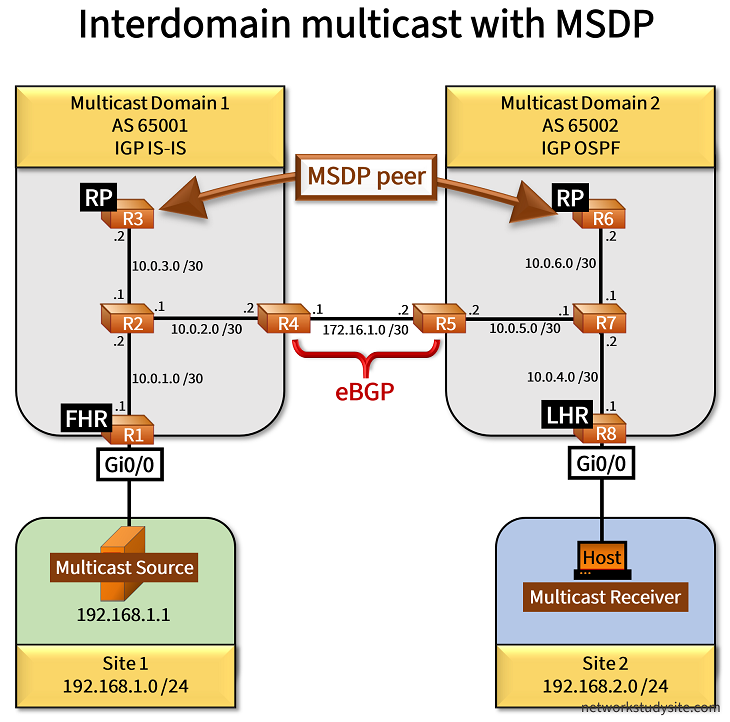
In the following example scenario, the Source in Site 1 sends a multicast stream to the group address 239.0.0.1. The Host in Site 2 requests this multicast stream. However, the Source and Receiver (Host) are connected to different multicast domains, and therefore interdomain multicast needs to be configured. The following list highlights important aspects of the configuration and operation.
- Bootstrap router (BSR) is configured in each domain in order to advertise group-to-RP mapping messages. However, the interconnection link between R4 - R5 is configured with the command ip pim bsr-border to disable advertising BSR messages between domains.
- Each domain uses a different IGP. Multicast Domain 1 uses IS-IS and Domain 2 uses OSPF. This shows the benefits of PIM which relies on the IGP for RPF calculations but can work together with any particular type of IGP protocol.
- The interconnection between R4 and R5 uses BGP with the IPv4 unicast address-family to select the RPF interface. The two domains exchange the Rendezvous Point (RP) IP addresses. Also, for the SPT switchover to work, the LHR needs to learn the unicast IP address of the Source (in order to send the PIM Join). Therefore, R4 advertses the Site 1 prefix 192.168.1.0/24 to R5 via BGP.
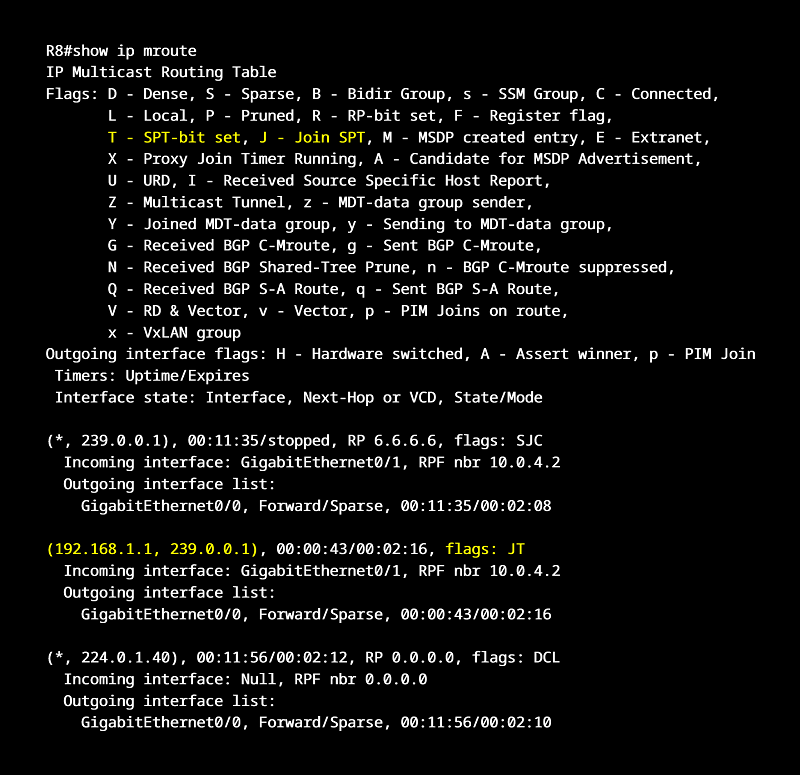
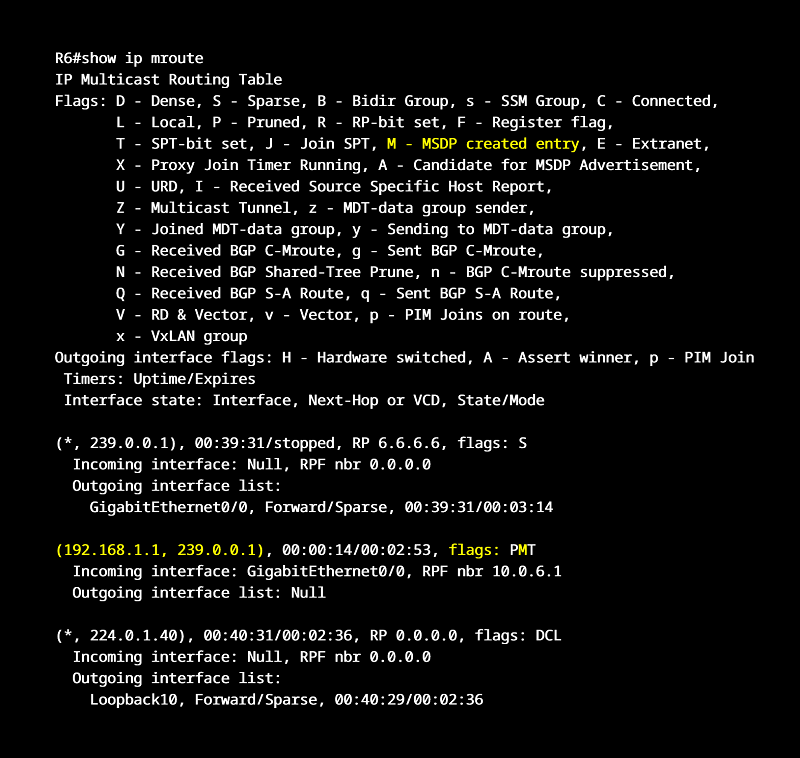
- MSDP is configured between the RP R3 and RP R6. This is very important because the two RPs must share state information for the interdomain multicast to function. In this example, the (S,G) entry created on RP R3 is sent to RP R6 and installed in its mroute table. Notice that MSDP uses unicast to exchange messages with the destination TCP port 639. This port needs to be enabled on the interconnection between the two Multicast Domains.
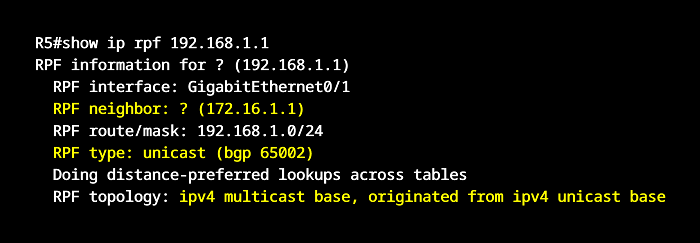
Configuration:
R1
R1#show run | sec ^ip multicast
ip multicast-routing

R1#show run int Gi0/0 | sec int
interface GigabitEthernet0/0
 description ** to Source **
 ip address 192.168.1.2 255.255.255.0
 ip router isis
 ip pim sparse-mode
 duplex auto
 speed auto
 media-type rj45

R1#show run int Gi0/1 | sec int
interface GigabitEthernet0/1
 description ** to R2 **
 ip address 10.0.1.1 255.255.255.252
 ip router isis
 ip pim sparse-mode
 duplex auto
 speed auto
 media-type rj45
 isis circuit-type level-2-only
 isis network point-to-point

R1#show run | sec ^router
router isis
 net 49.0001.0000.0000.0001.00
 is-type level-2-only
 log-adjacency-changes
R2
R2#show run | sec ^ip multicast
ip multicast-routing

R2#show run int Gi0/0 | sec int
interface GigabitEthernet0/0
 description ** to R1 - FHR **
 ip address 10.0.1.2 255.255.255.252
 ip router isis
 ip pim sparse-mode
 duplex auto
 speed auto
 media-type rj45
 isis circuit-type level-2-only
 isis network point-to-point

R2#show run int Gi0/1 | sec int
interface GigabitEthernet0/1
 description ** to R3 - Rendezvous Point **
 ip address 10.0.3.1 255.255.255.252
 ip router isis
 ip pim sparse-mode
 duplex auto
 speed auto
 media-type rj45
 isis circuit-type level-2-only
 isis network point-to-point

R2#show run int Gi0/2 | sec int
interface GigabitEthernet0/2
 description ** to R4 **
 ip address 10.0.2.1 255.255.255.252
 ip router isis
 ip pim sparse-mode
 duplex auto
 speed auto
 media-type rj45
 isis circuit-type level-2-only
 isis network point-to-point

R2#show run | sec ^router
router isis
 net 49.0001.0000.0000.0002.00
 is-type level-2-only
 log-adjacency-changes
R3 (RP/BSR)
R3#show run | sec ^ip multicast
ip multicast-routing

R3#show run | sec ^ip pim
ip pim bsr-candidate Loopback10 0
ip pim rp-candidate Loopback10

R3#show run | sec ^ip msdp
ip msdp peer 6.6.6.6 connect-source Loopback10
ip msdp cache-sa-state
ip msdp originator-id Loopback10

R3#show run int Lo10 | sec int
interface Loopback10
 ip address 3.3.3.3 255.255.255.255
 ip pim sparse-mode

R3#show run int Gi0/0 | sec int
interface GigabitEthernet0/0
 description ** to R2 **
 ip address 10.0.3.2 255.255.255.252
 ip router isis
 ip pim sparse-mode
 duplex auto
 speed auto
 media-type rj45
 isis circuit-type level-2-only
 isis network point-to-point

R3#show run | sec ^router
router isis
 net 49.0001.0000.0000.0003.00
 is-type level-2-only
 log-adjacency-changes
 passive-interface Loopback10
R4
R4#show run | sec ^ip multicast
ip multicast-routing

R4#show run int Gi0/0 | sec int
interface GigabitEthernet0/0
 description ** to R2 **
 ip address 10.0.2.2 255.255.255.252
 ip router isis
 ip pim sparse-mode
 duplex auto
 speed auto
 media-type rj45
 isis circuit-type level-2-only
 isis network point-to-point

R4#show run int Gi0/1 | sec int
interface GigabitEthernet0/1
 description ** to R5 - Multicast Domain 2 **
 ip address 172.16.1.1 255.255.255.252
 ip pim bsr-border
 ip pim sparse-mode
 duplex auto
 speed auto
 media-type rj45

R4#show run | sec ^router isis
router isis
 net 49.0001.0000.0000.0004.00
 is-type level-2-only
 log-adjacency-changes
 redistribute bgp 65001

R4#show run | sec ^router bgp
router bgp 65001
 bgp router-id 4.4.4.4
 bgp log-neighbor-changes
 neighbor 172.16.1.2 remote-as 65002
 !
 address-family ipv4
  network 3.3.3.3 mask 255.255.255.255
  network 192.168.1.0
  neighbor 172.16.1.2 activate
 exit-address-family
R5
R5#show run | sec ^ip multicast
ip multicast-routing

R5#show run int Gi0/0 | sec int
interface GigabitEthernet0/0
 description ** to R7 **
 ip address 10.0.5.2 255.255.255.252
 ip pim sparse-mode
 ip ospf network point-to-point
 duplex auto
 speed auto
 media-type rj45

R5#show run int Gi0/1 | sec int
interface GigabitEthernet0/1
 description ** to R4 - Multicast Domain 1 **
 ip address 172.16.1.2 255.255.255.252
 ip pim bsr-border
 ip pim sparse-mode
 duplex auto
 speed auto
 media-type rj45

R5#show run | sec ^router ospf
router ospf 10
 router-id 5.5.5.5
 redistribute bgp 65002 subnets
 network 10.0.5.0 0.0.0.3 area 0

R5#show run | sec ^router bgp
router bgp 65002
 bgp router-id 5.5.5.5
 bgp log-neighbor-changes
 neighbor 172.16.1.1 remote-as 65001
 !
 address-family ipv4
  network 6.6.6.6 mask 255.255.255.255
  neighbor 172.16.1.1 activate
 exit-address-family
R6 (RP/BSR)
R6#show run | sec ^ip multicast
ip multicast-routing

R6#show run | sec ^ip pim
ip pim bsr-candidate Loopback10 0
ip pim rp-candidate Loopback10

R6#show run | sec ^ip msdp
ip msdp peer 3.3.3.3 connect-source Loopback10
ip msdp cache-sa-state
ip msdp originator-id Loopback10

R6#show run int Lo10 | sec int
interface Loopback10
 ip address 6.6.6.6 255.255.255.255
 ip pim sparse-mode

R6#show run int Gi0/0 | sec int
interface GigabitEthernet0/0
 description ** to R7 **
 ip address 10.0.6.2 255.255.255.252
 ip pim sparse-mode
 ip ospf network point-to-point
 duplex auto
 speed auto
 media-type rj45

R6#show run | sec ^router
router ospf 10
 router-id 6.6.6.6
 network 6.6.6.6 0.0.0.0 area 0
 network 10.0.6.0 0.0.0.3 area 0
R7
R7#show run | sec ^ip multicast
ip multicast-routing

R7#show run int Gi0/0 | sec int
interface GigabitEthernet0/0
 description ** to R8 - LHR **
 ip address 10.0.4.2 255.255.255.252
 ip pim sparse-mode
 ip ospf network point-to-point
 duplex auto
 speed auto
 media-type rj45

R7#show run int Gi0/1 | sec int
interface GigabitEthernet0/1
 description ** to R6 - Rendezvous Point **
 ip address 10.0.6.1 255.255.255.252
 ip pim sparse-mode
 ip ospf network point-to-point
 duplex auto
 speed auto
 media-type rj45

R7#show run int Gi0/2 | sec int
interface GigabitEthernet0/2
 description ** to R5 **
 ip address 10.0.5.1 255.255.255.252
 ip pim sparse-mode
 ip ospf network point-to-point
 duplex auto
 speed auto
 media-type rj45

R7#show run | sec ^router
router ospf 10
 router-id 7.7.7.7
 network 10.0.4.0 0.0.0.3 area 0
 network 10.0.5.0 0.0.0.3 area 0
 network 10.0.6.0 0.0.0.3 area 0
R8
R8#show run | sec ^ip multicast
ip multicast-routing

R8#show run int Gi0/0 | sec int
interface GigabitEthernet0/0
 description ** to Host - Multicast Receiver **
 ip address 192.168.2.2 255.255.255.0
 ip pim sparse-mode
 duplex auto
 speed auto
 media-type rj45

R8#show run int Gi0/1 | sec int
interface GigabitEthernet0/1
 description ** to R7 **
 ip address 10.0.4.1 255.255.255.252
 ip pim sparse-mode
 ip ospf network point-to-point
 duplex auto
 speed auto
 media-type rj45

R8#show run | sec ^router
router ospf 10
 router-id 8.8.8.8
 passive-interface GigabitEthernet0/0
 network 10.0.4.0 0.0.0.3 area 0
 network 192.168.2.0 0.0.0.255 area 0
Multicast Source
Source#show run int Gi0/0 | sec int
interface GigabitEthernet0/0
 description ** to R1 **
 ip address 192.168.1.1 255.255.255.0
 duplex auto
 speed auto
 media-type rj45

Source#show run | sec ^ip route
ip route 0.0.0.0 0.0.0.0 GigabitEthernet0/0 192.168.1.2
Host (Multicast Receiver)
Host#show run int Gi0/0 | sec int
interface GigabitEthernet0/0
 description ** to R8 **
 ip address 192.168.2.1 255.255.255.0
 ip igmp join-group 239.0.0.1
 duplex auto
 speed auto
 media-type rj45

Host#show run | sec ^ip route
ip route 0.0.0.0 0.0.0.0 GigabitEthernet0/0 192.168.2.2
Source#ping 239.0.0.1 re 5
Type escape sequence to abort.
Sending 5, 100-byte ICMP Echos to 239.0.0.1, timeout is 2 seconds:

Reply to request 0 from 192.168.2.1, 58 ms           « Multicast stream is received on the Host in Site 2
Reply to request 1 from 192.168.2.1, 47 ms
Reply to request 2 from 192.168.2.1, 37 ms
Reply to request 3 from 192.168.2.1, 36 ms
Reply to request 4 from 192.168.2.1, 37 ms


R8#mtrace 192.168.1.1 239.0.0.1
Type escape sequence to abort.
Mtrace from 192.168.1.1 to 10.0.4.1 via group 239.0.0.1
From source (?) to destination (?)
Querying full reverse path... * switching to hop-by-hop:
 0  10.0.4.1
-1  10.0.4.1 ==> 10.0.4.1 PIM  [using shared tree]
-2  10.0.4.2 ==> 10.0.5.1 PIM  [192.168.1.0/24]
-3  10.0.5.2 ==> 172.16.1.2 PIM/MBGP  [192.168.1.0/24]           « Multicast trace from Last Hop Router R8 shows path until interdomain interconnection
-4  * * * 172.16.1.1


R6#show ip msdp sa-cache
MSDP Source-Active Cache - 1 entries
(192.168.1.1, 239.0.0.1), RP 3.3.3.3, AS ?,00:15:02/00:05:47, Peer 3.3.3.3        « RP R3 advertises (S,G) entry via MSDP to RP R6


R6#show ip msdp summary
MSDP Peer Status Summary
Peer Address     AS    State    Uptime/  Reset SA    Peer Name
                                Downtime Count Count
3.3.3.3          ?     Up       00:32:44 2     1     ?                            « MSDP peering is Up between the two RP routers


R6#show ip route | beg Ga
Gateway of last resort is not set

      3.0.0.0/32 is subnetted, 1 subnets
O E2     3.3.3.3 [110/1] via 10.0.6.1, 00:33:18, GigabitEthernet0/0               « Interdomain link exchanges RP unicast address
      6.0.0.0/32 is subnetted, 1 subnets
C        6.6.6.6 is directly connected, Loopback10
      10.0.0.0/8 is variably subnetted, 4 subnets, 2 masks
O        10.0.4.0/30 [110/2] via 10.0.6.1, 01:08:35, GigabitEthernet0/0
O        10.0.5.0/30 [110/2] via 10.0.6.1, 01:08:35, GigabitEthernet0/0
C        10.0.6.0/30 is directly connected, GigabitEthernet0/0
L        10.0.6.2/32 is directly connected, GigabitEthernet0/0
O E2  192.168.1.0/24 [110/1] via 10.0.6.1, 00:29:23, GigabitEthernet0/0           « Source IP is also advertised across the interdomain link
O     192.168.2.0/24 [110/3] via 10.0.6.1, 01:08:25, GigabitEthernet0/0


R6#show ip mroute | beg Int
 Interface state: Interface, Next-Hop or VCD, State/Mode

(*, 239.0.0.1), 00:17:14/00:03:02, RP 6.6.6.6, flags: S
  Incoming interface: Null, RPF nbr 0.0.0.0
  Outgoing interface list:
    GigabitEthernet0/0, Forward/Sparse, 00:17:14/00:03:02

(192.168.1.1, 239.0.0.1), 00:01:16/00:02:05, flags: PMT               « MSDP creates this entry on RP R6
  Incoming interface: GigabitEthernet0/0, RPF nbr 10.0.6.1
  Outgoing interface list: Null

(*, 224.0.1.40), 00:17:14/00:02:51, RP 0.0.0.0, flags: DCL
  Incoming interface: Null, RPF nbr 0.0.0.0
  Outgoing interface list:
    Loopback10, Forward/Sparse, 00:17:14/00:02:51


R3#show ip mroute | beg Int
 Interface state: Interface, Next-Hop or VCD, State/Mode

(*, 239.0.0.1), 00:09:15/stopped, RP 3.3.3.3, flags: SP
  Incoming interface: Null, RPF nbr 0.0.0.0
  Outgoing interface list: Null

(192.168.1.1, 239.0.0.1), 00:01:34/00:01:25, flags: PA
  Incoming interface: GigabitEthernet0/0, RPF nbr 10.0.3.1
  Outgoing interface list: Null

(*, 224.0.1.40), 00:17:11/00:02:30, RP 0.0.0.0, flags: DCL
  Incoming interface: Null, RPF nbr 0.0.0.0
  Outgoing interface list:
    Loopback10, Forward/Sparse, 00:17:11/00:02:30


R5#show ip bgp | beg Ne
     Network          Next Hop            Metric LocPrf Weight Path
 *>   3.3.3.3/32       172.16.1.1              20             0 65001 i             « Interdomain BGP session exchanges RP address
 *>   6.6.6.6/32       10.0.5.1                 3         32768 i
 *>   192.168.1.0      172.16.1.1              30             0 65001 i


R5#show ip rpf 192.168.1.1
RPF information for ? (192.168.1.1)
  RPF interface: GigabitEthernet0/1
  RPF neighbor: ? (172.16.1.1)
  RPF route/mask: 192.168.1.0/24
  RPF type: unicast (bgp 65002)                                                     « Unicast BGP used for RPF check
  Doing distance-preferred lookups across tables
  RPF topology: ipv4 multicast base, originated from ipv4 unicast base


R4#show ip rpf 192.168.1.1
RPF information for ? (192.168.1.1)
  RPF interface: GigabitEthernet0/0
  RPF neighbor: ? (10.0.2.1)
  RPF route/mask: 192.168.1.0/24
  RPF type: unicast (isis)                                                           « Unicast IS-IS used for RPF check
  Doing distance-preferred lookups across tables
  RPF topology: ipv4 multicast base, originated from ipv4 unicast base


R8#show ip pim rp mapping
PIM Group-to-RP Mappings

Group(s) 224.0.0.0/4
  RP 6.6.6.6 (?), v2                                                        « LHR only learns single RP in Multicast Domain 2
    Info source: 6.6.6.6 (?), via bootstrap, priority 0, holdtime 150
         Uptime: 03:48:45, expires: 00:02:23


R1#show ip pim rp mapping
PIM Group-to-RP Mappings

Group(s) 224.0.0.0/4
  RP 3.3.3.3 (?), v2
    Info source: 3.3.3.3 (?), via bootstrap, priority 0, holdtime 150
         Uptime: 03:49:09, expires: 00:02:27
IPv6 multicast with PIM Sparse Mode, BSR and MLD
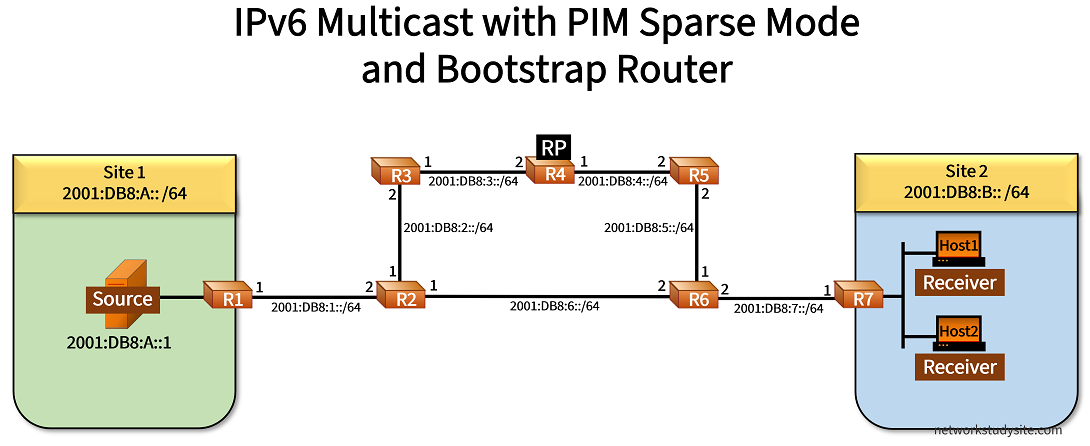
In the following example scenario IPv6 multicast is configured with PIM Sparse Mode using the unicast routing protocol OSPFv3 to connect Site 1 and Site 2. The Rendezvous Point (RP) and the Bootstrap Router (BSR) is configured on R4 which advertises the RP address 2001:DB8::1111/128 to PIM-enabled routers.
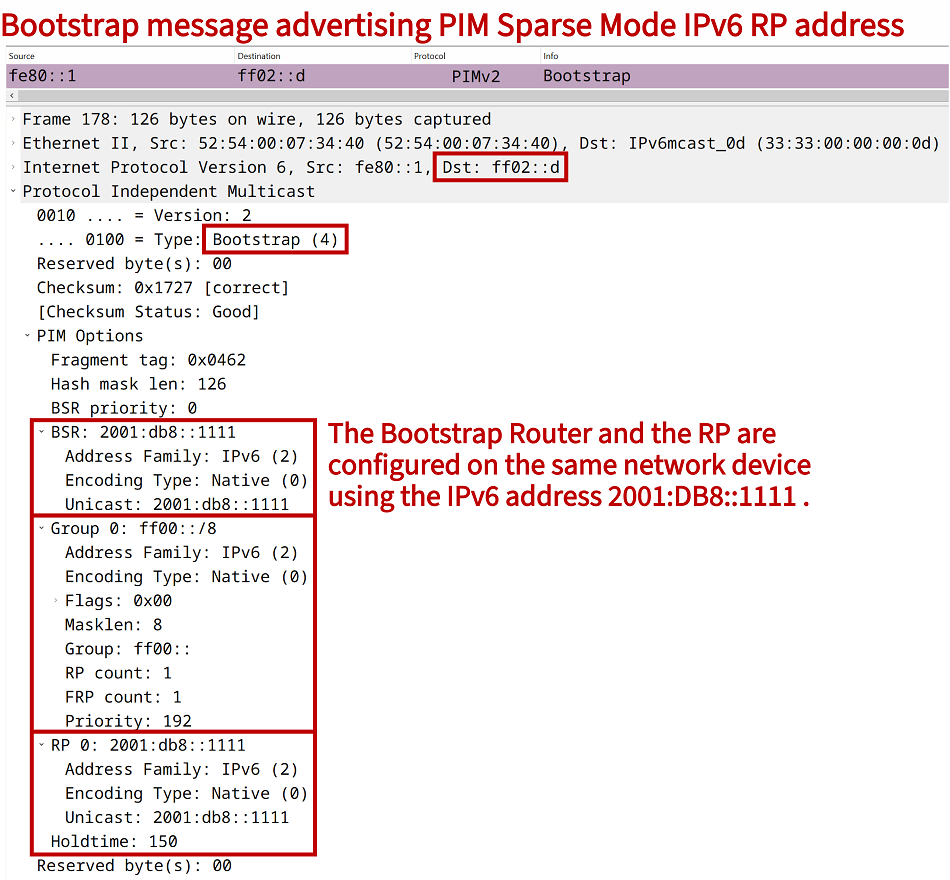
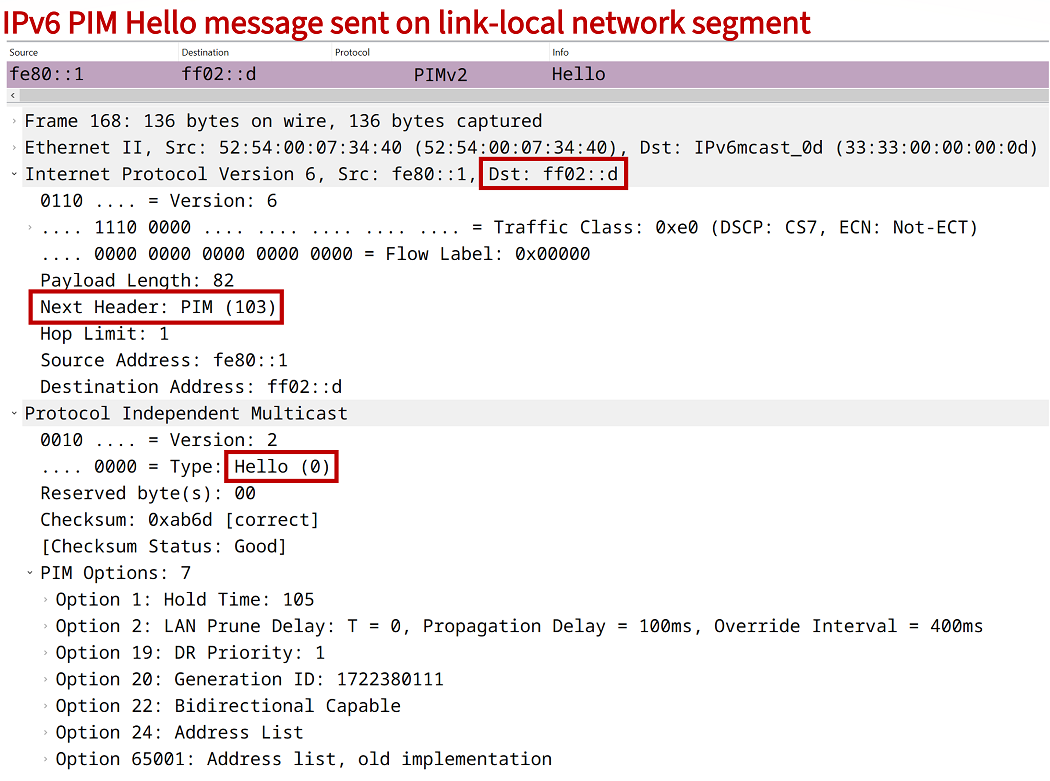
The command ipv6 multicast-routing enables IPv6 multicast on each router, and automatically initiates the sending of IPv6 PIM Hello messages and MLD Report and Query messages on the local network segment. Thus, a PIM neighborship is established without needing any further configuration.

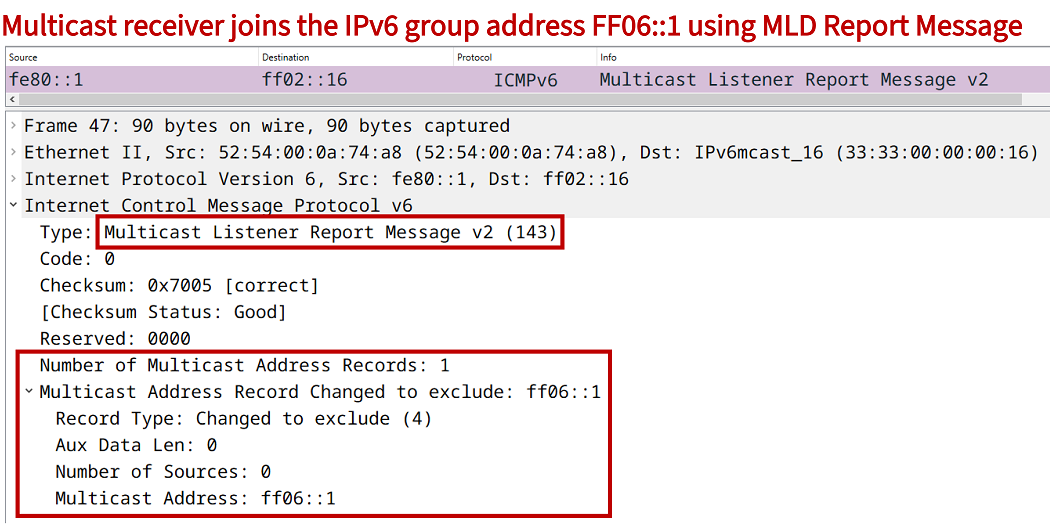
The Receivers use MLD to request a multicast stream from the Source. MLD in IPv6 is encapsulated in ICMPv6, and it takes over the function of IGMP in IPv4. In this example network, the Hosts in Site 2 join the multicast group FF06::1. This is accomplished with the interface-level command ipv6 mld join-group FF06::1.
Configuration:
R1
R1#show run | sec ^ipv6 uni|multicast
ipv6 unicast-routing
ipv6 multicast-routing

R1#show run int Gi0/0 | sec int
interface GigabitEthernet0/0
 description ** to Source **
 no ip address
 duplex auto
 speed auto
 media-type rj45
 ipv6 address FE80::2 link-local
 ipv6 address 2001:DB8:A::2/64
 ospfv3 10 ipv6 area 0

R1#show run int Gi0/1 | sec int
interface GigabitEthernet0/1
 description ** to R2 **
 no ip address
 duplex auto
 speed auto
 media-type rj45
 ipv6 address FE80::1 link-local
 ipv6 address 2001:DB8:1::1/64
 ospfv3 10 network point-to-point
 ospfv3 10 ipv6 area 0

R1#show run | sec ^router
router ospfv3 10
 router-id 1.1.1.1
 !
 address-family ipv4 unicast
  passive-interface GigabitEthernet0/0
 exit-address-family
 !
 address-family ipv6 unicast
  router-id 1.1.1.1
 exit-address-family
R2
R2#show run | sec ^ipv6 uni|multicast
ipv6 unicast-routing
ipv6 multicast-routing

R2#show run int Gi0/0 | sec int
interface GigabitEthernet0/0
 description ** to R1 **
 no ip address
 duplex auto
 speed auto
 media-type rj45
 ipv6 address FE80::2 link-local
 ipv6 address 2001:DB8:1::2/64
 ospfv3 10 network point-to-point
 ospfv3 10 ipv6 area 0

R2#show run int Gi0/1 | sec int
interface GigabitEthernet0/1
 description ** to R3 **
 no ip address
 duplex auto
 speed auto
 media-type rj45
 ipv6 address FE80::1 link-local
 ipv6 address 2001:DB8:2::1/64
 ospfv3 10 network point-to-point
 ospfv3 10 ipv6 area 0

R2#show run int Gi0/2 | sec int
interface GigabitEthernet0/2
 description ** to R6 **
 no ip address
 duplex auto
 speed auto
 media-type rj45
 ipv6 address FE80::1 link-local
 ipv6 address 2001:DB8:6::1/64
 ospfv3 10 network point-to-point
 ospfv3 10 ipv6 area 0

R2#show run | sec ^router
router ospfv3 10
 router-id 2.2.2.2
 !
 address-family ipv6 unicast
  router-id 2.2.2.2
 exit-address-family
R3
R3#show run | sec ^ipv6 uni|multicast
ipv6 unicast-routing
ipv6 multicast-routing

R3#show run int Gi0/0 | sec int
interface GigabitEthernet0/0
 description ** to R2 **
 no ip address
 duplex auto
 speed auto
 media-type rj45
 ipv6 address FE80::2 link-local
 ipv6 address 2001:DB8:2::2/64
 ospfv3 10 network point-to-point
 ospfv3 10 ipv6 area 0

R3#show run int Gi0/1 | sec int
interface GigabitEthernet0/1
 description ** to R4 **
 no ip address
 duplex auto
 speed auto
 media-type rj45
 ipv6 address FE80::1 link-local
 ipv6 address 2001:DB8:3::1/64
 ospfv3 10 network point-to-point
 ospfv3 10 ipv6 area 0

R3#show run | sec ^router
router ospfv3 10
 router-id 3.3.3.3
 !
 address-family ipv6 unicast
  router-id 3.3.3.3
 exit-address-family
R4 (RP/BSR)
R4#show run | sec ^ipv6 uni|multicast
ipv6 unicast-routing
ipv6 multicast-routing

R4#show run | sec ^ipv6 pim
ipv6 pim bsr candidate bsr 2001:DB8::1111
ipv6 pim bsr candidate rp 2001:DB8::1111

R4#show run int Lo10 | sec int
interface Loopback10
 no ip address
 ipv6 address 2001:DB8::1111/128
 ospfv3 10 ipv6 area 0

R4#show run int Gi0/0 | sec int
interface GigabitEthernet0/0
 description ** to R3 **
 no ip address
 duplex auto
 speed auto
 media-type rj45
 ipv6 address FE80::2 link-local
 ipv6 address 2001:DB8:3::2/64
 ospfv3 10 network point-to-point
 ospfv3 10 ipv6 area 0

R4#show run int Gi0/1 | sec int
interface GigabitEthernet0/1
 description ** to R5 **
 no ip address
 duplex auto
 speed auto
 media-type rj45
 ipv6 address FE80::1 link-local
 ipv6 address 2001:DB8:4::1/64
 ospfv3 10 network point-to-point
 ospfv3 10 ipv6 area 0

R4#show run | sec ^router
router ospfv3 10
 router-id 4.4.4.4
 !
 address-family ipv6 unicast
  router-id 4.4.4.4
 exit-address-family
R5
R5#show run | sec ^ipv6 uni|multicast
ipv6 unicast-routing
ipv6 multicast-routing

R5#show run int Gi0/0 | sec int
interface GigabitEthernet0/0
 description ** to R6 **
 no ip address
 duplex auto
 speed auto
 media-type rj45
 ipv6 address FE80::2 link-local
 ipv6 address 2001:DB8:5::2/64
 ospfv3 10 network point-to-point
 ospfv3 10 ipv6 area 0

R5#show run int Gi0/1 | sec int
interface GigabitEthernet0/1
 description ** to R4 **
 no ip address
 duplex auto
 speed auto
 media-type rj45
 ipv6 address FE80::2 link-local
 ipv6 address 2001:DB8:4::2/64
 ospfv3 10 network point-to-point
 ospfv3 10 ipv6 area 0

R5#show run | sec ^router
router ospfv3 10
 router-id 5.5.5.5
 !
 address-family ipv6 unicast
  router-id 5.5.5.5
 exit-address-family
R6
R6#show run | sec ^ipv6 uni|multicast
ipv6 unicast-routing
ipv6 multicast-routing

R6#show run int Gi0/0 | sec int
interface GigabitEthernet0/0
 description ** to R7 **
 no ip address
 duplex auto
 speed auto
 media-type rj45
 ipv6 address FE80::2 link-local
 ipv6 address 2001:DB8:7::2/64
 ospfv3 10 network point-to-point
 ospfv3 10 ipv6 area 0

R6#show run int Gi0/1 | sec int
interface GigabitEthernet0/1
 description ** to R5 **
 no ip address
 duplex auto
 speed auto
 media-type rj45
 ipv6 address FE80::1 link-local
 ipv6 address 2001:DB8:5::1/64
 ospfv3 10 network point-to-point
 ospfv3 10 ipv6 area 0

R6#show run int Gi0/2 | sec int
interface GigabitEthernet0/2
 description ** to R2 **
 no ip address
 duplex auto
 speed auto
 media-type rj45
 ipv6 address FE80::2 link-local
 ipv6 address 2001:DB8:6::2/64
 ospfv3 10 network point-to-point
 ospfv3 10 ipv6 area 0

R6#show run | sec ^router
router ospfv3 10
 router-id 6.6.6.6
 !
 address-family ipv6 unicast
  router-id 6.6.6.6
 exit-address-family
R7
R7#show run | sec ^ipv6 uni|multicast
ipv6 unicast-routing
ipv6 multicast-routing

R7#show run int Gi0/0 | sec int
interface GigabitEthernet0/0
 description ** to Receivers **
 no ip address
 duplex auto
 speed auto
 media-type rj45
 ipv6 address FE80::3 link-local
 ipv6 address 2001:DB8:B::3/64
 ospfv3 10 ipv6 area 0

R7#show run int Gi0/1 | sec int
interface GigabitEthernet0/1
 description ** to R6 **
 no ip address
 duplex auto
 speed auto
 media-type rj45
 ipv6 address FE80::1 link-local
 ipv6 address 2001:DB8:7::1/64
 ospfv3 10 network point-to-point
 ospfv3 10 ipv6 area 0

R7#show run | sec ^router
router ospfv3 10
 router-id 7.7.7.7
 !
 address-family ipv6 unicast
  passive-interface GigabitEthernet0/0
  router-id 7.7.7.7
 exit-address-family
Source
Source#show run int Gi0/0 | sec int
interface GigabitEthernet0/0
 description ** to R1 **
 no ip address
 duplex auto
 speed auto
 media-type rj45
 ipv6 address FE80::1 link-local
 ipv6 address 2001:DB8:A::1/64

Source#show run | sec ^ipv6 route
ipv6 route ::/0 GigabitEthernet0/0 2001:DB8:A::2
Host1
Host1#show run int Gi0/0 | sec int
interface GigabitEthernet0/0
 description ** to R7 **
 no ip address
 duplex auto
 speed auto
 media-type rj45
 ipv6 address FE80::1 link-local
 ipv6 address 2001:DB8:B::1/64
 ipv6 mld join-group FF06::1

Host1#show run | sec ^ipv6 route
ipv6 route ::/0 GigabitEthernet0/0 2001:DB8:B::3
Host2
Host2#show run int Gi0/0 | sec int
interface GigabitEthernet0/0
 description ** to R7 **
 no ip address
 duplex auto
 speed auto
 media-type rj45
 ipv6 address FE80::2 link-local
 ipv6 address 2001:DB8:B::2/64
 ipv6 mld join-group FF06::1

Host2#show run | sec ^ipv6 route
ipv6 route ::/0 GigabitEthernet0/0 2001:DB8:B::3
Source#ping FF06::1
Output Interface: GigabitEthernet0/0
Type escape sequence to abort.
Sending 5, 100-byte ICMP Echos to FF06::1, timeout is 2 seconds:
Packet sent with a source address of 2001:DB8:A::1

Reply to request 0 received from 2001:DB8:B::1, 87 ms       « Host1 replies to multicast ping
Reply to request 1 received from 2001:DB8:B::1, 7 ms
Reply to request 1 received from 2001:DB8:B::2, 7 ms        « Host2 replies to multicast ping
Reply to request 1 received from 2001:DB8:B::1, 24 ms
Reply to request 1 received from 2001:DB8:B::2, 24 ms
Reply to request 2 received from 2001:DB8:B::1, 4 ms
Reply to request 2 received from 2001:DB8:B::2, 4 ms
Reply to request 3 received from 2001:DB8:B::2, 6 ms
Reply to request 3 received from 2001:DB8:B::1, 6 ms
Reply to request 4 received from 2001:DB8:B::1, 5 ms
Reply to request 4 received from 2001:DB8:B::2, 5 ms
Success rate is 100 percent (5/5), round-trip min/avg/max = 4/16/87 ms
11 multicast replies and 0 errors.


R4#show ipv6 mroute
Multicast Routing Table
Flags: D - Dense, S - Sparse, B - Bidir Group, s - SSM Group,
       C - Connected, L - Local, I - Received Source Specific Host Report,
       P - Pruned, R - RP-bit set, F - Register flag, T - SPT-bit set,
       J - Join SPT, Y - Joined MDT-data group,
       y - Sending to MDT-data group
       g - BGP signal originated, G - BGP Signal received,
       N - BGP Shared-Tree Prune received, n - BGP C-Mroute suppressed,
       q - BGP Src-Active originated, Q - BGP Src-Active received
       E - Extranet
Timers: Uptime/Expires
Interface state: Interface, State

(*, FF06::1), 05:04:19/00:03:18, RP 2001:DB8::1111, flags: S                « Shared-Tree with RP at its root
  Incoming interface: Tunnel2
  RPF nbr: 2001:DB8::1111
  Immediate Outgoing interface list:
    GigabitEthernet0/1, Forward, 05:04:19/00:03:18

(2001:DB8:A::1, FF06::1), 00:00:40/00:02:51, RP 2001:DB8::1111, flags: SPR
  Incoming interface: Tunnel2
  RPF nbr: 2001:DB8::1111
  Immediate Outgoing interface list:
    GigabitEthernet0/1, Null, 00:00:40/00:03:18

(2001:DB8:A::1, FF06::1), 00:00:42/00:02:51, flags: S                       « Source-Tree between the First-Hop Router and RP
  Incoming interface: GigabitEthernet0/0
  RPF nbr: FE80::1
  Inherited Outgoing interface list:
    GigabitEthernet0/1, Forward, 05:04:19/00:03:18


R7#show ipv6 pim topology
IP PIM Multicast Topology Table
Entry state: (*/S,G)[RPT/SPT] Protocol Uptime Info Upstream Mode
Entry flags: KAT - Keep Alive Timer, AA - Assume Alive, PA - Probe Alive,
    RA - Really Alive, LH - Last Hop, DSS - Don't Signal Sources,
    RR - Register Received, SR - Sending Registers, E - MSDP External,
    DCC - Don't Check Connected, Y - Joined MDT-data group,
    y - Sending to MDT-data group
    BGS - BGP Signal Sent, !BGS - BGP signal suppressed
    SAS - BGP Src-Act Sent, SAR - BGP Src-Act Received
Interface state: Name, Uptime, Fwd, Info
Interface flags: LI - Local Interest, LD - Local Disinterest,
    II - Internal Interest, ID - Internal Disinterest,
    LH - Last Hop, AS - Assert, AB - Admin Boundary, BS - BGP Signal,
    BP - BGP Shared-Tree Prune, BPT - BGP Prune Time

(*,FF06::1)
SM UP: 05:52:56 JP: Join(00:00:26) Flags: LH              « R7 is the Last-Hop Router
RP: 2001:DB8::1111                                        « Address of the RP
RPF: GigabitEthernet0/1,FE80::2
  GigabitEthernet0/0 05:52:56  fwd     LI LH

(2001:DB8:A::1,FF06::1)
SM SPT UP: 00:01:01 JP: Join(now) Flags: KAT(00:02:28) RA
RPF: GigabitEthernet0/1,FE80::2
  No interfaces in immediate olist


R7#show ipv6 pim bsr election
PIMv2 BSR information

BSR Election Information
  Scope Range List: ff00::/8
     BSR Address: 2001:DB8::1111                          « Address of the Bootstrap Router (BSR)
     Uptime: 05:04:59, BSR Priority: 0, Hash mask length: 126
     RPF: FE80::2,GigabitEthernet0/1
     BS Timer: 00:01:12


R7#show ipv6 pim traffic
PIM Traffic Counters
Elapsed time since counters cleared: 06:37:49

                              Received     Sent
Valid PIM Packets               1111        1943
Hello                           805         1613
Join-Prune                      0           330         « R7 has sent PIM Join messages to the RP
Data Register                   0           -
Null Register                   0           0
Register Stop                   0           0
Assert                          0           0
Bidir DF Election               0           0

Errors:
Malformed Packets                           0
Bad Checksums                               0
Send Errors                                 0
Packet Sent on Loopback Errors              0
Packets Received on PIM-disabled Interface  0
Packets Received with Unknown PIM Version   0
Packets drops due to PIM queue limits       0
PIM Sparse Mode alternatives, Bidirectional PIM and PIM SSM
Different network designs and traffic types may benefit from a particular mode of PIM operation. For example, Bidirectional PIM (BIDIR-PIM) also leverages the Rendezvous Point (RP) to connect multicast sources and receivers, however it does not create Source-Based Tree (S,G) state entries. This also means, there is no SPT switchover in Bidirectional PIM.
Instead, with Bidirectional PIM only Shared Trees (*,G) are created which are rooted at the RP. This improves network scalability in case of a large number of simultaneous multicast sources and receivers, because many (S,G) entries are replaced by a few (*,G) entries. However, the RP is always in the traffic forwarding path and this may not be the optimal path between each multicast endpoint.
Another alternative to PIM Sparse Mode is PIM Source-Specific Multicast (PIM SSM). Essentially, PIM SSM allows for multicast receivers to subscribe to a group address served by a specific multicast source. So on a receiver, a multicast stream is only accepted from a particular source IP address (or sources). This improves network security, and facilitates segmentation of multicast traffic within a single group.