Layer Two Tunneling Protocol Version 3 (L2TPv3) Overview
Table of Contents
- What is L2TPv3? ‹
- How to configure L2TPv3? ‹
- Configure L2TPv3 with authentication ‹
- Configure L2TPv3 over IPSec ‹
- Configure L2TPv3 with Q-in-Q ‹
- Configure L2TPv3 over MPLS ‹
- Download section ‹
What is L2TPv3?
Layer-2 Tunneling Protocol version 3 (L2TPv3) is a point-to-point technology that relies on pseudowires to encapsulate Layer-2 traffic and transport it across a Layer-3 IP network. Thus, two sites can be directly connected at OSI Layer-2 with the configuration of a L2TPv3 tunnel. L2TPv3 can be configured in an IPSec/GRE tunnel, over an MPLS backbone network, and L2TPv3 can also transport Q-in-Q frames.
Two modes of operation can be deployed using the xconnect interface-level command. The command is either applied to a physical interface or to a subinterface. When applied to a physical interface L2TPv3 will carry frames for all VLANs, and when applied to a subinterface L2TPv3 will carry frames for a specific VLAN. The difference is visible in the following outputs.
R1#show xconnect all
Legend:    XC ST=Xconnect State  S1=Segment1 State  S2=Segment2 State
  UP=Up       DN=Down            AD=Admin Down      IA=Inactive
  SB=Standby  HS=Hot Standby     RV=Recovering      NH=No Hardware

XC ST  Segment 1                         S1 Segment 2                         S2
------+---------------------------------+--+---------------------------------+--
UP pri   ac Gi1:7(Ethernet)              UP l2tp 5.5.5.5:10                   UP           « Configured under physical interface


R1#show xconnect all
Legend:    XC ST=Xconnect State  S1=Segment1 State  S2=Segment2 State
  UP=Up       DN=Down            AD=Admin Down      IA=Inactive
  SB=Standby  HS=Hot Standby     RV=Recovering      NH=No Hardware

XC ST  Segment 1                         S1 Segment 2                         S2
------+---------------------------------+--+---------------------------------+--
UP pri   ac Gi1.100:100(Eth VLAN)        UP l2tp 10.2.0.1:100                 UP           « Configured under VLAN subinterface
Traffic sent over a L2TPv3 pseudowire is not encrypted by default, however L2TPv3 can be configured over a GRE tunnel. This is shown in the following capture. When used in combination with a GRE tunnel, IPSec encryption can be added, protecting Layer-2 frames in transit.

How to configure L2TPv3?
In the following scenario, Site 1 and Site 2 are connected at OSI Model Layer-2, passing traffic in VLAN 100 across a L2TPv3 pseudowire. The pseodwire spans between R1 and R3, and tunnels frames across an IP routed network.
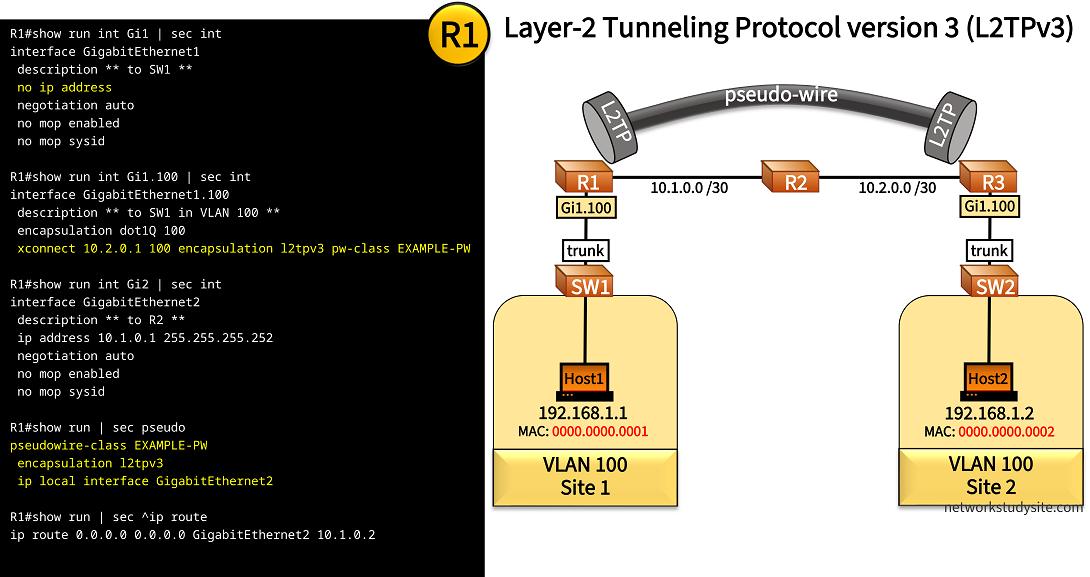
Configuration:
R1
R1#show run int Gi1 | sec int
interface GigabitEthernet1
 description ** to SW1 **
 no ip address
 negotiation auto
 no mop enabled
 no mop sysid

R1#show run int Gi1.100 | sec int
interface GigabitEthernet1.100
 description ** to SW1 in VLAN 100 **
 encapsulation dot1Q 100
 xconnect 10.2.0.1 100 encapsulation l2tpv3 pw-class EXAMPLE-PW

R1#show run int Gi2 | sec int
interface GigabitEthernet2
 description ** to R2 **
 ip address 10.1.0.1 255.255.255.252
 negotiation auto
 no mop enabled
 no mop sysid

R1#show run | sec pseudo
pseudowire-class EXAMPLE-PW
 encapsulation l2tpv3
 ip local interface GigabitEthernet2

R1#show run | sec ^ip route
ip route 0.0.0.0 0.0.0.0 GigabitEthernet2 10.1.0.2
!
enable
configure terminal
!
hostname R1
no ip domain lookup
no logging console
!
interface GigabitEthernet1
  description ** to SW1 **
  no shutdown
  exit
!
interface GigabitEthernet1.100
  description ** to SW1 in VLAN 100 **
  encapsulation dot1Q 100
  exit
!
interface GigabitEthernet2
  description ** to R2 **
  ip address 10.1.0.1 255.255.255.252
  no shutdown
  exit
!
pseudowire-class EXAMPLE-PW
 encapsulation l2tpv3
 ip local interface GigabitEthernet2
 exit
!
interface GigabitEthernet1.100
 xconnect 10.2.0.1 100 encapsulation l2tpv3 pw-class EXAMPLE-PW
  exit
 exit
!
ip route 0.0.0.0 0.0.0.0 GigabitEthernet2 10.1.0.2
!
R2
R2#show run int Gi0/0 | sec int
interface GigabitEthernet0/0
 description ** to R1 **
 ip address 10.1.0.2 255.255.255.252
 duplex auto
 speed auto
 media-type rj45

R2#show run int Gi0/1 | sec int
interface GigabitEthernet0/1
 description ** to R3 **
 ip address 10.2.0.2 255.255.255.252
 duplex auto
 speed auto
 media-type rj45
!
enable
configure terminal
!
hostname R2
no ip domain-lookup
no logging console
!
interface GigabitEthernet0/0
  description ** to R1 **
  ip address 10.1.0.2 255.255.255.252
  no shutdown
  exit
!
interface GigabitEthernet0/1
  description ** to R3 **
  ip address 10.2.0.2 255.255.255.252
  no shutdown
  exit
!
R3
R3#show run int Gi1 | sec int
interface GigabitEthernet1
 description ** to SW2 **
 no ip address
 negotiation auto
 no mop enabled
 no mop sysid

R3#show run int Gi1.100 | sec int
interface GigabitEthernet1.100
 description ** to SW2 in VLAN 100 **
 encapsulation dot1Q 100
 xconnect 10.1.0.1 100 encapsulation l2tpv3 pw-class EXAMPLE-PW

R3#show run int Gi2 | sec int
interface GigabitEthernet2
 description ** to R2 **
 ip address 10.2.0.1 255.255.255.252
 negotiation auto
 no mop enabled
 no mop sysid

R3#show run | sec ^pseudo
pseudowire-class EXAMPLE-PW
 encapsulation l2tpv3
 ip local interface GigabitEthernet2

R3#show run | sec ^ip route
ip route 0.0.0.0 0.0.0.0 GigabitEthernet2 10.2.0.2
!
enable
configure terminal
!
hostname R3
no ip domain lookup
no logging console
!
interface GigabitEthernet1
  description ** to SW2 **
  no shutdown
  exit
!
interface GigabitEthernet1.100
  description ** to SW2 in VLAN 100 **
  encapsulation dot1Q 100
  exit
!
interface GigabitEthernet2
  description ** to R2 **
  ip address 10.2.0.1 255.255.255.252
  no shutdown
  exit
!
pseudowire-class EXAMPLE-PW
 encapsulation l2tpv3
 ip local interface GigabitEthernet2
 exit
!
interface GigabitEthernet1.100
 xconnect 10.1.0.1 100 encapsulation l2tpv3 pw-class EXAMPLE-PW
  exit
 exit
!
ip route 0.0.0.0 0.0.0.0 GigabitEthernet2 10.2.0.2
!
SW1
SW1#show run int Gi0/0 | sec int
interface GigabitEthernet0/0
 description ** to Host1 **
 switchport access vlan 100
 switchport mode access
 negotiation auto

SW1#show run int Gi0/1 | sec int
interface GigabitEthernet0/1
 description ** to R1 **
 switchport trunk allowed vlan 100
 switchport trunk encapsulation dot1q
 switchport mode trunk
 negotiation auto
!
enable
configure terminal
!
hostname SW1
no ip domain lookup
no logging console
!
vlan 100
 name VLAN100
 exit
!
interface GigabitEthernet0/0
  description ** to Host1 **
  switchport mode access
  switchport access vlan 100
  exit
!
interface GigabitEthernet0/1
  description ** to R1 **
  switchport trunk encapsulation dot1q
  switchport mode trunk
  switchport trunk allowed vlan 100
  exit
!
Host1
Host1#show run int Gi0/0 | sec int
interface GigabitEthernet0/0
 description ** to SW1 **
 mac-address 0000.0000.0001
 ip address 192.168.1.1 255.255.255.0
 duplex auto
 speed auto
 media-type rj45
!
enable
configure terminal
!
hostname Host1
no ip domain lookup
no logging console
!
!
interface GigabitEthernet0/0
  description ** to SW1 **
  ip address 192.168.1.1 255.255.255.0
  mac-address 0000.0000.0001
  no shutdown
  exit
!
R1#show l2tp

L2TP Tunnel and Session Information Total tunnels 1 sessions 1

LocTunID   RemTunID   Remote Name   State  Remote Address  Sessn L2TP Class/
                                                           Count VPDN Group
2482747846 405660628  R3            est    10.2.0.1        1     l2tp_default_class

LocID      RemID      TunID      Username, Intf/      State  Last Chg Uniq ID
                                 Vcid, Circuit
2129542017 818738167  2482747846 100, Gi1.100:100     est    00:00:11 0              « L2TPv3 tunnel is established


R1#show xconnect all
Legend:    XC ST=Xconnect State  S1=Segment1 State  S2=Segment2 State
  UP=Up       DN=Down            AD=Admin Down      IA=Inactive
  SB=Standby  HS=Hot Standby     RV=Recovering      NH=No Hardware

XC ST  Segment 1                         S1 Segment 2                         S2
------+---------------------------------+--+---------------------------------+--
UP pri   ac Gi1.100:100(Eth VLAN)        UP l2tp 10.2.0.1:100                 UP     « Xconnect is UP using Virtual Circuit ID 100 wih peer 10.2.0.1


Host1#ping 192.168.1.2
Type escape sequence to abort.
Sending 5, 100-byte ICMP Echos to 192.168.1.2, timeout is 2 seconds:
!!!!!
Success rate is 100 percent (5/5), round-trip min/avg/max = 5/5/6 ms                 « Host1 can reach Host2 through the L2TPv3 tunnel


Host1#show arp
Protocol  Address          Age (min)  Hardware Addr   Type   Interface
Internet  192.168.1.1             -   0000.0000.0001  ARPA   GigabitEthernet0/0
Internet  192.168.1.2            56   0000.0000.0002  ARPA   GigabitEthernet0/0      « Host1 learns MAC address of Host2 through L2TPv3 tunnel
Configure L2TPv3 with authentication
In this example scenario, a L2TPv3 authenticated pseudowire is configured between R1 (Site 1) and R3 (Site 2), spanning VLAN 100 between the two sites. The L2TPv3 tunnel endpoints are authenticated using the L2TP class configuration mode. This configuration mode is enabled by issuing the l2tp-class EXAMPLE-CLASS command on R1 and R3.
The order of applying the configuration is important. First, the L2TP-class is created, then it is applied to the pseudowire-class. Finally, the pseudowire class is applied to the interface with the xconnect 10.2.0.1 100 encapsulation l2tpv3 pw-class EXAMPLE-PW command (example from R1).

Configuration:
R1
R1#show run int Gi1 | sec int
interface GigabitEthernet1
 description ** to SW1 **
 no ip address
 negotiation auto
 no mop enabled
 no mop sysid

R1#show run int Gi1.100 | sec int
interface GigabitEthernet1.100
 description ** to SW1 in VLAN 100 **
 encapsulation dot1Q 100
 xconnect 10.2.0.1 100 encapsulation l2tpv3 pw-class EXAMPLE-PW

R1#show run int Gi2 | sec int
interface GigabitEthernet2
 description ** to R2 **
 ip address 10.1.0.1 255.255.255.252
 negotiation auto
 no mop enabled
 no mop sysid

R1#show run | sec pseudo
pseudowire-class EXAMPLE-PW
 encapsulation l2tpv3
 protocol l2tpv3 EXAMPLE-CLASS
 ip local interface GigabitEthernet2

R1#show run | sec l2tp-class
l2tp-class EXAMPLE-CLASS
 authentication
 digest hash SHA1
 hostname R1
 password P4SSW0RD.123

R1#show run | sec ^ip route
ip route 0.0.0.0 0.0.0.0 GigabitEthernet2 10.1.0.2
!
enable
configure terminal
!
hostname R1
no ip domain lookup
no logging console
!
interface GigabitEthernet1
  description ** to SW1 **
  no shutdown
  exit
!
interface GigabitEthernet1.100
  description ** to SW1 in VLAN 100 **
  encapsulation dot1Q 100
  exit
!
interface GigabitEthernet2
  description ** to R2 **
  ip address 10.1.0.1 255.255.255.252
  no shutdown
  exit
!
l2tp-class EXAMPLE-CLASS
 authentication
 digest hash SHA1
 hostname R1
 password P4SSW0RD.123
 exit
!
pseudowire-class EXAMPLE-PW
 encapsulation l2tpv3
 protocol l2tpv3 EXAMPLE-CLASS
 ip local interface GigabitEthernet2
 exit
!
interface GigabitEthernet1.100
 xconnect 10.2.0.1 100 encapsulation l2tpv3 pw-class EXAMPLE-PW
  exit
 exit
!
ip route 0.0.0.0 0.0.0.0 GigabitEthernet2 10.1.0.2
!
R3
R3#show run int Gi1 | sec int
interface GigabitEthernet1
 description ** to SW2 **
 no ip address
 negotiation auto
 no mop enabled
 no mop sysid

R3#show run int Gi1.100 | sec int
interface GigabitEthernet1.100
 description ** to SW2 in VLAN 100 **
 encapsulation dot1Q 100
 xconnect 10.1.0.1 100 encapsulation l2tpv3 pw-class EXAMPLE-PW

R3#show run int Gi2 | sec int
interface GigabitEthernet2
 description ** to R2 **
 ip address 10.2.0.1 255.255.255.252
 negotiation auto
 no mop enabled
 no mop sysid

R3#show run | sec pseudo
pseudowire-class EXAMPLE-PW
 encapsulation l2tpv3
 protocol l2tpv3 EXAMPLE-CLASS
 ip local interface GigabitEthernet2

R3#show run | sec l2tp-class
l2tp-class EXAMPLE-CLASS
 authentication
 digest hash SHA1
 hostname R3
 password P4SSW0RD.123

R3#show run | sec ^ip route
ip route 0.0.0.0 0.0.0.0 GigabitEthernet2 10.2.0.2
!
enable
configure terminal
!
hostname R3
no ip domain lookup
no logging console
!
interface GigabitEthernet1
  description ** to SW2 **
  no shutdown
  exit
!
interface GigabitEthernet1.100
  description ** to SW2 in VLAN 100 **
  encapsulation dot1Q 100
  exit
!
interface GigabitEthernet2
  description ** to R2 **
  ip address 10.2.0.1 255.255.255.252
  no shutdown
  exit
!
l2tp-class EXAMPLE-CLASS
 authentication
 digest hash SHA1
 hostname R3
 password P4SSW0RD.123
 exit
!
pseudowire-class EXAMPLE-PW
 encapsulation l2tpv3
 protocol l2tpv3 EXAMPLE-CLASS
 ip local interface GigabitEthernet2
 exit
!
interface GigabitEthernet1.100
 xconnect 10.1.0.1 100 encapsulation l2tpv3 pw-class EXAMPLE-PW
  exit
 exit
!
ip route 0.0.0.0 0.0.0.0 GigabitEthernet2 10.2.0.2
!
R1#show l2tp

L2TP Tunnel and Session Information Total tunnels 1 sessions 1

LocTunID   RemTunID   Remote Name   State  Remote Address  Sessn L2TP Class/
                                                           Count VPDN Group
64869941   1015378088 R3            est    10.2.0.1        1     EXAMPLE-CLASS      « Authentication is configured under the L2TP-class

LocID      RemID      TunID      Username, Intf/      State  Last Chg Uniq ID
                                 Vcid, Circuit
3009344006 3526074657 64869941   100, Gi1.100:100     est    00:13:07 0


R1#show xconnect all
Legend:    XC ST=Xconnect State  S1=Segment1 State  S2=Segment2 State
  UP=Up       DN=Down            AD=Admin Down      IA=Inactive
  SB=Standby  HS=Hot Standby     RV=Recovering      NH=No Hardware

XC ST  Segment 1                         S1 Segment 2                         S2
------+---------------------------------+--+---------------------------------+--
UP pri   ac Gi1.100:100(Eth VLAN)        UP l2tp 10.2.0.1:100                 UP
Configure L2TPv3 over IPSec
In this example scenario, Site 1 and Site 2 are connected with a site-to-site IPSec IKEv2 GRE Tunnel, providing encryption for data in transit. An L2TPv3 tunnel is configured to carry Layer-2 traffic within the IPSec/GRE tunnel. L2TPv3 does not natively provide encryption, therefore in this scenario the IPSec/GRE tunnel is deployed.
As a result, the L2TPv3 tunnel configured between R1 (Site 1) and R3 (Site 2) stretches VLAN 100 between the sites, and Layer-2 traffic transported in the L2TPv3 tunnel is encrypted.
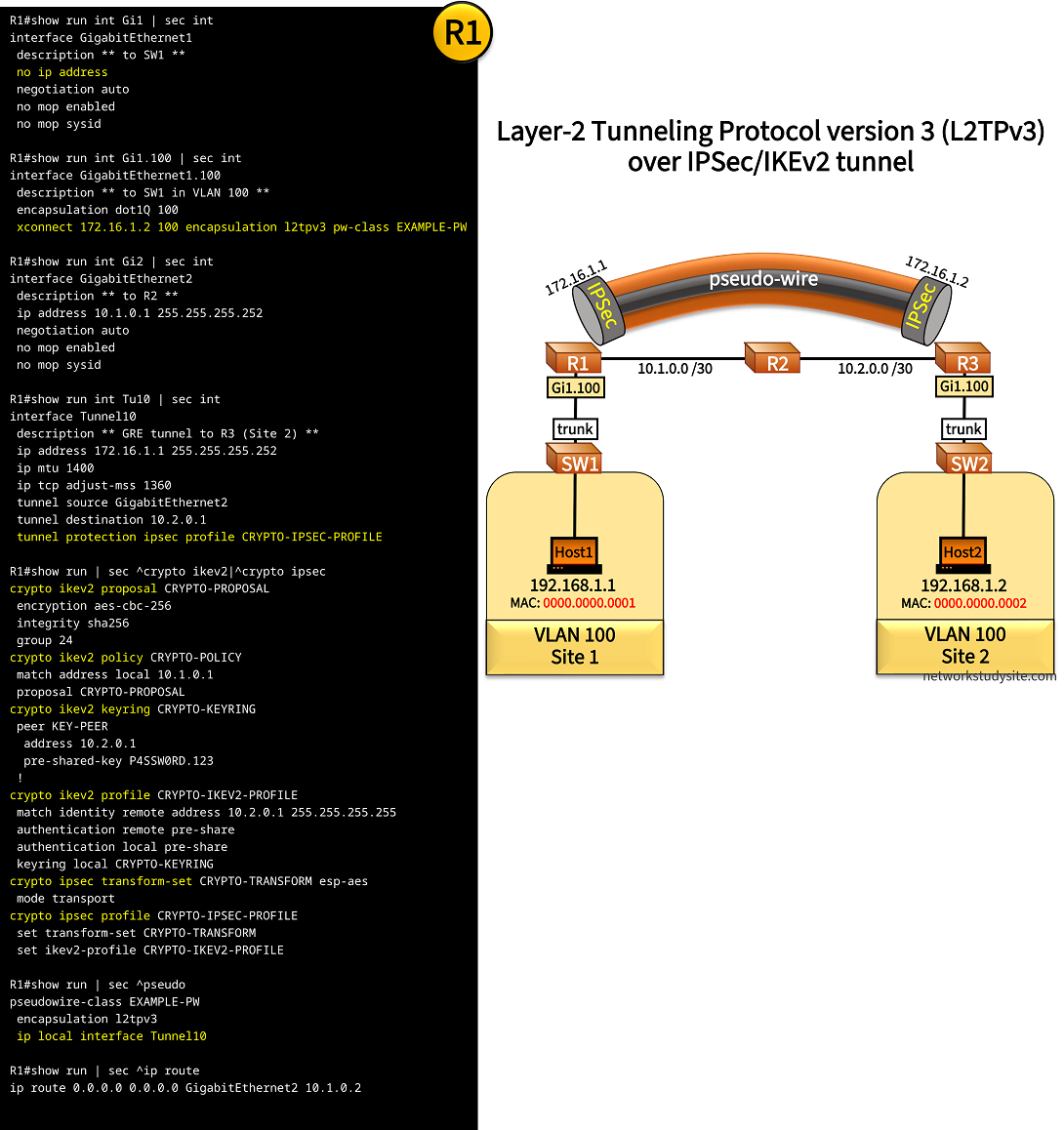
Configuration:
R1
R1#show run int Gi1 | sec int
interface GigabitEthernet1
 description ** to SW1 **
 no ip address
 negotiation auto
 no mop enabled
 no mop sysid

R1#show run int Gi1.100 | sec int
interface GigabitEthernet1.100
 description ** to SW1 in VLAN 100 **
 encapsulation dot1Q 100
 xconnect 172.16.1.2 100 encapsulation l2tpv3 pw-class EXAMPLE-PW

R1#show run int Gi2 | sec int
interface GigabitEthernet2
 description ** to R2 **
 ip address 10.1.0.1 255.255.255.252
 negotiation auto
 no mop enabled
 no mop sysid

R1#show run int Tu10 | sec int
interface Tunnel10
 description ** GRE tunnel to R3 (Site 2) **
 ip address 172.16.1.1 255.255.255.252
 ip mtu 1400
 ip tcp adjust-mss 1360
 tunnel source GigabitEthernet2
 tunnel destination 10.2.0.1
 tunnel protection ipsec profile CRYPTO-IPSEC-PROFILE

R1#show run | sec ^crypto ikev2|^crypto ipsec
crypto ikev2 proposal CRYPTO-PROPOSAL
 encryption aes-cbc-256
 integrity sha256
 group 24
crypto ikev2 policy CRYPTO-POLICY
 match address local 10.1.0.1
 proposal CRYPTO-PROPOSAL
crypto ikev2 keyring CRYPTO-KEYRING
 peer KEY-PEER
  address 10.2.0.1
  pre-shared-key P4SSW0RD.123
 !
crypto ikev2 profile CRYPTO-IKEV2-PROFILE
 match identity remote address 10.2.0.1 255.255.255.255
 authentication remote pre-share
 authentication local pre-share
 keyring local CRYPTO-KEYRING
crypto ipsec transform-set CRYPTO-TRANSFORM esp-aes
 mode transport
crypto ipsec profile CRYPTO-IPSEC-PROFILE
 set transform-set CRYPTO-TRANSFORM
 set ikev2-profile CRYPTO-IKEV2-PROFILE

R1#show run | sec ^pseudo
pseudowire-class EXAMPLE-PW
 encapsulation l2tpv3
 ip local interface Tunnel10

R1#show run | sec ^ip route
ip route 0.0.0.0 0.0.0.0 GigabitEthernet2 10.1.0.2
!
enable
configure terminal
!
hostname R1
no ip domain lookup
no logging console
!
interface GigabitEthernet1
  description ** to SW1 **
  no shutdown
  exit
!
interface GigabitEthernet1.100
  description ** to SW1 in VLAN 100 **
  encapsulation dot1Q 100
  exit
!
interface GigabitEthernet2
  description ** to R2 **
  ip address 10.1.0.1 255.255.255.252
  no shutdown
  exit
!
interface Tunnel10
 description ** GRE tunnel to R3 (Site 2) **
 ip address 172.16.1.1 255.255.255.252
 ip mtu 1400
 ip tcp adjust-mss 1360
 tunnel source GigabitEthernet2
 tunnel destination 10.2.0.1
 exit
!
crypto ikev2 proposal CRYPTO-PROPOSAL
 encryption aes-cbc-256
 integrity sha256
 group 24
 exit
!
crypto ikev2 policy CRYPTO-POLICY
 match address local 10.1.0.1
 proposal CRYPTO-PROPOSAL
 exit
!
crypto ikev2 keyring CRYPTO-KEYRING
 peer KEY-PEER
  address 10.2.0.1
  pre-shared-key P4SSW0RD.123
  exit
 exit
!
crypto ikev2 profile CRYPTO-IKEV2-PROFILE
 match identity remote address 10.2.0.1 255.255.255.255
 authentication remote pre-share
 authentication local pre-share
 keyring local CRYPTO-KEYRING
 exit
!
crypto ipsec transform-set CRYPTO-TRANSFORM esp-aes
 mode transport
 exit
!
crypto ipsec profile CRYPTO-IPSEC-PROFILE
 set transform-set CRYPTO-TRANSFORM
 set ikev2-profile CRYPTO-IKEV2-PROFILE
 exit
!
interface Tunnel10
 tunnel protection ipsec profile CRYPTO-IPSEC-PROFILE
 exit
!
pseudowire-class EXAMPLE-PW
 encapsulation l2tpv3
 ip local interface Tunnel10
 exit
!
interface GigabitEthernet1.100
 xconnect 172.16.1.2 100 encapsulation l2tpv3 pw-class EXAMPLE-PW
  exit
 exit
!
ip route 0.0.0.0 0.0.0.0 GigabitEthernet2 10.1.0.2
!
R3
R3#show run int Gi1 | sec int
interface GigabitEthernet1
 description ** to SW2 **
 no ip address
 negotiation auto
 no mop enabled
 no mop sysid

R3#show run int Gi1.100 | sec int
interface GigabitEthernet1.100
 description ** to SW2 in VLAN 100 **
 encapsulation dot1Q 100
 xconnect 172.16.1.1 100 encapsulation l2tpv3 pw-class EXAMPLE-PW

R3#show run int Gi2 | sec int
interface GigabitEthernet2
 description ** to R2 **
 ip address 10.2.0.1 255.255.255.252
 negotiation auto
 no mop enabled
 no mop sysid

R3#show run int Tu10 | sec int
interface Tunnel10
 description ** GRE tunnel to R1 (Site 1) **
 ip address 172.16.1.2 255.255.255.252
 ip mtu 1400
 ip tcp adjust-mss 1360
 tunnel source GigabitEthernet2
 tunnel destination 10.1.0.1
 tunnel protection ipsec profile CRYPTO-IPSEC-PROFILE

R3#show run | sec ^crypto ikev2|^crypto ipsec
crypto ikev2 proposal CRYPTO-PROPOSAL
 encryption aes-cbc-256
 integrity sha256
 group 24
crypto ikev2 policy CRYPTO-POLICY
 match address local 10.2.0.1
 proposal CRYPTO-PROPOSAL
crypto ikev2 keyring CRYPTO-KEYRING
 peer KEY-PEER
  address 10.1.0.1
  pre-shared-key P4SSW0RD.123
 !
crypto ikev2 profile CRYPTO-IKEV2-PROFILE
 match identity remote address 10.1.0.1 255.255.255.255
 authentication remote pre-share
 authentication local pre-share
 keyring local CRYPTO-KEYRING
crypto ipsec transform-set CRYPTO-TRANSFORM esp-aes
 mode transport
crypto ipsec profile CRYPTO-IPSEC-PROFILE
 set transform-set CRYPTO-TRANSFORM
 set ikev2-profile CRYPTO-IKEV2-PROFILE

R3#show run | sec ^pseudo
pseudowire-class EXAMPLE-PW
 encapsulation l2tpv3
 ip local interface Tunnel10

R3#show run | sec ^ip route
ip route 0.0.0.0 0.0.0.0 GigabitEthernet2 10.2.0.2
!
enable
configure terminal
!
hostname R3
no ip domain lookup
no logging console
!
interface GigabitEthernet1
  description ** to SW2 **
  no shutdown
  exit
!
interface GigabitEthernet1.100
  description ** to SW2 in VLAN 100 **
  encapsulation dot1Q 100
  exit
!
interface GigabitEthernet2
  description ** to R2 **
  ip address 10.2.0.1 255.255.255.252
  no shutdown
  exit
!
interface Tunnel10
 description ** GRE tunnel to R1 (Site 1) **
 ip address 172.16.1.2 255.255.255.252
 ip mtu 1400
 ip tcp adjust-mss 1360
 tunnel source GigabitEthernet2
 tunnel destination 10.1.0.1
 exit
!
crypto ikev2 proposal CRYPTO-PROPOSAL
 encryption aes-cbc-256
 integrity sha256
 group 24
 exit
!
crypto ikev2 policy CRYPTO-POLICY
 match address local 10.2.0.1
 proposal CRYPTO-PROPOSAL
 exit
!
crypto ikev2 keyring CRYPTO-KEYRING
 peer KEY-PEER
  address 10.1.0.1
  pre-shared-key P4SSW0RD.123
  exit
 exit
!
crypto ikev2 profile CRYPTO-IKEV2-PROFILE
 match identity remote address 10.1.0.1 255.255.255.255
 authentication remote pre-share
 authentication local pre-share
 keyring local CRYPTO-KEYRING
 exit
!
crypto ipsec transform-set CRYPTO-TRANSFORM esp-aes
 mode transport
 exit
!
crypto ipsec profile CRYPTO-IPSEC-PROFILE
 set transform-set CRYPTO-TRANSFORM
 set ikev2-profile CRYPTO-IKEV2-PROFILE
 exit
!
interface Tunnel10
 tunnel protection ipsec profile CRYPTO-IPSEC-PROFILE
 exit
!
pseudowire-class EXAMPLE-PW
 encapsulation l2tpv3
 ip local interface Tunnel10
 exit
!
interface GigabitEthernet1.100
 xconnect 172.16.1.1 100 encapsulation l2tpv3 pw-class EXAMPLE-PW
  exit
 exit
!
ip route 0.0.0.0 0.0.0.0 GigabitEthernet2 10.2.0.2
!
R1#show crypto session
Crypto session current status

Interface: Tunnel10
Profile: CRYPTO-IKEV2-PROFILE
Session status: UP-ACTIVE
Peer: 10.2.0.1 port 500
  Session ID: 1
  IKEv2 SA: local 10.1.0.1/500 remote 10.2.0.1/500 Active               « IKEv2 Security Association Up and Active
  IPSEC FLOW: permit 47 host 10.1.0.1 host 10.2.0.1
        Active SAs: 2, origin: crypto map


R1#show crypto session brief
Status: A- Active, U - Up, D - Down, I - Idle, S - Standby, N - Negotiating
        K - No IKE
ivrf = (none)
Peer            I/F          Username        Group/Phase1_id          Uptime   Status
10.2.0.1        Tu10                         10.2.0.1                 00:01:17 UA        « IPSEC/IKEv2 tunnel established


R1#show l2tp

L2TP Tunnel and Session Information Total tunnels 1 sessions 1

LocTunID   RemTunID   Remote Name   State  Remote Address  Sessn L2TP Class/
                                                           Count VPDN Group
2690305924 3110837454 R3            est    172.16.1.2      1     l2tp_default_class

LocID      RemID      TunID      Username, Intf/      State  Last Chg Uniq ID
                                 Vcid, Circuit
625152728  2651729718 2690305924 100, Gi1.100:100     est    00:31:05 0                  « L2TPv3 tunnel established over IPSec


R1#show xconnect all
Legend:    XC ST=Xconnect State  S1=Segment1 State  S2=Segment2 State
  UP=Up       DN=Down            AD=Admin Down      IA=Inactive
  SB=Standby  HS=Hot Standby     RV=Recovering      NH=No Hardware

XC ST  Segment 1                         S1 Segment 2                         S2
------+---------------------------------+--+---------------------------------+--
UP pri   ac Gi1.100:100(Eth VLAN)        UP l2tp 172.16.1.2:100               UP          « L2TPV3 tunnel endpoint is IPSec/GRE tunnel address


Host1#ping 192.168.1.2
Type escape sequence to abort.
Sending 5, 100-byte ICMP Echos to 192.168.1.2, timeout is 2 seconds:
!!!!!
Success rate is 100 percent (5/5), round-trip min/avg/max = 4/4/5 ms                     « Host1 can reach Host2 over the L2TPv3/IPSec tunnel


Host1#trace 192.168.1.2 probe 1
Type escape sequence to abort.
Tracing the route to 192.168.1.2
VRF info: (vrf in name/id, vrf out name/id)
  1 192.168.1.2 6 msec
Configure L2TPv3 with Q-in-Q
In the following example, the L2TPv3 pseudowire transports data assigned to VLAN 300 between R1 and R3. However, VLAN 300 is actually a Service-VLAN (SVLAN) for Q-in-Q double-tagged frames. What this means, is that although the SVLAN ID is always 300, the Customer-VLAN (CVLAN) is either 100 or 200, depending on which hosts are communicating. Within the L2TPv3 the SVLAN is removed, and only the CVLAN is used to differentiate the virtual networks.

Note that using Q-in-Q together with a Layer-2 tunneling protocol is also possible in the case of VXLAN, the resulting solution is called Q-in-VNI. The benefit of combining QinQ with a Layer-2 tunneling mechanism is scalability and network segmentation. Even though a single VLAN is stretched between the tunnel endpoints, this VLAN encapsulates and transports a second VLAN which is assigned to the end-hosts.

Configuration:
R1
R1#show run int Gi1 | sec int
interface GigabitEthernet1
 description ** to SW1 **
 no ip address
 negotiation auto
 no mop enabled
 no mop sysid

R1#show run int Gi1.300 | sec int
interface GigabitEthernet1.300
 description ** to SW1 in VLAN 300 **
 encapsulation dot1Q 300
 xconnect 10.2.0.1 300 encapsulation l2tpv3 pw-class EXAMPLE-PW

R1#show run int Gi2 | sec int
interface GigabitEthernet2
 description ** to R2 **
 ip address 10.1.0.1 255.255.255.252
 negotiation auto
 no mop enabled
 no mop sysid

R1#show run | sec pseudo
pseudowire-class EXAMPLE-PW
 encapsulation l2tpv3
 ip local interface GigabitEthernet2

R1#show run | sec ^ip route
ip route 0.0.0.0 0.0.0.0 GigabitEthernet2 10.1.0.2
R2
R2#show run int Gi0/0 | sec int
interface GigabitEthernet0/0
 description ** to R1 **
 ip address 10.1.0.2 255.255.255.252
 duplex auto
 speed auto
 media-type rj45

R2#show run int Gi0/1 | sec int
interface GigabitEthernet0/1
 description ** to R3 **
 ip address 10.2.0.2 255.255.255.252
 duplex auto
 speed auto
 media-type rj45
R3
R3#show run int Gi1 | sec int
interface GigabitEthernet1
 description ** to SW2 **
 no ip address
 negotiation auto
 no mop enabled
 no mop sysid

R3#show run int Gi1.300 | sec int
interface GigabitEthernet1.300
 description ** to SW2 in VLAN 300 **
 encapsulation dot1Q 300
 xconnect 10.1.0.1 300 encapsulation l2tpv3 pw-class EXAMPLE-PW

R3#show run int Gi2 | sec int
interface GigabitEthernet2
 description ** to R2 **
 ip address 10.2.0.1 255.255.255.252
 negotiation auto
 no mop enabled
 no mop sysid

R3#show run | sec ^pseudo
pseudowire-class EXAMPLE-PW
 encapsulation l2tpv3
 ip local interface GigabitEthernet2

R3#show run | sec ^ip route
ip route 0.0.0.0 0.0.0.0 GigabitEthernet2 10.2.0.2
SW1
SW1#show run int Gi0/0 | sec int
interface GigabitEthernet0/0
 description ** to SW3 **
 switchport access vlan 300
 switchport mode dot1q-tunnel
 negotiation auto
 no cdp enable

SW1#show run int Gi0/1 | sec int
interface GigabitEthernet0/1
 description ** to SW4 **
 switchport access vlan 300
 switchport mode dot1q-tunnel
 negotiation auto
 no cdp enable

SW1#show run int Gi0/2 | sec int
interface GigabitEthernet0/2
 description ** to R1 **
 switchport trunk allowed vlan 300
 switchport trunk encapsulation dot1q
 switchport mode trunk
 negotiation auto
SW2
SW2#show run int Gi0/0 | sec int
interface GigabitEthernet0/0
 description ** to SW5 **
 switchport access vlan 300
 switchport mode dot1q-tunnel
 negotiation auto
 no cdp enable

SW2#show run int Gi0/1 | sec int
interface GigabitEthernet0/1
 description ** to SW6 **
 switchport access vlan 300
 switchport mode dot1q-tunnel
 negotiation auto
 no cdp enable

SW2#show run int Gi0/2 | sec int
interface GigabitEthernet0/2
 description ** to R3 **
 switchport trunk allowed vlan 300
 switchport trunk encapsulation dot1q
 switchport mode trunk
 negotiation auto
SW3
SW3#show run int Gi0/0 | sec int
interface GigabitEthernet0/0
 description ** to Host1 **
 switchport access vlan 100
 switchport mode access
 negotiation auto

SW3#show run int Gi0/1 | sec int
interface GigabitEthernet0/1
 description ** to SW1 **
 switchport trunk allowed vlan 100
 switchport trunk encapsulation dot1q
 switchport mode trunk
 negotiation auto
SW4
SW4#show run int Gi0/0 | sec int
interface GigabitEthernet0/0
 description ** to Host2 **
 switchport access vlan 200
 switchport mode access
 negotiation auto

SW4#show run int Gi0/1 | sec int
interface GigabitEthernet0/1
 description ** to SW1 **
 switchport trunk allowed vlan 200
 switchport trunk encapsulation dot1q
 switchport mode trunk
 negotiation auto
SW5
SW5#show run int Gi0/0 | sec int
interface GigabitEthernet0/0
 description ** to Host3 **
 switchport access vlan 100
 switchport mode access
 negotiation auto

SW5#show run int Gi0/1 | sec int
interface GigabitEthernet0/1
 description ** to SW2 **
 switchport trunk allowed vlan 100
 switchport trunk encapsulation dot1q
 switchport mode trunk
 negotiation auto
Host1
Host1#show run int Gi0/0 | sec int
interface GigabitEthernet0/0
 description ** to SW3 **
 mac-address 0000.0000.0001
 ip address 192.168.1.1 255.255.255.0
 duplex auto
 speed auto
 media-type rj45
R1#show l2tp

L2TP Tunnel and Session Information Total tunnels 1 sessions 1

LocTunID   RemTunID   Remote Name   State  Remote Address  Sessn L2TP Class/
                                                           Count VPDN Group
3171464316 3018062638 R3            est    10.2.0.1        1     l2tp_default_class

LocID      RemID      TunID      Username, Intf/      State  Last Chg Uniq ID
                                 Vcid, Circuit
502979430  3624871676 3171464316 300, Gi1.300:300     est    00:27:08 0             « L2TPv3 tunnel transport traffic in VLAN 300


R1#show xconnect all
Legend:    XC ST=Xconnect State  S1=Segment1 State  S2=Segment2 State
  UP=Up       DN=Down            AD=Admin Down      IA=Inactive
  SB=Standby  HS=Hot Standby     RV=Recovering      NH=No Hardware

XC ST  Segment 1                         S1 Segment 2                         S2
------+---------------------------------+--+---------------------------------+--
UP pri   ac Gi1.300:300(Eth VLAN)        UP l2tp 10.2.0.1:300                 UP    « L2TPv3 tunnel state UP (established)


SW1#show mac address-table
          Mac Address Table
-------------------------------------------

Vlan    Mac Address       Type        Ports
----    -----------       --------    -----
 300    0000.0000.0001    DYNAMIC     Gi0/0
 300    0000.0000.0002    DYNAMIC     Gi0/1
 300    0000.0000.0003    DYNAMIC     Gi0/2        « SW1 learns MAC addresses of hosts through the L2TPv3 tunnel
 300    0000.0000.0004    DYNAMIC     Gi0/2
 300    5254.0005.831f    DYNAMIC     Gi0/1
 300    5254.0008.c9de    DYNAMIC     Gi0/0
Total Mac Addresses for this criterion: 6


Host1#show arp
Protocol  Address          Age (min)  Hardware Addr   Type   Interface
Internet  192.168.1.1             -   0000.0000.0001  ARPA   GigabitEthernet0/0
Internet  192.168.1.2             0   0000.0000.0003  ARPA   GigabitEthernet0/0          « Host1 learns MAC address of Host3


Host2#show arp
Protocol  Address          Age (min)  Hardware Addr   Type   Interface
Internet  192.168.1.1             -   0000.0000.0002  ARPA   GigabitEthernet0/0
Internet  192.168.1.2             0   0000.0000.0004  ARPA   GigabitEthernet0/0          « Host2 learns MAC address of Host4

Configure L2TPv3 over MPLS
In this example scenario, Site 1 and Site 2 are connected at the Data Link Layer through an MPLS Service Provider (SP) using L2TPv3. The SP leverages its MPLS core network to deploy a L2TPv3 tunnel between PE R1 and PE R5. Thus, a L2VPN is created over MPLS, and the end-devices (routers) R10 - R20 can communicate over this L2VPN.
In fact, R10 and R20 establish a BGP neighborship over the L2VPN, the BGP messages are encapsulated in L2TPv3 and also in MPLS.

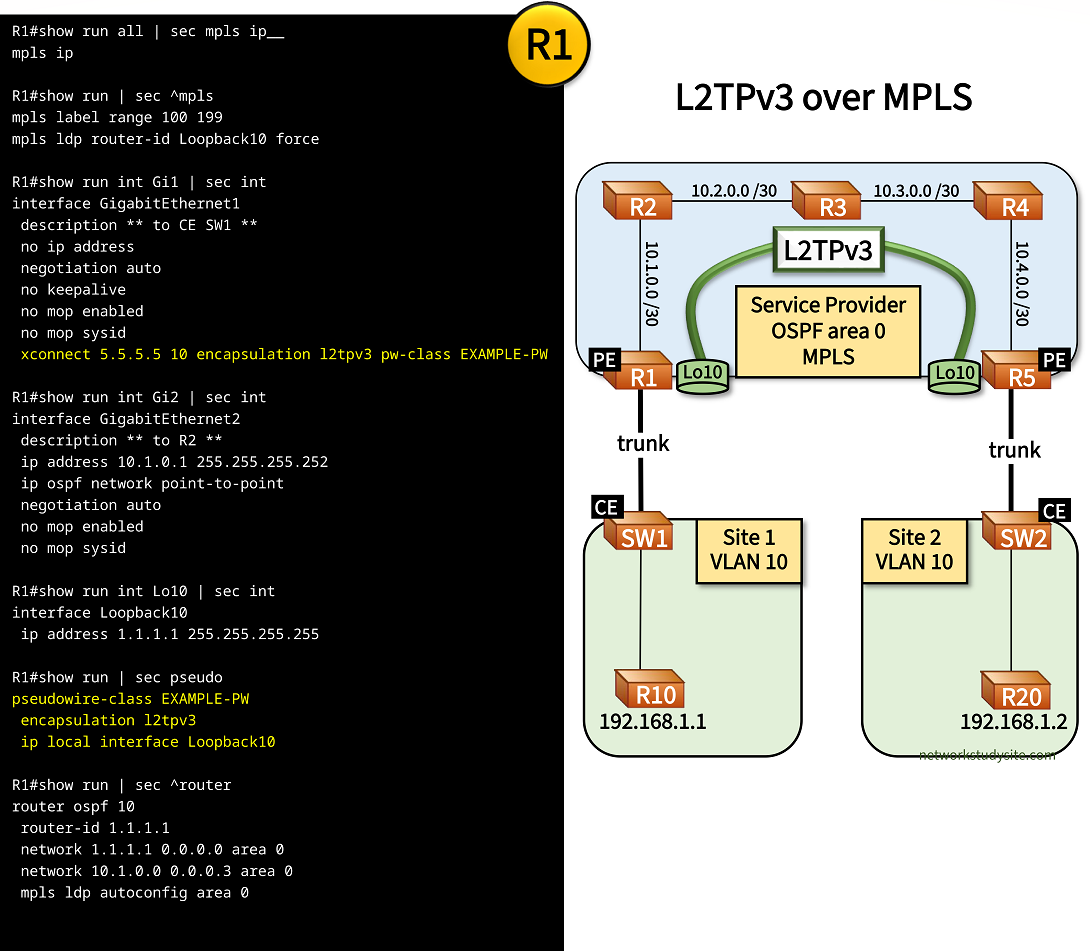
Configuration:
R1 (PE)
R1#show run all | sec mpls ip__
mpls ip

R1#show run | sec ^mpls
mpls label range 100 199
mpls ldp router-id Loopback10 force

R1#show run int Gi1 | sec int
interface GigabitEthernet1
 description ** to CE SW1 **
 no ip address
 negotiation auto
 no keepalive
 no mop enabled
 no mop sysid
 xconnect 5.5.5.5 10 encapsulation l2tpv3 pw-class EXAMPLE-PW

R1#show run int Gi2 | sec int
interface GigabitEthernet2
 description ** to R2 **
 ip address 10.1.0.1 255.255.255.252
 ip ospf network point-to-point
 negotiation auto
 no mop enabled
 no mop sysid

R1#show run int Lo10 | sec int
interface Loopback10
 ip address 1.1.1.1 255.255.255.255

R1#show run | sec pseudo
pseudowire-class EXAMPLE-PW
 encapsulation l2tpv3
 ip local interface Loopback10

R1#show run | sec ^router
router ospf 10
 router-id 1.1.1.1
 network 1.1.1.1 0.0.0.0 area 0
 network 10.1.0.0 0.0.0.3 area 0
 mpls ldp autoconfig area 0
R2
R2#show run all | sec mpls ip$
mpls ip

R2#show run | sec ^mpls
mpls label range 200 299
mpls ldp router-id Loopback10 force

R2#show run int Gi0/0 | sec int
interface GigabitEthernet0/0
 description ** to PE R1 **
 ip address 10.1.0.2 255.255.255.252
 ip ospf network point-to-point
 duplex auto
 speed auto
 media-type rj45

R2#show run int Gi0/1 | sec int
interface GigabitEthernet0/1
 description ** to R3 **
 ip address 10.2.0.1 255.255.255.252
 ip ospf network point-to-point
 duplex auto
 speed auto
 media-type rj45

R2#show run int Lo10 | sec int
interface Loopback10
 ip address 2.2.2.2 255.255.255.255

R2#show run | sec ^router
router ospf 10
 mpls ldp autoconfig area 0
 router-id 2.2.2.2
 network 2.2.2.2 0.0.0.0 area 0
 network 10.1.0.0 0.0.0.3 area 0
 network 10.2.0.0 0.0.0.3 area 0
R3
R3#show run all | sec mpls ip$
mpls ip

R3#show run | sec ^mpls
mpls label range 300 399
mpls ldp router-id Loopback10 force

R3#show run int Gi0/0 | sec int
interface GigabitEthernet0/0
 description ** to R2 **
 ip address 10.2.0.2 255.255.255.252
 ip ospf network point-to-point
 duplex auto
 speed auto
 media-type rj45

R3#show run int Gi0/1 | sec int
interface GigabitEthernet0/1
 description ** to R4 **
 ip address 10.3.0.2 255.255.255.252
 ip ospf network point-to-point
 duplex auto
 speed auto
 media-type rj45

R3#show run int Lo10 | sec int
interface Loopback10
 ip address 3.3.3.3 255.255.255.255

R3#show run | sec ^router
router ospf 10
 mpls ldp autoconfig area 0
 router-id 3.3.3.3
 network 3.3.3.3 0.0.0.0 area 0
 network 10.2.0.0 0.0.0.3 area 0
 network 10.3.0.0 0.0.0.3 area 0
R5 (PE)
R5#show run all | sec ^mpls ip$
mpls ip

R5#show run | sec ^mpls
mpls label range 500 599
mpls ldp router-id Loopback10 force

R5#show run int Gi1 | sec int
interface GigabitEthernet1
 description ** to CE SW2 **
 no ip address
 negotiation auto
 no keepalive
 no mop enabled
 no mop sysid
 xconnect 1.1.1.1 10 encapsulation l2tpv3 pw-class EXAMPLE-PW

R5#show run int Gi2 | sec int
interface GigabitEthernet2
 description ** to R4 **
 ip address 10.4.0.1 255.255.255.252
 ip ospf network point-to-point
 negotiation auto
 no mop enabled
 no mop sysid

R5#show run int Lo10 | sec int
interface Loopback10
 ip address 5.5.5.5 255.255.255.255

R5#show run | sec ^pseudo
pseudowire-class EXAMPLE-PW
 encapsulation l2tpv3
 ip local interface Loopback10

R5#show run | sec ^router
router ospf 10
 router-id 5.5.5.5
 network 5.5.5.5 0.0.0.0 area 0
 network 10.4.0.0 0.0.0.3 area 0
 mpls ldp autoconfig area 0
SW1 (CE)
SW1#show run int Gi0/0 | sec int
interface GigabitEthernet0/0
 description ** to R10 **
 switchport access vlan 10
 switchport mode access
 negotiation auto

SW1#show run int Gi0/1 | sec int
interface GigabitEthernet0/1
 description ** to PE R1 **
 switchport trunk allowed vlan 10
 switchport trunk encapsulation dot1q
 switchport mode trunk
 negotiation auto
SW2 (CE)
SW2#show run int Gi0/0 | sec int
interface GigabitEthernet0/0
 description ** to R20 **
 switchport access vlan 10
 switchport mode access
 negotiation auto

SW2#show run int Gi0/1 | sec int
interface GigabitEthernet0/1
 description ** to PE R5 **
 switchport trunk allowed vlan 10
 switchport trunk encapsulation dot1q
 switchport mode trunk
 negotiation auto
R10
R10#show run int Gi0/0 | sec int
interface GigabitEthernet0/0
 description ** to SW1 **
 mac-address 0000.0000.0001
 ip address 192.168.1.1 255.255.255.252
 duplex auto
 speed auto
 media-type rj45
 bfd interval 100 min_rx 50 multiplier 3

R10#show run | sec ^router
router bgp 65001
 bgp router-id 10.1.1.1
 bgp log-neighbor-changes
 neighbor 192.168.1.2 remote-as 65002
 neighbor 192.168.1.2 fall-over bfd
R20
R20#show run int Gi0/0 | sec int
interface GigabitEthernet0/0
 description ** to SW2 **
 mac-address 0000.0000.0002
 ip address 192.168.1.2 255.255.255.252
 duplex auto
 speed auto
 media-type rj45
 bfd interval 100 min_rx 50 multiplier 3

R20#show run | sec ^router
router bgp 65002
 bgp router-id 10.2.2.2
 bgp log-neighbor-changes
 neighbor 192.168.1.1 remote-as 65001
 neighbor 192.168.1.1 fall-over bfd
R1#show l2tp

L2TP Tunnel and Session Information Total tunnels 1 sessions 1

LocTunID   RemTunID   Remote Name   State  Remote Address  Sessn L2TP Class/
                                                           Count VPDN Group
4294456783 4280459778 R5            est    5.5.5.5         1     l2tp_default_class

LocID      RemID      TunID      Username, Intf/      State  Last Chg Uniq ID
                                 Vcid, Circuit
4276042609 3272937497 4294456783 10, Gi1              est    00:56:27 0                « L2TPv3 pseudowire established between PE routers


R1#show xconnect all
Legend:    XC ST=Xconnect State  S1=Segment1 State  S2=Segment2 State
  UP=Up       DN=Down            AD=Admin Down      IA=Inactive
  SB=Standby  HS=Hot Standby     RV=Recovering      NH=No Hardware

XC ST  Segment 1                         S1 Segment 2                         S2
------+---------------------------------+--+---------------------------------+--
UP pri   ac Gi1:7(Ethernet)              UP l2tp 5.5.5.5:10                   UP       « Pseudowire state is UP between PE Loopback addresses


R1#show l2tp tunnel packets

L2TP Tunnel Information Total tunnels 1 sessions 1

LocTunID   Pkts-In    Pkts-Out   Bytes-In   Bytes-Out
4294456783 70056      68336      4141824    4024781               « Traffic is forwarded through the L2TPv3 tunnel


R1#trace 5.5.5.5 source 1.1.1.1 probe 1
Type escape sequence to abort.
Tracing the route to 5.5.5.5
VRF info: (vrf in name/id, vrf out name/id)
  1 10.1.0.2 [MPLS: Label 205 Exp 0] 3 msec                       « Traffic is label switched between the PE router Loopback addresses
  2 10.2.0.2 [MPLS: Label 305 Exp 0] 3 msec
  3 10.3.0.1 [MPLS: Label 405 Exp 0] 3 msec
  4 10.4.0.1 2 msec


R10#ping 192.168.1.2
Type escape sequence to abort.
Sending 5, 100-byte ICMP Echos to 192.168.1.2, timeout is 2 seconds:
!!!!!
Success rate is 100 percent (5/5), round-trip min/avg/max = 5/6/7 ms         « R10 can reach R20 through the L2TPv3 tunnel


R10#show arp
Protocol  Address          Age (min)  Hardware Addr   Type   Interface
Internet  192.168.1.1             -   0000.0000.0001  ARPA   GigabitEthernet0/0
Internet  192.168.1.2            53   0000.0000.0002  ARPA   GigabitEthernet0/0       « R10 learns the MAC address of R20


R10#show ip bgp sum | beg Ne
Neighbor        V           AS MsgRcvd MsgSent   TblVer  InQ OutQ Up/Down  State/PfxRcd
192.168.1.2     4        65002      57      58        1    0    0 00:49:40        0   « BGP established between R10 - R20 across L2TPv3 tunnel
BGP is configured between R10 and R20 using a /30 IP subnetwork, and BFD is added for fast failure detection. R10 and R20 are directly connected at Layer-3 because of the Service Provider L2VPN which is privisioned through L2TPv3.
Note that these services may be provisioned by different Service Providers. What this means, is that Service Provider "A" (SP A) implements the L2VPN network through L2TPv3 (or another L2VPN technology), and SP "B" provisions the Layer-3 connection between R10 and R20. SP "B" may have MPLS L3VPN subscribers. Thus, R10 and R20 may themselves be a PE and CE router for an MPLS L3VPN. In such a hypothetical scenario, the eBGP neighborship between R10 - R20 would be configured in a VRF allocated to that particular customer.

Regarding terminology, the L2VPN would be the access network connecting the MPLS L3VPN PE (R10) and the CE (R20). The access network may be deployed using a sub-provider or last-mile provider. If R10 were the PE in this example MPLS L3VPN, then Site 1 would be the SP core's network edge, also called a PoP (Point of Presence) location hosting one or more PE routers. And if R20 were the CE device of the MPLS L3VPN then Site 2 would be the customer (also called subscriber) location.