Understand EIGRP Offset List Concept with Examples
- What is EIGRP Offset List? ‹
- What is the difference between Offset List and Distribute List? ‹
- Offset List incoming configuration ‹
- Offset List outgoing configuration ‹
- Offset List with EIGRP Named Mode ‹
- Download section ‹
What is EIGRP Offset List?
An EIGRP Offset List allows the network administrator to modify the metric of incoming or outgoing EIGRP route updates. To achieve this, an access-list is configured and applied to an Offset List to modify the metric of particular routes. Thus, Offset Lists enable path manipulation for EIGRP. An EIGRP Offset List achieves the following:
- Increase metric of incoming routes
- Increase metric of outgoing routes
As an example, the command offset-list ACL-OFFSET-LIST out 300 GigabitEthernet0/0 increases the metric by 300 for EIGRP routes advertised out on interface Gi0/0. Only those routes are affected which are permitted in the access-list.
| Tranditional, classic mode | Named mode |
|---|---|
R2#show run | sec ^router router eigrp 10 network 10.1.0.0 0.0.0.3 network 10.4.0.0 0.0.0.3 offset-list ACL-OFFSET-LIST out 300 GigabitEthernet0/0 eigrp router-id 2.2.2.2 R2#show run | sec ^ip access ip access-list standard ACL-OFFSET-LIST permit 192.168.1.0 0.0.0.255 permit 192.168.2.0 0.0.0.255 |
R2#show run | sec ^router router eigrp EXAMPLE-EIGRP ! address-family ipv4 unicast autonomous-system 10 ! topology base offset-list ACL-OFFSET-LIST out 300 GigabitEthernet0/0 exit-af-topology network 10.1.0.0 0.0.0.3 network 10.4.0.0 0.0.0.3 eigrp router-id 2.2.2.2 exit-address-family R2#show run | sec ^ip access ip access-list standard ACL-OFFSET-LIST permit 192.168.1.0 0.0.0.255 permit 192.168.2.0 0.0.0.255 |
What is the difference between Offset List and Distribute List?
An EIGRP Offset List modifies the metric of routes learned through EIGRP, and it is primarily focused on path selection. However, an EIGRP Distribute List does not influence the metric of routes. Instead, a Distribute List focuses on route filtering, whether to permit or deny a particular route from being accepted or advertised. Route tagging and tag manipulation are configured with an EIGRP Distribute List. Additionally, EIGRP routes can be identified and selected based on their route tag attribute, this mechanism also uses a Distribute List.
Offset List incoming configuration
In the following example scenario, R1 receives the prefixes 192.168.1.0/24 and 192.168.2.0/24 through EIGRP from router R2 and R3. By default these prefixes have the same metric on R1. However, an EIGRP Offset List is configured on R1 to increase the metric by 300 for the routes received on its interface Gi0/1. As a result, the preferred path is chosen through R3 in order to reach 192.168.1.0/24 and 192.168.2.0/24.
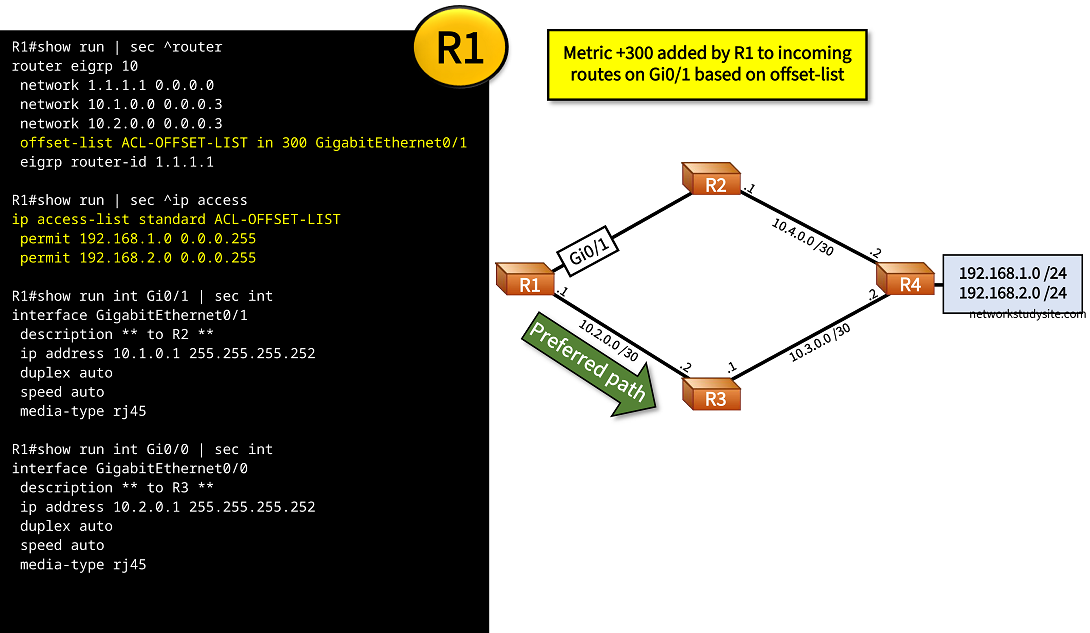
Configuration:
R1
R1#show run | sec ^router
router eigrp 10
 network 1.1.1.1 0.0.0.0
 network 10.1.0.0 0.0.0.3
 network 10.2.0.0 0.0.0.3
 offset-list ACL-OFFSET-LIST in 300 GigabitEthernet0/1
 eigrp router-id 1.1.1.1

R1#show run | sec ^ip access
ip access-list standard ACL-OFFSET-LIST
 permit 192.168.1.0 0.0.0.255
 permit 192.168.2.0 0.0.0.255

R1#show run int Gi0/1 | sec int
interface GigabitEthernet0/1
 description ** to R2 **
 ip address 10.1.0.1 255.255.255.252
 duplex auto
 speed auto
 media-type rj45

R1#show run int Gi0/0 | sec int
interface GigabitEthernet0/0
 description ** to R3 **
 ip address 10.2.0.1 255.255.255.252
 duplex auto
 speed auto
 media-type rj45

R1#show run int Lo10 | sec int
interface Loopback10
 ip address 1.1.1.1 255.255.255.255
R1#show ip route eigrp | beg 192.168.1.0
D     192.168.1.0/24 [90/131072] via 10.2.0.2, 00:05:22, GigabitEthernet0/0       « Path through R3 is preferred
D     192.168.2.0/24 [90/131072] via 10.2.0.2, 00:07:40, GigabitEthernet0/0


R1#show ip route 192.168.1.0
Routing entry for 192.168.1.0/24
  Known via "eigrp 10", distance 90, metric 131072, type internal            « More preferred lower metric through R3
  Redistributing via eigrp 10
  Last update from 10.2.0.2 on GigabitEthernet0/0, 00:05:12 ago
  Routing Descriptor Blocks:
  * 10.2.0.2, from 10.2.0.2, 00:05:12 ago, via GigabitEthernet0/0
      Route metric is 131072, traffic share count is 1
      Total delay is 5020 microseconds, minimum bandwidth is 1000000 Kbit
      Reliability 255/255, minimum MTU 1500 bytes
      Loading 1/255, Hops 2


R1#show ip eigrp topology 192.168.1.0
EIGRP-IPv4 Topology Entry for AS(10)/ID(1.1.1.1) for 192.168.1.0/24
  State is Passive, Query origin flag is 1, 1 Successor(s), FD is 131072
  Descriptor Blocks:
  10.2.0.2 (GigabitEthernet0/0), from 10.2.0.2, Send flag is 0x0
      Composite metric is (131072/130816), route is Internal                 « This is the more preferred lower metric through R3
      Vector metric:
        Minimum bandwidth is 1000000 Kbit
        Total delay is 5020 microseconds
        Reliability is 255/255
        Load is 1/255
        Minimum MTU is 1500
        Hop count is 2
        Originating router is 4.4.4.4
  10.1.0.2 (GigabitEthernet0/1), from 10.1.0.2, Send flag is 0x0
      Composite metric is (131372/131116), route is Internal                 « This is the metric after +300 increase by offset-list
      Vector metric:
        Minimum bandwidth is 1000000 Kbit
        Total delay is 5031 microseconds
        Reliability is 255/255
        Load is 1/255
        Minimum MTU is 1500
        Hop count is 2
        Originating router is 4.4.4.4
As visible in the above outputs, both paths are still present in the EIGRP topology table with their assigned metrics displayed. The path through R2 has its metric increased by 300 with the offset-list. This makes R1 prefer the path through R3.
Offset List outgoing configuration
In the following example topology router R2 increases the metric for prefixes 192.168.1.0/24 and 192.168.2.0/24 advertised out on interface Gi0/0. This means, the prefixes contained in the EIGRP Update message sent by R2 already have their metric increased by 300. As a result, R1 prefers R3 as the preferred path to reach 192.168.1.0/24 and 192.168.2.0/24.

Configuration:
R2
R2#show run | sec ^router
router eigrp 10
 network 2.2.2.2 0.0.0.0
 network 10.1.0.0 0.0.0.3
 network 10.4.0.0 0.0.0.3
 offset-list ACL-OFFSET-LIST out 300 GigabitEthernet0/0
 eigrp router-id 2.2.2.2

R2#show run | sec ^ip access
ip access-list standard ACL-OFFSET-LIST
 permit 192.168.1.0 0.0.0.255
 permit 192.168.2.0 0.0.0.255

R2#show run int Gi0/0 | sec int
interface GigabitEthernet0/0
 description ** to R1 **
 ip address 10.1.0.2 255.255.255.252
 duplex auto
 speed auto
 media-type rj45

R2#show run int Gi0/1 | sec int
interface GigabitEthernet0/1
 description ** to R4 **
 ip address 10.4.0.1 255.255.255.252
 duplex auto
 speed auto
 media-type rj45

R2#show run int Lo10 | sec int
interface Loopback10
 ip address 2.2.2.2 255.255.255.255
R1#show ip eigrp topology 192.168.1.0
EIGRP-IPv4 Topology Entry for AS(10)/ID(1.1.1.1) for 192.168.1.0/24
  State is Passive, Query origin flag is 1, 1 Successor(s), FD is 131072
  Descriptor Blocks:
  10.2.0.2 (GigabitEthernet0/0), from 10.2.0.2, Send flag is 0x0
      Composite metric is (131072/130816), route is Internal
      Vector metric:
        Minimum bandwidth is 1000000 Kbit
        Total delay is 5020 microseconds
        Reliability is 255/255
        Load is 1/255
        Minimum MTU is 1500
        Hop count is 2
        Originating router is 4.4.4.4
  10.1.0.2 (GigabitEthernet0/1), from 10.1.0.2, Send flag is 0x0
      Composite metric is (131372/131116), route is Internal            « R2 advertises metric increased by 300 due to offset-list
      Vector metric:
        Minimum bandwidth is 1000000 Kbit
        Total delay is 5031 microseconds
        Reliability is 255/255
        Load is 1/255
        Minimum MTU is 1500
        Hop count is 2
        Originating router is 4.4.4.4
As visible in the router output, the result in both example scenarios is the same. The result is that R1 prefers to reach the prefixes 192.168.1.0/24 and 192.168.2.0/24 through R3 instead of R2, because the route through R2 has its metric increased by 300 with an offset-list.
Offset List with EIGRP Named Mode
In the following example scenario an EIGRP outgoing offset-list is applied on R2 using EIGRP Named Mode configuration. The offset-list increases the metric by 300 for the two prefixes that are permitted in the access-list. As a result, R1 prefers the path through R3 in order to reach the prefixes 192.168.1.0/24 and 192.168.2.0/24.
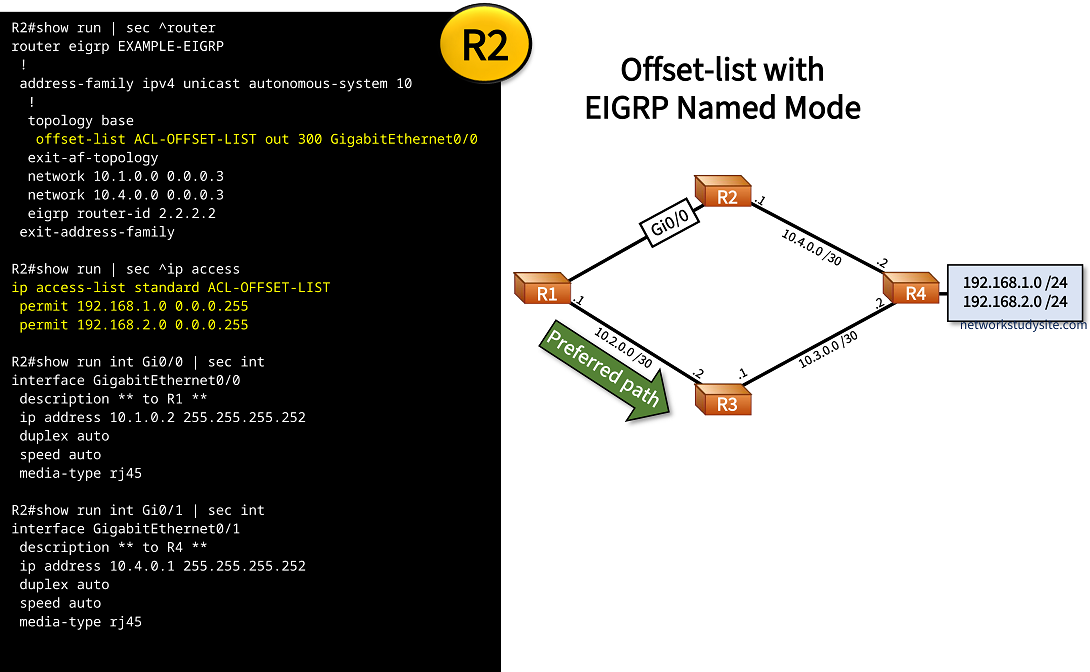
Configuration:
R2
R2#show run | sec ^router
router eigrp EXAMPLE-EIGRP
 !
 address-family ipv4 unicast autonomous-system 10
  !
  topology base
   offset-list ACL-OFFSET-LIST out 300 GigabitEthernet0/0
  exit-af-topology
  network 10.1.0.0 0.0.0.3
  network 10.4.0.0 0.0.0.3
  eigrp router-id 2.2.2.2
 exit-address-family

R2#show run | sec ^ip access
ip access-list standard ACL-OFFSET-LIST
 permit 192.168.1.0 0.0.0.255
 permit 192.168.2.0 0.0.0.255

R2#show run int Gi0/0 | sec int
interface GigabitEthernet0/0
 description ** to R1 **
 ip address 10.1.0.2 255.255.255.252
 duplex auto
 speed auto
 media-type rj45

R2#show run int Gi0/1 | sec int
interface GigabitEthernet0/1
 description ** to R4 **
 ip address 10.4.0.1 255.255.255.252
 duplex auto
 speed auto
 media-type rj45

R2#show run int Lo10 | sec int
interface Loopback10
 ip address 2.2.2.2 255.255.255.255
R1#show ip cef 192.168.1.0
192.168.1.0/24
  nexthop 10.2.0.2 GigabitEthernet0/0           « Next-hop through R3 is preferred


R1#show ip cef 192.168.2.0
192.168.2.0/24
  nexthop 10.2.0.2 GigabitEthernet0/0


R1#show ip eigrp topology all
EIGRP-IPv4 VR(EXAMPLE-EIGRP) Topology Table for AS(10)/ID(1.1.1.1)
Codes: P - Passive, A - Active, U - Update, Q - Query, R - Reply,
       r - reply Status, s - sia Status

P 10.4.0.0/30, 1 successors, FD is 1966080, serno 3
        via 10.1.0.2 (1966080/1310720), GigabitEthernet0/1
        via 10.2.0.2 (2621440/1966080), GigabitEthernet0/0
P 192.168.2.0/24, 1 successors, FD is 2048000, serno 12
        via 10.2.0.2 (2048000/1392640), GigabitEthernet0/0
        via 10.1.0.2 (2048300/1392940), GigabitEthernet0/1        « Route received from R2 has 300+ metric compared to route received from R3
P 10.1.0.0/30, 1 successors, FD is 1310720, serno 1
        via Connected, GigabitEthernet0/1
P 10.2.0.0/30, 1 successors, FD is 1310720, serno 2
        via Connected, GigabitEthernet0/0
P 192.168.1.0/24, 1 successors, FD is 2048000, serno 11
        via 10.2.0.2 (2048000/1392640), GigabitEthernet0/0
        via 10.1.0.2 (2048300/1392940), GigabitEthernet0/1
P 10.3.0.0/30, 1 successors, FD is 1966080, serno 4
        via 10.2.0.2 (1966080/1310720), GigabitEthernet0/0
        via 10.1.0.2 (2621440/1966080), GigabitEthernet0/1


R1#trace 192.168.1.1 probe 1
Type escape sequence to abort.
Tracing the route to 192.168.1.1
VRF info: (vrf in name/id, vrf out name/id)
  1 10.2.0.2 2 msec          « Next-hop through R3 is preferred
  2 10.3.0.2 2 msec