Setting Up a Time-Based ACL with Time Range Configuration
Table of Contents
- What is a time-based ACL? ‹
- How to configure a time-based ACL? ‹
- Absolute time-range configuration ‹
- Periodic time-range configuration ‹
- Download section ‹
What is a time-based ACL?
A time-based access control list (ACL) is only active during a specific time range. The time-range command is used to configure an absolute or periodic time range during which an access-list will be active. An absolute time-range occurs at a given point in time and does not repeat itself. This is shown below.
R1>
R1>enable
R1#configure terminal
Enter configuration commands, one per line.  End with CNTL/Z.
R1(config)#
R1(config)#time-range RANGE-NAME
R1(config-time-range)#absolute start 08:00 02 January 2022 end 17:00 02 January 2022
R1(config-time-range)#
R1(config-time-range)#exit
R1(config)#
A periodic time-range repeats itself at a defined interval. The following example time-range is active every Monday, Tuesday, and Wednesday between 6:00 - 18:00.
R1>
R1>enable
R1#configure terminal
Enter configuration commands, one per line.  End with CNTL/Z.
R1(config)#
R1(config)#time-range RANGE-NAME
R1(config-time-range)#periodic Monday 6:00 to 18:00
R1(config-time-range)#periodic Tuesday 6:00 to 18:00
R1(config-time-range)#periodic Wednesday 6:00 to 18:00
R1(config-time-range)#
R1(config-time-range)#exit
R1(config)#
How to configure a time-based ACL?
In the following example, a periodic time-range is configured with the time-range command on R1, and it is applied to an extended access-list. The access-list is then applied inbound on the interface GigabitEthernet0/0.
R1>
R1>enable
R1#configure terminal
Enter configuration commands, one per line.  End with CNTL/Z.
R1(config)#
R1(config)#time-range RANGE-NAME
R1(config-time-range)#periodic Monday 6:00 to 18:00
R1(config-time-range)#periodic Tuesday 6:00 to 18:00
R1(config-time-range)#periodic Wednesday 6:00 to 18:00
R1(config-time-range)#
R1(config-time-range)#exit
R1(config)#
R1(config)#ip access-list extended EXAMPLE-ACL
R1(config-ext-nacl)#deny ip host 192.168.0.1 any time-range RANGE-NAME
R1(config-ext-nacl)#permit ip any any
R1(config-ext-nacl)#
R1(config-ext-nacl)#exit
R1(config)#
R1(config)#interface GigabitEthernet0/0
R1(config-if)#ip access-group EXAMPLE-ACL in
R1(config-if)#
R1(config-if)#exit
R1(config)#exit
R1#
Absolute time-range configuration
In this example a time-based extended ACL is configured on R2 with an absolute time-range called TIME-RANGE.
The ACL is attached inbound to R2 interface Gi0/0. As a result, during the time period between 2022 January 1 07:03 - 07:05, two prefixes connected to R1 cannot reach R3 or any IP address beyond R2. The two prefixes affected are 192.168.1.0/24 and 192.168.2.0/24.
On R2 the clock is manually set to 2022 January 1 07:00 with the exec mode command clock set 07:00:00 January 1 2022. This allows to test the time-based ACL.

Configuration:
R1
R1#show run int Gi0/0 | sec int
interface GigabitEthernet0/0
 description ** to R2 **
 ip address 10.0.1.1 255.255.255.252
 duplex auto
 speed auto
 media-type rj45

R1#show run int Lo10 | sec int
interface Loopback10
 ip address 192.168.1.1 255.255.255.255

R1#show run int Lo20 | sec int
interface Loopback20
 ip address 192.168.2.1 255.255.255.255

R1#show run | sec ip route
ip route 0.0.0.0 0.0.0.0 GigabitEthernet0/0 10.0.1.2
R2
R2#show run | sec ^time-range
time-range TIME-RANGE
 absolute start 07:03 01 January 2022 end 07:05 01 January 2022

R2#show run | sec ^ip access-list
ip access-list extended ACL-EXTENDED
 deny   ip host 192.168.1.1 any time-range TIME-RANGE
 deny   ip host 192.168.2.1 any time-range TIME-RANGE
 permit ip any any

R2#show run int Gi0/0 | sec int
interface GigabitEthernet0/0
 description ** to R1 **
 ip address 10.0.1.2 255.255.255.252
 ip access-group ACL-EXTENDED in
 duplex auto
 speed auto
 media-type rj45

R2#show run int Gi0/1 | sec int
interface GigabitEthernet0/1
 description ** to R3 **
 ip address 10.0.2.1 255.255.255.252
 duplex auto
 speed auto
 media-type rj45

R2#show run | sec ip route
ip route 192.168.0.0 255.255.252.0 GigabitEthernet0/0 10.0.1.1
R3
R3#show run int Gi0/0 | sec int
interface GigabitEthernet0/0
 description ** to R2 **
 ip address 10.0.2.2 255.255.255.252
 duplex auto
 speed auto
 media-type rj45

R3#show run | sec ip route
ip route 0.0.0.0 0.0.0.0 GigabitEthernet0/0 10.0.2.1
R2#show time-range
time-range entry: TIME-RANGE (inactive)          « At first the time-range is inactive
   absolute start 07:03 01 January 2022 end 07:05 01 January 2022
   used in: IP ACL entry
   used in: IP ACL entry


R2#show time-range
time-range entry: TIME-RANGE (active)            « Then the time-range turns active
   absolute start 07:03 01 January 2022 end 07:05 01 January 2022
   used in: IP ACL entry
   used in: IP ACL entry


R2#show access-list
Extended IP access list ACL-EXTENDED
    10 deny ip host 192.168.1.1 any time-range TIME-RANGE (active) (5 matches)       « The ACL starts to deny packets
    20 deny ip host 192.168.2.1 any time-range TIME-RANGE (active) (5 matches)
    30 permit ip any any


R1#ping 10.0.2.2 source 192.168.1.1 re 100
Type escape sequence to abort.
Sending 100, 100-byte ICMP Echos to 10.0.2.2, timeout is 2 seconds:
Packet sent with a source address of 192.168.1.1
U.U.U.U.U.U.U.U.U.U.U.!!!!!!!!!!!!!!!!!!!!!!!!!!!!!!!!!!!!!!!!!!!!!!!!
!!!!!!!!!!!!!!!!!!!!!!!!!!!!!!
Success rate is 78 percent (78/100), round-trip min/avg/max = 102/103/105 ms
As visible in the above output, when the time-range expires, the ACL is no longer active and traffic resumes. Note that after the time-range expires, the ACL has counted all the packets denied and permitted during the active time-range. This is shown in the following output.
R2#show ip access-list
Extended IP access list ACL-EXTENDED
    10 deny ip host 192.168.1.1 any time-range TIME-RANGE (inactive) (43 matches)
    20 deny ip host 192.168.2.1 any time-range TIME-RANGE (inactive) (87 matches)
    30 permit ip any any (424 matches)

Periodic time-range configuration
In th following example a time-based ACL is configured on R2 with a periodic time-range called RANGE-NAME.
The ACL is attached inbound to R2 interface Gi0/0. As a result, every day during the time periods 7:05 - 7:07, 7:09 - 7:11, and 7:15 - 7:17, two prefixes attached to R1 cannot reach R3 or any IP address beyond R2. The two prefixes affected are 192.168.1.0/24 and 192.168.2.0/24.
On R2 the clock is manually set to 2022 January 1 07:00 with the exec mode command clock set 07:00:00 January 1 2022. Thus, the time-based ACL can be tested.
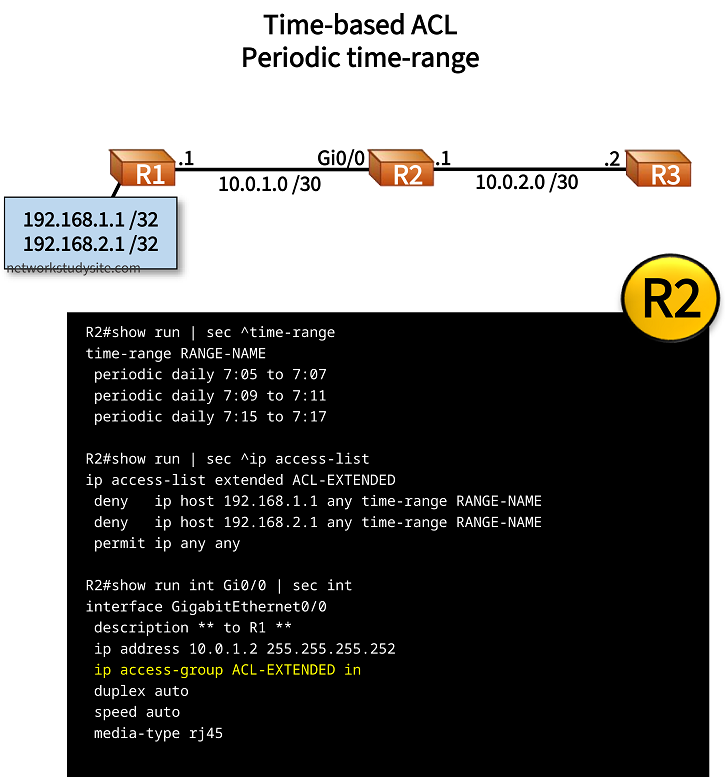
Configuration:
R1
R1#show run int Gi0/0 | sec int
interface GigabitEthernet0/0
 description ** to R2 **
 ip address 10.0.1.1 255.255.255.252
 duplex auto
 speed auto
 media-type rj45

R1#show run int Lo10 | sec int
interface Loopback10
 ip address 192.168.1.1 255.255.255.255

R1#show run int Lo20 | sec int
interface Loopback20
 ip address 192.168.2.1 255.255.255.255

R1#show run | sec ip route
ip route 0.0.0.0 0.0.0.0 GigabitEthernet0/0 10.0.1.2
R2
R2#show run | sec ^time-range
time-range RANGE-NAME
 periodic daily 7:05 to 7:07
 periodic daily 7:09 to 7:11
 periodic daily 7:15 to 7:17

R2#show run | sec ^ip access-list
ip access-list extended ACL-EXTENDED
 deny   ip host 192.168.1.1 any time-range RANGE-NAME
 deny   ip host 192.168.2.1 any time-range RANGE-NAME
 permit ip any any

R2#show run int Gi0/0 | sec int
interface GigabitEthernet0/0
 description ** to R1 **
 ip address 10.0.1.2 255.255.255.252
 ip access-group ACL-EXTENDED in
 duplex auto
 speed auto
 media-type rj45

R2#show run int Gi0/1 | sec int
interface GigabitEthernet0/1
 description ** to R3 **
 ip address 10.0.2.1 255.255.255.252
 duplex auto
 speed auto
 media-type rj45

R2#show run | sec ip route
ip route 192.168.0.0 255.255.252.0 GigabitEthernet0/0 10.0.1.1
R3
R3#show run int Gi0/0 | sec int
interface GigabitEthernet0/0
 description ** to R2 **
 ip address 10.0.2.2 255.255.255.252
 duplex auto
 speed auto
 media-type rj45

R3#show run | sec ip route
ip route 0.0.0.0 0.0.0.0 GigabitEthernet0/0 10.0.2.1
R2#show time-range
time-range entry: RANGE-NAME (inactive)
   periodic daily 7:05 to 7:07
   periodic daily 7:09 to 7:11
   periodic daily 7:15 to 7:17
   used in: IP ACL entry
   used in: IP ACL entry


R2#show ip access-list
Extended IP access list ACL-EXTENDED
    10 deny ip host 192.168.1.1 any time-range RANGE-NAME (active) (27 matches)
    20 deny ip host 192.168.2.1 any time-range RANGE-NAME (active) (16 matches)
    30 permit ip any any (53 matches)
When the time-range is active, the ACL starts to permit only allowed traffic, and counts the denied and permitted packets.