Syslog Introduction and Configuration - Cisco Router
Table of Contents
- What is syslog? ‹
- Can syslog run on TCP? ‹
- What is the difference between SNMP and syslog? ‹
- Can syslog be encrypted? ‹
- Download section ‹
What is syslog?
Syslog is a standardized technology for logging system messages to a remote server for analysis. The syslog remote logging protocol uses a client/server model, and syslog messages can range from low severity level 7 (debug) to high severity level 0 (Emergency: system is unusable). These messages are transmitted to a syslog server listening on the default UDP port 514.
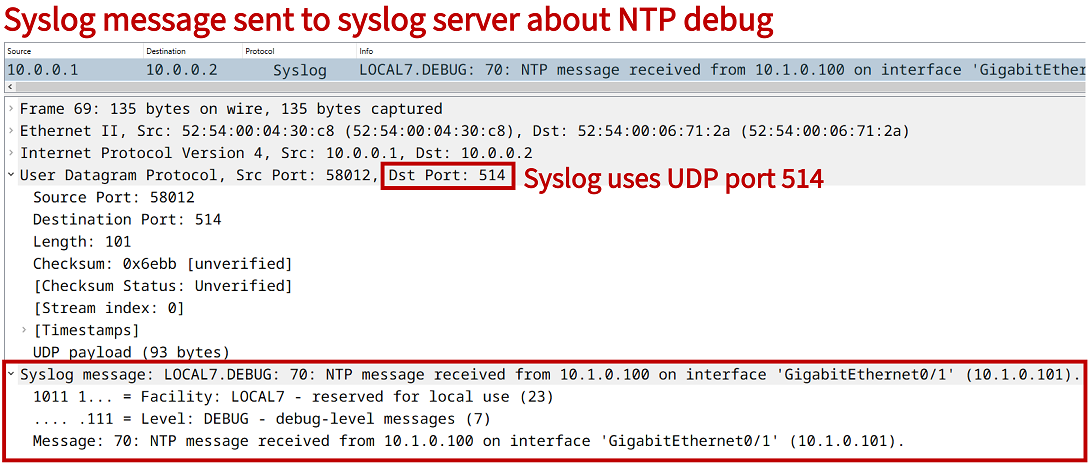
A syslog server logs the messages, which can be accessed at a later time for purposes such as troubleshooting, security auditing, or network reporting. Syslog categorizes messages based on a facility code which is defined in RFC 5424. For network devices the default facility is the number 7 (network news subsystem).
The following example configuration makes R1 send debug messages via syslog to the Server. The source IP address of syslog messages is configured on R1 with the logging source-interface Loopback10 global configuration command.
R1>enable
R1#configure terminal
Enter configuration commands, one per line.  End with CNTL/Z.
R1(config)#logging trap debugging
R1(config)#logging source-interface Loopback10
R1(config)#logging host 10.0.0.2
R1(config)#exit
%SYS-6-LOGGINGHOST_STARTSTOP: Logging to host 10.0.0.2 port 0 CLI Request Triggered
%SYS-6-LOGGINGHOST_STARTSTOP: Logging to host 10.0.0.2 port 514 started - CLI initiated
R1#
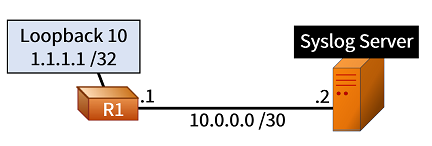
If R1 turns on debugging for IP packets, and pings interface Loopback 10, this generates syslog messages. These syslog messages are captured with tcpdump on the Syslog Server as shown below. The source IP address is 1.1.1.1, and UDP port 514 is used.
Server:~$ sudo tcpdump -c 5 --interface eth0 udp port 514
tcpdump: verbose output suppressed, use -v[v]... for full protocol decode
listening on eth0, link-type EN10MB (Ethernet), snapshot length 262144 bytes
19:04:08.595902 IP 1.1.1.1.50059 > 10.0.0.2.514: SYSLOG local7.debug, length: 84
19:04:08.596654 IP 1.1.1.1.50059 > 10.0.0.2.514: SYSLOG local7.debug, length: 75
19:04:08.597359 IP 1.1.1.1.50059 > 10.0.0.2.514: SYSLOG local7.debug, length: 148
19:04:08.598105 IP 1.1.1.1.50059 > 10.0.0.2.514: SYSLOG local7.debug, length: 89
19:04:08.598863 IP 1.1.1.1.50059 > 10.0.0.2.514: SYSLOG local7.debug, length: 79
5 packets captured
69 packets received by filter
0 packets dropped by kernel
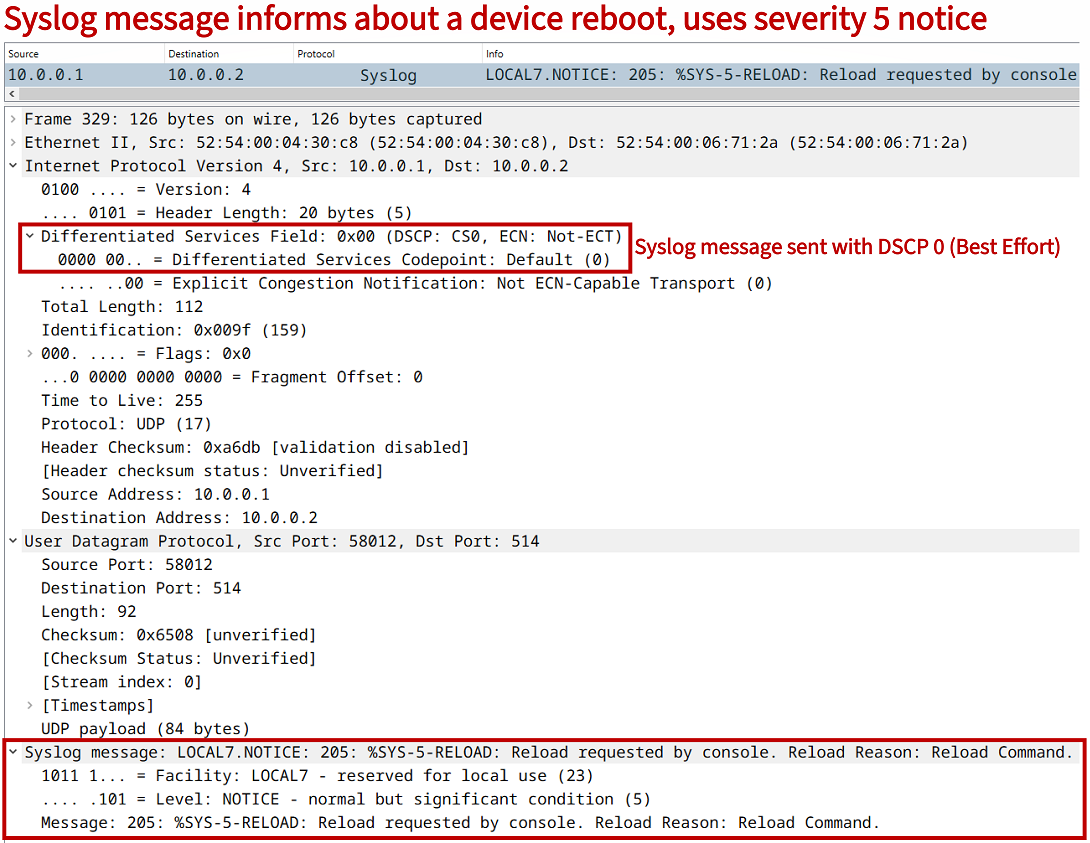
Also, notice the following syslog message packet capture signals a device reboot which uses the network news subsystem LOCAL7 facility, and the severity level 5 NOTICE. This message will be logged on the Syslog Server.
Can syslog run on TCP?
Yes, syslog can be configured to use TCP as the transport protocol. As shown in the following example configuration, R1 sends debugging level syslog messages to the Syslog Server using TCP port 5000.
R1#show run | sec ^logging
logging trap debugging
logging source-interface Loopback10
logging host 10.0.0.2 transport tcp port 5000
As in the previous example, if R1 turns on debugging for IP packets, and pings interface Loopback 10, this generates syslog messages. However currently, the TCP three-way handshake is initiated with a Syn message (Flags [S]), because syslog is instructed to use the connection-oriented TCP transport over port 5000.
Server:~$ sudo tcpdump -c 5 --interface eth0 tcp port 5000
tcpdump: verbose output suppressed, use -v[v]... for full protocol decode
listening on eth0, link-type EN10MB (Ethernet), snapshot length 262144 bytes
19:10:26.034668 IP 1.1.1.1.38834 > 10.0.0.2.5000: Flags [S], seq 4063319596, win 4128, options [mss 1460], length 0
19:10:28.039061 IP 1.1.1.1.38834 > 10.0.0.2.5000: Flags [S], seq 4063319596, win 4128, options [mss 1460], length 0
19:10:32.038689 IP 1.1.1.1.38834 > 10.0.0.2.5000: Flags [S], seq 4063319596, win 4128, options [mss 1460], length 0
19:10:40.038422 IP 1.1.1.1.38834 > 10.0.0.2.5000: Flags [S], seq 4063319596, win 4128, options [mss 1460], length 0
19:10:56.040444 IP 1.1.1.1.14437 > 10.0.0.2.5000: Flags [S], seq 548789353, win 4128, options [mss 1460], length 0
5 packets captured
5 packets received by filter
0 packets dropped by kernel
What is the difference between SNMP and syslog?
Both SNMP and syslog allow a network administrator to gain technical insights about a system or a network, however these two protocols have different use cases. The following are several differences between SNMP and syslog:
- syslog is commonly used to analyze historical data, SNMP collects data for near real-time monitoring and service operations incident management (although SNMP monitoring can also be archived for later analysis)
- syslog proactively sends UDP logging messages, SNMP usually polls a device to query MIB variables (although SNMP can also send trap/inform messages proactively)
- syslog does not allow for remote administration, whereas SNMP allows for remote administration (such as configuration) of a client device
Meanwhile, syslog remote logging may be less popular today with the evolution of device capabilities which enable standardized protocols for API-based network management, automation and SD-WAN. As a result, increasingly NETCONF/RESTCONF and gRPC are used in newer platforms. These protocols also support network telemetry services, which provide enhanced network monitoring compared to syslog.
Can syslog be encrypted?
RFC 5425 describes Syslog TLS which is a secure, encrypted way of transporting syslog messages between a client and a server. Instead of UDP, Syslog TLS uses TCP on port 6514. The client and the server both need to use certificate-based authentication.