Bidirectional Forwarding Detection (BFD) Configuration
Table of Contents
- What is BFD? ‹
- What is BGP and BFD? ‹
- Is BFD TCP or UDP? ‹
- BFD with BGP single-hop configuration ‹
- BFD with BGP multi-hop configuration ‹
- BFD authentication configuration ‹
- BFD with OSPF configuration ‹
- BFD with static route configuration ‹
- Download section ‹
What is BFD?
Bidirectional Forwarding Detection (BFD) reduces the time it takes to detect a network failure. BFD is faster at detecting link failures than a traditional routing protocol keepalive mechanism, such as periodic Hello packets. A BFD neighborship is explicitly configured between two networking devices and a link failure can be detected in under a second.
The following quote from the RFC highlights why BFD needs to be configured together with a routing protocol (such as BGP) or a static route.
A BFD session is established based on the needs of the application that will be making use of it. It is up to the application to determine the need for BFD, and the addresses to use -- there is no discovery mechanism in BFD.
RFC 5880, Bidirectional Forwarding Detection (BFD)
What is BGP and BFD?
BGP has a default hold time of 180 seconds, and although the timers can be adjusted, BFD is commonly configured to provide a fast failure detection mechanism for BGP. The following output shows the default hold time for BGP.
R1#show ip bgp neighbors | section time
  Last read 00:00:33, last write 00:00:31, hold time is 180, keepalive interval is 60 seconds
  Default minimum time between advertisement runs is 30 seconds
Event Timers (current time is 0x166F304):
uptime: 354142 ms, Sent idletime: 31012 ms, Receive idletime: 30790 ms
The following example outputs show a configuration where BGP relies on BFD to detect a link failure on the connected interface Gi0/0. As a result, BGP becomes the client process of BFD.
Router#show run | sec router
router bgp 65001
 bgp router-id 1.1.1.1
 bgp log-neighbor-changes
 neighbor 10.0.0.2 remote-as 65002
 neighbor 10.0.0.2 fall-over bfd

Router#show run int Gi0/0 | sec int
interface GigabitEthernet0/0
 ip address 10.0.0.1 255.255.255.252
 duplex auto
 speed auto
 media-type rj45
 bfd interval 100 min_rx 100 multiplier 3
Is BFD TCP or UDP?
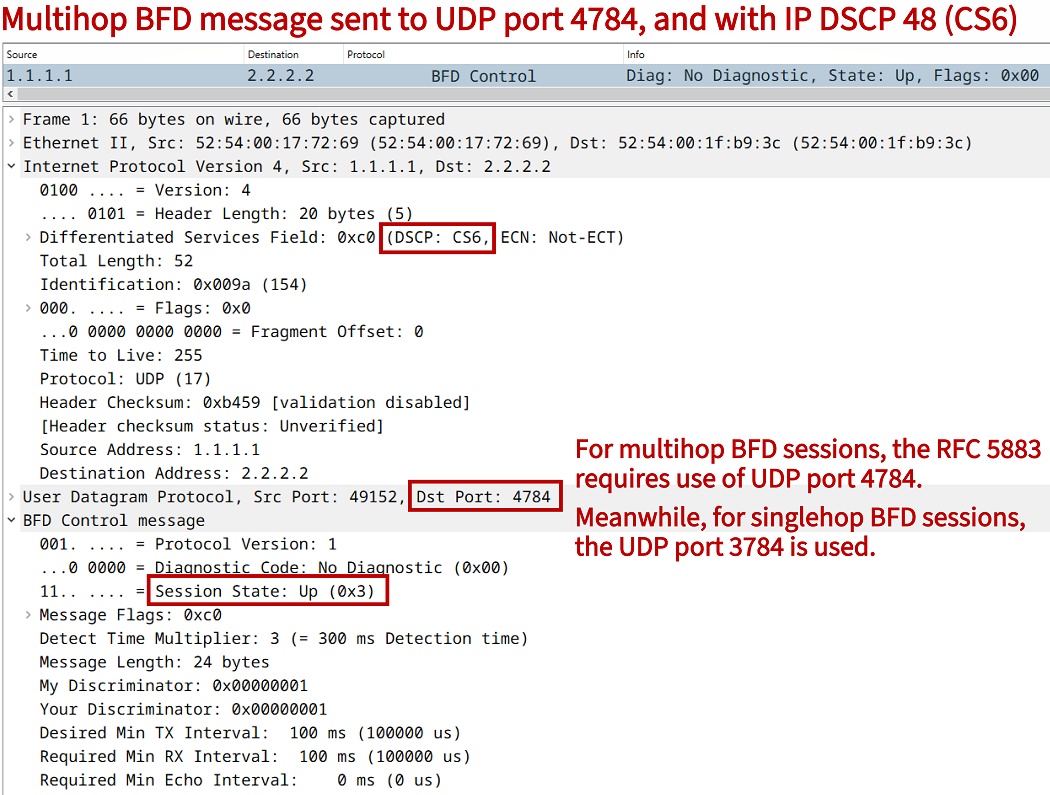
The transport protocol UDP is used to encapsulate a BFD control message. UDP port 3784 is used for single-hop BFD sessions, and UDP port 4784 is used for multihop sessions. The BFD protocol operation has a low-overhead. A BFD control message encapsuted in IPv4 consists of a 66 byte frame which includes a 24 byte BFD payload. The following packet capture provides additional details.
BFD with BGP single-hop configuration
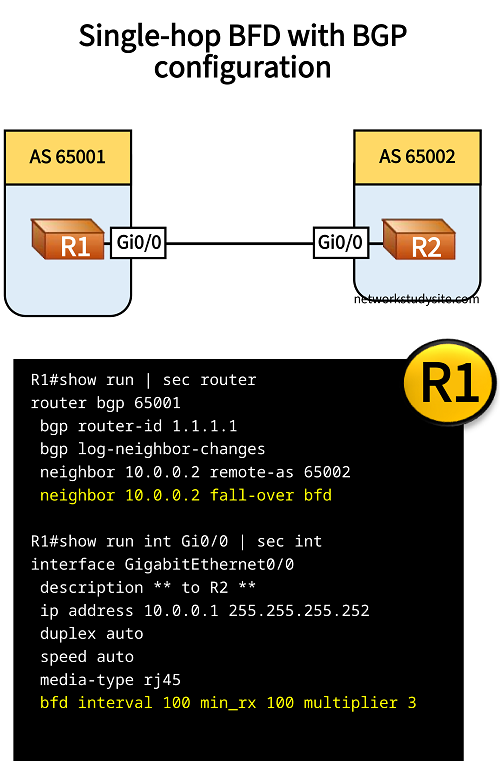
In this example topology single-hop BFD is configured between two BGP speaking routers. On both participating routers, BFD sends a control packet (keepalive) every 100 milliseconds, and anticipates a BFD keepalive from the other side every 100 milliseconds.
If three keepalives are missed, the BFD neighborship is torn down and the client processes of BFD are informed about the session failure. In this particular scenario, BGP is a client process of BFD, so it will receive the update about the failure. As a result, BGP will immediately terminate the neighborship instead of waiting for the BGP hold time to expire.
Configuration:
R1
R1#show run | sec router
router bgp 65001
 bgp router-id 1.1.1.1
 bgp log-neighbor-changes
 neighbor 10.0.0.2 remote-as 65002
 neighbor 10.0.0.2 fall-over bfd

R1#show run int Gi0/0 | sec int
interface GigabitEthernet0/0
 description ** to R2 **
 ip address 10.0.0.1 255.255.255.252
 duplex auto
 speed auto
 media-type rj45
 bfd interval 100 min_rx 100 multiplier 3
R2
R2#show run | sec router
router bgp 65002
 bgp router-id 2.2.2.2
 bgp log-neighbor-changes
 neighbor 10.0.0.1 remote-as 65001
 neighbor 10.0.0.1 fall-over bfd

R2#show run int Gi0/0 | sec int
interface GigabitEthernet0/0
 description ** to R1 **
 ip address 10.0.0.2 255.255.255.252
 duplex auto
 speed auto
 media-type rj45
 bfd interval 100 min_rx 100 multiplier 3
R1#show bfd neighbors

IPv4 Sessions
NeighAddr                              LD/RD         RH/RS     State     Int
10.0.0.2                                1/1          Up        Up        Gi0/0        « BFD Session State is Up


R1#show bfd summary client

Client              Session          Up          Down
BGP                       1           1             0             « BGP is a client of BFD
CEF                       1           1             0

Total                     1           1             0
When the connection between the two BGP neighbors is interrupted, the following log messages indicate that the BFD as well BGP neighborship is down.
R1#show log | beg Log Buffer
Log Buffer (8192 bytes):

%BFDFSM-6-BFD_SESS_DOWN: BFD-SYSLOG: BFD session ld:1 handle:1,is going Down Reason: ECHO FAILURE
%BGP-5-NBR_RESET: Neighbor 10.0.0.2 reset (BFD adjacency down)
%BGP-5-ADJCHANGE: neighbor 10.0.0.2 Down BFD adjacency down
%BGP_SESSION-5-ADJCHANGE: neighbor 10.0.0.2 IPv4 Unicast topology base removed from session  BFD adjacency down
%BFD-6-BFD_SESS_DESTROYED: BFD-SYSLOG: bfd_session_destroyed,  ld:1 neigh proc:BGP, handle:1 act
BFD with BGP multi-hop configuration
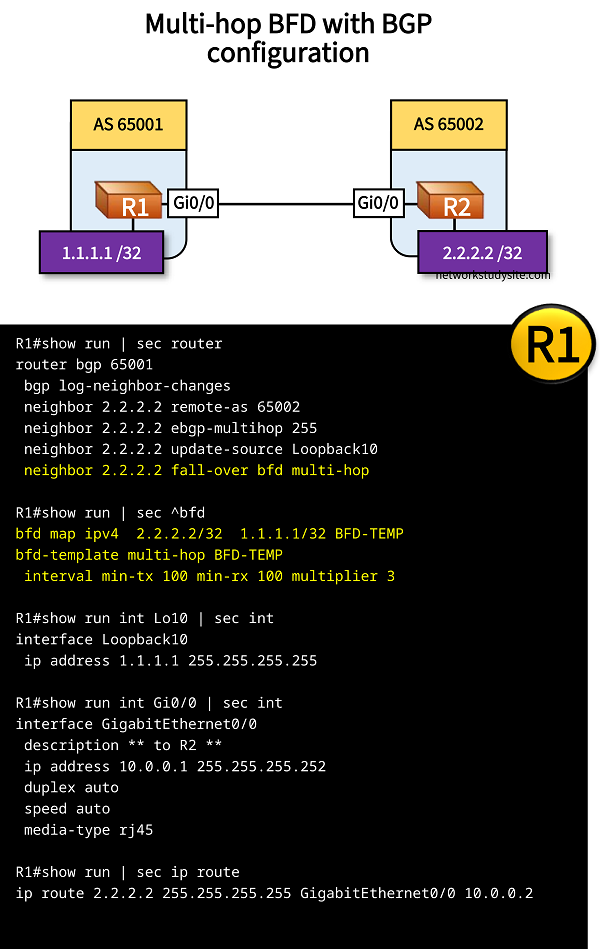
In this example scenario, eBGP is configured between R1 and R2 using Loopback addresses. For this to work, the following is configured.
- multihop eBGP is configured
- BGP update-source is configured as the Loopback address
- static route is configured pointing to the neighboring router's Loopback address
Multi-hop BGP needs a multi-hop BFD session. So, in order to add a BFD session for fast failure detection the following needs to be configured.
- a BFD template specifying the keepalive intervals and multiplier value
- a BFD map which has the BFD template assigned
- the multi-hop BFD configuration added to the BGP neighbor
Configuration:
R1
R1#show run | sec router
router bgp 65001
 bgp log-neighbor-changes
 neighbor 2.2.2.2 remote-as 65002
 neighbor 2.2.2.2 ebgp-multihop 255
 neighbor 2.2.2.2 update-source Loopback10
 neighbor 2.2.2.2 fall-over bfd multi-hop

R1#show run | sec ^bfd
bfd map ipv4  2.2.2.2/32  1.1.1.1/32 BFD-TEMP
bfd-template multi-hop BFD-TEMP
 interval min-tx 100 min-rx 100 multiplier 3

R1#show run int Lo10 | sec int
interface Loopback10
 ip address 1.1.1.1 255.255.255.255

R1#show run int Gi0/0 | sec int
interface GigabitEthernet0/0
 description ** to R2 **
 ip address 10.0.0.1 255.255.255.252
 duplex auto
 speed auto
 media-type rj45

R1#show run | sec ip route
ip route 2.2.2.2 255.255.255.255 GigabitEthernet0/0 10.0.0.2
R2
R2#show run | sec router
router bgp 65002
 bgp log-neighbor-changes
 neighbor 1.1.1.1 remote-as 65001
 neighbor 1.1.1.1 ebgp-multihop 255
 neighbor 1.1.1.1 update-source Loopback10
 neighbor 1.1.1.1 fall-over bfd multi-hop

R2#show run | sec ^bfd
bfd map ipv4  1.1.1.1/32  2.2.2.2/32 BFD-TEMP
bfd-template multi-hop BFD-TEMP
 interval min-tx 100 min-rx 100 multiplier 3

R2#show run int Lo10 | sec int
interface Loopback10
 ip address 2.2.2.2 255.255.255.255

R2#show run int Gi0/0 | sec int
interface GigabitEthernet0/0
 description ** to R1 **
 ip address 10.0.0.2 255.255.255.252
 duplex auto
 speed auto
 media-type rj45

R2#show run | sec ip route
ip route 1.1.1.1 255.255.255.255 GigabitEthernet0/0 10.0.0.1
R1#show bfd neighbors

IPv4 Multihop Sessions
NeighAddr[vrf]                                LD/RD         RH/RS     State
2.2.2.2                                        1/1          Up        Up


R1#show bfd summary client

Client              Session          Up          Down
BGP                       1           1             0

Total                     1           1             0


R1#show bfd map
 Destination[vrf]: 2.2.2.2/32
 Source[vrf]: 1.1.1.1/32
 Template: BFD-TEMP
 Authentication(Type/Keychain): invalid_type/


R1#show ip bgp sum | beg Ne
Neighbor        V           AS MsgRcvd MsgSent   TblVer  InQ OutQ Up/Down  State/PfxRcd
2.2.2.2         4        65002      67      67        1    0    0 00:57:55        0        « BGP session is established with Loopback IP
BFD authentication configuration
In this example scenario, BFD is configured with authentication. Thus, the BFD session only establishes if the authentication string (password) match between R1 and R2. The authenticated BFD session is then used by BGP to detect failures between R1 and R2.

Configuration:
R1
R1#show run | sec router
router bgp 65001
 bgp router-id 1.1.1.1
 bgp log-neighbor-changes
 neighbor 10.0.0.2 remote-as 65002
 neighbor 10.0.0.2 fall-over bfd single-hop

R1#show run int Gi0/0 | sec int
interface GigabitEthernet0/0
 description ** to R2 **
 ip address 10.0.0.1 255.255.255.252
 duplex auto
 speed auto
 media-type rj45
 bfd template BFD-TEMP

R1#show run | sec ^bfd
bfd-template single-hop BFD-TEMP
 interval min-tx 100 min-rx 100 multiplier 3
 authentication sha-1 keychain BFD-AUTH

R1#show run | sec key chain
key chain BFD-AUTH
 key 10
  key-string p4ssw0rd.123
R2
R2#show run | sec router
router bgp 65002
 bgp router-id 2.2.2.2
 bgp log-neighbor-changes
 neighbor 10.0.0.1 remote-as 65001
 neighbor 10.0.0.1 fall-over bfd single-hop

R2#show run int Gi0/0 | sec int
interface GigabitEthernet0/0
 description ** to R1 **
 ip address 10.0.0.2 255.255.255.252
 duplex auto
 speed auto
 media-type rj45
 bfd template BFD-TEMP

R2#show run | sec ^bfd
bfd-template single-hop BFD-TEMP
 interval min-tx 100 min-rx 100 multiplier 3
 authentication sha-1 keychain BFD-AUTH

R2#show run | sec key chain
key chain BFD-AUTH
 key 10
  key-string p4ssw0rd.123
R1#show bfd neighbors

IPv4 Sessions
NeighAddr                              LD/RD         RH/RS     State     Int
10.0.0.2                                1/1          Up        Up        Gi0/0


R1#show bfd summary client

Client              Session          Up          Down
BGP                       1           1             0
CEF                       1           1             0

Total                     1           1             0


R1#show ip bgp sum | begin Neighbor
Neighbor        V           AS MsgRcvd MsgSent   TblVer  InQ OutQ Up/Down  State/PfxRcd
10.0.0.2        4        65002      57      58        1    0    0 00:48:40        0
BFD with OSPF configuration
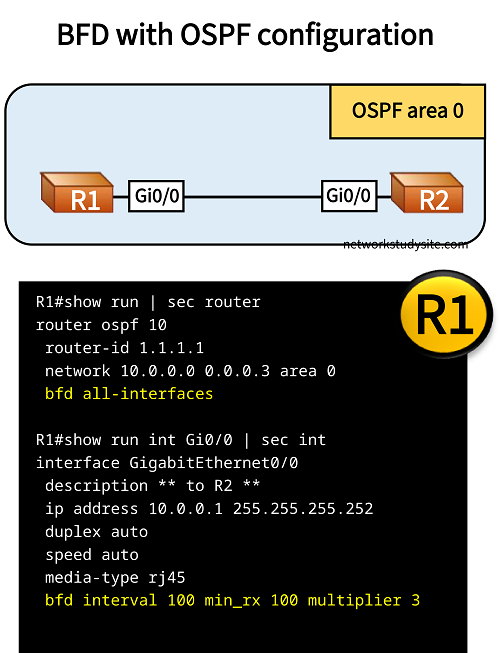
In this example scenario, OSPF uses the BFD session configured between R1 and R2 to detect failures.
Configuration:
R1
R1#show run | sec router
router ospf 10
 router-id 1.1.1.1
 network 10.0.0.0 0.0.0.3 area 0
 bfd all-interfaces

R1#show run int Gi0/0 | sec int
interface GigabitEthernet0/0
 description ** to R2 **
 ip address 10.0.0.1 255.255.255.252
 duplex auto
 speed auto
 media-type rj45
 bfd interval 100 min_rx 100 multiplier 3
R2
R2#show run | sec router
router ospf 10
 router-id 2.2.2.2
 network 10.0.0.0 0.0.0.3 area 0
 bfd all-interfaces

R2#show run int Gi0/0 | sec int
interface GigabitEthernet0/0
 description ** to R1 **
 ip address 10.0.0.2 255.255.255.252
 duplex auto
 speed auto
 media-type rj45
 bfd interval 100 min_rx 100 multiplier 3
R1#show ip ospf neighbor

Neighbor ID     Pri   State           Dead Time   Address         Interface
2.2.2.2           1   FULL/DR         00:00:34    10.0.0.2        GigabitEthernet0/0


R1#show bfd neighbors

IPv4 Sessions
NeighAddr                              LD/RD         RH/RS     State     Int
10.0.0.2                                1/1          Up        Up        Gi0/0


R1#show bfd summary client

Client              Session          Up          Down
OSPF                      1           1             0           « OSPF is a client of BFD
CEF                       1           1             0

Total                     1           1             0
If the connection between R1 and R2 fails, the following messages are logged by the router.
R1#show log | beg Log Buffer
Log Buffer (8192 bytes):

%BFDFSM-6-BFD_SESS_DOWN: BFD-SYSLOG: BFD session ld:1 handle:1,is going Down Reason: ECHO FAILURE
%BFD-6-BFD_SESS_DESTROYED: BFD-SYSLOG: bfd_session_destroyed,  ld:1 neigh proc:OSPF, handle:1 act
%OSPF-5-ADJCHG: Process 10, Nbr 2.2.2.2 on GigabitEthernet0/0 from FULL to DOWN, Neighbor Down: BFD node down
BFD with static route configuration
In this example scenario BFD support for static route monitoring is configured. In other words, a BFD session is created betwen R1 and R2, and a static route is the client of the BFD process. Thus, if the BFD session between R1 and R2 goes down, then the static route pointing to 2.2.2.2/32 is removed from the routing table of R1. The following configuration steps are needed in order to achieve this.
- static route to 2.2.2.2/32 is configured on R1, and BFD is configured to monitor this static route with ip route static bfd command
- on R2 BFD is configured to monitor a static route, however as there is no static route on R2, the keyword unassociate is added
- on both routers a BFD template is configured with the interval and multiplier values, and associated to the connected interfaces

Configuration:
R1
R1#show run | sec ^ip route
ip route static bfd GigabitEthernet0/0 10.0.0.2
ip route 2.2.2.2 255.255.255.255 GigabitEthernet0/0 10.0.0.2

R1#show run int Gi0/0 | sec int
interface GigabitEthernet0/0
 description ** to R2 **
 ip address 10.0.0.1 255.255.255.252
 duplex auto
 speed auto
 media-type rj45
 bfd template BFD-TEMP

R1#show run | sec ^bfd
bfd-template single-hop BFD-TEMP
 interval min-tx 100 min-rx 100 multiplier 3
R2
R2#show run | sec ^ip route
ip route static bfd GigabitEthernet0/0 10.0.0.1 unassociate

R2#show run int Gi0/0 | sec int
interface GigabitEthernet0/0
 description ** to R1 **
 ip address 10.0.0.2 255.255.255.252
 duplex auto
 speed auto
 media-type rj45
 bfd template BFD-TEMP

R2#show run | sec ^bfd
bfd-template single-hop BFD-TEMP
 interval min-tx 100 min-rx 100 multiplier 3
R1#show ip static route
Codes: M - Manual static, A - AAA download, N - IP NAT, D - DHCP,
       G - GPRS, V - Crypto VPN, C - CASA, P - Channel interface processor,
       B - BootP, S - Service selection gateway
       DN - Default Network, T - Tracking object
       L - TL1, E - OER, I - iEdge
       D1 - Dot1x Vlan Network, K - MWAM Route
       PP - PPP default route, MR - MRIPv6, SS - SSLVPN
       H - IPe Host, ID - IPe Domain Broadcast
       U - User GPRS, TE - MPLS Traffic-eng, LI - LIIN
       IR - ICMP Redirect
Codes in []: A - active, N - non-active, B - BFD-tracked, D - Not Tracked, P - permanent

Static local RIB for default

M  2.2.2.2/32 [1/0] via GigabitEthernet0/0 10.0.0.2 [A B]     « Route is Active and BFD tracked


R1#show ip static route bfd
Codes in []: R - Reachable, U - Unreachable, L - Loop, D - Not Tracked

GigabitEthernet0/0 10.0.0.2 [R]        « Route is Reachable


IPV4 Static BFD Multihop Sessions:


R1#show bfd neighbors

IPv4 Sessions
NeighAddr                              LD/RD         RH/RS     State     Int
10.0.0.2                                1/1          Up        Up        Gi0/0


R1#show bfd summary client

Client              Session          Up          Down
IPv4 Static               1           1             0        « Static route is a client of BFD
CEF                       1           1             0

Total                     1           1             0


R1#show ip route static | beg Ga
Gateway of last resort is not set

      2.0.0.0/32 is subnetted, 1 subnets
S        2.2.2.2 [1/0] via 10.0.0.2, GigabitEthernet0/0
If the connection between R1 and R2 is disrupted, the BFD session is terminated and the following outputs can be seen on R1. As visible, the static route is removed from the routing table of R1.
R1#show log | beg Log Buffer
Log Buffer (8192 bytes):

%BFDFSM-6-BFD_SESS_DOWN: BFD-SYSLOG: BFD session ld:1 handle:1,is going Down Reason: DETECT TIMER EXPIRED


R1#show ip static route bfd
Codes in []: R - Reachable, U - Unreachable, L - Loop, D - Not Tracked

GigabitEthernet0/0 10.0.0.2 [U]         « The static route is Unreachable


IPV4 Static BFD Multihop Sessions:


R1#show ip route static | beg Ga
Gateway of last resort is not set

R1#
R1#