NAT64 Concepts Explained to Facilitate IPv6 Transition
Table of Contents
- What is NAT64? ‹
- Stateful NAT64 with static translation example configuration ‹
- Stateful NAT64 with NAT pool configuration ‹
- Stateful NAT64 with overload command ‹
- Download section ‹
What is NAT64?
NAT64 is a type of network address translation (NAT) that enables IPv6-only hosts access to an IPv4-only network. NAT64 supports the transition from IPv4 to IPv6 by enabling pockets of IPv6 devices to access an IPv4-only network.

In practice, a router creates a NAT64 /96 prefix and appends a 32-bit IPv4 address in hexadecimal format. The resulting /128 IPv6 address can be used by IPv6-only hosts to reach any IPv4 address. In the other direction, the NAT64 router assigns each IPv6-only host a unique IPv4 address which can be reached from the IPv4-only network.
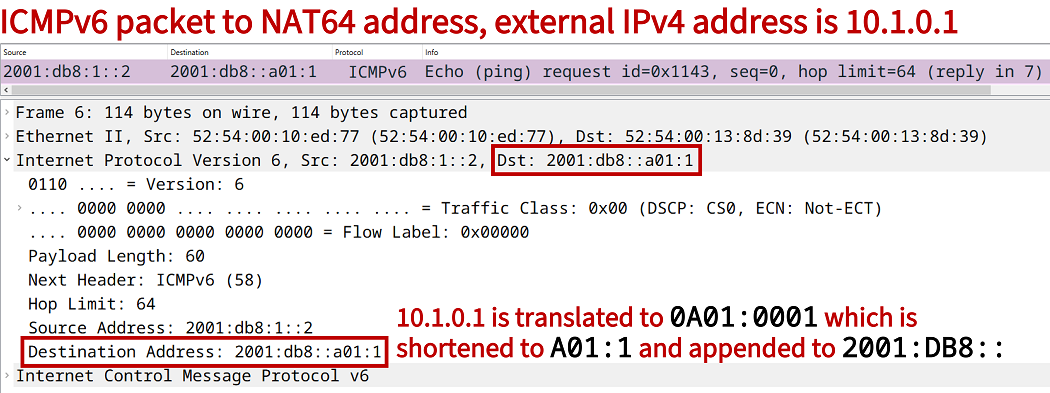
Note that the /96 NAT64 prefix can be manually selected and configured, or the reserved well-known prefix (WKP) 64:ff9b::/96 can automatically be used by a NAT64 router. The RFC 6146 notes an important aspect of NAT64, and it is quoted below:
In the absence of preexisting state in a NAT64, only IPv6 nodes can initiate sessions to IPv4 nodes. This works for roughly the same class of applications that work through IPv4-to-IPv4 NATs.
RFC 6146, Stateful NAT64: Network Address and Protocol Translation from IPv6 Clients to IPv4 Servers
Stateful NAT64 with static translation example configuration
In the following example scenario, Site 1 supports only IPv6 addresses and is connected to an IPv4-only network through R1. NAT64 is configured on R1 and allows for the mapping of IPv6 and IPv4 addresses. As a result, hosts in Site 1 have access to servers located in the IPv4-only network.

Configuration:
R1
R1#show run | sec ^nat
nat64 prefix stateful 2001:DB8::/96
nat64 v6v4 static 2001:DB8:1::2 172.16.1.2
nat64 v6v4 static 2001:DB8:1::3 172.16.1.3

R1#show run int Gi0/1 | sec int
interface GigabitEthernet0/1
 description ** to R2 **
 ip address 172.16.1.1 255.255.255.248
 duplex auto
 speed auto
 media-type rj45
 nat64 enable

R1#show run int Gi0/0 | sec int
interface GigabitEthernet0/0
 description ** to Site1 IPv6 **
 no ip address
 duplex auto
 speed auto
 media-type rj45
 nat64 enable
 ipv6 address FE80::1 link-local
 ipv6 address 2001:DB8:1::1/64

R1#show run | sec ip route
ip route 0.0.0.0 0.0.0.0 GigabitEthernet0/1 172.16.1.6

R1#show run | sec ipv6 uni
ipv6 unicast-routing
R2
R2#show run int Gi0/0 | sec int
interface GigabitEthernet0/0
 description ** to R1 **
 ip address 172.16.1.6 255.255.255.248
 duplex auto
 speed auto
 media-type rj45

R2#show run int Gi0/1 | sec int
interface GigabitEthernet0/1
 description ** to Server1 **
 ip address 10.1.0.2 255.255.255.252
 duplex auto
 speed auto
 media-type rj45

R2#show run int Gi0/2 | sec int
interface GigabitEthernet0/2
 description ** to R3 **
 ip address 172.16.2.1 255.255.255.252
 duplex auto
 speed auto
 media-type rj45

R2#show run | sec ^router
router ospf 10
 router-id 2.2.2.2
 network 0.0.0.0 255.255.255.255 area 0
R3
R3#show run int Gi0/0 | sec int
interface GigabitEthernet0/0
 description ** to R2 **
 ip address 172.16.2.2 255.255.255.252
 duplex auto
 speed auto
 media-type rj45

R3#show run int Gi0/1 | sec int
interface GigabitEthernet0/1
 description ** to Server2 **
 ip address 10.2.0.2 255.255.255.252
 duplex auto
 speed auto
 media-type rj45

R3#show run | sec ^router
router ospf 10
 router-id 3.3.3.3
 network 0.0.0.0 255.255.255.255 area 0
Host1
Host1#show run int Gi0/0 | sec int
interface GigabitEthernet0/0
 description ** to R1 **
 no ip address
 duplex auto
 speed auto
 media-type rj45
 ipv6 address FE80::2 link-local
 ipv6 address 2001:DB8:1::2/64

Host1#show run | sec ipv6 route
ipv6 route ::/0 GigabitEthernet0/0 2001:DB8:1::1
Server1
Server1#show run int Gi0/0 | sec int
interface GigabitEthernet0/0
 description ** to R2 **
 ip address 10.1.0.1 255.255.255.252
 duplex auto
 speed auto
 media-type rj45

Server1#show run | sec ip route
ip route 0.0.0.0 0.0.0.0 GigabitEthernet0/0 10.1.0.2
Host1#ping 2001:DB8::10.1.0.1
Type escape sequence to abort.
Sending 5, 100-byte ICMP Echos to 2001:DB8::A01:1, timeout is 2 seconds:
!!!!!
Success rate is 100 percent (5/5), round-trip min/avg/max = 3/3/3 ms         « Host1 can ping Server1


Host1#ping 2001:DB8::A01:1
Type escape sequence to abort.
Sending 5, 100-byte ICMP Echos to 2001:DB8::A01:1, timeout is 2 seconds:
!!!!!
Success rate is 100 percent (5/5), round-trip min/avg/max = 2/2/3 ms


Host1#ping 2001:DB8::10.2.0.1
Type escape sequence to abort.
Sending 5, 100-byte ICMP Echos to 2001:DB8::A02:1, timeout is 2 seconds:
!!!!!
Success rate is 100 percent (5/5), round-trip min/avg/max = 4/4/5 ms          « Host1 can ping Server2


Host1#trace 2001:DB8::10.2.0.1
Type escape sequence to abort.
Tracing the route to 2001:DB8::A02:1

  1 2001:DB8:1::1 1 msec 1 msec 2 msec
  2 2001:DB8::AC10:106 3 msec 2 msec 3 msec
  3 2001:DB8::AC10:202 3 msec 2 msec 3 msec
  4 2001:DB8::A02:1 4 msec *  4 msec


R1#show nat64 translations
Proto   Original IPv4           Translated IPv4
        Translated IPv6         Original IPv6
--------------------------------------------------------
icmp    10.2.0.1:1984           [2001:DB8::A02:1]:1984             « IPv6 address that represents Server1 in the IPv6 network
        172.16.1.2:1984         [2001:DB8:1::2]:1984               « IPv4 address that represents Host1 in the IPv4 network
icmp    10.1.0.1:5205           [2001:DB8::A01:1]:5205
        172.16.1.2:5205         [2001:DB8:1::2]:5205
---     ---                     ---
        172.16.1.2              2001:DB8:1::2
---     ---                     ---
        172.16.1.3              2001:DB8:1::3
As visible in the above logs, a translation happens on R1 between IPv6 and IPv4. The translation mechanism uses the configured stateful prefix 2001:DB8::/96, and appends the translated 32 bit IPv4 address in hexadecimal characters.
At the same time, IPv6 hosts are also represented by using IPv4 addresses configured on R1. The following commands on R1 statically map the Site 1 host IPv6 addresses to IPv4 addresses. This means, any time the following IPv4 address are pinged, the requests are forwarded to the mapped IPv6 addresses.
R1>enable
R1#configure terminal
Enter configuration commands, one per line.  End with CNTL/Z.
R1(config)#nat64 prefix stateful 2001:DB8::/96
R1(config)#nat64 v6v4 static 2001:DB8:1::2 172.16.1.2
R1(config)#nat64 v6v4 static 2001:DB8:1::3 172.16.1.3
R1(config)#
R1(config)#exit
R1#
Stateful NAT64 with NAT pool configuration
In this example, Site 1 is an IPv6-only network that connects to servers located in an IPv4-only network throught R1. By using NAT64 on R1, IPv6 prefixes are mapped to IPv4 prefixes, and connection is possible between the two address spaces. Specifically, R1 has NAT64 configured with a NAT pool.
This means, a pool of IPv4 addresses is defined with the command nat64 v4 pool NAT-POOL 172.16.1.2 172.16.1.5. An IPv6 access-list enables Site 1 hosts to use their /64 prefix together with the stateful /96 prefix for IP address conversion. The IP addresses are selected from the NAT pool. The pool defines 4 addresses starting with 172.16.1.2.
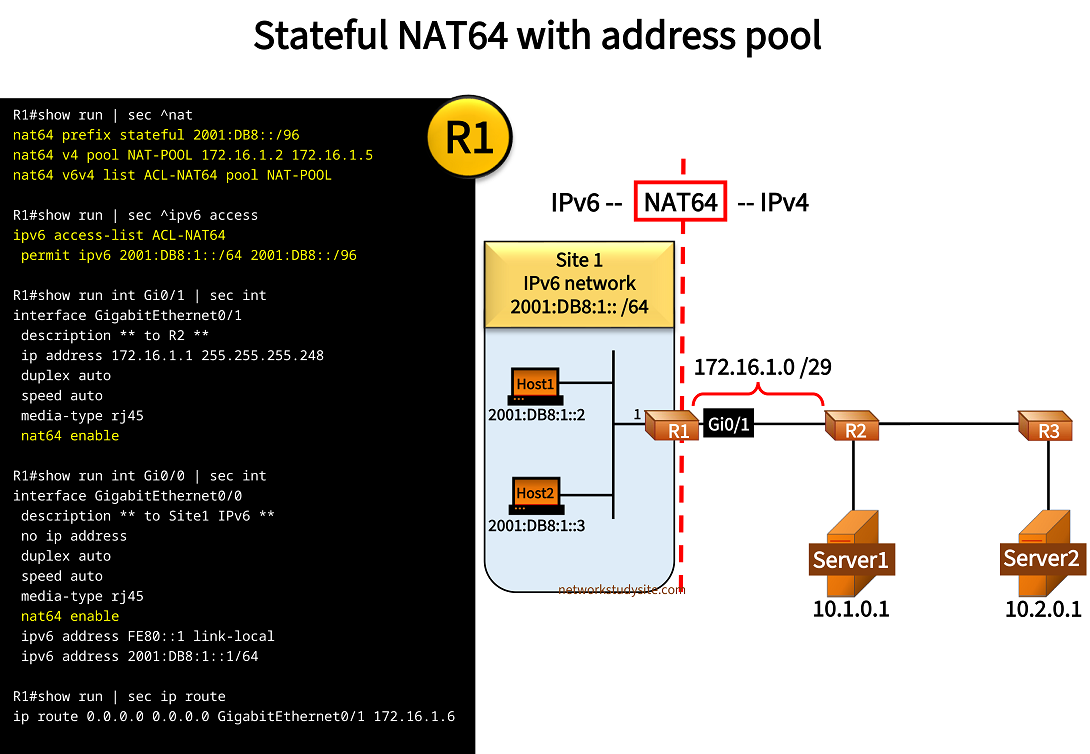
Configuration:
R1
R1#show run | sec ^nat
nat64 prefix stateful 2001:DB8::/96
nat64 v4 pool NAT-POOL 172.16.1.2 172.16.1.5
nat64 v6v4 list ACL-NAT64 pool NAT-POOL

R1#show run int Gi0/1 | sec int
interface GigabitEthernet0/1
 description ** to R2 **
 ip address 172.16.1.1 255.255.255.248
 duplex auto
 speed auto
 media-type rj45
 nat64 enable

R1#show run int Gi0/0 | sec int
interface GigabitEthernet0/0
 description ** to Site1 IPv6 **
 no ip address
 duplex auto
 speed auto
 media-type rj45
 nat64 enable
 ipv6 address FE80::1 link-local
 ipv6 address 2001:DB8:1::1/64

R1#show run | sec ip route
ip route 0.0.0.0 0.0.0.0 GigabitEthernet0/1 172.16.1.6

R1#show run | sec ipv6 uni
ipv6 unicast-routing
R2
R2#show run int Gi0/0 | sec int
interface GigabitEthernet0/0
 description ** to R1 **
 ip address 172.16.1.6 255.255.255.248
 duplex auto
 speed auto
 media-type rj45

R2#show run int Gi0/1 | sec int
interface GigabitEthernet0/1
 description ** to Server1 **
 ip address 10.1.0.2 255.255.255.252
 duplex auto
 speed auto
 media-type rj45

R2#show run int Gi0/2 | sec int
interface GigabitEthernet0/2
 description ** to R3 **
 ip address 172.16.2.1 255.255.255.252
 duplex auto
 speed auto
 media-type rj45

R2#show run | sec ^router
router ospf 10
 router-id 2.2.2.2
 network 0.0.0.0 255.255.255.255 area 0
Host1#ping 2001:DB8::10.1.0.1
Type escape sequence to abort.
Sending 5, 100-byte ICMP Echos to 2001:DB8::A01:1, timeout is 2 seconds:
!!!!!
Success rate is 100 percent (5/5), round-trip min/avg/max = 2/3/6 ms            « Host1 can ping Server1


Host1#ping 2001:DB8::10.2.0.1
Type escape sequence to abort.
Sending 5, 100-byte ICMP Echos to 2001:DB8::A02:1, timeout is 2 seconds:
!!!!!
Success rate is 100 percent (5/5), round-trip min/avg/max = 5/5/6 ms            « Host1 can ping Server2


R1#show nat64 translations
Proto   Original IPv4           Translated IPv4
        Translated IPv6         Original IPv6
--------------------------------------------------------
icmp    10.1.0.1:938            [2001:DB8::A01:1]:938
        172.16.1.5:938          [2001:DB8:1::2]:938              « IPv4 address selected from the NAT pool
icmp    10.2.0.1:8800           [2001:DB8::A02:1]:8800
        172.16.1.5:8800         [2001:DB8:1::2]:8800
---     ---                     ---
        172.16.1.5              2001:DB8:1::2

Total number of translations: 3
The above output shows the NAT64 translation and includes the IPv4 address 172.16.1.5 assigned to Host1. This means, in the IPv4 only network Host1 can be reached through the IP adddress 172.16.1.5.
Stateful NAT64 with overload command
In the following example, NAT64 overload is configured on R1, this means all IPv6-only hosts in Site 1 are represented with the single IPv4 address 172.16.1.2. With this configuration, IPv6-only hosts in Site 1 have access to the servers located in the IPv4-only networks.
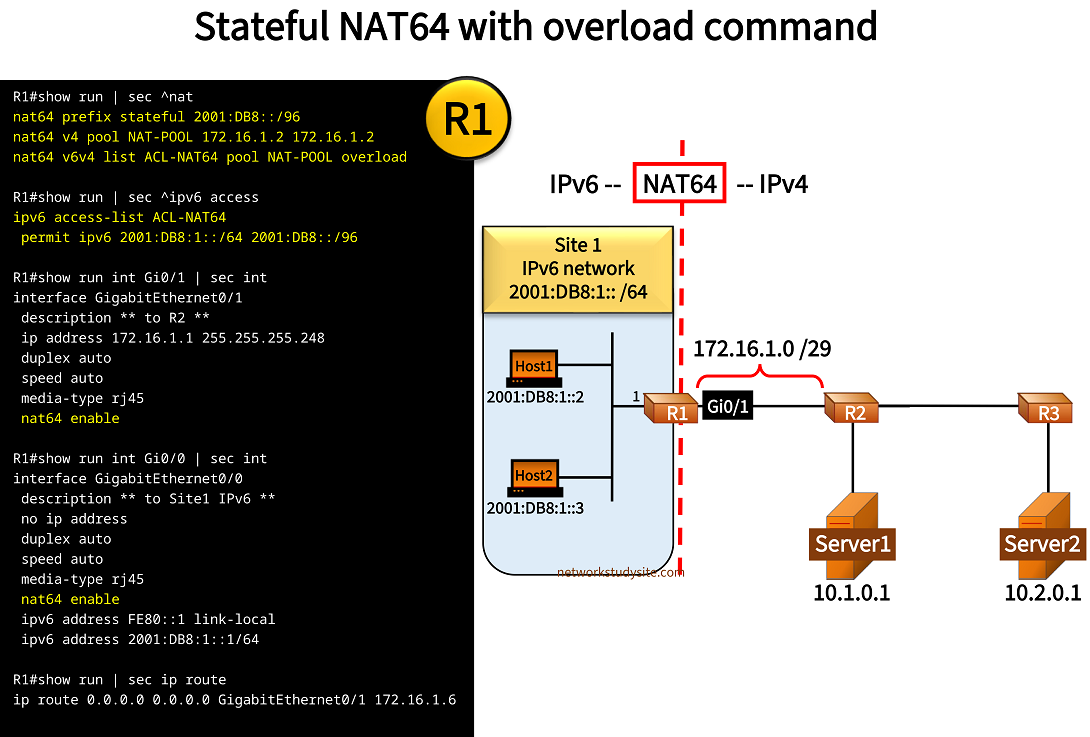
Configuration:
R1
R1#show run | sec ^nat
nat64 prefix stateful 2001:DB8::/96
nat64 v4 pool NAT-POOL 172.16.1.2 172.16.1.2
nat64 v6v4 list ACL-NAT64 pool NAT-POOL overload

R1#show run | sec ^ipv6 access
ipv6 access-list ACL-NAT64
 permit ipv6 2001:DB8:1::/64 2001:DB8::/96

R1#show run int Gi0/1 | sec int
interface GigabitEthernet0/1
 description ** to R2 **
 ip address 172.16.1.1 255.255.255.248
 duplex auto
 speed auto
 media-type rj45
 nat64 enable

R1#show run int Gi0/0 | sec int
interface GigabitEthernet0/0
 description ** to Site1 IPv6 **
 no ip address
 duplex auto
 speed auto
 media-type rj45
 nat64 enable
 ipv6 address FE80::1 link-local
 ipv6 address 2001:DB8:1::1/64

R1#show run | sec ip route
ip route 0.0.0.0 0.0.0.0 GigabitEthernet0/1 172.16.1.6

R1#show run | sec ipv6 uni
ipv6 unicast-routing
R2
R2#show run int Gi0/0 | sec int
interface GigabitEthernet0/0
 description ** to R1 **
 ip address 172.16.1.6 255.255.255.248
 duplex auto
 speed auto
 media-type rj45

R2#show run int Gi0/1 | sec int
interface GigabitEthernet0/1
 description ** to Server1 **
 ip address 10.1.0.2 255.255.255.252
 duplex auto
 speed auto
 media-type rj45

R2#show run int Gi0/2 | sec int
interface GigabitEthernet0/2
 description ** to R3 **
 ip address 172.16.2.1 255.255.255.252
 duplex auto
 speed auto
 media-type rj45

R2#show run | sec ^router
router ospf 10
 router-id 2.2.2.2
 network 0.0.0.0 255.255.255.255 area 0
Host1#ping 2001:DB8::10.1.0.1
Type escape sequence to abort.
Sending 5, 100-byte ICMP Echos to 2001:DB8::A01:1, timeout is 2 seconds:
!!!!!
Success rate is 100 percent (5/5), round-trip min/avg/max = 2/2/3 ms


Host1#ping 2001:DB8::10.2.0.1
Type escape sequence to abort.
Sending 5, 100-byte ICMP Echos to 2001:DB8::A02:1, timeout is 2 seconds:
!!!!!
Success rate is 100 percent (5/5), round-trip min/avg/max = 4/4/5 ms


Host2#ping 2001:DB8::10.1.0.1
Type escape sequence to abort.
Sending 5, 100-byte ICMP Echos to 2001:DB8::A01:1, timeout is 2 seconds:
!!!!!
Success rate is 100 percent (5/5), round-trip min/avg/max = 3/3/3 ms


R1#show nat64 translations
Proto   Original IPv4           Translated IPv4
        Translated IPv6         Original IPv6
--------------------------------------------------------
icmp    10.1.0.1:3673           [2001:DB8::A01:1]:3673
        172.16.1.2:3673         [2001:DB8:1::2]:3673        « Single IPv4 address is used on behalf of all IPv6-only hosts
icmp    10.2.0.1:4487           [2001:DB8::A02:1]:4487
        172.16.1.2:4487         [2001:DB8:1::2]:4487
icmp    10.1.0.1:4639           [2001:DB8::A01:1]:4639
        172.16.1.2:4639         [2001:DB8:1::3]:4639

Total number of translations: 3