Fundamentals of DiffServ MPLS Quality of Service (QoS)
Table of Contents
Jump to section:
- • What is TOS reflection?
- • What happens to the EXP value in an MPLS network?
- ◦ Using a single MPLS label
- ◦ Using L3VPN with MPLS label stack
- ◦ Rewriting the EXP value in an MPLS header
- • Penultimate Hop Pop (PHP) and Explicit-Null label
- • Uniform mode
- • Pipe mode
- • Short Pipe mode
- • Download section
- What is ToS reflection? ‹
- What happens to the EXP value in an MPLS network? ‹
- Penultimate Hop Pop (PHP) and Explicit-Null label ‹
- Uniform mode ‹
- Pipe mode ‹
- Short Pipe mode ‹
- Download section ‹
What is ToS reflection?
A benefit of label switching (MPLS) is that Quality of Service (QoS) guarantees can be configured end-to-end. As a result, a Service Level Agreement (SLA) between an MPLS L3VPN Service Provider (SP) and a customer can include specific guarantees with respect to a particular application or traffic type. This is because QoS can be enforced along a Label Switched Path (LSP).
Focusing on SPs, there are multiple locations in a network where QoS is configured and enforced. If the SP manages the Customer Edge (CE) devices, then QoS is often configured on the CE. An outbound policy can be configured on the PE-facing interface (or VRF-aware subinterface) of the CE router. The CE generally expects customer traffic destined to the MPLS cloud to be tagged (marked with appropriate DSCP) so the traffic can be assigned into a correct queue before forwarding to the PE.
When a packet sent from the customer site arrives at a PE router, the PE copies the first three bits of the IP packet's DSCP field into the EXP field of the MPLS label. The first three bits of the IP packet's DSCP field are called "IP Precedence" and they indicate the Type of Service (ToS) parameters. Copying the three bit IP Precedence value into the MPLS EXP field is called ToS reflection, and it is a default behaviour of MPLS PE routers. Note, the MPLS EXP field was renamed in RFC 5462 to the TC field.
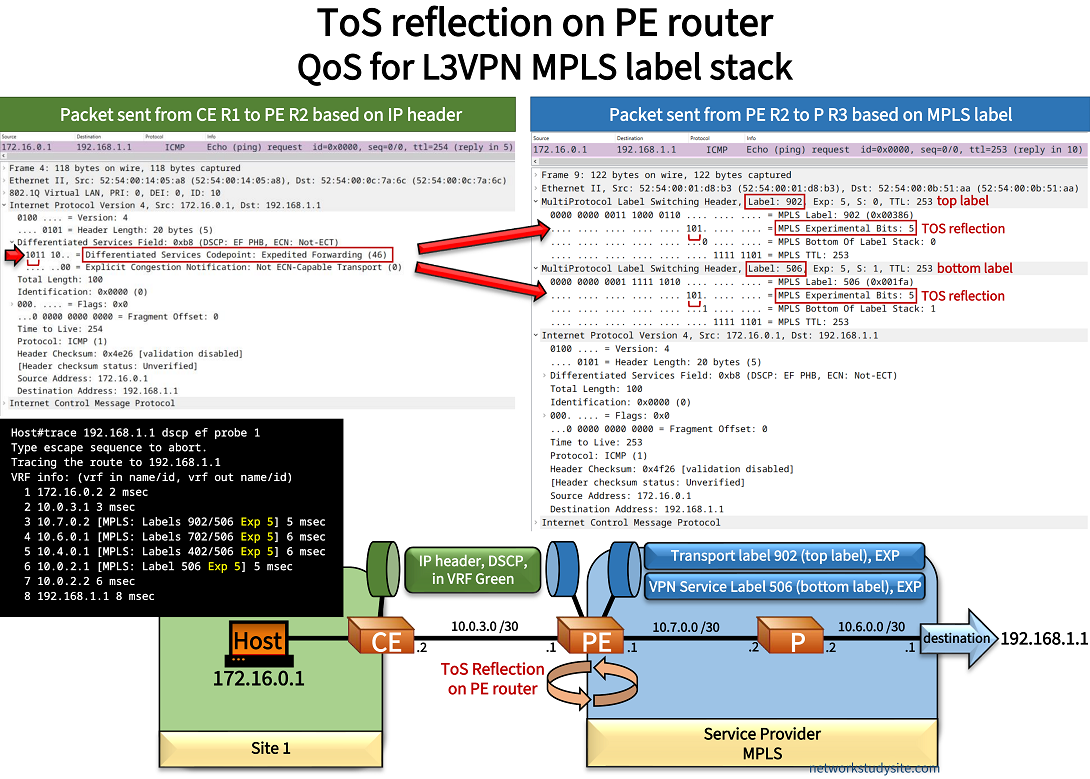
Host#trace 192.168.1.1 dscp ef probe 1
Type escape sequence to abort.
Tracing the route to 192.168.1.1
VRF info: (vrf in name/id, vrf out name/id)
  1 172.16.0.2 2 msec
  2 10.0.3.1 3 msec
  3 10.7.0.2 [MPLS: Labels 902/506 Exp 5] 5 msec      « MPLS label switching with EXP value 5 within the Service Provider's network
  4 10.6.0.1 [MPLS: Labels 702/506 Exp 5] 6 msec
  5 10.4.0.1 [MPLS: Labels 402/506 Exp 5] 6 msec
  6 10.0.2.1 [MPLS: Label 506 Exp 5] 5 msec
  7 10.0.2.2 6 msec
  8 192.168.1.1 8 msec
The Provider Edge (PE) routers are the gateways to an MPLS network, and they may also apply policies ingress (inbound into the MPLS network) or egress (for traffic exiting the MPLS network). Depending on the MPLS QoS mode configured the PE routers may modify and rewrite the QoS values (DSCP and EXP) in different ways, as discussed in the remainder of this blog post.
What happens to the EXP value in an MPLS network?
The default behaviour of Label Switch Routers (LSRs) within an MPLS network is to copy the EXP value from the received label onto the newly pushed or swapped label. As a result, the EXP value is preserved throughout the LSP between each label switched next-hop.
However, this can change if specific QoS policies or EXP field rewrite rules are applied in the MPLS network. For example, when changing the EXP value on an MPLS label stack (e.g MPLS L3VPN), the implicit-null label can break an end-to-end uniform QoS mode because of the penultimate hop pop (PHP) mechanism. It is important to plan ahead and test QoS policies before applying them.
Using a single MPLS label
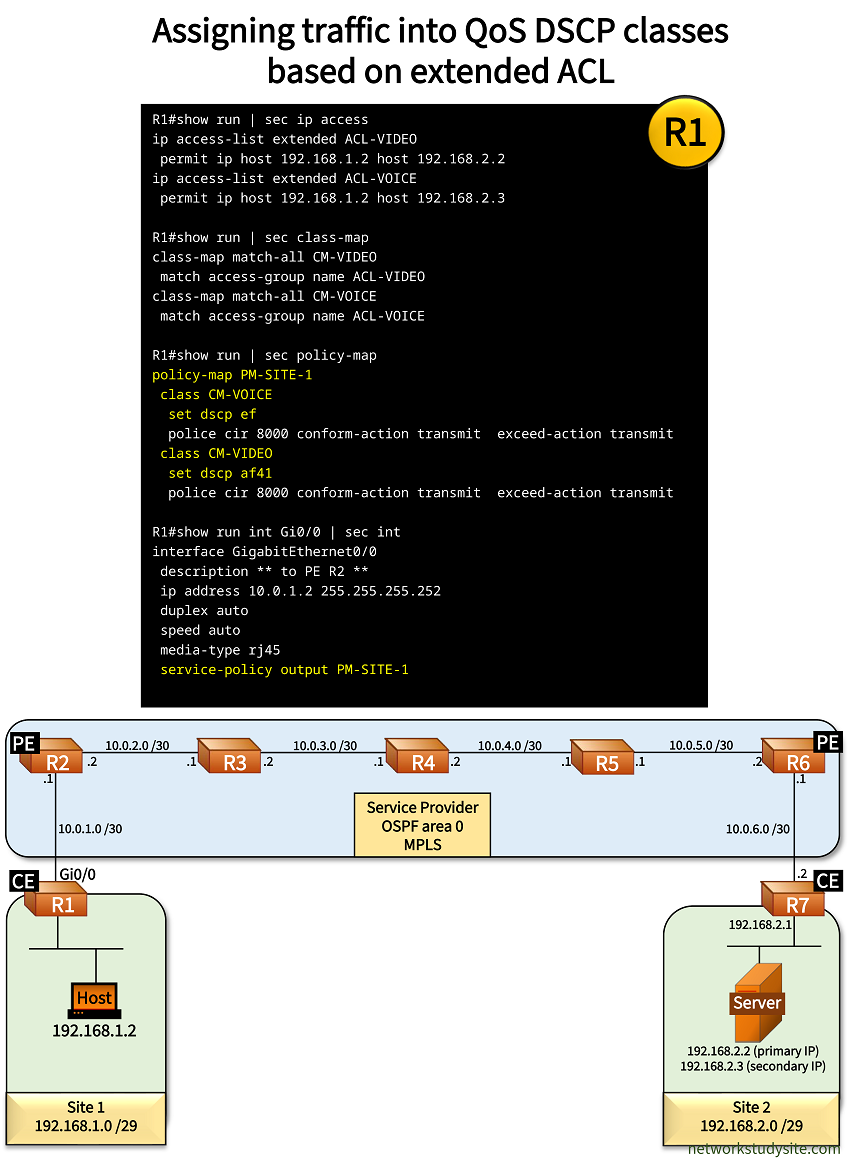
In the following scenario, two Sites are connected with a SP MPLS network using OSPF as the IGP, and LDP to distribute labels. All routers within the example SP network (R2, R3, R4, R5, R6) have MPLS enabled with the mpls ip command in global configuration mode.
Prefixes learned through OSPF are configured to receive an MPLS label with the mpls ldp autoconfig area 0 command in router configuration mode.
Also, the MPLS label range is configured on each SP router with the mpls label range 200 299 command (example from R2). This facilitates troubleshooting and overview of the example scenario. For simplicity, a single MPLS transport label is used to connect the sites, L3VPN is not configured, BGP is not configured, Route Distinguishers and Route Target values are not used. Traffic exiting Site 1 is assigned into one of two classes, depending on the destination IP address.
- Class-map CM-VIDEO is selected if the Host communicates with IP address 192.168.2.2. CE router R1 assigns this traffic a DSCP value of 41 (Assured Forwarding).
- Class-map CM-VOICE is selected if the Host communicates with IP address 192.168.2.3. CE router R1 assigns this traffic a DSCP value of 46 (Expedited Forwarding).
After ToS reflection is carried out by the PE router R2, the EXP values remain unchanged across the MPLS network.
Configuration:
R1 (CE)
R1#show run | sec ip access
ip access-list extended ACL-VIDEO
 permit ip host 192.168.1.2 host 192.168.2.2
ip access-list extended ACL-VOICE
 permit ip host 192.168.1.2 host 192.168.2.3

R1#show run | sec class-map
class-map match-all CM-VIDEO
 match access-group name ACL-VIDEO
class-map match-all CM-VOICE
 match access-group name ACL-VOICE

R1#show run | sec policy-map
policy-map PM-SITE-1
 class CM-VOICE
  set dscp ef
  police cir 8000 conform-action transmit  exceed-action transmit
 class CM-VIDEO
  set dscp af41
  police cir 8000 conform-action transmit  exceed-action transmit

R1#show run int Gi0/0 | sec int
interface GigabitEthernet0/0
 description ** to PE R2 **
 ip address 10.0.1.2 255.255.255.252
 duplex auto
 speed auto
 media-type rj45
 service-policy output PM-SITE-1

R1#show run int Gi0/1 | sec int
interface GigabitEthernet0/1
 description ** to LAN Site 1 **
 no ip address
 duplex auto
 speed auto
 media-type rj45

R1#show run int Gi0/1.10 | sec int
interface GigabitEthernet0/1.10
 description ** to LAN Site 1 (VLAN 10) **
 encapsulation dot1Q 10
 ip address 192.168.1.1 255.255.255.248
R2 (PE)
R2#show run all | sec mpls ip__
mpls ip

R2#show run int Gi1 | sec int
interface GigabitEthernet1
 description ** to CE R1 **
 ip address 10.0.1.1 255.255.255.252
 negotiation auto
 no keepalive
 no mop enabled
 no mop sysid

R2#show run int Gi2 | sec int
interface GigabitEthernet2
 description ** to R2 **
 ip address 10.0.2.2 255.255.255.252
 ip ospf network point-to-point
 negotiation auto
 no mop enabled
 no mop sysid

R2#show run int Lo10 | sec int
interface Loopback10
 ip address 2.2.2.2 255.255.255.255

R2#show run | sec router ospf
router ospf 10
 router-id 2.2.2.2
 redistribute static
 passive-interface GigabitEthernet1
 network 2.2.2.2 0.0.0.0 area 0
 network 10.0.2.0 0.0.0.3 area 0
 mpls ldp autoconfig area 0

R2#show run | sec ip route
ip route 192.168.1.0 255.255.255.248 GigabitEthernet1 10.0.1.2

R2#show run | sec ^mpls
mpls label range 200 299
mpls ldp router-id Loopback10 force
Server
Server#show run int Gi0/0 | sec int
interface GigabitEthernet0/0
 description ** to SW2 **
 ip address 192.168.2.3 255.255.255.248 secondary
 ip address 192.168.2.2 255.255.255.248
 duplex auto
 speed auto
 media-type rj45

Server#show run | sec ip route
ip route 0.0.0.0 0.0.0.0 192.168.2.1
R1#show policy-map int Gi0/0 output
 GigabitEthernet0/0

  Service-policy output: PM-SITE-1

    Class-map: CM-VOICE (match-all)       « Class-map CM-VOICE
      56 packets, 2352 bytes
      5 minute offered rate 0000 bps, drop rate 0000 bps
      Match: access-group name ACL-VOICE
      QoS Set
        dscp ef                           « Packets marked with DSCP Expedited Forwarding
          Packets marked 56
      police:
          cir 8000 bps, bc 1500 bytes
        conformed 56 packets, 2352 bytes; actions:
          transmit
        exceeded 0 packets, 0 bytes; actions:
          transmit
        conformed 0000 bps, exceeded 0000 bps

    Class-map: CM-VIDEO (match-all)       « Class-map CM-VIDEO
      35 packets, 1470 bytes
      5 minute offered rate 0000 bps, drop rate 0000 bps
      Match: access-group name ACL-VIDEO
      QoS Set
        dscp af41                         « Packets marked with DSCP Assured Forwarding
          Packets marked 35
      police:
          cir 8000 bps, bc 1500 bytes
        conformed 35 packets, 1470 bytes; actions:
          transmit
        exceeded 0 packets, 0 bytes; actions:
          transmit
        conformed 0000 bps, exceeded 0000 bps

    Class-map: class-default (match-any)
      315 packets, 36008 bytes
      5 minute offered rate 0000 bps, drop rate 0000 bps
      Match: any


Host#trace 192.168.2.2 pr 1
Type escape sequence to abort.
Tracing the route to 192.168.2.2
VRF info: (vrf in name/id, vrf out name/id)
  1 192.168.1.1 3 msec
  2 10.0.1.1 3 msec
  3 10.0.2.1 [MPLS: Label 308 Exp 4] 9 msec       « EXP value preserved throughout the LSP
  4 10.0.3.1 [MPLS: Label 408 Exp 4] 9 msec
  5 10.0.4.1 [MPLS: Label 508 Exp 4] 8 msec
  6 10.0.5.2 [MPLS: Label 608 Exp 4] 6 msec
  7 10.0.6.2 8 msec
  8 192.168.2.2 9 msec


Host#trace 192.168.2.3 pr 1
Type escape sequence to abort.
Tracing the route to 192.168.2.3
VRF info: (vrf in name/id, vrf out name/id)
  1 192.168.1.1 3 msec
  2 10.0.1.1 3 msec
  3 10.0.2.1 [MPLS: Label 308 Exp 5] 7 msec        « EXP value preserved throughout the LSP
  4 10.0.3.1 [MPLS: Label 408 Exp 5] 7 msec
  5 10.0.4.1 [MPLS: Label 508 Exp 5] 6 msec
  6 10.0.5.2 [MPLS: Label 608 Exp 5] 7 msec
  7 10.0.6.2 9 msec
  8 192.168.2.2 9 msec
Using L3VPN with MPLS label stack
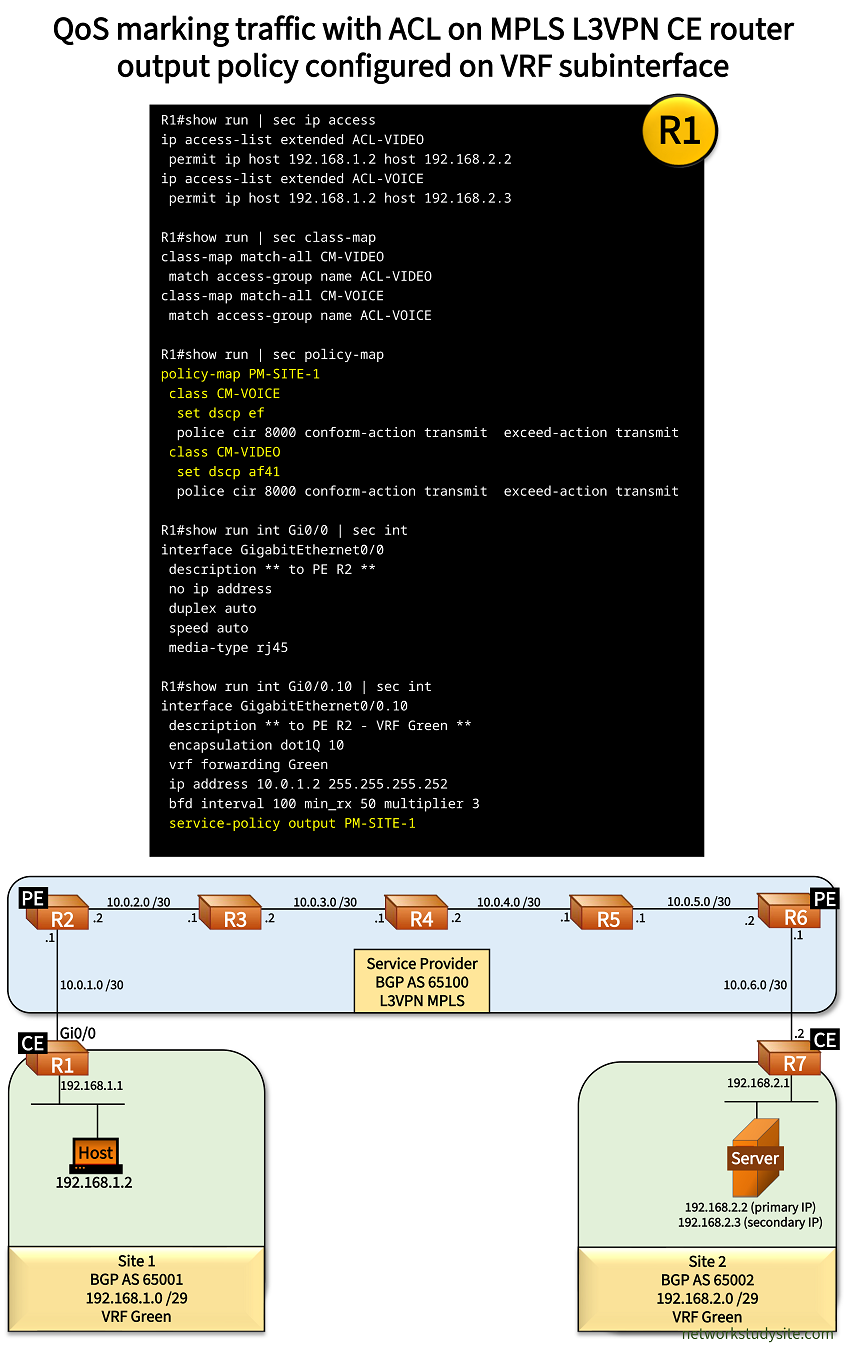
In this example scenario, Site 1 and Site 2 are connected through the SP's Layer-3 VPN MPLS network using VRF Green. The L3VPN network has a BGP-free core, this means BGP is only configured on the PE routers. There is an MPLS label stack present, with a top label (aka transport label, next-hop label, IGP label) and a bottom label (aka VPN service label). This label stack carries traffic belonging to VRF Green between the two sites. The PE - CE routing protocol is eBGP, combined with BFD for fast failover.
As in the previous scenario, traffic exiting Site 1 is assigned into one of two classes, depending on the destination IP address.
- Class-map CM-VIDEO is selected if the Host communicates with IP address 192.168.2.2. CE router R1 assigns this traffic a DSCP value of 41 (Assured Forwarding).
- Class-map CM-VOICE is selected if the Host communicates with IP address 192.168.2.3. CE router R1 assigns this traffic a DSCP value of 46 (Expedited Forwarding).
With a L3VPN MPLS label stack, ToS reflection on PE R2 copies the DSCP IP Precedence values into each of the two imposed labels within the label stack.
Configuration:
R1 (CE)
R1#show run | sec ip access
ip access-list extended ACL-VIDEO
 permit ip host 192.168.1.2 host 192.168.2.2
ip access-list extended ACL-VOICE
 permit ip host 192.168.1.2 host 192.168.2.3

R1#show run | sec class-map
class-map match-all CM-VIDEO
 match access-group name ACL-VIDEO
class-map match-all CM-VOICE
 match access-group name ACL-VOICE

R1#show run | sec policy-map
policy-map PM-SITE-1
 class CM-VOICE
  set dscp ef
  police cir 8000 conform-action transmit  exceed-action transmit
 class CM-VIDEO
  set dscp af41
  police cir 8000 conform-action transmit  exceed-action transmit

R1#show run int Gi0/0 | sec int
interface GigabitEthernet0/0
 description ** to PE R2 **
 no ip address
 duplex auto
 speed auto
 media-type rj45

R1#show run int Gi0/0.10 | sec int
interface GigabitEthernet0/0.10
 description ** to PE R2 - VRF Green **
 encapsulation dot1Q 10
 vrf forwarding Green
 ip address 10.0.1.2 255.255.255.252
 bfd interval 100 min_rx 50 multiplier 3
 service-policy output PM-SITE-1

R1#show run int Gi0/1 | sec int
interface GigabitEthernet0/1
 description ** to LAN Site 1 **
 no ip address
 duplex auto
 speed auto
 media-type rj45

R1#show run int Gi0/1.10 | sec int
interface GigabitEthernet0/1.10
 description ** to LAN Site 1 - VLAN 10 - VRF Green **
 encapsulation dot1Q 10
 vrf forwarding Green
 ip address 192.168.1.1 255.255.255.248

R1#show run | sec router bgp
router bgp 65001
 bgp router-id 1.1.1.1
 bgp log-neighbor-changes
 !
 address-family ipv4 vrf Green
  network 192.168.1.0 mask 255.255.255.248
  neighbor 10.0.1.1 remote-as 65100
  neighbor 10.0.1.1 fall-over bfd
  neighbor 10.0.1.1 activate
 exit-address-family

R1#show run | sec ^vrf
vrf definition Green
 rd 65001:100
 !
 address-family ipv4
 exit-address-family
R2 (PE)
R2#show run all | sec mpls ip__
mpls ip

R2#show run | sec ^mpls
mpls label range 200 299
mpls ldp router-id Loopback10 force

R2#show run int Gi2 | sec int
interface GigabitEthernet2
 description ** to R2 **
 ip address 10.0.2.2 255.255.255.252
 ip ospf network point-to-point
 negotiation auto
 no mop enabled
 no mop sysid

R2#show run int Gi1 | sec int
interface GigabitEthernet1
 description ** to CE R1 **
 no ip address
 negotiation auto
 no keepalive
 no mop enabled
 no mop sysid
 service instance 10 ethernet
  encapsulation dot1q 100
 !

R2#show run int Gi1.10 | sec int
interface GigabitEthernet1.10
 description ** to CE R1 - VRF Green **
 encapsulation dot1Q 10
 vrf forwarding Green
 ip address 10.0.1.1 255.255.255.252
 bfd interval 100 min_rx 50 multiplier 3

R2#show run int Lo10 | sec int
interface Loopback10
 ip address 2.2.2.2 255.255.255.255

R2#show run | sec ^vrf
vrf definition Green
 rd 65001:100
 !
 address-family ipv4
  route-target export 65001:100
  route-target import 65002:100
 exit-address-family

R2#show run | sec ^router
router ospf 10
 router-id 2.2.2.2
 passive-interface GigabitEthernet1
 network 2.2.2.2 0.0.0.0 area 0
 network 10.0.2.0 0.0.0.3 area 0
 mpls ldp autoconfig area 0
router bgp 65100
 bgp router-id 2.2.2.2
 bgp log-neighbor-changes
 neighbor 6.6.6.6 remote-as 65100
 neighbor 6.6.6.6 update-source Loopback10
 !
 address-family vpnv4
  neighbor 6.6.6.6 activate
  neighbor 6.6.6.6 send-community extended
  neighbor 6.6.6.6 next-hop-self
 exit-address-family
 !
 address-family ipv4 vrf Green
  neighbor 10.0.1.2 remote-as 65001
  neighbor 10.0.1.2 fall-over bfd
  neighbor 10.0.1.2 activate
 exit-address-family
R3
R3#show run all | sec mpls ip__
mpls ip

R3#show run | sec ^mpls
mpls label range 300 399
mpls ldp router-id Loopback10 force

R3#show run int Gi0/0 | sec int
interface GigabitEthernet0/0
 description ** to R2 **
 ip address 10.0.2.1 255.255.255.252
 ip ospf network point-to-point
 duplex auto
 speed auto

R3#show run int Gi0/1 | sec int
interface GigabitEthernet0/1
 description ** to R4 **
 ip address 10.0.3.2 255.255.255.252
 ip ospf network point-to-point
 duplex auto
 speed auto


R3#show run int Lo10 | sec int
interface Loopback10
 ip address 3.3.3.3 255.255.255.255

R3#show run | sec ^router
router ospf 10
 mpls ldp autoconfig area 0
 router-id 3.3.3.3
 network 3.3.3.3 0.0.0.0 area 0
 network 10.0.2.0 0.0.0.3 area 0
 network 10.0.3.0 0.0.0.3 area 0
R6 (PE)
R6#show run all | sec mpls ip__
mpls ip

R6#show run | sec ^mpls
mpls label range 600 699
mpls ldp router-id Loopback10 force

R6#show run int Gi2 | sec int
interface GigabitEthernet2
 description ** to R5 **
 ip address 10.0.5.2 255.255.255.252
 ip ospf network point-to-point
 negotiation auto
 no mop enabled
 no mop sysid

R6#show run int Gi1 | sec int
interface GigabitEthernet1
 description ** to CE R7 **
 no ip address
 negotiation auto
 bfd interval 100 min_rx 50 multiplier 3
 no mop enabled
 no mop sysid
 service instance 10 ethernet
  encapsulation dot1q 100
 !

R6#show run int Gi1.10 | sec int
interface GigabitEthernet1.10
 description ** to CE R7 - VRF Green **
 encapsulation dot1Q 10
 vrf forwarding Green
 ip address 10.0.6.1 255.255.255.252
 bfd interval 100 min_rx 50 multiplier 3

R6#show run int Lo10 | sec int
interface Loopback10
 ip address 6.6.6.6 255.255.255.255

R6#show run | sec ^router
router ospf 10
 router-id 6.6.6.6
 passive-interface GigabitEthernet1
 network 6.6.6.6 0.0.0.0 area 0
 network 10.0.5.0 0.0.0.3 area 0
 mpls ldp autoconfig area 0
router bgp 65100
 bgp router-id 6.6.6.6
 bgp log-neighbor-changes
 neighbor 2.2.2.2 remote-as 65100
 neighbor 2.2.2.2 update-source Loopback10
 !
 address-family vpnv4
  neighbor 2.2.2.2 activate
  neighbor 2.2.2.2 send-community extended
  neighbor 2.2.2.2 next-hop-self
 exit-address-family
 !
 address-family ipv4 vrf Green
  neighbor 10.0.6.2 remote-as 65002
  neighbor 10.0.6.2 fall-over bfd
  neighbor 10.0.6.2 activate
 exit-address-family

R6#show run | sec ^vrf
vrf definition Green
 rd 65002:100
 !
 address-family ipv4
  route-target export 65002:100
  route-target import 65001:100
 exit-address-family
R7 (CE)
R7#show run int Gi0/0 | sec int
interface GigabitEthernet0/0
 description ** to PE R6 **
 no ip address
 duplex auto
 speed auto
 media-type rj45

R7#show run int Gi0/0.10 | sec int
interface GigabitEthernet0/0.10
 description ** to PE R6 **
 encapsulation dot1Q 10
 vrf forwarding Green
 ip address 10.0.6.2 255.255.255.252
 bfd interval 100 min_rx 50 multiplier 3

R7#show run int Gi0/1 | sec int
interface GigabitEthernet0/1
 description ** to LAN Site 2 **
 no ip address
 duplex auto
 speed auto
 media-type rj45

R7#show run int Gi0/1.10 | sec int
interface GigabitEthernet0/1.10
 description ** to LAN Site 2 - VLAN 10 - VRF Green **
 encapsulation dot1Q 10
 vrf forwarding Green
 ip address 192.168.2.1 255.255.255.248

R7#show run | sec ^router
router bgp 65002
 bgp router-id 7.7.7.7
 bgp log-neighbor-changes
 network 192.168.2.0 mask 255.255.255.248
 neighbor 10.0.6.1 remote-as 65100
 neighbor 10.0.6.1 fall-over bfd
 !
 address-family ipv4 vrf Green
  network 192.168.2.0 mask 255.255.255.248
  neighbor 10.0.6.1 remote-as 65100
  neighbor 10.0.6.1 fall-over bfd
  neighbor 10.0.6.1 activate
 exit-address-family

R7#show run | sec ^vrf
vrf definition Green
 rd 65002:100
 !
 address-family ipv4
 exit-address-family
Server
Server#show run int Gi0/0 | sec int
interface GigabitEthernet0/0
 description ** to SW2 **
 ip address 192.168.2.3 255.255.255.248 secondary
 ip address 192.168.2.2 255.255.255.248
 duplex auto
 speed auto
 media-type rj45

Server#show run | sec ip route
ip route 0.0.0.0 0.0.0.0 192.168.2.1
R1#show policy-map interface Gi0/0.10 output
 GigabitEthernet0/0.10

  Service-policy output: PM-SITE-1

    Class-map: CM-VOICE (match-all)          « Class-map CM-VOICE
      288 packets, 31464 bytes
      5 minute offered rate 1000 bps, drop rate 0000 bps
      Match: access-group name ACL-VOICE
      QoS Set
        dscp ef                              « Packets marked with DSCP Expedited Forwarding
          Packets marked 288
      police:
          cir 8000 bps, bc 1500 bytes
        conformed 68 packets, 5504 bytes; actions:
          transmit
        exceeded 220 packets, 25960 bytes; actions:    « Packets exceeded the committed information rate (CIR)
          transmit
        conformed 1000 bps, exceeded 1000 bps

    Class-map: CM-VIDEO (match-all)          « Class-map CM-VIDEO
      14 packets, 644 bytes
      5 minute offered rate 0000 bps, drop rate 0000 bps
      Match: access-group name ACL-VIDEO
      QoS Set
        dscp af41                            « Packets marked with DSCP Assured Forwarding
          Packets marked 14
      police:
          cir 8000 bps, bc 1500 bytes
        conformed 14 packets, 644 bytes; actions:
          transmit
        exceeded 0 packets, 0 bytes; actions:
          transmit
        conformed 0000 bps, exceeded 0000 bps

    Class-map: class-default (match-any)
      19940 packets, 1157326 bytes
      5 minute offered rate 5000 bps, drop rate 0000 bps
      Match: any


Host#trace 192.168.2.2 pr 1
Type escape sequence to abort.
Tracing the route to 192.168.2.2
VRF info: (vrf in name/id, vrf out name/id)
  1 192.168.1.1 5 msec
  2 10.0.1.1 6 msec
  3 10.0.2.1 [MPLS: Labels 305/610 Exp 4] 9 msec     « EXP value is preserved throughout the MPLS network
  4 10.0.3.1 [MPLS: Labels 405/610 Exp 4] 9 msec
  5 10.0.4.1 [MPLS: Labels 505/610 Exp 4] 9 msec
  6 10.0.6.1 [MPLS: Label 610 Exp 4] 7 msec
  7 10.0.6.2 8 msec
  8 192.168.2.2 10 msec


Host#trace 192.168.2.3 pr 1
Type escape sequence to abort.
Tracing the route to 192.168.2.3
VRF info: (vrf in name/id, vrf out name/id)
  1 192.168.1.1 3 msec
  2 10.0.1.1 4 msec
  3 10.0.2.1 [MPLS: Labels 305/610 Exp 5] 8 msec    « EXP value is preserved throughout the MPLS network
  4 10.0.3.1 [MPLS: Labels 405/610 Exp 5] 8 msec
  5 10.0.4.1 [MPLS: Labels 505/610 Exp 5] 7 msec
  6 10.0.6.1 [MPLS: Label 610 Exp 5] 7 msec
  7 10.0.6.2 7 msec
  8 192.168.2.2 10 msec
Rewriting the EXP value in an MPLS header
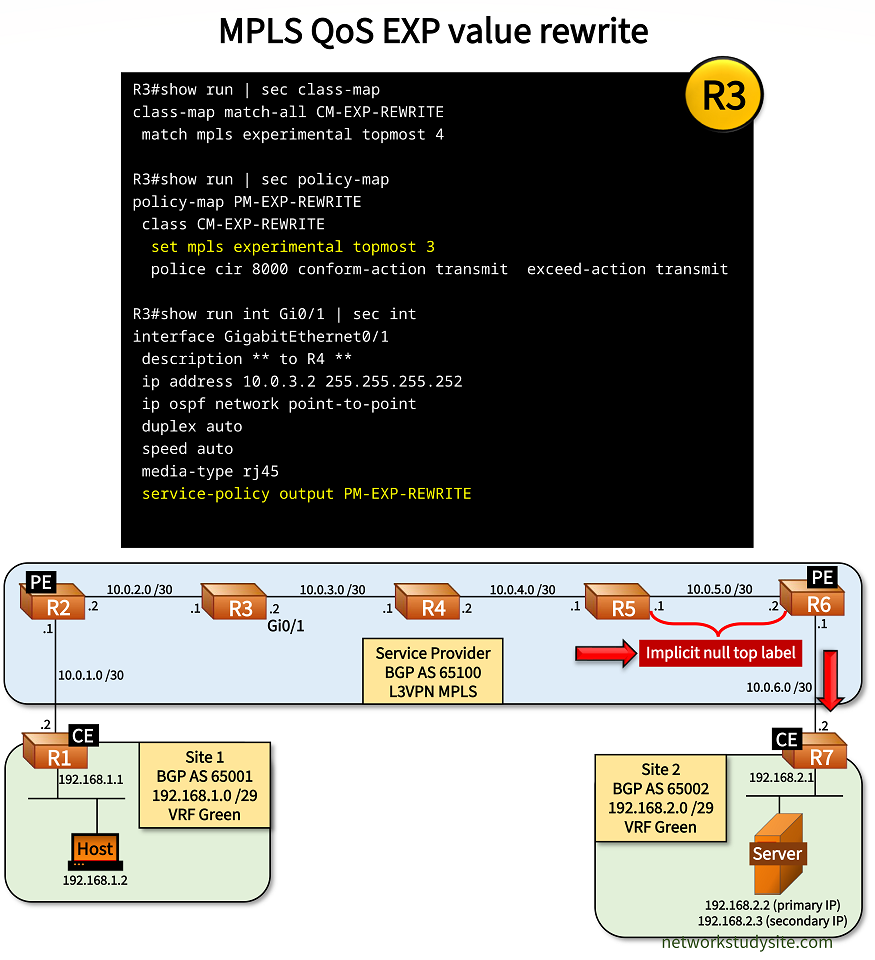
In this example scenario, MPLS L3VPN is configured by the SP, connecting Site 1 and Site 2 in VRF Green. Traffic exiting Site 1 is assigned into one of two classes by the CE router R1, depending on the destination IP address.
- Class-map CM-VIDEO is selected if the Host communicates with IP address 192.168.2.2. CE router R1 assigns this traffic a DSCP value of 41 (Assured Forwarding).
- Class-map CM-VOICE is selected if the Host communicates with IP address 192.168.2.3. CE router R1 assigns this traffic a DSCP value of 46 (Expedited Forwarding).
After ToS reflection by PE router R2, the MPLS EXP value is carried along the path unchanged, by default. However, in this scenario P router R3 rewrites the EXP value in the following manner. If the topmost MPLS header's EXP value 4 is received on R3, it is rewritten by R3 to EXP value 3 on the egress interface Gi0/1. This is achieved with an output policy-map, as shown in the following image.
Configuration:
R1 (CE)
R1#show run | sec ip access
ip access-list extended ACL-VIDEO
 permit ip host 192.168.1.2 host 192.168.2.2
ip access-list extended ACL-VOICE
 permit ip host 192.168.1.2 host 192.168.2.3

R1#show run | sec class-map
class-map match-all CM-VIDEO
 match access-group name ACL-VIDEO
class-map match-all CM-VOICE
 match access-group name ACL-VOICE

R1#show run | sec policy-map
policy-map PM-SITE-1
 class CM-VOICE
  set dscp ef
  police cir 8000 conform-action transmit  exceed-action transmit
 class CM-VIDEO
  set dscp af41
  police cir 8000 conform-action transmit  exceed-action transmit

R1#show run int Gi0/0 | sec int
interface GigabitEthernet0/0
 description ** to PE R2 **
 no ip address
 duplex auto
 speed auto
 media-type rj45

R1#show run int Gi0/0.10 | sec int
interface GigabitEthernet0/0.10
 description ** to PE R2 - VRF Green **
 encapsulation dot1Q 10
 vrf forwarding Green
 ip address 10.0.1.2 255.255.255.252
 bfd interval 100 min_rx 50 multiplier 3
 service-policy output PM-SITE-1

R1#show run int Gi0/1 | sec int
interface GigabitEthernet0/1
 description ** to LAN Site 1 **
 no ip address
 duplex auto
 speed auto
 media-type rj45

R1#show run int Gi0/1.10 | sec int
interface GigabitEthernet0/1.10
 description ** to LAN Site 1 - VLAN 10 - VRF Green **
 encapsulation dot1Q 10
 vrf forwarding Green
 ip address 192.168.1.1 255.255.255.248

R1#show run | sec router bgp
router bgp 65001
 bgp router-id 1.1.1.1
 bgp log-neighbor-changes
 !
 address-family ipv4 vrf Green
  network 192.168.1.0 mask 255.255.255.248
  neighbor 10.0.1.1 remote-as 65100
  neighbor 10.0.1.1 fall-over bfd
  neighbor 10.0.1.1 activate
 exit-address-family

R1#show run | sec ^vrf
vrf definition Green
 rd 65001:100
 !
 address-family ipv4
 exit-address-family
R2 (PE)
R2#show run all | sec mpls ip__
mpls ip

R2#show run | sec ^mpls
mpls label range 200 299
mpls ldp router-id Loopback10 force

R2#show run int Gi2 | sec int
interface GigabitEthernet2
 description ** to R2 **
 ip address 10.0.2.2 255.255.255.252
 ip ospf network point-to-point
 negotiation auto
 no mop enabled
 no mop sysid

R2#show run int Gi1 | sec int
interface GigabitEthernet1
 description ** to CE R1 **
 no ip address
 negotiation auto
 no keepalive
 no mop enabled
 no mop sysid
 service instance 10 ethernet
  encapsulation dot1q 100
 !

R2#show run int Gi1.10 | sec int
interface GigabitEthernet1.10
 description ** to CE R1 - VRF Green **
 encapsulation dot1Q 10
 vrf forwarding Green
 ip address 10.0.1.1 255.255.255.252
 bfd interval 100 min_rx 50 multiplier 3

R2#show run int Lo10 | sec int
interface Loopback10
 ip address 2.2.2.2 255.255.255.255

R2#show run | sec ^vrf
vrf definition Green
 rd 65001:100
 !
 address-family ipv4
  route-target export 65001:100
  route-target import 65002:100
 exit-address-family

R2#show run | sec ^router
router ospf 10
 router-id 2.2.2.2
 passive-interface GigabitEthernet1
 network 2.2.2.2 0.0.0.0 area 0
 network 10.0.2.0 0.0.0.3 area 0
 mpls ldp autoconfig area 0
router bgp 65100
 bgp router-id 2.2.2.2
 bgp log-neighbor-changes
 neighbor 6.6.6.6 remote-as 65100
 neighbor 6.6.6.6 update-source Loopback10
 !
 address-family vpnv4
  neighbor 6.6.6.6 activate
  neighbor 6.6.6.6 send-community extended
  neighbor 6.6.6.6 next-hop-self
 exit-address-family
 !
 address-family ipv4 vrf Green
  neighbor 10.0.1.2 remote-as 65001
  neighbor 10.0.1.2 fall-over bfd
  neighbor 10.0.1.2 activate
 exit-address-family
R3
R3#show run all | sec mpls ip__
mpls ip

R3#show run | sec ^mpls
mpls label range 300 399
mpls ldp router-id Loopback10 force

R3#show run | sec class-map
class-map match-all CM-EXP-REWRITE
 match mpls experimental topmost 4

R3#show run | sec policy-map
policy-map PM-EXP-REWRITE
 class CM-EXP-REWRITE
  set mpls experimental topmost 3
  police cir 8000 conform-action transmit  exceed-action transmit

R3#show run int Gi0/0 | sec int
interface GigabitEthernet0/0
 description ** to R2 **
 ip address 10.0.2.1 255.255.255.252
 ip ospf network point-to-point
 duplex auto
 speed auto
 media-type rj45

R3#show run int Gi0/1 | sec int
interface GigabitEthernet0/1
 description ** to R4 **
 ip address 10.0.3.2 255.255.255.252
 ip ospf network point-to-point
 duplex auto
 speed auto
 media-type rj45
 service-policy output PM-EXP-REWRITE

R3#show run int Lo10 | sec int
interface Loopback10
 ip address 3.3.3.3 255.255.255.255

R3#show run | sec router ospf
router ospf 10
 mpls ldp autoconfig area 0
 router-id 3.3.3.3
 network 3.3.3.3 0.0.0.0 area 0
 network 10.0.2.0 0.0.0.3 area 0
 network 10.0.3.0 0.0.0.3 area 0
R3#show policy-map int Gi0/1 output
 GigabitEthernet0/1

  Service-policy output: PM-EXP-REWRITE

    Class-map: CM-EXP-REWRITE (match-all)
      10 packets, 600 bytes
      5 minute offered rate 0000 bps, drop rate 0000 bps
      Match: mpls experimental topmost 4
      QoS Set
        mpls experimental topmost 3     « MPLS label EXP field is changed to 3
          Packets marked 10             « So far 10 packets have been rewritten
      police:
          cir 8000 bps, bc 1500 bytes
        conformed 10 packets, 600 bytes; actions:
          transmit
        exceeded 0 packets, 0 bytes; actions:
          transmit
        conformed 0000 bps, exceeded 0000 bps

    Class-map: class-default (match-any)
      1306 packets, 116151 bytes
      5 minute offered rate 0000 bps, drop rate 0000 bps
      Match: any


Host#trace 192.168.2.2 pr 1
Type escape sequence to abort.
Tracing the route to 192.168.2.2
VRF info: (vrf in name/id, vrf out name/id)
  1 192.168.1.1 2 msec
  2 10.0.1.1 3 msec
  3 10.0.2.1 [MPLS: Labels 304/607 Exp 4] 7 msec    « Here R3 rewrites the EXP value from 4 to 3
  4 10.0.3.1 [MPLS: Labels 406/607 Exp 3] 7 msec
  5 10.0.4.1 [MPLS: Labels 504/607 Exp 3] 7 msec
  6 10.0.6.1 [MPLS: Label 607 Exp 4] 6 msec         « Interestingly, at the last hop, EXP value is again 4
  7 10.0.6.2 7 msec
  8 192.168.2.2 12 msec


Host#trace 192.168.2.3 pr 1
Type escape sequence to abort.
Tracing the route to 192.168.2.3
VRF info: (vrf in name/id, vrf out name/id)
  1 192.168.1.1 3 msec
  2 10.0.1.1 3 msec
  3 10.0.2.1 [MPLS: Labels 304/607 Exp 5] 7 msec    « For the destination IP 192.168.2.3, the EXP value 5 is not affected by the policy-map
  4 10.0.3.1 [MPLS: Labels 406/607 Exp 5] 8 msec
  5 10.0.4.1 [MPLS: Labels 504/607 Exp 5] 6 msec
  6 10.0.6.1 [MPLS: Label 607 Exp 5] 6 msec
  7 10.0.6.2 7 msec
  8 192.168.2.2 10 msec
The above traceroute to 192.168.2.2 reveals a specific behaviour regarding EXP value rewrite with the MPLS label stack. Although R3 has rewritten the EXP value to 3, at the last label switched hop (between R5 - R6), we still see the MPLS EXP value 4. This is because of the implicit-null label which is sent from PE R6 and received by R5. As a result of the implicit-null label, the topmost MPLS header (with EXP 3) in the label stack is popped (deleted) by R5 before the packet is sent to PE R6.
Now that the topmost MPLS header is deleted, there is only a single MPLS header present, the bottom label (VPN Service Label). However, the bottom label still has the original EXP value 4 assigned, because it was not rewritten by R3. This MPLS behaviour needs to be taken into account when planning end-to-end QoS. The following output shows that R5 receives an implicit-null label from PE R6.
R5#show mpls forwarding-table
Local      Outgoing   Prefix           Bytes Label   Outgoing   Next Hop
Label      Label      or Tunnel Id     Switched      interface
500        Pop Label  4.4.4.4/32       0             Gi0/1      10.0.4.2
501        402        3.3.3.3/32       0             Gi0/1      10.0.4.2
502        Pop Label  10.0.3.0/30      0             Gi0/1      10.0.4.2
503        403        10.0.2.0/30      0             Gi0/1      10.0.4.2
504        Pop Label  6.6.6.6/32       11659         Gi0/0      10.0.5.2       « To reach PE R6 from R5, top label is popped
505        407        2.2.2.2/32       13548         Gi0/1      10.0.4.2


R5#show mpls ldp bindings 6.6.6.6 32
  lib entry: 6.6.6.6/32, rev 16
        local binding:  label: 504
        remote binding: lsr: 6.6.6.6:0, label: imp-null      « To reach PE R6 from R5, top label is popped due to implicit-null label
        remote binding: lsr: 4.4.4.4:0, label: 406
Penultimate Hop Pop (PHP) and Explicit-Null label
The fact that R5 receives an implicit null label from PE R6 prompts R5 to remove the top label (as shown in the previous section). This breaks the end-to-end QoS mechanism. In order to avoid having the top label removed by R5 due to penultimate hop pop (PHP), PE R6 is configured to advertise an explicit null label to R5. This is achieved by adding the command mpls ldp explicit-null on PE R6 in global configuration mode. Once the command is added, the following output is visible on R5.
R5#show mpls forwarding-table
Local      Outgoing   Prefix           Bytes Label   Outgoing   Next Hop
Label      Label      or Tunnel Id     Switched      interface
500        Pop Label  4.4.4.4/32       0             Gi0/1      10.0.4.2
501        402        3.3.3.3/32       0             Gi0/1      10.0.4.2
502        Pop Label  10.0.3.0/30      0             Gi0/1      10.0.4.2
503        403        10.0.2.0/30      0             Gi0/1      10.0.4.2
504        explicit-n 6.6.6.6/32       0             Gi0/0      10.0.5.2      « Explicit null received from R6
505        407        2.2.2.2/32       54424         Gi0/1      10.0.4.2


R5#show mpls ldp binding 6.6.6.6 32
  lib entry: 6.6.6.6/32, rev 16
        local binding:  label: 504
        remote binding: lsr: 4.4.4.4:0, label: 406
        remote binding: lsr: 6.6.6.6:0, label: exp-null                       « Explicit null received from R6
Accordingly, now the traceroute shows that the EXP value is not modified at the last MPLS hop, and a label with the null value also appears.
Host#trace 192.168.2.2 pr 1
Type escape sequence to abort.
Tracing the route to 192.168.2.2
VRF info: (vrf in name/id, vrf out name/id)
  1 192.168.1.1 2 msec
  2 10.0.1.1 2 msec
  3 10.0.2.1 [MPLS: Labels 304/607 Exp 4] 7 msec
  4 10.0.3.1 [MPLS: Labels 406/607 Exp 3] 8 msec
  5 10.0.4.1 [MPLS: Labels 504/607 Exp 3] 8 msec
  6 10.0.6.1 [MPLS: Labels 0/607 Exp 3] 7 msec    « Explicit null visible, EXP value 3 remains
  7 10.0.6.2 7 msec
  8 192.168.2.2 10 msec
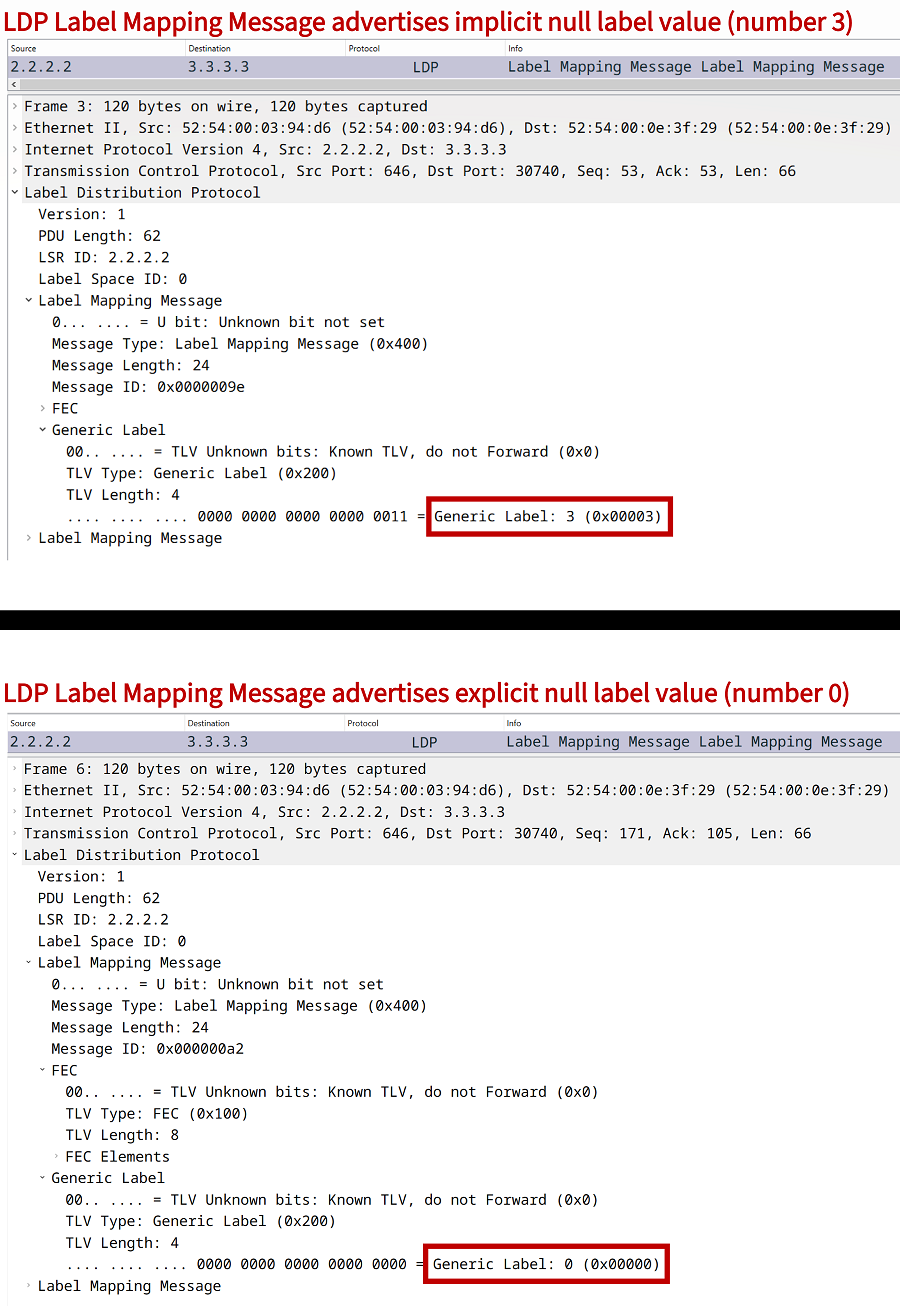
The following two packet captures compare an LDP Label Mapping Message which advertises the implicit-null label (which is signaled with the value 3), and another LDP message which advertises the explicit-null label (value 0).
Whenever a neighboring Label Switch Router (LSR) receives the MPLS label 3 for a destination prefix, it removes (pop) that label from the label stack when forwarding traffic. However, if the label 0 is received, then the LSR uses the label 0 for the next-hop, instead of removing the label.
Uniform mode
The Uniform MPLS QoS mode ensures a consistent handling of the DSCP/IP Precedence field value and the MPLS EXP field value end-to-end, between the PE-facing interfaces of the CE routers. This mode of operation is well suited for Service Providers who manage their entire MPLS network and possibly the CE devices. It creates a single Unified MPLS QoS domain.
The Uniform mode of MPLS QoS handling deliberately ensures that a top label's EXP value is always preserved unchanged within the MPLS core network. The top label's EXP value can be replicated to the bottom label without needing the explicit-null. This is shown below.
In this scenario, R3 rewrites the topmost label's EXP value from 4 to 1. In order to preserve a uniform QoS policy, R5 copies the topmost EXP value onto the exposed bottom label. This is achieved by using the qos-group command to tag received labels on the R5 input interface Gi0/1.
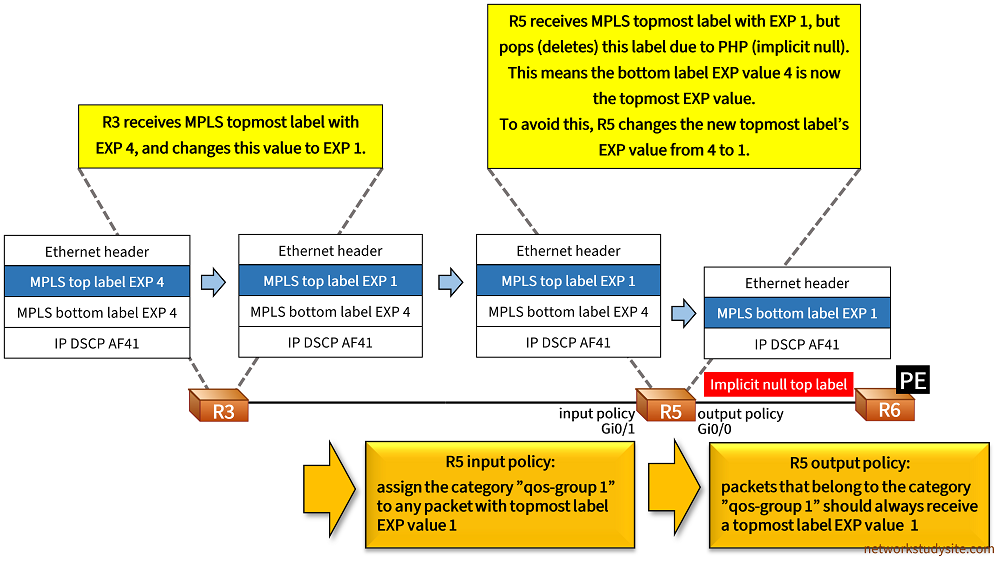
If R5 had not copied the EXP value, then the bottom label EXP value 4 would be exposed, breaking the Uniform MPLS QoS policy. The following configuration is applied on R5.
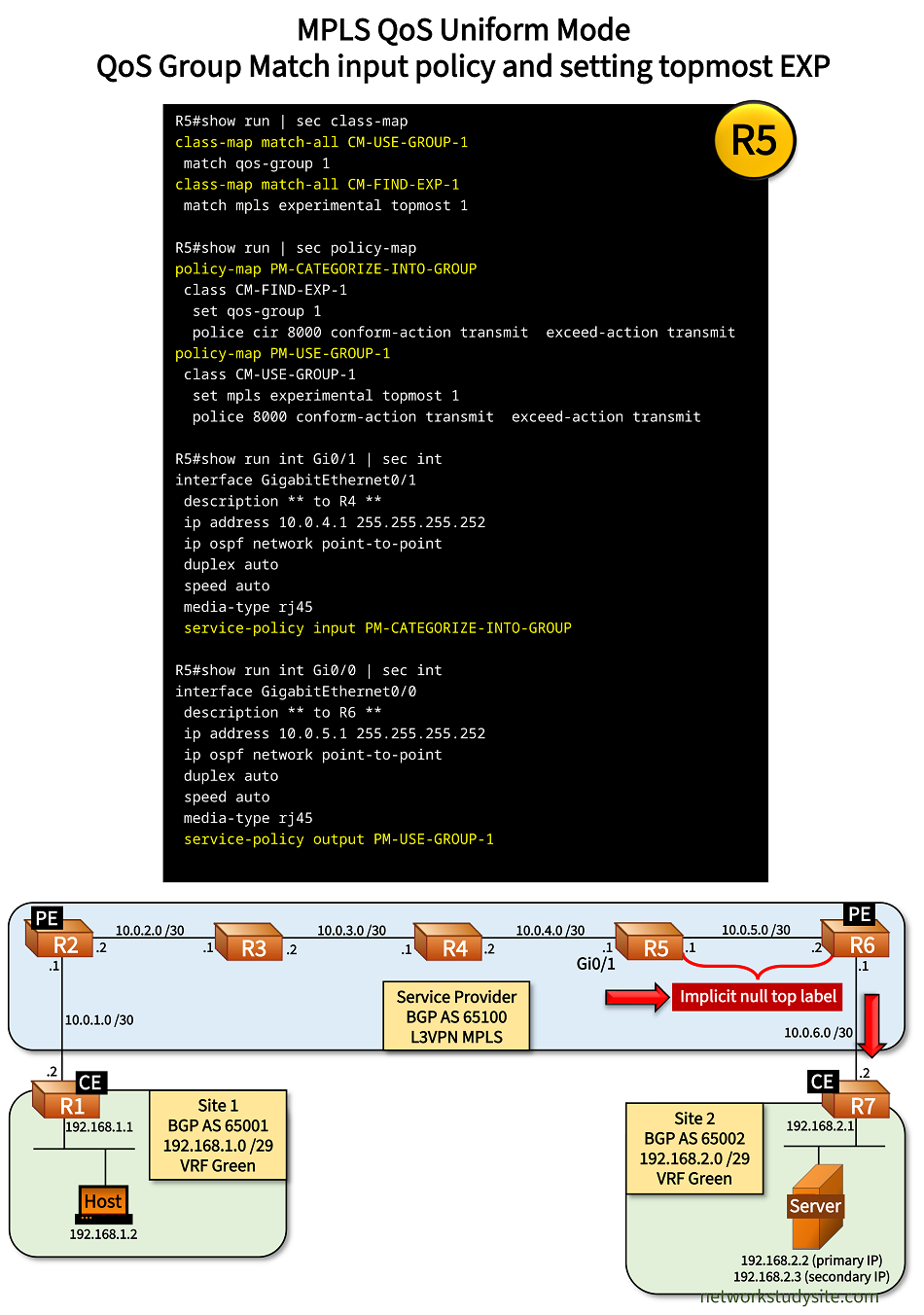
Configuration:
R3
R3#show run | sec class-map
class-map match-all CM-EXP-REWRITE
 match mpls experimental topmost 4

R3#show run | sec policy-map
policy-map PM-EXP-REWRITE
 class CM-EXP-REWRITE
  set mpls experimental topmost 1
  police cir 8000 conform-action transmit  exceed-action transmit

R3#show run int Gi0/1 | sec int
interface GigabitEthernet0/1
 description ** to R4 **
 ip address 10.0.3.2 255.255.255.252
 ip ospf network point-to-point
 duplex auto
 speed auto
 media-type rj45
 service-policy output PM-EXP-REWRITE
R5
R5#show run | sec class-map
class-map match-all CM-USE-GROUP-1
 match qos-group 1
class-map match-all CM-FIND-EXP-1
 match mpls experimental topmost 1

R5#show run | sec policy-map
policy-map PM-CATEGORIZE-INTO-GROUP
 class CM-FIND-EXP-1
  set qos-group 1
  police cir 8000 conform-action transmit  exceed-action transmit
policy-map PM-USE-GROUP-1
 class CM-USE-GROUP-1
  set mpls experimental topmost 1
  police 8000 conform-action transmit  exceed-action transmit

R5#show run int Gi0/1 | sec int
interface GigabitEthernet0/1
 description ** to R4 **
 ip address 10.0.4.1 255.255.255.252
 ip ospf network point-to-point
 duplex auto
 speed auto
 media-type rj45
 service-policy input PM-CATEGORIZE-INTO-GROUP

R5#show run int Gi0/0 | sec int
interface GigabitEthernet0/0
 description ** to R6 **
 ip address 10.0.5.1 255.255.255.252
 ip ospf network point-to-point
 duplex auto
 speed auto
 media-type rj45
 service-policy output PM-USE-GROUP-1
R5#show policy-map int Gi0/1 input
 GigabitEthernet0/1

  Service-policy input: PM-CATEGORIZE-INTO-GROUP

    Class-map: CM-FIND-EXP-1 (match-all)
      230 packets, 27502 bytes
      5 minute offered rate 0000 bps, drop rate 0000 bps
      Match: mpls experimental topmost 1        « Match ingress labels with EXP 1
      QoS Set
        qos-group 1                             « Assign these packets to "qos-group 1"
          Packets marked 230
      police:
          cir 8000 bps, bc 1500 bytes
        conformed 37 packets, 3956 bytes; actions:
          transmit
        exceeded 193 packets, 23546 bytes; actions:
          transmit
        conformed 0000 bps, exceeded 0000 bps

    Class-map: class-default (match-any)
      653 packets, 52479 bytes
      5 minute offered rate 0000 bps, drop rate 0000 bps
      Match: any


R5#show policy-map int Gi0/0 output
 GigabitEthernet0/0

  Service-policy output: PM-USE-GROUP-1

    Class-map: CM-USE-GROUP-1 (match-all)
      230 packets, 26582 bytes
      5 minute offered rate 1000 bps, drop rate 0000 bps
      Match: qos-group 1                         « Match outgoing packets belonging to "qos-group 1"
      QoS Set
        mpls experimental topmost 1              « Assign these packets an MPLS EXP value of 1
          Packets marked 230
      police:
          cir 8000 bps, bc 1500 bytes
        conformed 38 packets, 3926 bytes; actions:
          transmit
        exceeded 192 packets, 22656 bytes; actions:
          transmit
        conformed 1000 bps, exceeded 1000 bps

    Class-map: class-default (match-any)
      777 packets, 67986 bytes
      5 minute offered rate 0000 bps, drop rate 0000 bps
      Match: any


Host#trace 192.168.2.2 pr 1
Type escape sequence to abort.
Tracing the route to 192.168.2.2
VRF info: (vrf in name/id, vrf out name/id)
  1 192.168.1.1 2 msec
  2 10.0.1.1 2 msec
  3 10.0.2.1 [MPLS: Labels 305/607 Exp 4] 7 msec
  4 10.0.3.1 [MPLS: Labels 407/607 Exp 1] 7 msec
  5 10.0.4.1 [MPLS: Labels 507/607 Exp 1] 6 msec
  6 10.0.6.1 [MPLS: Label 607 Exp 1] 6 msec      « EXP value 1 also preserved after Penultimate Hop Pop (PHP)
  7 10.0.6.2 6 msec
  8 192.168.2.2 9 msec
Without this rewrite policy configured on R5, the following traceroute is visible, where the PHP removes the top label (EXP 1) and the bottom label EXP 4 is used. In a uniform MPLS QoS mode this is not desirable.
Host#trace 192.168.2.2 pr 1
Type escape sequence to abort.
Tracing the route to 192.168.2.2
VRF info: (vrf in name/id, vrf out name/id)
  1 192.168.1.1 2 msec
  2 10.0.1.1 2 msec
  3 10.0.2.1 [MPLS: Labels 305/607 Exp 4] 8 msec
  4 10.0.3.1 [MPLS: Labels 407/607 Exp 1] 6 msec
  5 10.0.4.1 [MPLS: Labels 507/607 Exp 1] 7 msec        « EXP value 1 will be removed due to PHP
  6 10.0.6.1 [MPLS: Label 607 Exp 4] 6 msec             « EXP value 4 of bottom label exposed, breaks Uniform QoS
  7 10.0.6.2 8 msec
  8 192.168.2.2 9 msec
Pipe mode
With MPLS QoS Pipe mode, two separate levels of QoS markings are created, one for the customer, and another for the Service Provider (SP). The SP receives packets that are marked by the customer, and the SP does not modify these markings. Instead, the SP creates its own set of markings within the MPLS network. This creates an independent layer of QoS within the SP's network (Pipe mode).
The following image shows how the ingress PE router does not follow the default (ToS reflection) behaviour. Instead of copying DSCP-to-EXP values automatically at the ingress PE router R2, the EXP value is now specifically configured on R2. As a result, in this example R2 receives IP packets with DSCP AF 41 (IP Precedence 4) but marks the MPLS label with an EXP value 2.

Configuration:
R2 (PE)
R2#show run | sec class-map
class-map match-all CM-LABEL-IMPOSITION
 match ip precedence 4

R2#show run | sec policy-map
policy-map PM-LABEL-IMPOSITION
 class CM-LABEL-IMPOSITION
  set mpls experimental imposition 2
  police 8000 conform-action transmit  exceed-action transmit

R2#show run int Gi1.10 | sec int
interface GigabitEthernet1.10
 description ** to CE R1 - VRF Green **
 encapsulation dot1Q 10
 vrf forwarding Green
 ip address 10.0.1.1 255.255.255.252
 bfd interval 100 min_rx 50 multiplier 3
 service-policy input PM-LABEL-IMPOSITION
R2#show policy-map int Gi1.10 input
 GigabitEthernet1.10

  Service-policy input: PM-LABEL-IMPOSITION

    Class-map: CM-LABEL-IMPOSITION (match-all)
      258 packets, 30012 bytes
      5 minute offered rate 0000 bps, drop rate 0000 bps
      Match: ip precedence 4               « Matching IP Precedence 4 in the ingress IP packet
      QoS Set
        mpls experimental imposition 2     « Assigning MPLS label EXP value 2
          Marker statistics: Disabled
      police:
          cir 8000 bps, bc 1500 bytes
        conformed 43 packets, 4642 bytes; actions:
          transmit
        exceeded 215 packets, 25370 bytes; actions:
          transmit
        conformed 0000 bps, exceeded 0000 bps

    Class-map: class-default (match-any)
      124256 packets, 7302605 bytes
      5 minute offered rate 16000 bps, drop rate 0000 bps
      Match: any


Host#trace 192.168.2.2 pr 1
Type escape sequence to abort.
Tracing the route to 192.168.2.2
VRF info: (vrf in name/id, vrf out name/id)
  1 192.168.1.1 3 msec
  2 10.0.1.1 4 msec
  3 10.0.2.1 [MPLS: Labels 305/607 Exp 2] 9 msec     « MPLS label EXP value 2 is assigned
  4 10.0.3.1 [MPLS: Labels 407/607 Exp 2] 7 msec
  5 10.0.4.1 [MPLS: Labels 504/607 Exp 2] 7 msec
  6 10.0.6.1 [MPLS: Label 607 Exp 2] 6 msec
  7 10.0.6.2 8 msec
  8 192.168.2.2 9 msec
Regarding the egress PE, the DSCP value of the customer's IP packet is not modified in any way. The default behaviour of the egress PE router is preserved, and accordingly R6 does not copy the MPLS label EXP value into the DSCP field of the IP packet. Importantly, the egress PE router uses the QoS markings of the SP EXP value to define any outbound policy (for IP DSCP-based traffic destined to the CE).
Short Pipe mode
With MPLS QoS Short Pipe mode, (similar to Pipe mode) two seperate levels of QoS markings are created, one for the customer, and another for the Service Provider. The SP receives packets that are marked by the customer, and the SP does not modify these markings. Instead, the SP creates its own set of markings within the MPLS network. This creates an independent layer of QoS within the SP's network (Pipe mode).
However, as opposed to the Pipe mode, in the Short Pipe mode the egress PE router uses the QoS markings of the customer's IP packet DSCP value to define any outbound policy. So, the difference between Pipe and Short Pipe mode is how the egress PE router chooses the applied QoS policy for traffic destined to the CE.